
Using a smartwatch for swimming transforms workout tracking by monitoring lap counts, stroke types, heart rate, and calories burned in real-time. This step-by-step guide covers everything needed to properly use a smartwatch for swimming and essential post-swim care to maintain device longevity.
Quick Summary Table
| Key Step | What to Do |
|---|---|
| Before Swimming | Enable swim mode, ensure water lock is on, secure band tightly |
| During Swimming | Start workout tracking, swim normally, monitor metrics if needed |
| After Swimming | Rinse with fresh water, dry completely, disable water lock, check data |
| Maintenance | Clean band weekly, inspect seals monthly, avoid extreme temperatures |
Preparing Your Smartwatch Before Swimming
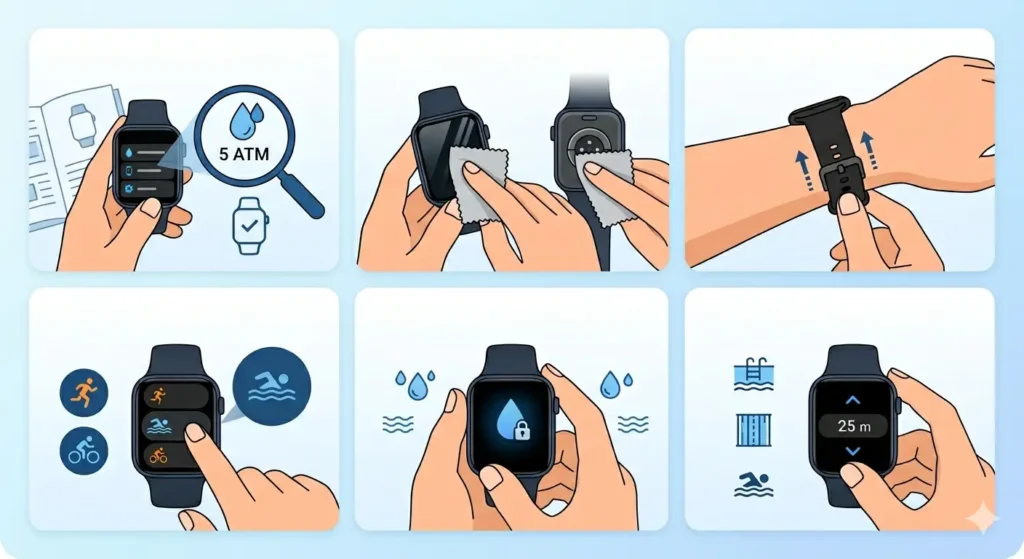
Proper preparation ensures accurate tracking and protects the device from water damage. Most smartwatches rated IP68 or 5ATM can handle pool swimming, while 10ATM or higher ratings support open water swimming.
- Step 1: Check the water resistance rating in the smartwatch specifications or settings menu to confirm swimming compatibility
- Step 2: Clean the screen and sensors with a soft cloth to remove any dirt or oils that might affect touchscreen responsiveness underwater
- Step 3: Tighten the watch band one notch tighter than usual wear to prevent the device from sliding during arm movements
- Step 4: Navigate to the sports or workout menu and select the swimming mode (typically labeled as ‘Pool Swim’ or ‘Open Water Swim’)
- Step 5: Enable the water lock feature, which disables touchscreen input and prevents accidental button presses underwater
- Step 6: Set the pool length if swimming in a pool (common options include 25 meters, 50 meters, or 25 yards) for accurate lap counting
Pro Tip: Always activate water lock before entering the water, not after. Once the screen gets wet, touchscreen controls become unreliable, making it difficult to enable this crucial feature.
Starting Your Swimming Workout
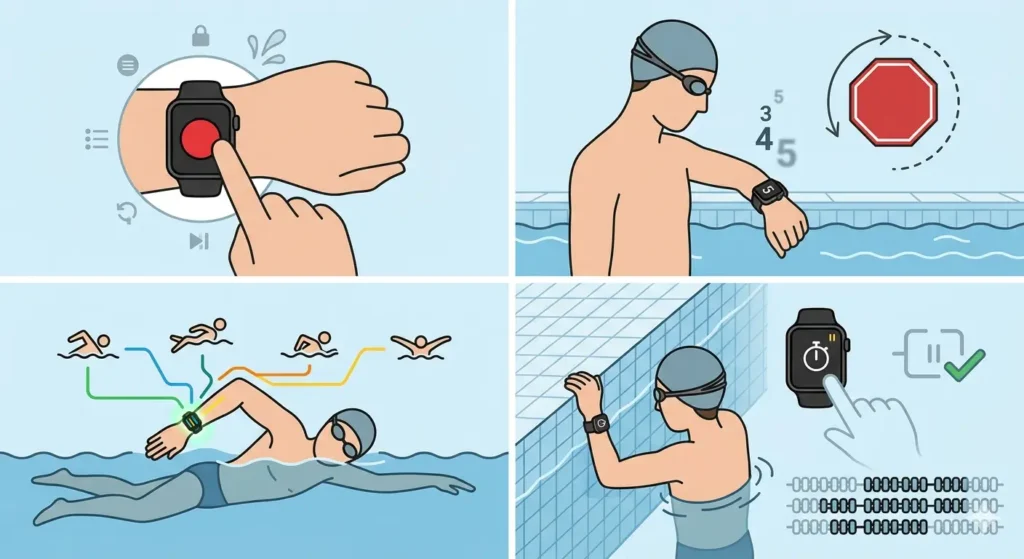
Beginning the workout correctly ensures the smartwatch captures all swimming data from the first stroke. The device uses accelerometer and gyroscope sensors to detect arm movements and calculate metrics.
- Step 1: Press the start button or tap the screen (before water lock activates) to begin recording the swimming session
- Step 2: Wait for the countdown timer (usually 3-5 seconds) to complete before entering the water
- Step 3: Begin swimming with natural strokes – the watch automatically detects stroke types including freestyle, backstroke, breaststroke, and butterfly
- Step 4: Pause at pool walls for 10-15 seconds if lap counting seems inaccurate, as a clear stop helps the device register completed laps
Monitoring Your Swim Metrics During Exercise
While swimming, the smartwatch continuously tracks performance data. Understanding what information appears on screen helps swimmers adjust pace and technique in real-time.
Most smartwatches display current lap number, total distance, elapsed time, and heart rate during swimming. Raising the wrist toward the face typically activates the screen for quick metric checks between laps. The device automatically pauses tracking when detecting prolonged inactivity, such as resting at the pool edge.
Swimming metrics update every time the watch detects a completed lap. Heart rate monitoring works underwater but may show slight delays compared to land-based activities due to water pressure affecting sensor contact. Using a stopwatch alongside smartwatch tracking helps verify lap times for competitive training.
Ending Your Swimming Session
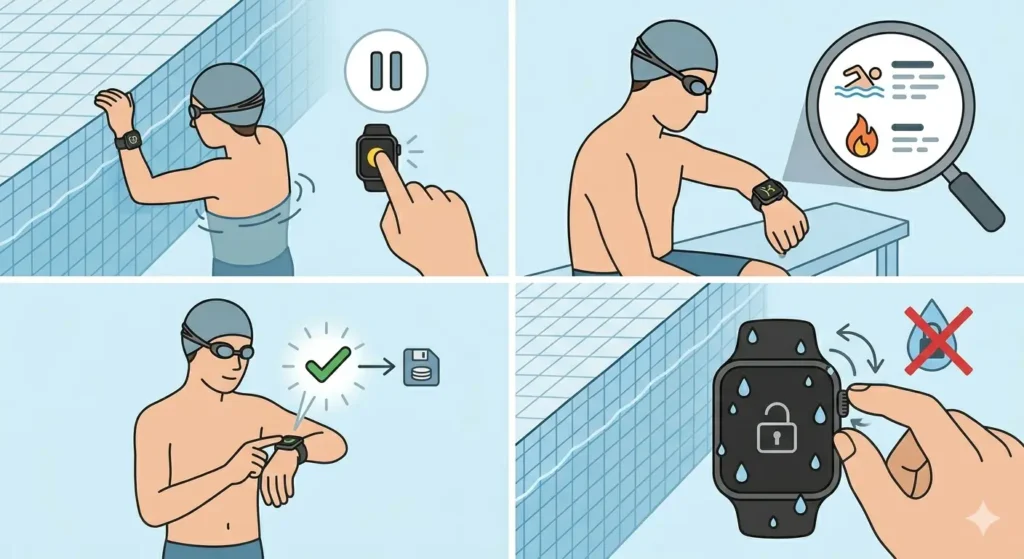
Properly concluding the workout saves all collected data and prepares the watch for post-swim care. Rushing this step might result in lost workout information.
- Step 1: Exit the water and press the main button or designated stop button to pause the workout
- Step 2: Review the workout summary displayed on screen, showing total distance, duration, average pace, and calories burned
- Step 3: Confirm and save the workout by selecting the checkmark or save option
- Step 4: Disable water lock by turning the digital crown, pressing the designated button, or following the on-screen unlock prompt (methods vary by brand)
Cleaning Your Smartwatch After Swimming
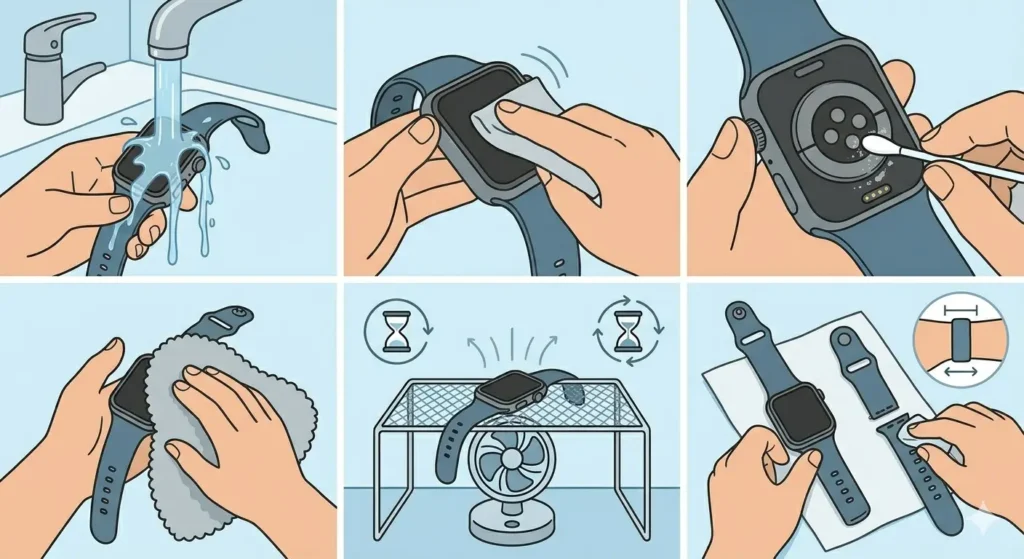
Post-swim cleaning prevents chlorine, salt, and bacteria buildup that damages watch components over time. This maintenance step takes only a few minutes but significantly extends device lifespan.
- Step 1: Rinse the entire smartwatch under lukewarm tap water for 15-20 seconds, ensuring water reaches all crevices around buttons and sensors
- Step 2: Gently rub the screen, case, and band with fingers to remove chlorine residue or saltwater deposits
- Step 3: Pay special attention to sensor areas on the back of the watch and the charging port, as mineral buildup here affects functionality
- Step 4: Pat dry with a soft, lint-free cloth or microfiber towel
- Step 5: Leave the watch in a well-ventilated area for 30-60 minutes to air dry completely before charging
- Step 6: Remove the band if possible and clean both sides separately, as moisture trapped under bands causes skin irritation
Pro Tip: Never use hot water, soap, or cleaning chemicals on the smartwatch, as these substances can degrade waterproof seals and damage the oleophobic screen coating.
Reviewing and Analyzing Your Swim Data
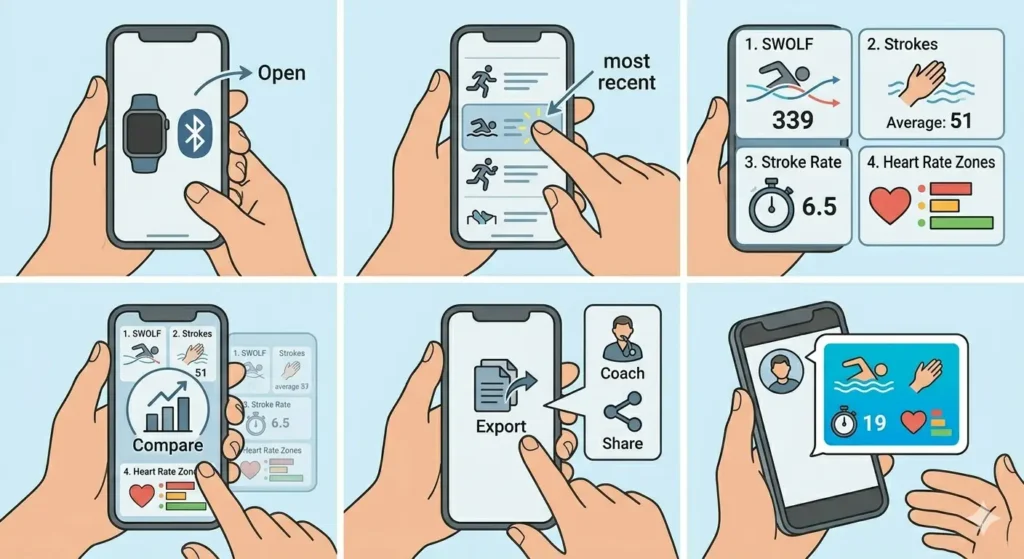
The companion smartphone app provides detailed swimming analytics unavailable on the watch screen alone. Accessing this information helps track progress and identify areas for improvement.
- Step 1: Open the smartwatch companion app on the smartphone (typically syncs automatically via Bluetooth)
- Step 2: Navigate to the workout or activity section and select the most recent swimming session
- Step 3: Review detailed metrics including stroke count per lap, SWOLF score (efficiency metric combining strokes and time), stroke rate, and heart rate zones
- Step 4: Compare current performance against previous swimming sessions to track progress over time
- Step 5: Export or share data with coaches or training partners if desired through app sharing features
Many smartwatch apps generate time comparison tools showing performance improvements across weeks or months. These visualizations make it easier to spot training patterns and set realistic goals.
Maintaining Your Smartwatch for Long-Term Swimming Use
Regular maintenance beyond daily rinsing keeps the smartwatch functioning properly for years of swimming workouts. These practices prevent common issues before they require expensive repairs.
Inspect the watch band weekly for signs of wear, especially where the band connects to the case. Replace bands showing cracks, tears, or discoloration to prevent unexpected failures during swimming. Check the charging port monthly for corrosion or debris buildup, cleaning gently with a dry cotton swab if needed.
Store the smartwatch in a cool, dry location when not in use, avoiding direct sunlight or extreme temperatures that compromise waterproof seals. Schedule professional water resistance testing annually if swimming regularly, as seals naturally degrade over time even with proper care.
Update the smartwatch firmware whenever manufacturers release new versions, as these updates often include improved swimming algorithms and bug fixes. Enable automatic updates in the companion app settings to ensure the device always runs the latest software.
Tips for Better Swimming Tracking Accuracy
- Wear the smartwatch 2-3 finger widths above the wrist bone, allowing the heart rate sensor optimal skin contact even during arm rotation
- Calibrate the device by manually entering pool length before each session at new swimming facilities
- Avoid excessive wrist rotation or irregular stroke patterns that confuse the accelerometer’s lap counting algorithm
- Charge the battery to at least 50% before swimming sessions lasting longer than 60 minutes
- Test the water lock feature in shallow water during the first use to understand how it functions
- Record backup timing with a clock tab during important training sessions to verify smartwatch accuracy
- Remove the watch during hot tub or sauna use after swimming, as extreme heat damages internal components
- Use sport-specific bands designed for swimming rather than leather or fabric bands that absorb water
Common Problems and Solutions
Inaccurate Lap Counting
The smartwatch may miss laps or count extra laps when swimmers perform flip turns too close to the wall or fail to pause long enough between laps. Ensure clear stops at each wall for 5-10 seconds and maintain consistent stroke patterns throughout the lap. Some devices allow manual lap counting adjustments in the companion app after the workout.
Water Lock Not Disabling
Water trapped in the speaker grill or around buttons prevents proper water lock deactivation. Gently shake the watch with the speaker facing downward to expel water, or use the water ejection feature (available on some models) that vibrates the speaker to push water out. Wait 2-3 minutes for remaining moisture to evaporate before attempting to unlock again.
Heart Rate Reading Drops During Swimming
Water pressure and arm position changes cause optical heart rate sensors to lose skin contact intermittently. Tighten the band slightly and ensure the sensor sits flush against the skin without gaps. Heart rate tracking underwater will never match the consistency of land-based activities due to physical limitations of optical sensors.
Touchscreen Remains Unresponsive After Swimming
Chlorine residue or mineral deposits on the screen prevent proper touch detection. Clean the screen thoroughly with fresh water and dry completely. If problems persist, the water lock feature may still be active – check settings to ensure it was properly disabled.
Battery Drains Quickly After Swimming
Moisture in the charging port causes parasitic battery drain. Dry the charging port completely with a soft cloth and wait at least 30 minutes before charging. Avoid charging immediately after swimming, as trapped water can cause short circuits.
Frequently Asked Questions
Can all smartwatches be used for swimming?
No, only smartwatches with water resistance ratings of 5ATM (50 meters) or higher should be used for swimming. Devices marked as ‘splash-resistant’ or ‘water-resistant’ without specific ATM ratings are not suitable for swimming activities. Always check the manufacturer’s specifications before swimming with any smartwatch.
How accurate is smartwatch swim tracking compared to manual counting?
Smartwatch swim tracking typically achieves 90-95% accuracy for lap counting in standard pool environments when used correctly. Accuracy depends on consistent stroke technique, proper pool length calibration, and clear pauses at walls. Open water swimming shows slightly lower accuracy due to the absence of walls for lap detection.
Should the smartwatch be worn on the dominant or non-dominant wrist while swimming?
Wear the smartwatch on the non-dominant wrist for most accurate tracking, as this wrist typically performs more consistent stroke movements. Some devices allow wrist position settings in the companion app to adjust tracking algorithms accordingly. Experiment with both wrists during practice sessions to determine which provides better data quality.
How often should the smartwatch be rinsed after swimming in chlorinated pools?
Rinse the smartwatch with fresh water immediately after every swimming session in chlorinated pools. Chlorine begins corroding metal components and degrading rubber seals within hours if not removed promptly. Make rinsing a non-negotiable habit to prevent long-term damage.
Does salt water damage smartwatches more than chlorinated water?
Yes, salt water is more corrosive than chlorinated water and requires more thorough post-swim cleaning. Salt crystals form as water evaporates, working into small crevices and damaging seals over time. Soak the watch under running fresh water for at least 30 seconds after ocean swimming to dissolve all salt deposits.
Can heart rate monitoring work accurately underwater?
Heart rate monitoring works underwater but with reduced accuracy compared to land-based activities. Optical sensors struggle with water pressure, movement, and inconsistent skin contact during swimming. Expect heart rate readings to show occasional gaps or delayed updates, though overall trends remain useful for training purposes.
What happens if water lock is not enabled before swimming?
Swimming without water lock enabled causes accidental button presses and screen touches from water contact, potentially pausing workouts or changing settings mid-swim. While this does not damage the watch, it results in inaccurate workout data and frustration trying to resume tracking underwater.
How long does a smartwatch battery last during continuous swimming?
Most smartwatches last 6-10 hours of continuous swim tracking on a full charge, though this varies significantly by model and feature usage. GPS-enabled open water swimming drains batteries faster than pool swimming. Check manufacturer specifications for exact swimming battery life estimates.
Can smartwatches track different swimming strokes automatically?
Yes, modern smartwatches automatically detect and differentiate between freestyle, backstroke, breaststroke, and butterfly strokes using accelerometer and gyroscope data. The device displays stroke type breakdowns in the companion app after the workout. Stroke detection accuracy improves with consistent, proper technique.
Is it safe to shower with the smartwatch after swimming?
Yes, showering with a swim-rated smartwatch is safe and actually recommended for thorough chlorine or salt removal. Use lukewarm water and avoid soap directly on the watch, as soap residue can affect touchscreen responsiveness and sensor accuracy. The shower provides an convenient opportunity for proper post-swim rinsing.