
Understanding your Garmin Body Battery can transform how you manage energy levels throughout the day. This comprehensive guide explains what Body Battery is, how it works, and how to use it effectively to optimize daily activities and recovery. Whether you’re new to Garmin devices or just discovered this feature, learning to interpret Body Battery readings will help make better decisions about when to push hard and when to rest.
Quick Summary Table
| Topic | Key Information |
|---|---|
| What is Body Battery? | A score from 0-100 showing your energy reserves based on stress, activity, and sleep |
| How it Charges | Through quality sleep, rest, and low-stress periods |
| How it Drains | Physical activity, mental stress, illness, and poor sleep quality |
| Optimal Morning Score | 80-100 indicates full recovery and readiness |
| Device Requirements | Compatible Garmin watch worn 24/7 with heart rate monitoring enabled |
What is Garmin Body Battery?
Garmin Body Battery is an energy monitoring feature that assigns a numerical score between 0 and 100 to represent current energy reserves. The system analyzes multiple biometric data points throughout the day and night to calculate this score. A higher number indicates more available energy, while a lower number suggests depleted reserves requiring rest.
The feature uses heart rate variability (HRV), stress levels, sleep quality, and activity data to determine how much energy the body has available at any given moment. Think of it like a smartphone battery indicator, but for the human body. The score updates continuously as long as the watch remains on the wrist.
Body Battery differs from simple step counting or calorie tracking because it considers recovery just as much as exertion. This holistic approach helps identify patterns in energy levels and reveals how different activities, sleep habits, and stress affect overall vitality.
How to Access Your Body Battery Data
Accessing Body Battery information requires a compatible Garmin device and the Garmin Connect app. Here’s how to view the data:
On Your Garmin Watch
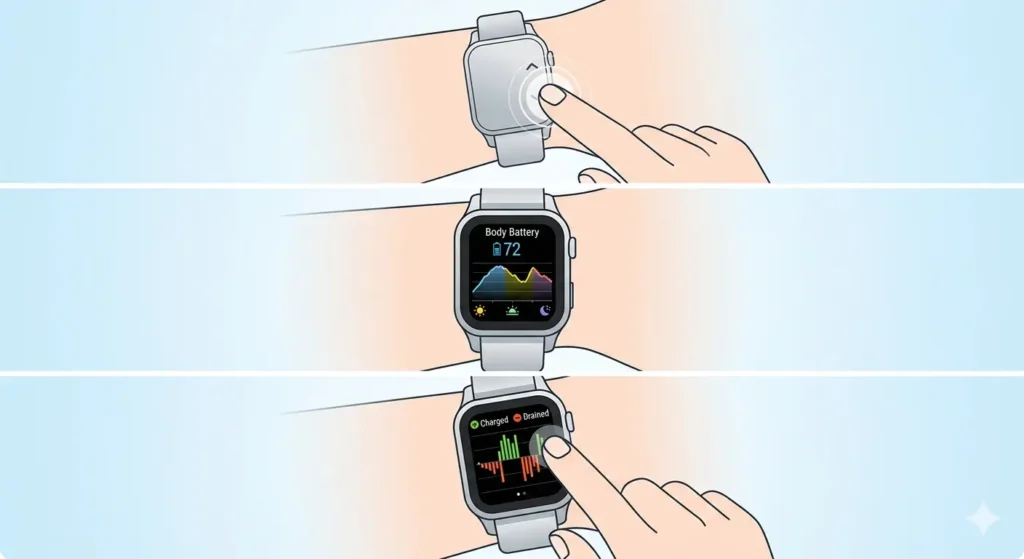
- Step 1: Press the up or down button to scroll through the widget pages on the watch face
- Step 2: Look for the Body Battery widget, which displays the current score along with a graph showing changes throughout the day
- Step 3: Tap or press the select button on the widget to see more detailed information, including when the battery charged and drained
In the Garmin Connect App
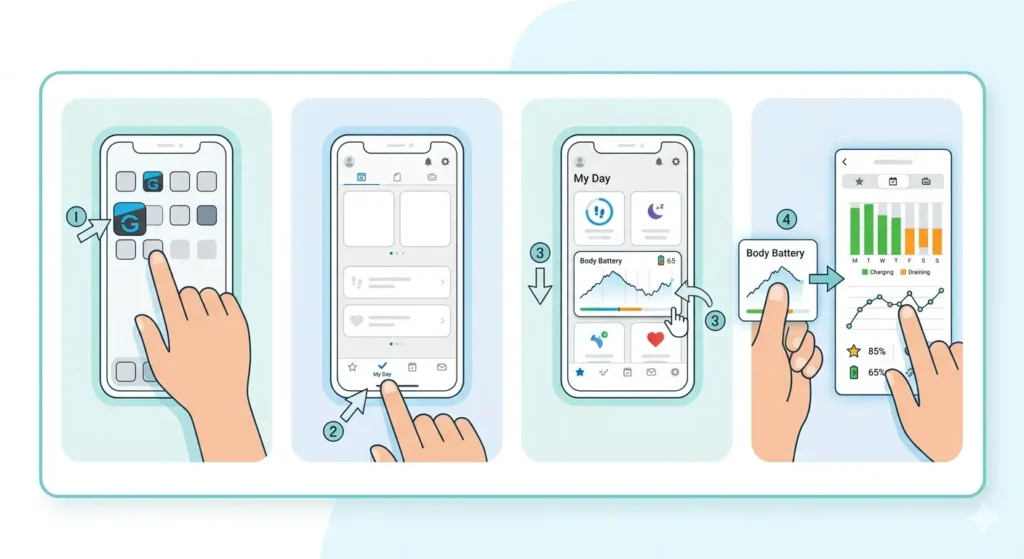
- Step 1: Open the Garmin Connect app on a smartphone
- Step 2: Tap on ‘My Day’ at the bottom of the screen
- Step 3: Scroll down to find the Body Battery card, which shows the current score and a detailed graph
- Step 4: Tap on the Body Battery card to access extended history, weekly trends, and detailed breakdowns of charging and draining periods
The app provides more comprehensive data than the watch display, including historical trends that help identify patterns over weeks or months. This extended view is valuable for understanding long-term energy management.
Understanding Body Battery Scores
Body Battery scores fall into distinct ranges that indicate different energy states. Learning what each range means helps interpret the data correctly.
Score Ranges Explained
80-100 (High Energy): This range indicates full or near-full energy reserves. The body is well-rested and ready for intense physical or mental activities. Most people reach this range after a good night’s sleep with minimal stress.
50-79 (Moderate Energy): This mid-range score suggests decent energy levels suitable for regular activities. While there’s still capacity for exercise or work, pushing too hard might lead to faster depletion. This range is common during afternoon hours after morning activities.
20-49 (Low Energy): Energy reserves are running low in this range. The body needs rest and recovery. Light activities are manageable, but intense workouts or stressful situations will drain the battery quickly. Evening hours often see scores in this range.
0-19 (Very Low Energy): This critically low range indicates severe energy depletion. Rest and recovery are essential. Continuing to push through this state can lead to burnout, illness, or injury. Sleep or relaxation should be the priority.
Color Coding on Garmin Devices
Garmin uses color coding to make score interpretation easier at a glance. Green typically represents high energy (80-100), yellow indicates moderate levels (50-79), orange shows low energy (20-49), and red signals very low reserves (0-19). These colors appear on both the watch display and the Garmin Connect app.
How Body Battery Charges
Body Battery recharges primarily during rest and sleep. Understanding the charging mechanisms helps optimize recovery periods.
Sleep Quality Impact
Sleep is the primary charging period for Body Battery. During deep sleep stages, the score increases as the body recovers from the previous day’s activities. Quality matters more than quantity – seven hours of restful sleep with minimal interruptions charges the battery more effectively than nine hours of fragmented, poor-quality sleep.
The watch monitors sleep stages, heart rate variability, and movement to determine how much charging occurs overnight. Waking up with a score between 80-100 indicates successful overnight recovery, while lower morning scores suggest sleep quality issues or insufficient rest.
Daytime Rest Periods
Body Battery can also charge during the day through restful activities. Sitting quietly, meditation, napping, or engaging in low-stress leisure activities allow the score to increase. Even 15-20 minutes of genuine relaxation can add points to the battery.
The key factor is reduced heart rate and low stress levels. Activities that calm the nervous system trigger charging, while multitasking or worrying prevent it even during physical rest.
Low-Stress Activities
Gentle activities like easy walking, stretching, or light yoga can sometimes maintain or slightly increase Body Battery scores. These activities promote relaxation without significant physical demand, creating conditions for recovery while moving.
How Body Battery Drains
Several factors contribute to Body Battery depletion throughout the day. Recognizing these helps manage energy more effectively.
Physical Activity
Exercise and physical exertion drain Body Battery scores. Intense workouts deplete energy faster than moderate activities. A high-intensity interval training session might drop the score by 20-30 points, while a casual walk might only reduce it by 5-10 points.
The watch calculates drain based on heart rate elevation, duration, and activity intensity. Recovery time after exercise also affects how quickly the battery starts charging again.
Mental and Emotional Stress
Stress significantly impacts Body Battery, often draining it as much as physical activity. Work deadlines, difficult conversations, anxiety, or emotional challenges all trigger the stress response, which the watch detects through heart rate variability changes.
Many people notice their Body Battery dropping during stressful meetings or challenging situations, even while sitting still. This demonstrates how mental strain affects physical energy reserves.
Illness and Recovery
Being sick prevents Body Battery from charging properly and accelerates drain. Even with adequate sleep, morning scores remain low during illness because the immune system uses significant energy fighting infection.
Consistently low scores despite good sleep habits may indicate developing illness before other symptoms appear. Many users report their Body Battery predicted they were getting sick 1-2 days before feeling unwell.
Poor Sleep Quality
Inadequate or disrupted sleep not only fails to charge Body Battery but can sometimes result in waking up with a lower score than bedtime. Alcohol consumption, late meals, screen time before bed, or sleep disorders all interfere with the charging process.
Setting Up Body Battery for Accurate Readings
Proper setup ensures Body Battery provides reliable data. Follow these configuration steps for optimal accuracy.
- Step 1: Ensure the Garmin watch is worn 24/7, including during sleep, as the feature requires continuous data collection
- Step 2: Verify that heart rate monitoring is enabled and set to track continuously throughout the day and night
- Step 3: Enter accurate personal information in the Garmin Connect app, including age, weight, height, and gender, as these affect calculations
- Step 4: Wear the watch snugly on the wrist, positioned about one finger-width above the wrist bone for accurate heart rate detection
- Step 5: Allow 7-14 days for the watch to calibrate and learn individual patterns before relying heavily on the data
- Step 6: Check that the watch firmware and Garmin Connect app are updated to the latest versions for improved accuracy
Pro-Tip: Body Battery accuracy improves significantly after wearing the watch consistently for two weeks. The algorithm learns individual stress responses, activity patterns, and recovery rates, making predictions more personalized and reliable over time.
Using Body Battery to Optimize Daily Activities
Body Battery data becomes most valuable when applied to daily planning and decision-making. Here’s how to use the information practically.
Timing Workouts Effectively
Schedule intense workouts when Body Battery scores are high, typically in the morning after quality sleep or during personal peak energy times. Attempting hard training sessions with a score below 50 increases injury risk and reduces performance quality.
Light recovery workouts or rest days make sense when scores hover in the low ranges. This approach aligns training with the body’s actual capacity rather than following rigid schedules regardless of readiness.
Managing Work and Productivity
Tackle demanding mental tasks during high Body Battery periods. Schedule important meetings, creative work, or complex problem-solving when scores are above 70. Save routine tasks, administrative work, or collaborative activities for lower energy periods.
When tracking energy patterns over weeks, most people discover consistent high and low periods during the day. Using these insights to structure schedules around natural energy fluctuations improves productivity and reduces burnout.
Recognizing Overtraining
Consistently low morning scores despite adequate sleep often signal overtraining or insufficient recovery. Athletes and fitness enthusiasts can use this data to adjust training intensity, add rest days, or modify workout plans before overtraining becomes serious.
If morning Body Battery scores remain below 60 for several consecutive days, the body needs additional recovery time. Ignoring this signal often leads to decreased performance, illness, or injury.
Improving Sleep Habits
Monitor how different bedtime routines affect overnight charging. Experiment with variables like screen time, meal timing, room temperature, or relaxation techniques, then observe how morning scores change.
Tracking this data over time reveals which habits support recovery and which interfere with it. For example, avoiding screens 90 minutes before bed might consistently result in morning scores 10-15 points higher than nights with late device usage.
Interpreting Body Battery Trends
Long-term patterns provide more insight than individual daily scores. The Garmin Connect app offers weekly and monthly trend views that help identify important patterns.
Weekly Pattern Analysis
Review weekly trends to spot recurring patterns. Many people notice lower scores mid-week when work stress peaks, with recovery happening over weekends. Others see opposite patterns with weekday structure supporting better scores than unstructured weekend schedules.
Understanding personal weekly rhythms helps plan challenging activities during naturally high-energy periods and schedule rest during predictable low points.
Seasonal and Lifestyle Changes
Body Battery trends often shift with seasons, life changes, or modified routines. Starting a new job, changing exercise programs, or adjusting sleep schedules all affect average scores and charging patterns.
Comparing current trends to historical data helps determine whether changes represent normal variation or signal issues requiring attention. A sudden sustained drop in average scores deserves investigation into potential causes like increased stress, reduced sleep quality, or developing health issues.
Tips for Maximizing Body Battery Performance
Several strategies help maintain higher average Body Battery scores and improve overall energy management.
Prioritize Sleep Consistency
Maintain consistent sleep and wake times, even on weekends. Regular schedules support better overnight charging compared to highly variable sleep patterns. Going to bed and waking up at similar times helps the body establish efficient recovery rhythms.
Manage Stress Proactively
Incorporate stress-reduction techniques throughout the day. Breathing exercises, short meditation sessions, or brief walks between meetings can prevent stress from accumulating and draining Body Battery excessively.
The Garmin watch includes breathing exercises and relaxation reminders that can be scheduled strategically during typically stressful periods. Using these features often prevents scores from dropping as severely during challenging days.
Balance Activity and Recovery
Alternate intense workout days with lighter activity or complete rest. This approach allows Body Battery to recharge between demanding sessions, supporting better long-term performance and preventing chronic depletion.
Planning rest days based on actual recovery status rather than fixed schedules optimizes training adaptations while reducing injury risk.
Stay Hydrated and Nourished
Proper hydration and nutrition support better Body Battery performance. Dehydration and poor nutrition affect heart rate variability and stress responses, which influence score calculations. Consistent, balanced meals and adequate water intake help maintain stable energy levels.
Limit Alcohol and Caffeine
Both substances interfere with sleep quality and Body Battery charging. Evening alcohol consumption consistently results in lower morning scores due to disrupted sleep stages and poor recovery. Late-day caffeine similarly affects overnight charging by interfering with sleep quality.
Monitoring how these substances affect individual scores helps determine optimal consumption timing and amounts that minimize recovery interference.
Common Problems and Troubleshooting
Sometimes Body Battery doesn’t function as expected. These solutions address frequent issues users encounter.
Fix 1: Body Battery Not Showing on Watch
If the Body Battery widget doesn’t appear on the watch, verify device compatibility first. Not all Garmin models support this feature. For compatible devices, ensure the widget is enabled in watch settings. Access the widget menu, locate Body Battery, and activate it if currently disabled.
Update watch firmware to the latest version through Garmin Connect, as older firmware may not include Body Battery functionality or may contain bugs affecting display.
Fix 2: Inconsistent or Erratic Readings
Erratic Body Battery scores often result from poor heart rate data quality. Check that the watch fits snugly against the wrist without being too tight. Clean the sensor area on both the watch and wrist regularly, as dirt or sweat buildup interferes with readings.
If scores seem unrealistic, remove the watch for a few hours then restart it before putting it back on. This resets the sensors and often resolves temporary glitches.
Fix 3: Battery Not Charging During Sleep
When Body Battery fails to charge overnight despite sleeping well, verify that sleep tracking is functioning properly. The watch must detect sleep for charging to occur. Check sleep data in Garmin Connect to confirm the watch recognized the sleep period.
Ensure continuous heart rate monitoring is enabled, as Body Battery calculations require this data. Without ongoing HR tracking, the feature cannot function properly.
Fix 4: Always Low Scores Despite Good Habits
Persistently low Body Battery scores despite adequate sleep, low stress, and proper recovery may indicate health issues requiring medical attention. Conditions affecting heart rate variability, chronic stress disorders, or sleep conditions like apnea can prevent normal charging.
Before concluding a medical issue exists, verify the watch has been worn consistently for at least two weeks to allow proper calibration. If scores remain abnormally low after calibration with good lifestyle habits, consulting a healthcare provider is appropriate.
Fix 5: Syncing Issues with Garmin Connect
If Body Battery data doesn’t appear in the Garmin Connect app, check that the watch syncs properly. Open the app and manually trigger a sync. Ensure Bluetooth is enabled on the smartphone and the watch is within range.
Reinstalling the Garmin Connect app sometimes resolves persistent syncing problems. Before reinstalling, note that some data may be lost if not previously synced to Garmin’s servers.
For time-sensitive planning and scheduling activities around your energy levels, using a world time comparison tool helps coordinate activities across different time zones while considering Body Battery patterns.
Frequently Asked Questions
How long does it take for Body Battery to calibrate?
Body Battery typically requires 7-14 days of continuous wear to calibrate properly. During this period, the watch learns individual stress responses, activity patterns, and recovery rates. Initial readings may seem inaccurate, but precision improves as the algorithm gathers more personal data and establishes baseline patterns.
Can Body Battery predict illness before symptoms appear?
Many users report that Body Battery indicated developing illness 1-2 days before feeling sick. Consistently low morning scores despite good sleep often signal the immune system fighting infection. While not a diagnostic tool, unusual patterns can serve as an early warning to prioritize rest and preventive care.
Why does my Body Battery drain while sleeping?
Body Battery can drain during sleep due to poor sleep quality, stress, illness, alcohol consumption, or late eating. If the body cannot reach restorative sleep stages or experiences stress responses during the night, recovery doesn’t occur. Consistently draining overnight warrants investigating sleep hygiene, stress levels, or potential health issues.
Is a Body Battery score of 50 good or bad?
A score of 50 represents moderate energy levels – neither exceptionally high nor critically low. This score is adequate for daily activities and light exercise but suggests avoiding intense workouts or highly stressful tasks. Most people experience scores around 50 during afternoon hours after morning activities have depleted some energy reserves.
Do I need to wear my Garmin watch 24/7 for Body Battery to work?
Yes, continuous wear is essential for accurate Body Battery tracking. The feature requires constant heart rate monitoring, stress data, and sleep tracking to calculate scores properly. Removing the watch for extended periods creates data gaps that reduce accuracy and prevent proper charging calculations during sleep.
Can stress drain Body Battery as much as exercise?
Absolutely. Mental and emotional stress can drain Body Battery as significantly as physical activity. The watch detects stress through heart rate variability changes, regardless of whether the source is physical or psychological. Many people notice substantial drops during stressful meetings or emotional situations even while sitting still.
What should my Body Battery be when I wake up?
Ideally, morning Body Battery scores should range between 80-100, indicating full overnight recovery. Scores between 60-79 suggest decent recovery but potential sleep quality issues. Consistently waking with scores below 60 signals inadequate recovery requiring attention to sleep habits, stress management, or possible overtraining.
Does Body Battery account for caffeine consumption?
Body Battery doesn’t directly track caffeine intake, but it detects caffeine’s effects on heart rate and sleep quality. Caffeine consumed late in the day often results in lower overnight charging due to disrupted sleep. The score reflects these physiological impacts even without specifically monitoring caffeine consumption.
Can I improve my Body Battery score quickly?
Short-term improvements come from rest, relaxation, or napping. Even 15-20 minutes of genuine relaxation with reduced heart rate and stress can add points. However, sustainable high scores require consistent quality sleep, effective stress management, balanced activity levels, and adequate recovery time between intense efforts.
Why is my Body Battery different from my friend’s with the same watch?
Body Battery is highly personalized based on individual heart rate variability, stress responses, fitness levels, age, and recovery patterns. Two people can experience identical activities but show different score changes because their bodies respond differently. The feature measures personal energy reserves, not universal standards, making direct comparisons between individuals meaningless.
For tracking rest periods and timing recovery sessions effectively, an online stopwatch helps monitor meditation, breathing exercises, or strategic rest breaks that support Body Battery recharging throughout the day.