
Calibrating your smartwatch for accurate fitness tracking ensures reliable data for steps, distance, heart rate, and calories burned. Most fitness enthusiasts notice discrepancies between their smartwatch readings and actual activity levels, which typically stems from improper calibration. This guide walks through the complete calibration process to maximize tracking accuracy and get the most value from wearable technology.
Quick Summary Table
| Calibration Type | Time Required | Frequency Needed |
|---|---|---|
| Basic Setup | 5-10 minutes | Once (initial setup) |
| Distance Calibration | 20-30 minutes | Every 2-3 months |
| Heart Rate Calibration | 10-15 minutes | Monthly |
| Stride Length Update | 5 minutes | As needed |
Key Takeaways
- Accurate personal data (height, weight, age) forms the foundation of precise fitness tracking
- GPS calibration requires at least one outdoor walk or run in open areas
- Regular recalibration maintains accuracy as fitness levels change
- Proper wrist placement significantly impacts heart rate sensor performance
- Different activities require specific calibration approaches
Method 1: Enter Accurate Personal Information
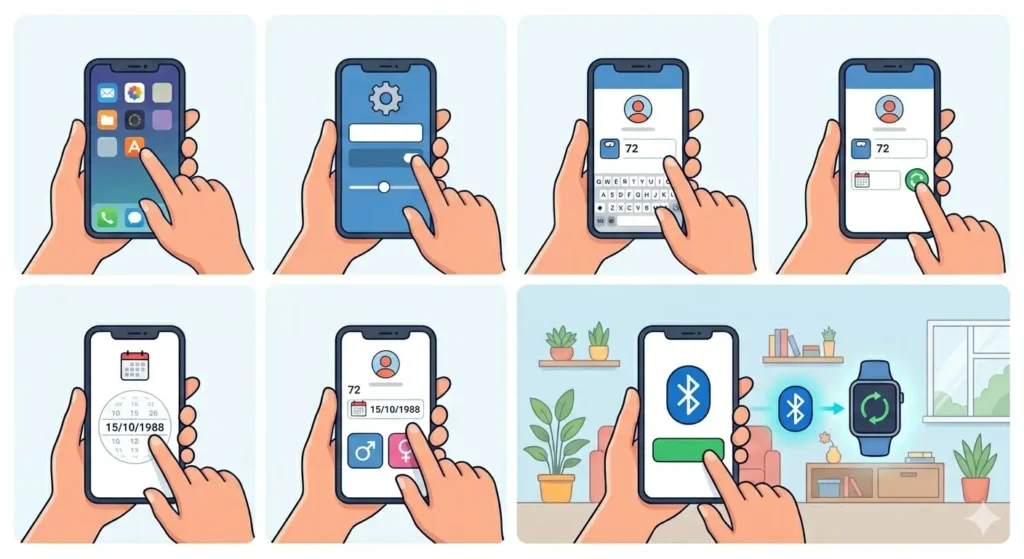
The smartwatch calculates calories, stride length, and other metrics based on physical characteristics. Entering precise personal data creates the baseline for all fitness calculations.
Update Your Profile Settings
- Step 1: Open the companion app on the smartphone
- Step 2: Navigate to Profile or Settings section
- Step 3: Enter current weight (update regularly if weight changes)
- Step 4: Verify height measurement matches actual height
- Step 5: Input correct date of birth for age-based calculations
- Step 6: Select biological sex for metabolic rate calculations
- Step 7: Save all changes and sync with the smartwatch
Most people find that even small discrepancies in weight or height can throw off calorie estimates by 10-15%. Double-checking these values every few months ensures continued accuracy, especially during fitness journeys involving weight changes.
Method 2: Calibrate GPS and Distance Tracking
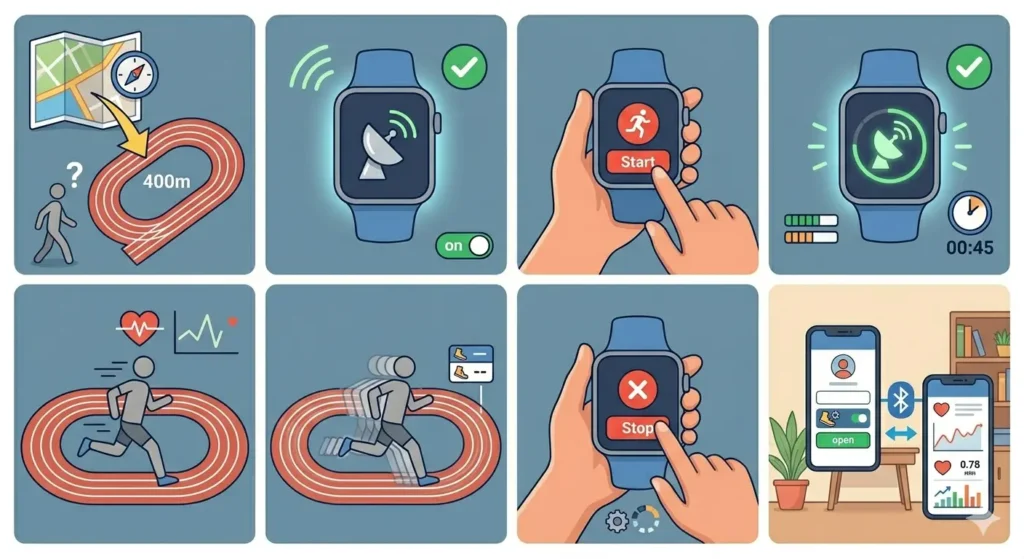
GPS calibration teaches the smartwatch to measure distance accurately by comparing GPS data with actual ground covered. This process works best when performed on a known distance track or route.
Outdoor GPS Calibration
- Step 1: Find a measured outdoor track (standard running tracks are 400 meters)
- Step 2: Ensure GPS is enabled on the smartwatch
- Step 3: Start an outdoor walk or run workout from the watch
- Step 4: Wait for GPS signal confirmation (usually 30-60 seconds)
- Step 5: Walk or run at a normal, consistent pace for at least 20 minutes
- Step 6: Complete the full distance on the track (at least 1-2 kilometers)
- Step 7: Stop the workout and let the watch process the data
- Step 8: Sync the workout with the companion app
The key is to maintain natural movement patterns during calibration. Avoid stopping frequently or walking in circles, as this confuses the accelerometer and GPS coordination.
Pro-Tip: Perform GPS calibration in an open area away from tall buildings or dense tree cover. Urban canyons and forest trails can interfere with satellite signals, resulting in inaccurate calibration data that affects all future tracking.
Indoor Distance Calibration
- Step 1: Measure a known indoor distance (like a hallway or gym track)
- Step 2: Start an indoor walk or run workout on the watch
- Step 3: Walk or run the measured distance at normal pace
- Step 4: Repeat for at least 15-20 minutes
- Step 5: End the workout and compare watch distance to actual distance
- Step 6: Adjust stride length manually if significant discrepancy exists
Method 3: Calibrate Stride Length
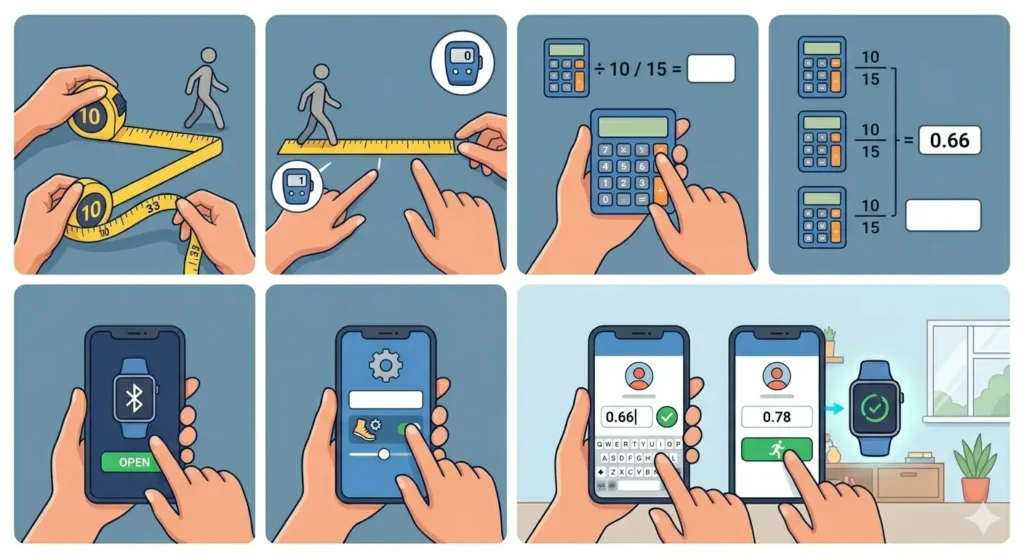
Stride length directly affects step and distance calculations. Most smartwatches estimate this value, but manual calibration provides better accuracy.
Calculate Personal Stride Length
- Step 1: Measure a distance of exactly 10 meters (33 feet)
- Step 2: Walk this distance at normal pace while counting steps
- Step 3: Divide 10 meters by the number of steps taken
- Step 4: Repeat this process 3 times and calculate the average
- Step 5: Open the smartwatch companion app
- Step 6: Find Stride Length or Walking Settings
- Step 7: Enter the calculated stride length manually
- Step 8: Repeat the process for running stride (typically 10-20% longer)
This works best when performed on flat, even surfaces. Stairs, hills, or uneven terrain alter natural stride length and create inaccurate baseline measurements.
Method 4: Optimize Heart Rate Sensor Accuracy
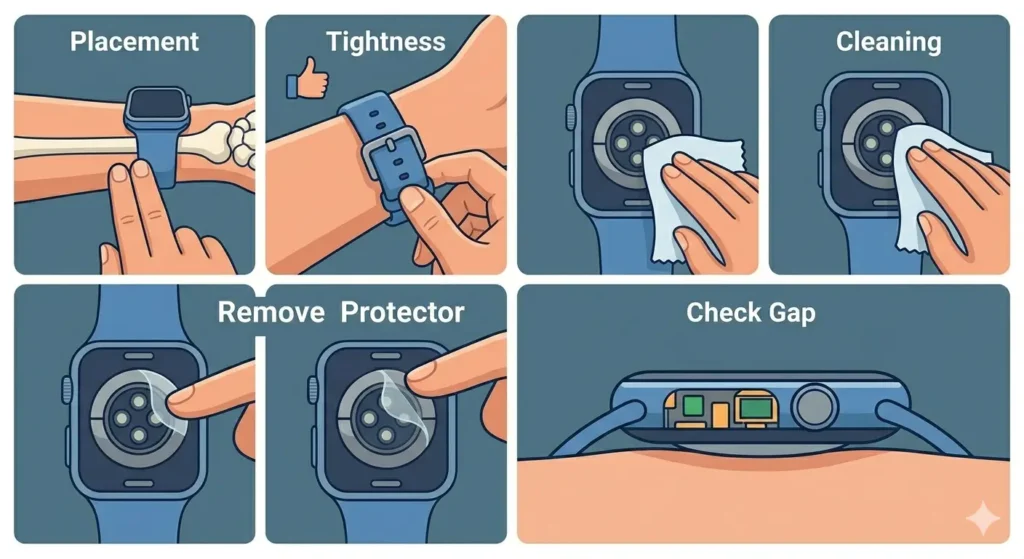
Heart rate sensors rely on proper skin contact and positioning. Calibration involves both physical placement and software optimization.
Physical Positioning
- Step 1: Wear the smartwatch 1-2 finger widths above the wrist bone
- Step 2: Ensure the band is snug but not uncomfortably tight
- Step 3: Clean the back sensor with a soft, dry cloth
- Step 4: Remove any screen protectors covering the sensor area
- Step 5: Verify the watch sits flat against the skin without gaps
Software Calibration
- Step 1: Open the fitness or health app on the smartphone
- Step 2: Navigate to Heart Rate Settings
- Step 3: Enable continuous heart rate monitoring
- Step 4: Set up resting heart rate baseline by sitting still for 5 minutes
- Step 5: Perform a moderate intensity workout while wearing a chest strap monitor (if available)
- Step 6: Compare readings and adjust sensitivity settings if needed
- Step 7: Save the calibration profile
Pro-Tip: Tattoos, scars, or very dark skin tones can interfere with optical heart rate sensors. If readings seem consistently off, consider pairing the smartwatch with an external chest strap heart rate monitor for activities requiring precise data.
Method 5: Calibrate Activity-Specific Settings
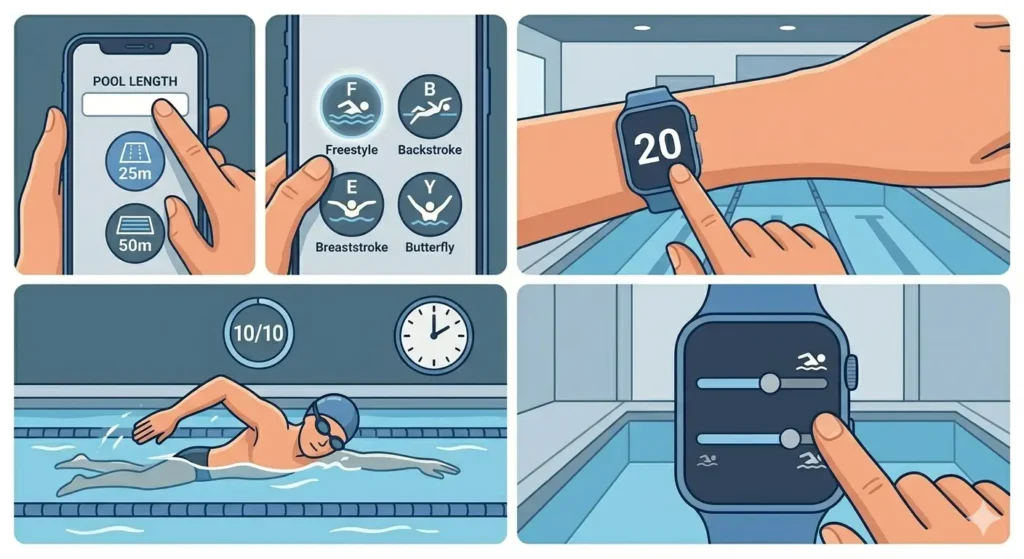
Different activities require unique calibration approaches. Swimming, cycling, and strength training each use different sensors and algorithms.
Swimming Calibration
- Step 1: Enter pool length accurately in watch settings (typically 25m or 50m)
- Step 2: Select correct swimming stroke type before starting workout
- Step 3: Swim at consistent pace for at least 10 laps
- Step 4: Verify lap count matches actual laps completed
- Step 5: Adjust sensitivity settings if lap detection is inaccurate
Cycling Calibration
- Step 1: Ensure GPS is active for outdoor cycling
- Step 2: Pair with external sensors (cadence, speed) if available
- Step 3: Ride a known distance route at normal effort
- Step 4: Compare watch data with actual distance and elevation
- Step 5: Update wheel size in settings if using speed sensor
Method 6: Perform Regular Recalibration
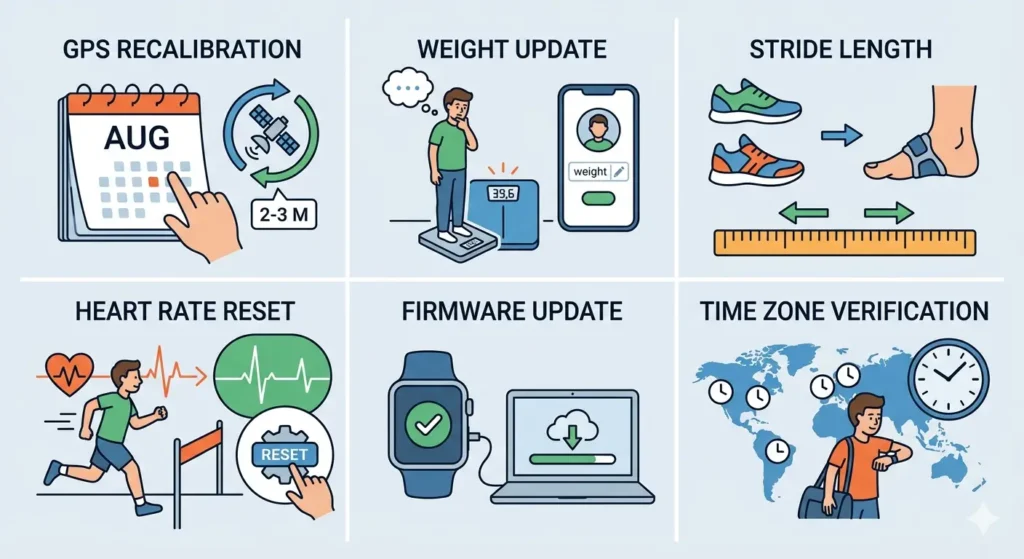
Fitness levels change over time, affecting stride length, heart rate zones, and calorie burn. Regular recalibration maintains accuracy as the body adapts.
- Step 1: Schedule GPS recalibration every 2-3 months
- Step 2: Update weight in profile settings whenever changes occur
- Step 3: Recalibrate stride length if changing running shoes or experiencing injury
- Step 4: Reset heart rate zones after significant fitness improvements
- Step 5: Check for firmware updates that improve sensor accuracy
- Step 6: Verify time zone settings with tools like world time comparison when traveling
Tips for Maintaining Calibration Accuracy
- Keep the smartwatch charged above 20% – low battery affects sensor performance
- Clean sensors weekly to prevent dirt buildup affecting readings
- Avoid wearing the watch too loosely during workouts
- Update the companion app regularly for algorithm improvements
- Use clock tab features to ensure time synchronization remains accurate
- Restart the smartwatch monthly to clear temporary calibration errors
- Store workout history for at least 3 months to improve adaptive algorithms
- Enable automatic activity detection for better background calibration
- Test calibration accuracy periodically with online stopwatch tools during timed activities
Common Problems and Solutions
Fix 1: Steps Count Seems Too High or Too Low
Recalibrate stride length using the manual measurement method. Verify the watch is worn on the dominant hand setting matches actual wearing position (left or right wrist). Tighten the band to reduce excessive movement that can register false steps.
Fix 2: Distance Tracking Shows Inaccurate Measurements
Perform a fresh GPS calibration in an open outdoor area. Check that location services are enabled in smartphone settings. Clear the GPS cache in the watch settings menu and recalibrate on a known distance route.
Fix 3: Heart Rate Readings Are Inconsistent
Ensure the watch is positioned correctly on the wrist, away from the bone. Clean both the sensor and skin before workouts. Tighten the band slightly during exercise but loosen afterward. Update to the latest firmware version for improved sensor algorithms.
Fix 4: Calorie Burn Estimates Seem Wrong
Update weight, height, and age in profile settings. Verify activity type is selected correctly before workouts. Complete the GPS and heart rate calibration processes to improve algorithmic accuracy. Consider that calorie estimates are approximations with 10-20% variance even when calibrated.
Fix 5: GPS Signal Takes Too Long to Connect
Stand still outdoors for 60-90 seconds when starting GPS activities. Enable GLONASS or Galileo satellite systems in watch settings if available. Sync the watch regularly to update satellite position data. Avoid starting GPS activities indoors or under heavy tree cover.
Frequently Asked Questions
How often should a smartwatch be calibrated for fitness tracking?
Perform initial calibration when first setting up the device, then recalibrate GPS and distance tracking every 2-3 months. Update personal information (weight, height) whenever changes occur. Heart rate calibration benefits from monthly checks, while stride length needs adjustment only when changing shoes or experiencing injuries that affect gait.
Why does the smartwatch show different step counts than the phone?
Smartwatches and phones use different sensors and wearing positions, leading to varied step detection. The watch tracks arm movement while phones detect hip or pocket movement. Calibrating stride length on the smartwatch and ensuring it’s worn on the correct wrist setting reduces discrepancies, though minor differences (5-10%) remain normal.
Can a smartwatch be calibrated without GPS?
Indoor calibration works by manually measuring known distances and adjusting stride length settings. Walk a precisely measured hallway or indoor track multiple times, then compare the watch’s distance reading to actual distance traveled. Adjust stride length in settings until readings align closely with real measurements.
Does wrist position affect fitness tracking accuracy?
Wearing position significantly impacts heart rate sensor accuracy and step counting. The watch should sit 1-2 finger widths above the wrist bone, snug enough to maintain skin contact but loose enough for comfort. The sensor needs direct skin contact without gaps for reliable heart rate readings during exercise.
What causes sudden changes in smartwatch tracking accuracy?
Software updates, battery degradation, sensor dirt buildup, or physical changes (weight gain/loss, muscle development) affect accuracy. Environmental factors like extreme cold, high altitude, or dense urban areas also impact GPS performance. Regular cleaning, firmware updates, and periodic recalibration address most accuracy shifts.
Should the smartwatch be calibrated differently for running versus walking?
Running and walking have distinct stride lengths and movement patterns. Many smartwatches automatically detect activity type, but manual calibration for each improves accuracy. Calculate and enter separate stride lengths for walking and running, as running stride typically measures 10-20% longer than walking stride.
How does altitude affect smartwatch calibration?
Altitude impacts barometric pressure sensors used for elevation tracking and can affect GPS accuracy. Calibrate the altimeter at a known elevation point before mountain activities. Some watches automatically calibrate altitude using GPS data, but manual calibration at sea level or known elevations provides better baseline accuracy.
Can fitness tracking accuracy improve over time without manual calibration?
Many modern smartwatches use adaptive algorithms that learn from patterns over weeks of wear. However, manual calibration accelerates this learning process and establishes more accurate baselines immediately. Combining automatic learning with periodic manual calibration delivers the best long-term accuracy.
Why do smartwatch calorie counts differ from gym equipment?
Gym equipment uses generic formulas based on machine resistance and time, while smartwatches incorporate personal metrics (age, weight, heart rate) for calculations. Neither method is perfectly accurate – both estimate energy expenditure with 10-25% variance. Smartwatch readings become more accurate after complete calibration with personal data.
Is chest strap heart rate monitoring necessary for calibration?
Chest straps provide more accurate heart rate data during high-intensity exercise due to direct electrical signal measurement. While not required for basic calibration, pairing a chest strap during initial setup helps establish accurate heart rate zones. After calibration, the wrist-based sensor usually provides sufficient accuracy for daily tracking.