
Using GPS for running on a smartwatch transforms workout tracking by providing accurate distance, pace, and route data. Modern smartwatches come equipped with GPS sensors that connect to satellite systems, allowing runners to monitor their performance without carrying a phone. This technology has become essential for runners who want detailed metrics about their training sessions.
Quick Summary
- Enable GPS in smartwatch settings before starting a run
- Allow 30-60 seconds for satellite connection outdoors
- Select running mode from the workout menu
- GPS works without phone connectivity on most modern smartwatches
- Battery life decreases when GPS is actively tracking
- Accurate tracking requires clear view of the sky
Activating GPS on Your Smartwatch
The GPS function on a smartwatch needs proper activation to track running activities accurately. Different smartwatch brands have varying menu structures, but the core process remains similar across devices.
Enabling GPS in Settings
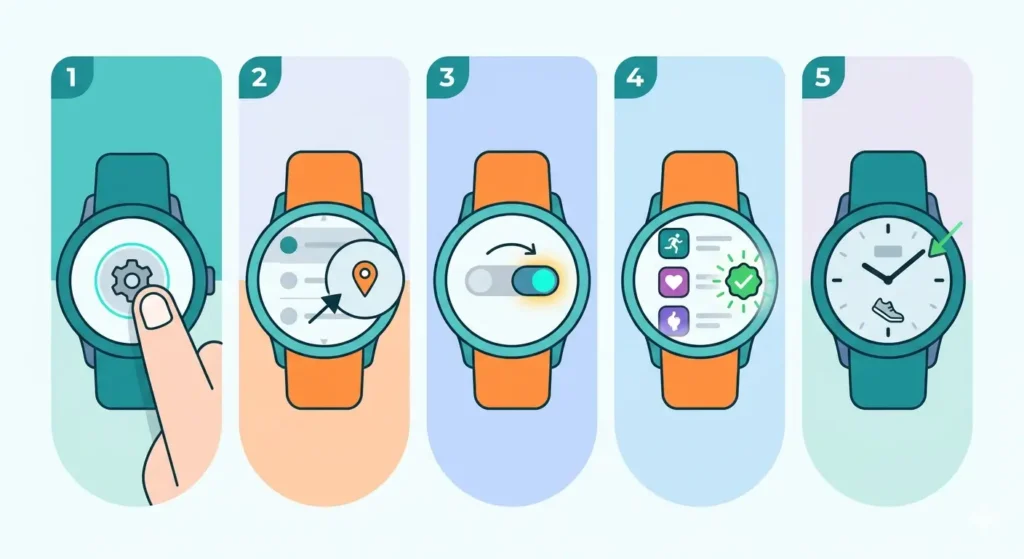
- Step 1: Navigate to the Settings app on the smartwatch
- Step 2: Look for ‘Location’ or ‘GPS’ settings
- Step 3: Toggle the GPS option to ‘On’ or ‘Enabled’
- Step 4: Confirm that location permissions are granted for fitness apps
- Step 5: Return to the home screen to begin workout setup
Some smartwatches automatically enable GPS when a running workout is selected. However, manually checking this setting ensures the feature is ready before heading outdoors.
Understanding GPS Modes
Most smartwatches offer multiple GPS modes that balance accuracy with battery consumption. The standard GPS mode provides sufficient accuracy for most runners, while GPS+GLONASS or GPS+Galileo modes use multiple satellite systems for enhanced precision in challenging environments like urban areas with tall buildings or dense forests.
Battery-saving modes reduce GPS polling frequency, which extends battery life but may sacrifice some accuracy. This option works well for long-distance runs where exact route tracking is less critical than overall distance and time.
Starting a GPS-Tracked Run
Once GPS is enabled, starting a tracked run requires accessing the workout menu and waiting for satellite connection. The quality of this connection determines tracking accuracy throughout the run.
Selecting Running Mode
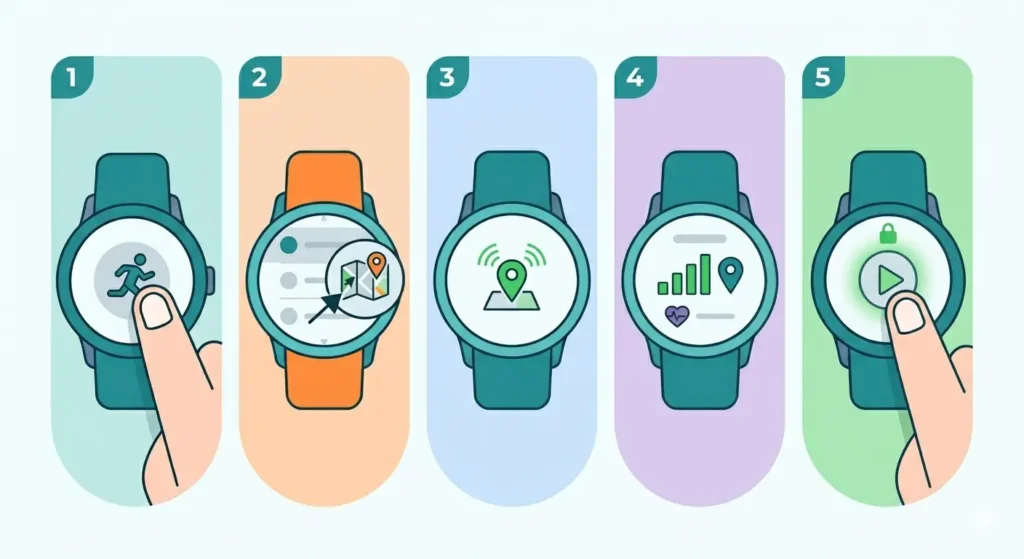
- Step 1: Press the designated workout button or swipe to the exercise menu
- Step 2: Scroll through activities and select ‘Run’ or ‘Outdoor Run’
- Step 3: Wait for the GPS icon to indicate a successful connection (usually changes color or stops flashing)
- Step 4: Review the pre-run screen showing current GPS signal strength
- Step 5: Press start when GPS is locked and ready
The satellite connection process typically takes 30-60 seconds in open areas. Standing still outdoors during this time helps the watch establish a stronger initial lock. Moving around or starting immediately can result in inaccurate distance readings for the first few minutes.
Pro-Tip: Always wait for the GPS connection indicator to show ‘Ready’ or turn green before starting a run. Starting too early leads to inaccurate distance measurements and can throw off pace calculations for the entire workout.
Positioning for Optimal GPS Signal
GPS accuracy depends heavily on satellite visibility. Standing in an open area away from tall buildings, dense tree cover, or tunnels allows the smartwatch to connect with more satellites. The watch should be worn on top of the wrist, not covered by sleeves, as fabric can interfere with signal reception.
Urban runners may experience brief signal loss when passing between buildings. The smartwatch typically fills these gaps using accelerometer data, but pre-run positioning in an open space establishes a stronger baseline connection.
Monitoring GPS During Your Run
Active GPS tracking displays real-time metrics on the smartwatch screen. Understanding these displays helps runners adjust their pace and stay on target during workouts.
Reading GPS Metrics
The running screen typically shows distance, current pace, average pace, and elapsed time. Some watches display a map view with the route being tracked. Distance updates continuously as the GPS recalculates position every few seconds.
Pace measurements can fluctuate briefly when turning corners or changing speed suddenly. The average pace metric provides a more stable reference point for maintaining consistent effort throughout a run.
GPS Accuracy Indicators
Many smartwatches display GPS signal strength during runs. A strong signal appears as multiple bars or a solid icon, while weak signals show fewer bars or a flashing indicator. If the GPS indicator disappears or shows weak signal, the tracking may become less accurate until connection improves.
Using features like online stopwatch tools before runs helps verify timing accuracy, while world time comparison tools assist runners traveling across time zones who need to schedule workouts.
Ending and Saving Your GPS Run
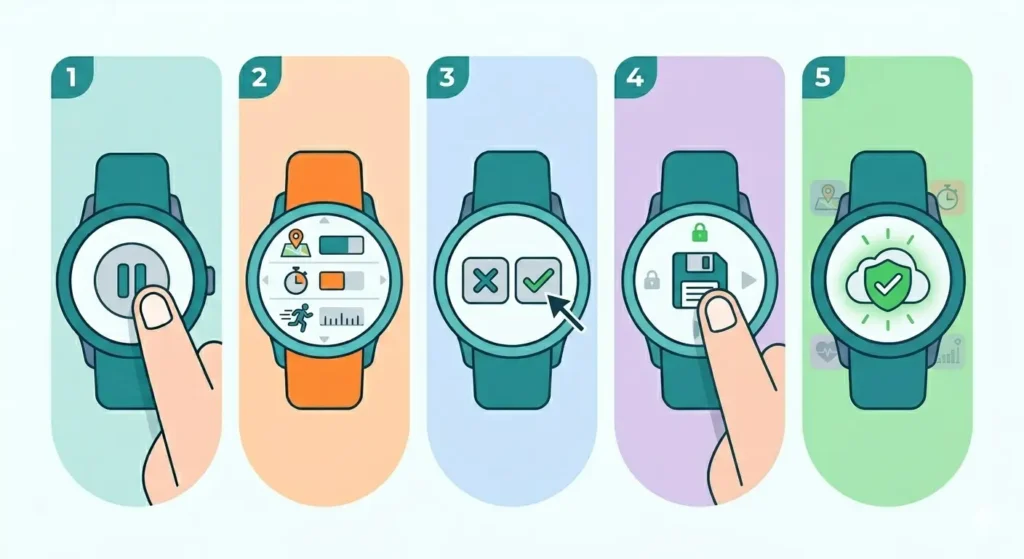
Properly ending a GPS-tracked run ensures all data is saved correctly and prevents battery drain from continued tracking.
- Step 1: Press the pause button when the run is complete
- Step 2: Review the summary screen showing total distance, time, and pace
- Step 3: Select ‘End’ or ‘Finish’ to stop GPS tracking
- Step 4: Choose ‘Save’ to store the workout data
- Step 5: Wait for confirmation that the activity has been saved
The smartwatch may upload the run to companion apps automatically if connected to a smartphone or Wi-Fi. This syncing process preserves detailed route maps and splits for later review.
Tips for Better GPS Running Accuracy
Several practices improve GPS tracking quality and ensure workout data reflects actual performance.
Pre-Run Preparation
Charge the smartwatch fully before long runs, as GPS drains battery faster than regular use. Update the watch’s GPS data file (also called AGPS or assisted GPS) through the companion app, which helps the device find satellites more quickly.
Wearing the watch snugly but comfortably on the wrist, about a finger’s width above the wrist bone, optimizes both GPS and heart rate sensor performance.
Environmental Considerations
GPS works best with clear sky visibility. Cloudy weather has minimal impact, but thick tree canopy, tall buildings, and tunnels can block signals. Planning routes with better satellite visibility improves tracking consistency.
Very cold weather can affect battery performance, potentially reducing GPS tracking time. Wearing the watch under a sleeve when not checking it helps maintain battery temperature.
Calibration and Maintenance
Some smartwatches benefit from occasional calibration runs on tracks with known distances. Running a measured 400-meter track and comparing the watch’s reading helps identify any systematic tracking errors.
Keeping the watch’s firmware updated ensures access to the latest GPS improvements and bug fixes. Manufacturers regularly release updates that enhance satellite connection speed and tracking accuracy.
Common Problems and Solutions
Even with proper setup, runners occasionally encounter GPS tracking issues that affect workout data quality.
GPS Won’t Connect
If the GPS fails to connect after several minutes, restart the smartwatch and try again. Moving to a more open area away from buildings or trees often resolves connection problems. Checking that location services are enabled in the watch settings prevents permission-related issues.
Inaccurate Distance Readings
Distance measurements that seem wrong may result from poor GPS signal during the run. Running the same route multiple times and comparing results helps identify if inaccuracy is consistent or occasional. Consistently short or long distances suggest the need for GPS calibration or firmware updates.
Battery Drains Too Quickly
GPS is the most battery-intensive feature on smartwatches. Reducing screen brightness, disabling music playback, and using standard GPS mode instead of multi-satellite modes extends battery life. For ultra-long runs, enabling battery-saver modes sacrifices some accuracy for additional tracking time.
Route Map Looks Erratic
Jagged or erratic route maps typically indicate poor GPS signal during parts of the run. Urban canyons, tunnels, and dense forests cause these tracking gaps. While the overall distance may still be reasonably accurate, the visual route representation will show irregular patterns. Running routes with better sky visibility produces cleaner map data.
Frequently Asked Questions
Does GPS work on a smartwatch without a phone?
Yes, most modern smartwatches have built-in GPS sensors that function independently of smartphones. The watch connects directly to satellites for tracking position and distance. Phone connectivity is only needed for features like music streaming or receiving notifications during runs.
How long does GPS battery last during running?
GPS battery life varies by smartwatch model and settings, typically ranging from 5 to 40 hours of continuous tracking. Standard GPS mode on mid-range smartwatches usually provides 10-15 hours, while battery-saver modes can extend this significantly. Premium sport-focused watches offer longer GPS battery life specifically designed for ultra-distance events.
Why does my smartwatch GPS take so long to connect?
Initial GPS connection time depends on how recently the watch last connected to satellites and whether assisted GPS data is up to date. Watches that haven’t been used for several days may take 2-3 minutes to connect. Regular use and keeping the watch’s GPS assistance data updated through the companion app reduces connection time to 30-60 seconds.
Can GPS track indoor running?
GPS cannot track indoor running effectively because satellite signals do not penetrate buildings. For treadmill or indoor track running, smartwatches use accelerometer and gyroscope data instead. Selecting ‘Indoor Run’ or ‘Treadmill’ mode disables GPS and relies on motion sensors, which require calibration for accurate distance measurement.
How accurate is smartwatch GPS for running distance?
Smartwatch GPS accuracy typically falls within 2-5% of actual distance under good conditions. This means a 10-kilometer run might register as 9.8 to 10.2 kilometers. Accuracy improves with clear sky visibility and degrades in urban canyons or heavy forest cover. High-end sport watches with multi-band GPS offer better accuracy, often within 1-2%.
Should GPS be on all the time on a smartwatch?
No, GPS should only be enabled during activities that require tracking. Keeping GPS on continuously drains battery rapidly and is unnecessary for daily wear. Most smartwatches automatically activate GPS when starting outdoor workouts and disable it afterward to conserve power.
What is the difference between GPS and GPS+GLONASS for running?
GPS refers to the American satellite system, while GLONASS is the Russian equivalent. GPS+GLONASS mode uses both systems simultaneously, connecting to more satellites for better accuracy in challenging environments like cities with tall buildings or mountainous terrain. This mode consumes more battery but provides more reliable tracking when GPS-only signals are weak.
Can weather affect GPS accuracy on smartwatches?
Normal weather conditions like rain or clouds have minimal impact on GPS accuracy. However, very heavy storms or thick cloud cover can slightly degrade signal quality. Temperature extremes affect battery performance rather than GPS signal, potentially reducing tracking duration in very cold conditions.
How do I know if my smartwatch GPS is working correctly?
Test GPS accuracy by running a known distance like a measured track. A properly functioning GPS should register a 400-meter track lap within 390-410 meters. Checking if the GPS icon shows a solid connection before starting and monitoring signal strength during runs helps verify proper operation. Routes that show smooth, logical paths on the map indicate good GPS performance.
Why does my running pace jump around during GPS tracking?
Instant pace calculations are based on very recent GPS readings, making them sensitive to brief signal variations or rapid speed changes. This natural fluctuation explains why current pace numbers jump around while running. Average pace and lap pace provide more stable metrics. Most smartwatches offer pace smoothing or averaging settings to reduce this jumpiness in the display.