

Setting the date on a watch seems straightforward until the hands stop moving or the mechanism jams. Knowing how to set the date on a watch properly protects the delicate calendar mechanism from damage, especially during the critical hours between 9 PM and 3 AM—commonly known as the ‘danger zone.’ This guide walks through the safe, correct method for adjusting the date on mechanical, automatic, and quartz watches without risking costly repairs.
Quick Summary Table
| Key Point | Details |
|---|---|
| Danger Zone Hours | 9 PM – 3 AM (avoid date changes during this window) |
| Safe Time to Adjust | 6 AM – 6 PM (calendar gears fully disengaged) |
| Crown Positions | Position 0 (pushed in), Position 1 (date), Position 2 (time) |
| Direction | Always advance date forward, never backward |
| Month-End Adjustment | Manually correct after 30-day months (April, June, September, November) |
Understanding the Watch Crown Positions
The crown—that small knob on the side of the watch—controls both time and date settings. Most watches have three distinct crown positions:
- Position 0 (Normal/Pushed In): The crown sits flush against the case. The watch runs normally and may be water-resistant if it’s a screw-down crown.
- Position 1 (First Click Out): Pull the crown out one notch. This position controls the date function on most watches. Some models may also allow day-of-week changes here.
- Position 2 (Fully Extended): Pull the crown out to the furthest position. This stops the second hand and allows time adjustment.
Screw-down crowns require an extra step: unscrew the crown counterclockwise until it pops out slightly before pulling to Position 1 or 2.
Method 1: Setting the Date Safely (Standard Procedure)
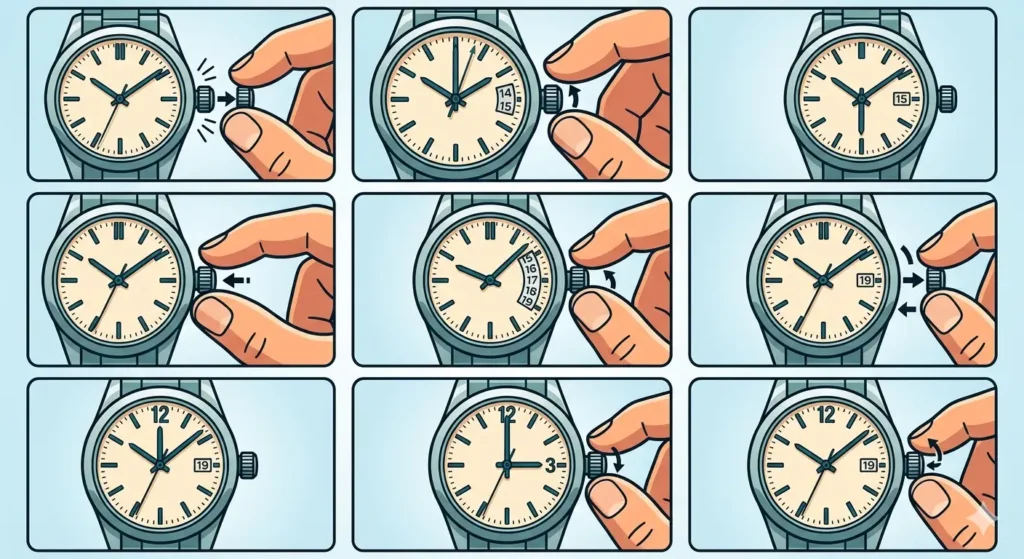
- Step 1: Pull the crown out to Position 2 (time-setting position) to stop the watch movement.
- Step 2: Rotate the crown to move the hands forward until the date changes. Note this exact position—this indicates midnight.
- Step 3: Continue rotating the hands forward to reach 6 AM. The watch is now safely outside the danger zone.
- Step 4: Push the crown back to Position 1 (date-setting position).
- Step 5: Rotate the crown to advance the date forward to yesterday’s date.
- Step 6: Pull the crown back out to Position 2 (time-setting position).
- Step 7: Rotate the hands forward past midnight to trigger today’s date change.
- Step 8: Continue rotating to set the correct current time.
- Step 9: Push the crown back to Position 0. For screw-down crowns, press in while turning clockwise until tight.
This method ensures the date mechanism never engages while the calendar gears are in their active transition phase. Most people find that taking these extra steps prevents the grinding sensation that signals gear conflict.
What Is the ‘Danger Zone’ and Why Does It Matter?
Between approximately 9 PM and 3 AM, the watch’s calendar mechanism actively prepares for and executes the date change. During these hours, tiny gears mesh together, building tension that releases at midnight to flip the date wheel.
Manually changing the date while these gears are engaged can cause:
- Stripped or broken date wheel teeth
- Bent calendar mechanism fingers
- Misaligned date display (numbers sitting between windows)
- Complete calendar mechanism failure requiring professional repair
The ‘danger zone’ window varies slightly by watch brand and movement type. Some high-end movements use instantaneous date changes concentrated around midnight, while others gradually shift over several hours. When in doubt, the safest practice treats 8 PM through 4 AM as off-limits for date adjustment.
Pro Tip: If the watch currently shows a time between 8 PM and 4 AM and the date needs correction, always move the hands forward (never backward) to 6 AM first. This simple habit prevents accidental damage even when rushing through the setting process.
Method 2: Quick-Set Date Function (If Available)
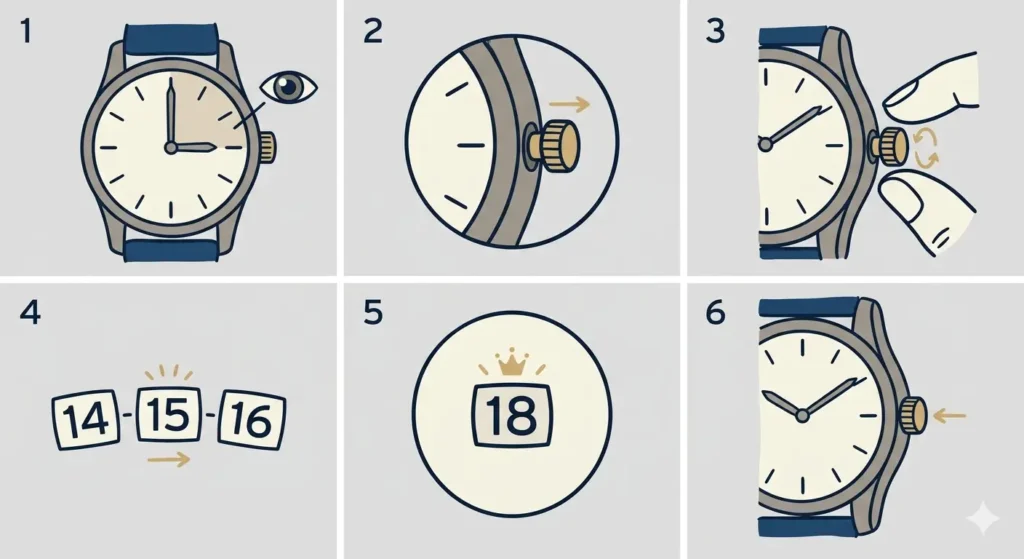
Many modern watches feature a quick-set date function accessible at crown Position 1. This works best when the watch displays a time safely outside the danger zone.
- Step 1: Check the current time displayed on the watch. Confirm the hands show between 6 AM and 6 PM.
- Step 2: Pull the crown out to Position 1 (first click).
- Step 3: Rotate the crown in the date-advance direction (typically clockwise, but some models vary).
- Step 4: Watch the date wheel click forward one day with each rotation or partial rotation.
- Step 5: Stop when the correct date appears centered in the window.
- Step 6: Push the crown back to Position 0.
The quick-set method saves time but only works safely when the displayed time sits far from the danger zone. Never use quick-set if the hour hand points anywhere near 9, 10, 11, 12, 1, 2, or 3.
Adjusting Date After Short Months
Watches without perpetual calendar complications cannot automatically account for months with fewer than 31 days. Manual correction becomes necessary five times per year: after April 30th, June 30th, September 30th, November 30th, and February 28th (or 29th in leap years).
For example, on May 1st following April’s 30 days, the watch incorrectly displays ’31’ instead of ‘1’. Simply advance the date one position forward using either the quick-set method or the full procedure outlined above. Checking world time comparison tools helps verify the correct date when traveling across time zones during these transition periods.
February requires special attention. After February 28th in common years, advance the date three positions forward (skipping 29, 30, and 31). In leap years, advance two positions (skipping 30 and 31).
Tips for Different Watch Types
Mechanical and Automatic Watches
Hand-wound and self-winding mechanical movements require the most careful handling during date setting. The calendar mechanism connects directly to the gear train, making it vulnerable to forceful adjustment.
- Always wind mechanical watches before setting the date to ensure adequate mainspring tension
- Turn the crown gently—resistance indicates the danger zone or mechanical obstruction
- Never force the crown if the date won’t advance; instead, move the hands forward 12 hours and try again
- Consider servicing watches that exhibit grinding, clicking, or resistance during date changes
Quartz Watches
Battery-powered quartz movements generally tolerate date setting with more flexibility than mechanical calibers, but the danger zone rules still apply to protect the physical calendar mechanism.
- Quartz watches often feature bi-directional date setting (forward and backward)
- The crown typically requires less force to operate than mechanical movements
- Low battery power can cause sluggish or incomplete date changes—replace batteries showing weak timekeeping
- Some quartz models include perpetual calendar functions that automatically adjust for short months
Digital Watches
Fully digital timepieces eliminate mechanical calendar mechanisms entirely, allowing date changes at any time without risk. Button combinations vary by manufacturer, so consulting the specific model’s manual ensures correct programming.
Common Problems and Solutions
Fix 1: Date Changes at Noon Instead of Midnight
When the date flips during daylight hours, the watch’s internal 12-hour cycle runs exactly opposite to the actual day-night cycle. The hands show the correct time, but the AM/PM orientation sits backward.
The solution involves advancing the time by exactly 12 hours:
- Pull the crown to Position 2
- Rotate the hands forward through one complete 12-hour cycle
- Watch for the date to change, confirming the new midnight position
- Continue forward to the correct current time
- Return the crown to Position 0
This adjustment maintains accurate timekeeping while correcting the AM/PM orientation without touching the date wheel directly.
Fix 2: Date Sits Between Two Numbers
A misaligned date display—where the window shows parts of two consecutive dates—signals either incomplete date advancement or damage to the calendar mechanism.
First, attempt resolution through normal operation:
- Move the hands forward to safely past 6 AM
- Pull the crown to Position 1 and use quick-set to advance the date one full click
- Return the crown to Position 0 and monitor for 24 hours
If the date continues displaying misaligned, professional servicing becomes necessary. Forcing the mechanism risks converting a minor alignment issue into broken components.
Fix 3: Date Won’t Advance Using Quick-Set
When rotating the crown at Position 1 produces no date movement, three scenarios typically explain the issue:
- Danger Zone Engagement: The time displayed falls between 8 PM and 4 AM. Move the hands forward to 6 AM and retry.
- Incorrect Crown Position: The crown sits at Position 2 (time setting) instead of Position 1. Push in slightly until the date-advance function engages.
- Mechanical Obstruction: Something blocks the calendar mechanism. Stop immediately and consult a watchmaker to avoid damage.
Pro Tip: Using an online stopwatch to time the date-change cycle helps identify mechanical problems. A healthy watch movement completes the date flip within 1-3 seconds at midnight. Sluggish changes taking 30+ seconds may indicate needed lubrication or worn components.
Fix 4: Crown Won’t Pull Out to Position 1 or 2
Screw-down crowns must first be unscrewed before pulling. Turn the crown counterclockwise (lefty-loosey) while pulling gently outward until feeling a slight pop or release. The crown then pulls normally through its positions.
Standard push-pull crowns that won’t extend may suffer from:
- Debris or corrosion in the crown tube
- Damaged crown stem
- Misaligned or broken clutch mechanism
Avoid excessive force. Professional cleaning or repair resolves stuck crowns without risking broken stems or stripped threads.
Maintaining Date Accuracy Long-Term
Regular wear keeps automatic watches wound and their calendar mechanisms exercised. Watches sitting unworn for extended periods may develop sluggish date changes or require extra care when restarting.
For watches worn daily:
- Set the date correctly once, then allow normal daily operation to maintain accuracy
- Perform month-end corrections on the first day of each short month
- Service mechanical movements every 3-5 years to maintain calendar function
For occasional-wear pieces:
- Use watch winders to maintain power and calendar accuracy
- Reset the date using the full safe procedure each time wearing resumes
- Consider watches with perpetual calendars for hassle-free operation
Keeping track of time changes and date accuracy across multiple watches becomes easier with tools like a clock tab that displays current time at a glance.
Frequently Asked Questions
Can the date be changed backward on a watch?
Some quartz watches allow bi-directional date setting, but mechanical and automatic movements should never have their dates wound backward. Reversing the date wheel fights against the calendar mechanism’s one-way design, potentially damaging the gear teeth or driving fingers. Always advance the date forward, even if this means cycling through 28-30 days to reach the desired date.
What happens if the date is changed during the danger zone?
Changing the date between 9 PM and 3 AM can strip gear teeth, bend calendar mechanism components, or cause the date to display misaligned. Minor damage may manifest as a grinding sensation or resistance when using quick-set. Severe damage requires complete calendar mechanism replacement by a professional watchmaker, often costing hundreds of dollars depending on the movement.
How often does a watch need date correction?
Standard calendar watches require manual correction five times per year after months with fewer than 31 days (April, June, September, November, and February). Perpetual calendar watches automatically account for short months and leap years, requiring correction only once every 100-400 years depending on the complication’s sophistication.
Why does the date change at noon instead of midnight?
The watch’s internal AM/PM cycle runs exactly 12 hours opposite to the actual day. This occurs when the time was initially set 12 hours off or after battery replacement in quartz watches. The fix involves advancing the hands forward by 12 hours to flip the cycle, then continuing to the correct current time.
Is it safe to change the date at 6 AM or 6 PM?
Yes, both 6 AM and 6 PM sit safely outside the danger zone when the calendar mechanism remains fully disengaged. The safest window runs from 6 AM through 6 PM, giving ample buffer from the active calendar change period that begins around 8-9 PM.
Can the hands be moved backward to set the time?
Moving the hands backward to adjust time carries less risk than reversing the date, but forward movement remains the safest practice. Some vintage movements use fragile gear trains that prefer forward rotation only. Modern watches generally tolerate backward hand movement, but passing through midnight in reverse can confuse calendar mechanisms. When possible, always advance the hands forward.
What is a perpetual calendar and does it eliminate date setting?
A perpetual calendar complication automatically accounts for months of different lengths and leap years, eliminating manual date correction for decades or centuries. These sophisticated mechanisms ‘know’ whether February has 28 or 29 days and skip the 31st date after 30-day months. However, they still require careful handling during setting and should never be adjusted during the danger zone.
How can you tell if the date mechanism is damaged?
Signs of calendar mechanism damage include: date numbers sitting misaligned in the window, grinding or clicking sounds when using quick-set, dates that skip days or refuse to advance, dates changing multiple times per day, or visible resistance when rotating the crown at Position 1. Any of these symptoms warrant professional inspection before continued use causes additional damage.
Do all watches have a quick-set date function?
No, vintage watches and some dress watches lack quick-set date features. These timepieces require advancing the hands through complete 24-hour cycles to change the date, making the full safe setting procedure essential. Quick-set functionality became common in the 1970s-1980s but remains absent from certain traditional or historically-inspired designs.
What is the difference between date and day-date complications?
A date complication displays only the numerical date (1-31) in a window. A day-date complication shows both the numerical date and the day of the week (Monday, Tuesday, etc.), typically in separate windows. Day-date watches often feature two separate quick-set positions—one for date and one for day—each with its own danger zone considerations.