

Setting an annual calendar watch requires understanding its unique mechanism and following precise steps to ensure accurate date display throughout the year. This guide provides a complete step-by-step process for properly configuring an annual calendar complication, one of the most practical features in modern horology.
Quick Summary Table
| Step | Action | Key Point |
|---|---|---|
| 1 | Pull crown to position 1 | Never adjust between 8 PM – 2 AM |
| 2 | Set the date | Advance slowly, one click per day |
| 3 | Set the month | Use dedicated pusher or crown position |
| 4 | Set the time | Pull crown to position 2 |
| 5 | Return crown to normal | Push firmly and ensure water resistance |
Understanding Annual Calendar Watches
An annual calendar watch automatically adjusts for months with 30 and 31 days, requiring manual correction only once per year at the end of February. Unlike perpetual calendars that account for leap years, annual calendars offer a practical middle ground between simple date watches and complex perpetual mechanisms.
The complication tracks three key elements: date, day of the week, and month. Most annual calendar watches require adjustment on March 1st each year, regardless of whether the previous year was a leap year.
Setting the Date on Your Annual Calendar Watch
Locate the Crown Positions
Annual calendar watches typically feature a crown with three positions. Position 0 is the normal wearing position where the crown sits flush against the case. Position 1 allows date and month adjustments, while position 2 controls the time setting.
Some models include additional pushers on the case side for independent adjustment of date, day, or month complications. Consult the specific model’s manual to identify all adjustment points.
Initial Date Setting Process

- Step 1: Gently pull the crown out to position 1, feeling for the first click
- Step 2: Rotate the crown clockwise slowly to advance the date display
- Step 3: Continue advancing until the correct date appears in the window
- Step 4: Verify the date has fully engaged by checking the number sits centered in the display window
Pro-Tip: Always advance the date forward, never backward. Reversing the date mechanism can damage the delicate gears inside the annual calendar module. If you pass the correct date, continue forward through the entire month cycle.
Adjusting the Month Display
Using the Crown Method

For watches where the month adjusts via crown rotation in position 1, turn the crown counterclockwise while in the date-setting position. Each rotation advances the month indicator by one.
- Step 1: With crown in position 1, rotate counterclockwise
- Step 2: Count each month change as the indicator advances
- Step 3: Stop when the current month appears correctly
Using Dedicated Pushers
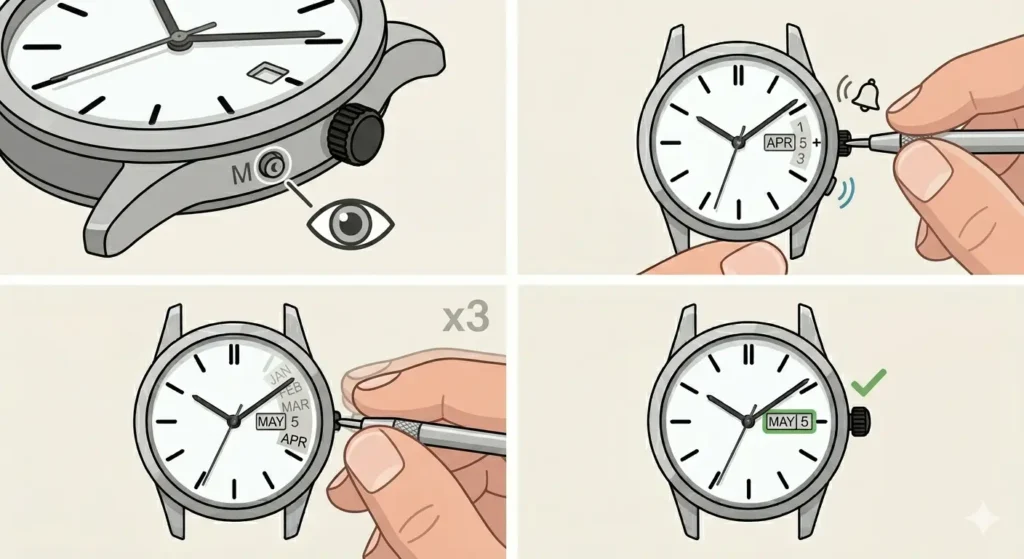
Many annual calendar models feature recessed pushers specifically for month adjustment. These require a special tool or the tip of a ballpoint pen.
- Step 1: Locate the pusher marked ‘M’ or with a month symbol
- Step 2: Press gently using the corrector tool until you hear a soft click
- Step 3: Repeat pressing until the correct month displays
- Step 4: Verify the month indicator aligns properly in its window
Setting the Day of the Week
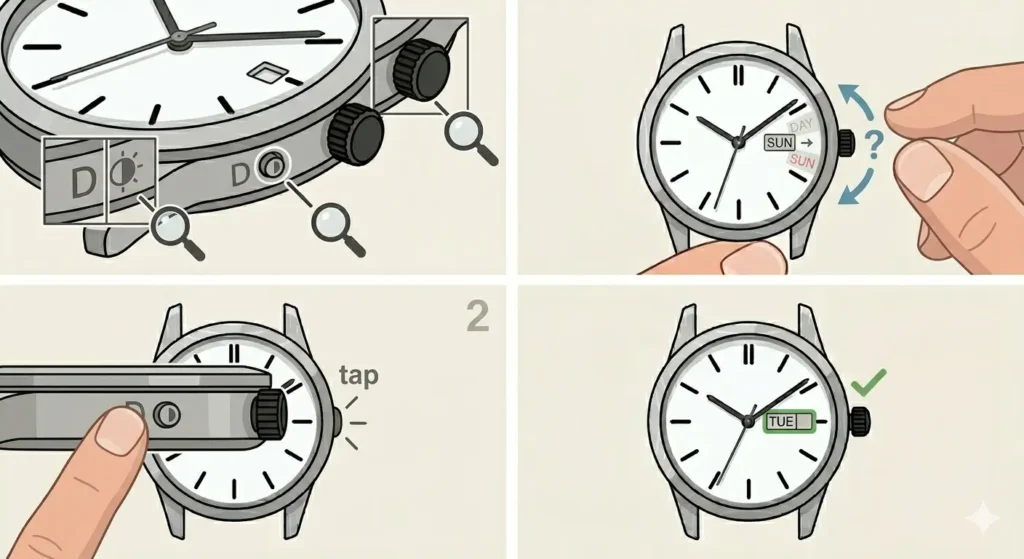
The day complication requires separate adjustment on most annual calendar watches. This function either operates through a dedicated pusher or shares the crown position with date adjustment.
- Step 1: Identify the day adjustment method for your specific model
- Step 2: If using a pusher, press the one marked ‘D’ or with a day symbol
- Step 3: If using the crown, determine which rotation direction advances the day
- Step 4: Advance until the current day appears fully visible
Some models display the day in multiple languages. Ensure the correct language setting appears before finalizing adjustments.
Configuring the Correct Time
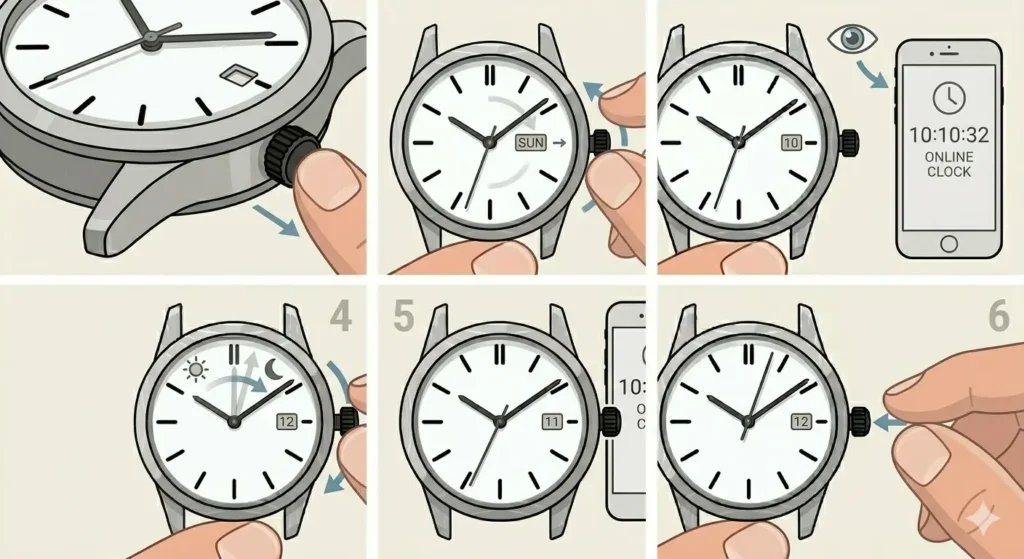
After setting all calendar functions, the final step involves accurate time setting. This step should always come last to prevent misalignment during calendar adjustments.
- Step 1: Pull the crown to position 2 (the furthest position from the case)
- Step 2: Rotate the crown to move the hour and minute hands
- Step 3: Reference an accurate time source like an online clock for precise synchronization
- Step 4: Advance the hands past midnight if needed to ensure correct AM/PM setting
- Step 5: Set to the exact current time
- Step 6: Push the crown back to position 0 when the second hand reaches 12
Critical Timing Considerations
The forbidden zone for calendar adjustments extends from 8 PM to 2 AM. During these hours, the calendar mechanism engages its gears to prepare for the date change at midnight. Adjusting during this period can strip gears, bend levers, or completely damage the calendar module.
If the watch shows a time within this danger zone, first advance the time to 6 AM or later before making any calendar adjustments. This simple precaution prevents thousands of dollars in potential repair costs.
Pro-Tip: When unsure whether the displayed time is AM or PM, advance the hands through a complete 12-hour cycle and watch for the date change. This confirms the current period and ensures proper calendar alignment.
Tips for Maintaining Calendar Accuracy
Regular wear keeps automatic annual calendar watches fully wound and functioning correctly. The self-winding mechanism maintains power reserve, ensuring the calendar advances properly each day.
For watches not worn daily, consider using a watch winder that rotates the timepiece to maintain the power reserve. Set the winder to the manufacturer’s recommended turns per day, typically between 650 and 900 rotations.
Mark March 1st on a calendar as the annual adjustment date. Setting a reminder ensures the watch receives its yearly correction promptly, maintaining accuracy throughout the following twelve months.
Store the watch in a stable temperature environment away from magnetic fields. Extreme temperature fluctuations can affect lubricants and accuracy, while magnetism disrupts the movement’s precision.
When traveling across time zones, use a time comparison tool to verify the correct local time before adjusting the watch. This prevents unnecessary adjustments and reduces wear on the movement.
Common Problems and Solutions
Date Displays Between Two Numbers
This indicates the date wheel has not fully advanced. Pull the crown to position 2 and rotate the hands forward past midnight, then backward to 6 AM, and forward again past midnight. This completes the date change cycle and properly seats the date wheel.
Month Indicator Shows Wrong Month
The month likely advanced during a 30-day month when the watch expected 31 days, or the watch was not corrected on March 1st. Use the month correction pusher or crown function to advance the month indicator back to the current month.
Calendar Functions Stop Working
Insufficient power reserve causes calendar complications to cease functioning. Wind the watch manually by rotating the crown clockwise in position 0 for approximately 30-40 rotations. This rebuilds the power reserve and restarts the calendar mechanism.
Day and Date Misaligned
The day and date must match correctly. Verify both against a reliable calendar source. Adjust each function independently using their respective pushers or crown positions until both align with the actual day and date.
Frequently Asked Questions
How often does an annual calendar watch need adjustment?
An annual calendar watch requires manual adjustment once per year, specifically on March 1st. This single correction accounts for February’s shorter length, whether 28 or 29 days. All other months advance automatically without intervention.
Can annual calendar watches be adjusted backward?
No, annual calendar mechanisms should never be adjusted backward. The gears are designed for forward advancement only. Reversing can cause permanent damage to the delicate calendar module. If overshooting the correct date, continue forward through the complete cycle.
What happens if the watch stops running between adjustments?
When the power reserve depletes completely, all functions including the calendar stop. After rewinding, manually set the date, month, day, and time following the proper sequence. Using timing tools helps ensure accuracy during this reset process.
Why does the date change at 11 AM instead of midnight?
This indicates the watch’s AM/PM setting is reversed by exactly 12 hours. Pull the crown to position 2 and advance the hands forward by 12 hours. Watch for the date to change, which confirms midnight has passed and the watch now shows the correct period.
Do all annual calendar watches work the same way?
While the basic principle remains consistent, different manufacturers implement annual calendar mechanisms with varying adjustment methods. Some use pushers exclusively, others rely on crown positions, and certain models combine both approaches. Always consult the specific manufacturer’s instructions.
Is it safe to set the calendar while wearing the watch?
Yes, setting the calendar while wearing the watch is safe, provided the crown is manipulated gently and the time falls outside the 8 PM to 2 AM forbidden zone. Remove the watch when using pushers to apply pressure more accurately without risking case damage or personal injury.
How long does an annual calendar watch power reserve last?
Most annual calendar watches maintain a power reserve between 38 and 72 hours when fully wound. Higher-end models may extend to 120 hours or more. The specific duration depends on the movement’s design and barrel configuration. Check the manufacturer’s specifications for exact power reserve capacity.
Can water damage affect annual calendar functions?
Yes, water intrusion severely damages annual calendar mechanisms. The complex gearing and springs corrode rapidly when exposed to moisture. Always verify the crown sits fully pushed in at position 0 and ensure gaskets receive regular maintenance during service intervals to maintain water resistance.
What is the difference between annual and perpetual calendar watches?
Annual calendars require one adjustment per year for February, while perpetual calendars automatically account for leap years and need no adjustment until the year 2100. Perpetual calendars contain significantly more components, making them more expensive and complex than annual calendar mechanisms.
Should annual calendar watches be serviced more frequently than regular watches?
Annual calendar watches benefit from service every 4-5 years compared to the standard 5-7 year interval for simple time-only watches. The additional complications contain more parts requiring lubrication and adjustment. Regular maintenance prevents premature wear and ensures reliable calendar operation.