

Setting a perpetual calendar watch correctly ensures accurate date display for years without manual adjustment. This sophisticated timepiece complication automatically accounts for varying month lengths and leap years, making it essential to configure properly from the start.
Quick Summary Table
| Key Step | What to Do | Why It Matters |
|---|---|---|
| Pull Crown to Position 2 | Unlock date adjustment mode | Prevents damage to movement |
| Set Current Date | Rotate crown to match today’s date | Establishes baseline accuracy |
| Adjust Month Display | Use dedicated pusher or crown position | Syncs calendar system |
| Configure Leap Year | Align indicator to current cycle year | Ensures long-term precision |
| Set Day and Time | Complete final adjustments | Full functionality activation |
Understanding Your Perpetual Calendar Watch
A perpetual calendar watch differs from standard timepieces through its mechanical ability to track dates accurately until the year 2100. The mechanism recognizes 28, 29, 30, and 31-day months automatically, eliminating monthly corrections that simpler calendars require.
Before beginning the setting process, familiarize yourself with the crown positions and any additional pushers on the case. Most perpetual calendars feature a crown with three positions and specialized pushers for month, day, and leap year adjustments.
How to Set Your Perpetual Calendar Watch
Prepare the Watch for Setting
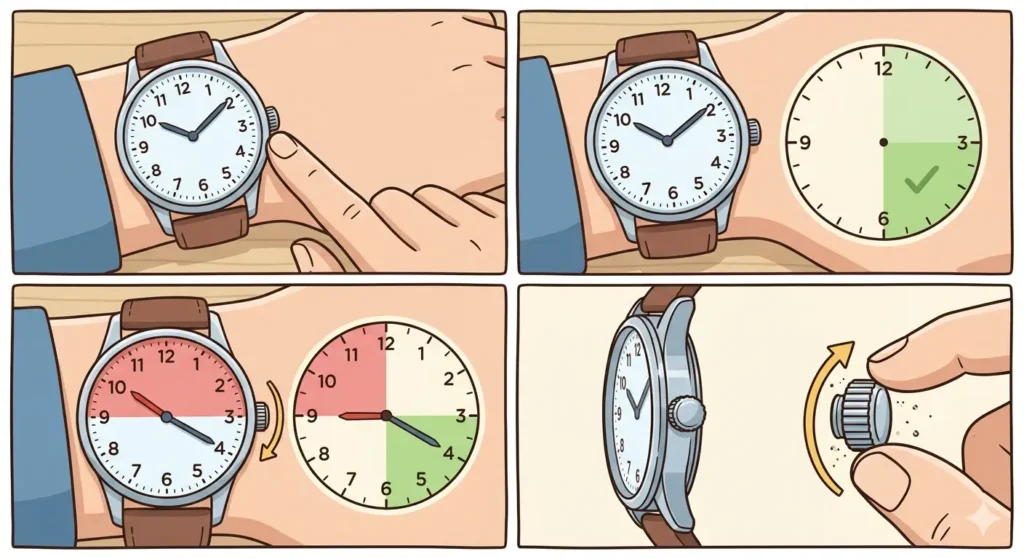
- Step 1: Check the current time displayed on the watch face
- Step 2: Ensure the time shows between 6:00 AM and 3:00 PM to avoid the date change mechanism period
- Step 3: If the watch displays time between 9:00 PM and 3:00 AM, advance the hands forward until reaching safe hours
- Step 4: Unscrew the crown if the watch features a screw-down crown (turn counterclockwise)
Pro-Tip: Never adjust any calendar function when the watch displays time between 9:00 PM and 3:00 AM. The date change mechanism engages during these hours, and adjustments can permanently damage the delicate gears inside the movement.
Set the Month Display
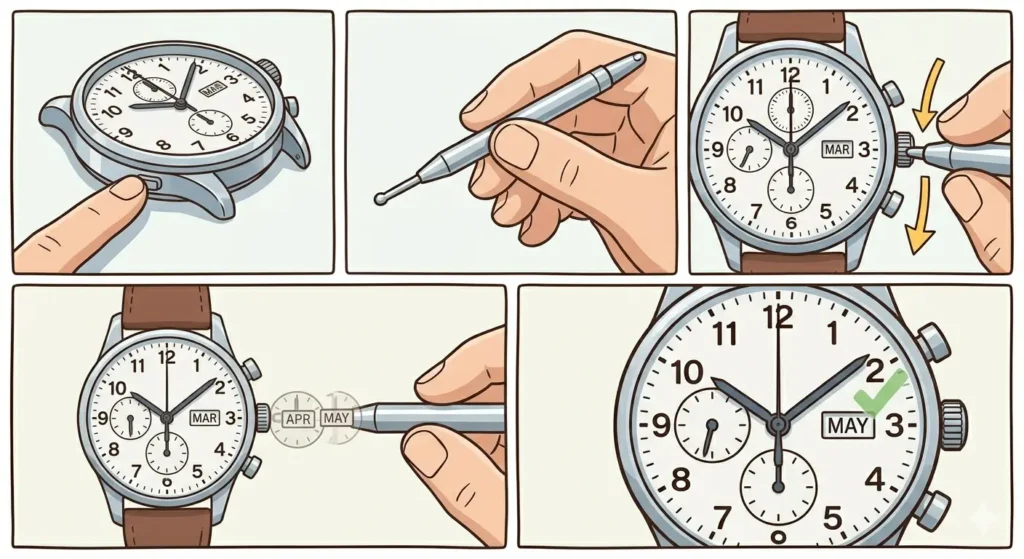
- Step 1: Locate the month adjustment pusher, typically positioned at 10 o’clock or 11 o’clock on the case
- Step 2: Use the dedicated tool provided with the watch or a pointed object with rounded tip
- Step 3: Press the pusher gently and release – each press advances the month by one
- Step 4: Continue pressing until the correct current month appears in the month window or subdial
- Step 5: Verify the month indicator shows the accurate position before proceeding
Configure the Date
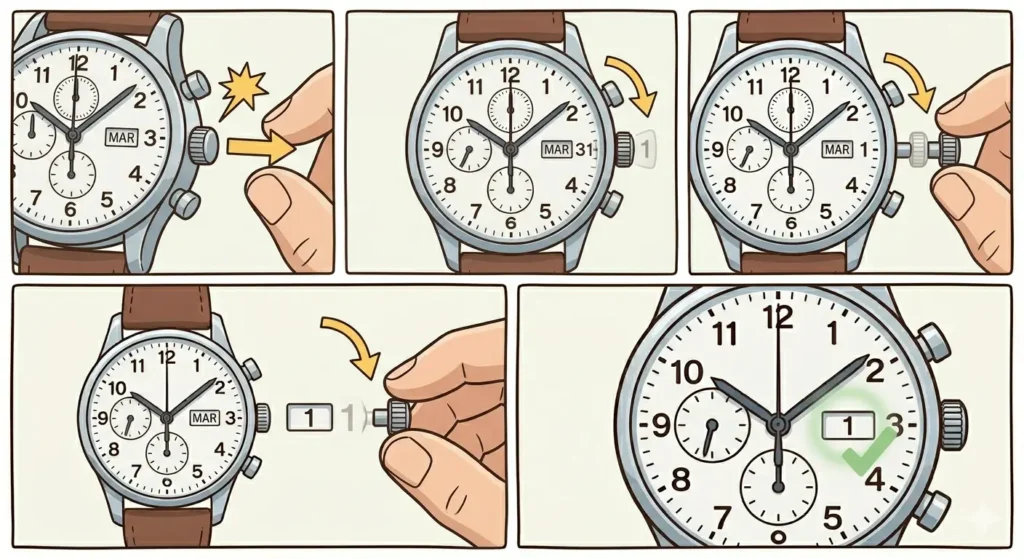
- Step 1: Pull the crown out to the second position (one click out from the case)
- Step 2: Rotate the crown clockwise slowly and observe the date wheel advancing
- Step 3: Turn until the date display matches today’s date exactly
- Step 4: Double-check that the date sits centered in its window for proper visibility
Adjust the Leap Year Indicator
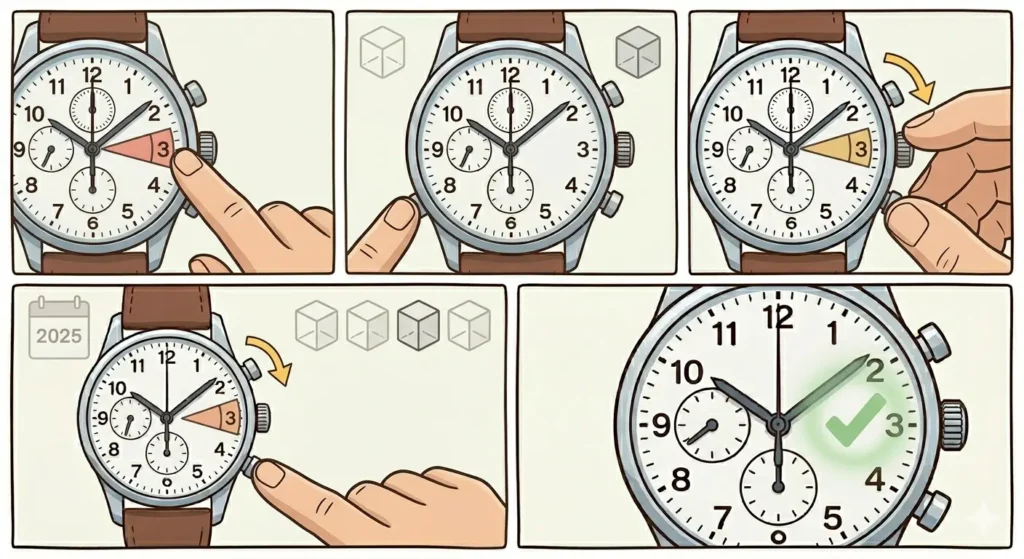
- Step 1: Identify the leap year indicator – usually displayed as numbers 1, 2, 3, 4 or colored sectors
- Step 2: Find the leap year pusher, commonly located at 8 o’clock or integrated into the crown system
- Step 3: Determine the current position in the leap year cycle (year 1, 2, 3, or 4 where 4 indicates leap year)
- Step 4: Press the leap year pusher until the indicator aligns with the correct year in the current four-year cycle
- Step 5: Confirm the setting matches the actual calendar year position
Pro-Tip: Calculate the leap year position by dividing the current year by 4. The remainder tells the position: 0 = leap year (position 4), 1 = year after leap year (position 1), 2 = two years after (position 2), 3 = three years after (position 3).
Set the Day of the Week
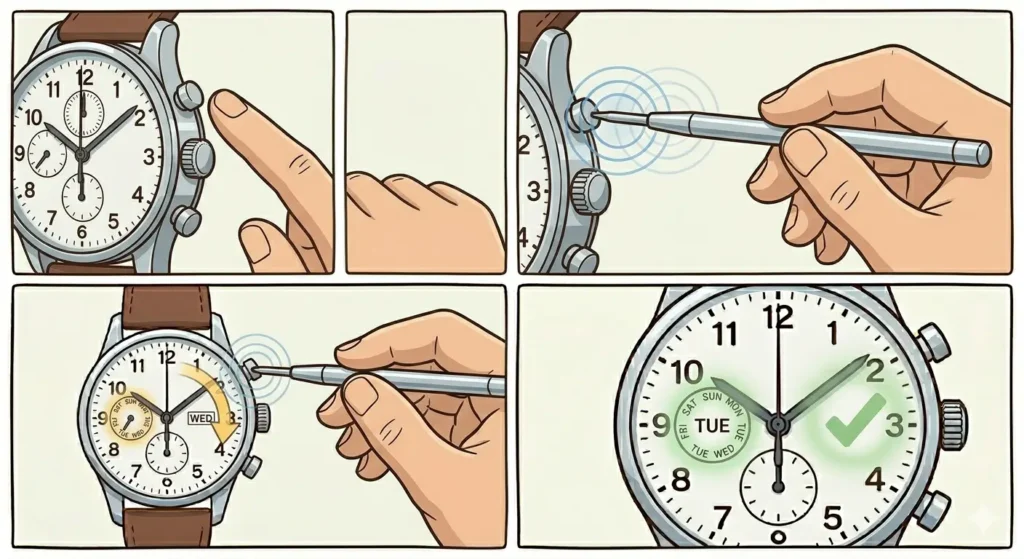
- Step 1: Locate the day adjustment pusher, usually positioned at 2 o’clock on the case
- Step 2: Press the pusher repeatedly using the dedicated tool
- Step 3: Advance through the days until reaching the current day of the week
- Step 4: Ensure the day appears fully in its display window without partial letters showing
Complete Time Setting
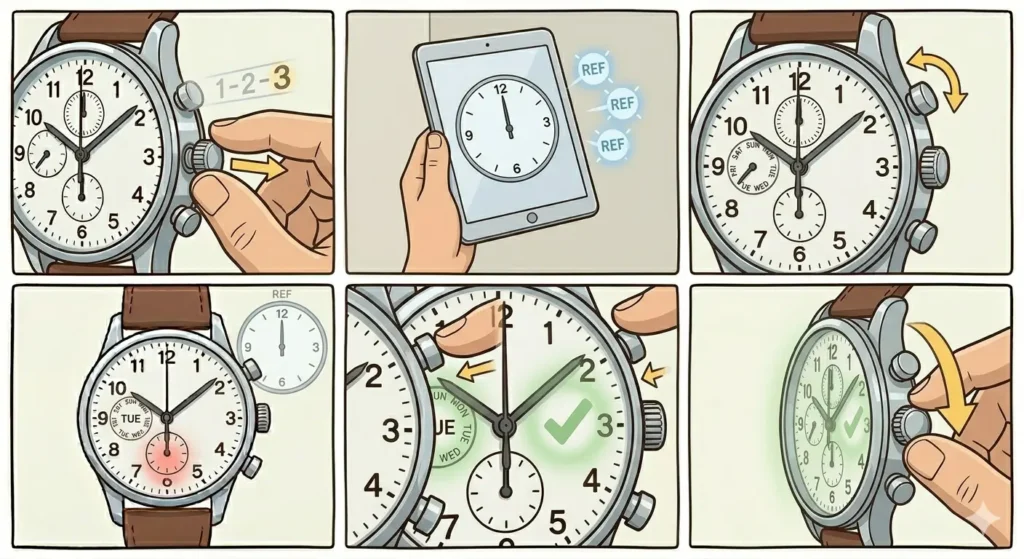
- Step 1: Pull the crown to the third position (fully extended)
- Step 2: Use a reliable time source like an accurate online clock for precise synchronization
- Step 3: Rotate the crown to set the hour and minute hands to the exact current time
- Step 4: For watches with a seconds hand, wait until the reference time reaches a full minute
- Step 5: Push the crown back in at the exact moment the second matches, starting the watch
- Step 6: Screw down the crown clockwise if applicable until finger-tight
Tips for Maintaining Perpetual Calendar Accuracy
Keep the watch wound consistently if it features automatic movement. The perpetual calendar mechanism requires continuous power to maintain accurate date tracking across month transitions.
Store the watch in a watch winder when not wearing it regularly. This prevents the calendar from stopping and requiring complete resetting, which can be time-consuming given the multiple displays involved.
Service the watch every 5-7 years through authorized service centers. The intricate perpetual calendar movement contains hundreds of tiny components that benefit from professional cleaning and lubrication.
Avoid rapid date changes near midnight. Even outside the danger zone, quick consecutive adjustments can stress the calendar mechanism unnecessarily.
Reference world time tools when traveling to ensure accurate time zone adjustments without disturbing the calendar settings.
Common Problems and Troubleshooting
Date Changes at Noon Instead of Midnight
This indicates the watch runs 12 hours ahead or behind. Pull the crown to position 2 and advance the time by exactly 12 hours. The date should jump forward once during this adjustment, confirming correct AM/PM alignment.
Month Display Stuck Between Two Months
The month mechanism may have been adjusted during the danger zone hours. Reset the time to 10:00 AM, then use the month pusher to advance through a complete 12-month cycle back to the current month. This often reseats the mechanism properly.
Leap Year Indicator Not Advancing
Some perpetual calendars only advance the leap year automatically at the end of February. If manual adjustment fails, the watch may require service as the leap year mechanism involves delicate pawls and springs that can become misaligned.
Date Skips Numbers
Insufficient power reserve can cause the date to advance incompletely. Fully wind the watch if manual, or wear it continuously for 48 hours if automatic. The date wheel should complete transitions properly once power stabilizes.
Day and Date Out of Sync
Adjust only the day pusher to bring it into alignment with the date. The day and date mechanisms operate independently, so correcting one without changing the other resolves this mismatch.
Frequently Asked Questions
Can a perpetual calendar watch be set backwards?
Never turn any perpetual calendar function backwards. The mechanism designed for forward-only operation can suffer gear damage if forced in reverse. Always advance forward through a complete cycle to reach the desired setting.
How accurate does the time need to be when setting a perpetual calendar?
Set the time as precisely as possible, ideally within one second of an atomic time source. While small discrepancies accumulate slowly, starting with exact time ensures maximum accuracy over months of wear.
What happens if the perpetual calendar stops running?
When a perpetual calendar stops, all calendar functions freeze at that point. Upon restarting, complete resetting of date, month, day, and leap year becomes necessary following the proper sequence outlined in the setting procedure.
Do all perpetual calendars work the same way?
No, different manufacturers implement variations in pusher locations, adjustment methods, and display styles. Always consult the specific manual for the watch model, as pusher functions and crown positions can vary significantly between brands.
How often should a perpetual calendar watch be worn?
Wear the watch at least every 3-4 days if relying on automatic winding, or keep it in a quality watch winder. Consistent power prevents calendar stoppage and eliminates frequent resetting requirements.
Can the perpetual calendar be adjusted at any time during the day?
Adjust calendar functions only between 6:00 AM and 3:00 PM for safety. The date change mechanism engages from approximately 9:00 PM to 3:00 AM, making adjustments during these hours potentially damaging to the movement.
What is the danger zone for perpetual calendar adjustment?
The danger zone spans from 9:00 PM to 3:00 AM when internal gears engage for automatic date change. Forcing adjustments during this window can break teeth on the calendar wheels or bend delicate lever springs.
Why does the leap year need manual setting?
The leap year indicator establishes the watch’s position in the four-year cycle. Without correct leap year setting, the watch will incorrectly add or omit the February 29th date when the actual leap year arrives.
How long does it take to fully set a perpetual calendar watch?
Complete setup typically requires 10-15 minutes when done carefully. Rushing through adjustments increases error risk and potential damage, so patience during the setting process proves worthwhile.
Will a perpetual calendar watch ever need date correction?
Properly functioning perpetual calendars maintain accuracy until the year 2100, when a century year rule exception occurs. Until then, the watch automatically handles all month lengths and leap years without manual correction.