

Setting a moon phase watch requires understanding the lunar cycle and aligning the moon phase display with the current phase of the moon. This guide provides clear, step-by-step instructions to help anyone accurately set this elegant complication on their timepiece.
Quick Summary Table
| Key Step | What to Do |
|---|---|
| Find the Last New Moon | Check a lunar calendar or use world time comparison tool to determine the date |
| Calculate Days Since New Moon | Count the days from the last new moon to today |
| Locate Crown Position | Pull the crown to the moon phase setting position (usually second position) |
| Set to Full Moon | Advance the moon disc until it shows a full moon centered in the aperture |
| Advance to Current Phase | Click forward by the number of days calculated since the last full moon |
Understanding Moon Phase Complications
A moon phase complication displays the current phase of the moon as it appears in the sky. The mechanism typically consists of a disc with two moons printed on it, rotating beneath an aperture shaped like the view of the lunar cycle. The disc completes one full rotation every 29.5 days, matching the lunar month.
Most moon phase watches use a 59-tooth gear system. This gear advances the moon disc by one tooth each day, creating a highly accurate representation of the lunar cycle. Some high-end models feature even more precise mechanisms with 135-tooth gears, requiring adjustment only once every 122 years.
Setting the Moon Phase Display
Method 1: Using the Last New Moon
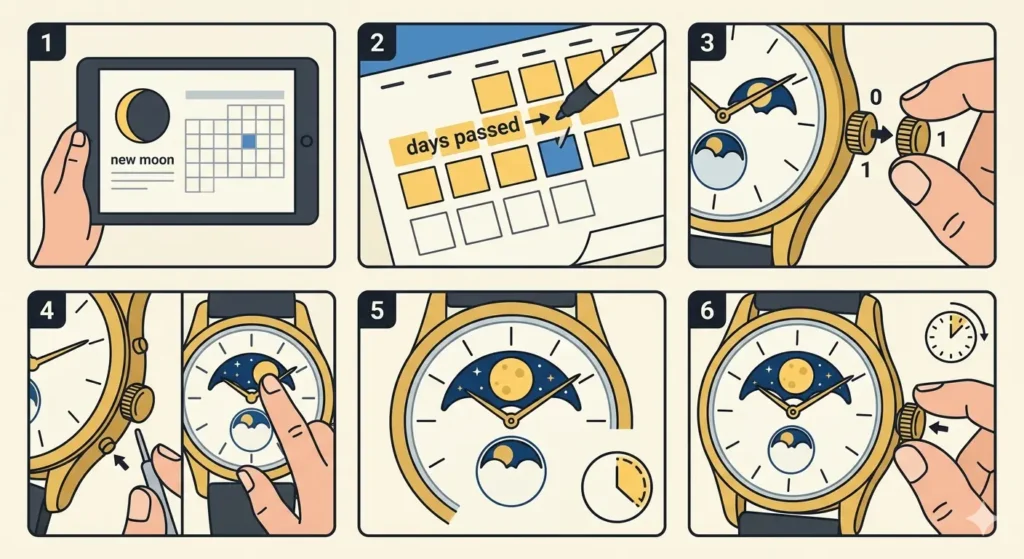
- Step 1: Determine the date of the most recent new moon using a lunar calendar, astronomy app, or reliable online resource
- Step 2: Calculate how many days have passed since that new moon date to the current date
- Step 3: Pull the crown out to the first position (this is typically the date-setting position for most watches)
- Step 4: If the watch has a dedicated moon phase pusher or corrector button, use that instead of the crown
- Step 5: Advance the moon phase display by pressing the pusher repeatedly or rotating the crown until the full moon appears centered in the aperture window
- Step 6: Continue advancing the display forward by the number of days calculated in Step 2
- Step 7: Push the crown back to its normal position or release the corrector button
Pro Tip: Never adjust the moon phase complication between 8 PM and 4 AM. During this time window, the internal gears are engaged in changing the date, and forcing an adjustment can damage the delicate mechanism. Always set the time to 6:30 before making moon phase adjustments.
Method 2: Using the Last Full Moon
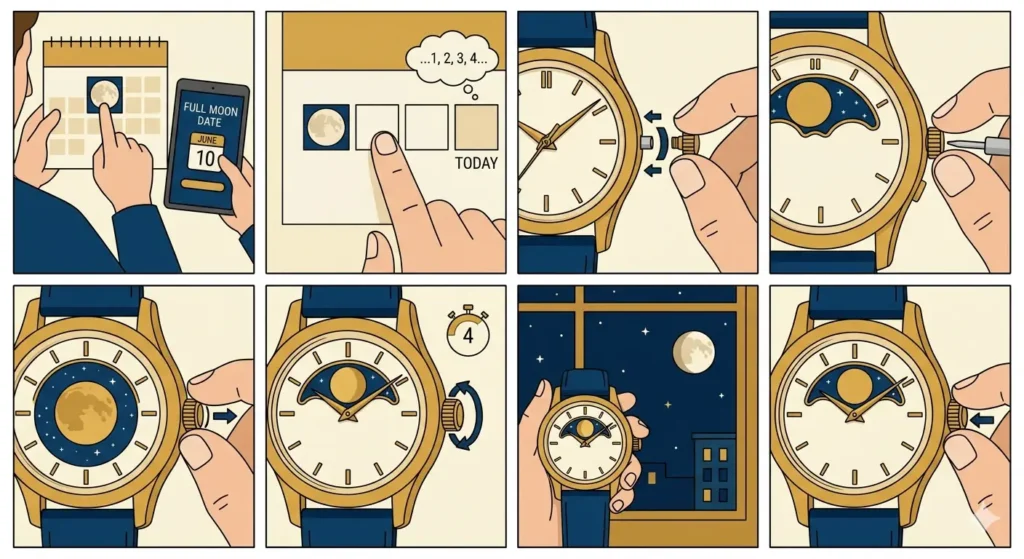
- Step 1: Find the date of the most recent full moon from a lunar calendar
- Step 2: Count the number of days from that full moon to today
- Step 3: Access the moon phase setting by pulling the crown to the appropriate position or locating the corrector pusher
- Step 4: Advance the moon disc until a full moon is perfectly centered in the display window
- Step 5: Add the number of days since the full moon by clicking the pusher or turning the crown
- Step 6: Verify the moon phase matches what appears in the night sky
- Step 7: Return the crown to its standard position
Tips for Accurate Moon Phase Setting
Check the current moon phase by looking at the actual moon in the sky or using a reliable astronomy website. This visual confirmation ensures the watch display matches reality. The lunar cycle follows a predictable pattern: new moon, waxing crescent, first quarter, waxing gibbous, full moon, waning gibbous, last quarter, and waning crescent.
Some watches feature a moon phase corrector button recessed into the case. This small pusher requires a specialized tool or the tip of a paperclip to press. Each click advances the moon disc by one day. Count carefully to avoid overshooting the correct phase.
For watches without a dedicated corrector, the crown typically needs to be pulled to a specific position. Consult the watch manual to identify which crown position controls the moon phase. Most commonly, this is the first position out from the case, though some models use the second position.
Keep track of time zones when setting the moon phase. The moon appears differently depending on geographical location and hemisphere. Those in the Southern Hemisphere will see the moon oriented differently than observers in the Northern Hemisphere, though the phase itself remains the same.
Modern digital tools like clock tab can help track both regular time and lunar cycles simultaneously, making it easier to maintain accuracy when setting moon phase complications.
Common Problems and Solutions
Fix 1: Moon Phase Won’t Advance
This issue typically occurs when the crown isn’t pulled to the correct position. Verify the crown is in the exact position specified for moon phase adjustment. Some watches require the crown to be in a very specific location, and being off by even a millimeter prevents the mechanism from engaging.
If using a corrector pusher, ensure the tool or pin is pressing firmly enough to engage the mechanism. These pushers sometimes require more pressure than expected, though excessive force should never be applied.
Fix 2: Moon Disc Moves Too Quickly
Accidentally advancing the moon phase display by multiple days happens when clicking too rapidly. Slow down the adjustment process and count each click carefully. Each press should move the disc exactly one day forward.
Reset the display by advancing it through a complete cycle (59 clicks) and starting over. This ensures alignment and prevents confusion about the current position.
Fix 3: Moon Phase Doesn’t Match Sky
Recalculate the days since the last new or full moon. Counting errors are the most common cause of misalignment. Double-check the lunar calendar source to ensure the reference date is correct.
Consider the time of day when setting the complication. The moon phase technically changes at a specific moment each day, so setting early morning versus late evening can create a one-day discrepancy.
Fix 4: Display Shows Wrong Moon Orientation
Some moon phase watches are designed for specific hemispheres. A watch made for Northern Hemisphere observers shows the moon differently than one made for Southern Hemisphere users. This is not a defect but rather a design feature.
Verify the watch specifications to confirm it matches the intended hemisphere. No adjustment can change this orientation, as it’s built into the moon disc artwork.
Pro Tip: Moon phase watches accumulate an error of approximately one day every 2 years and 8 months due to the simplified 29.5-day cycle (the actual lunar synodic period is 29.530588 days). Mark a calendar reminder to check and readjust the moon phase annually to maintain accuracy.
Maintaining Moon Phase Accuracy
Regular wear keeps the watch wound and the moon phase mechanism running smoothly. Automatic watches require wrist movement to maintain power, while manual-wound pieces need daily winding at the same time each day.
Service intervals matter for complications. Moon phase mechanisms should be inspected during regular watch servicing every 3-5 years. The watchmaker can verify the gear teeth are undamaged and the moon disc rotates freely.
Avoid rapid date changes near midnight. The date change mechanism and moon phase mechanism often operate simultaneously during the hours around midnight. Adjusting either during this time can cause the gears to bind or skip teeth.
Store the watch properly when not wearing it. Use a watch winder for automatic pieces with moon phase complications to keep the mechanism running continuously. This prevents the need for frequent resetting and maintains accuracy.
Track lunar cycles using tools like online stopwatch features that can be set for 29.5-day intervals, creating reminders to verify moon phase accuracy.
Frequently Asked Questions
How often does a moon phase watch need to be reset?
A standard 59-tooth moon phase watch requires resetting approximately every 2 years and 8 months when it accumulates a one-day error. High-precision models with 135-tooth mechanisms need adjustment only once every 122 years under normal circumstances.
Can a moon phase be set backwards?
Most moon phase mechanisms are designed for forward adjustment only. Setting backwards can damage the delicate gears and teeth. Always advance the moon disc forward through the complete cycle if the setting is overshot.
What happens if the moon phase is set during the danger zone hours?
Adjusting the moon phase between 8 PM and 4 AM risks damaging the internal gears because the date change mechanism is engaged during this period. The gears can strip teeth, bend, or misalign, requiring expensive repairs.
Do moon phase watches work in both hemispheres?
The phase of the moon itself is the same worldwide, but the orientation appears flipped between Northern and Southern Hemispheres. Most moon phase watches are designed for one hemisphere, and this orientation cannot be changed without replacing the moon disc.
Why does the moon phase display show two moons?
The disc contains two identical moon images positioned 180 degrees apart. This design allows the mechanism to complete one full lunar cycle with just half a rotation of the disc, making the complication more compact and reliable.
How accurate is a moon phase complication compared to the actual moon?
A standard moon phase watch with 59 teeth is accurate to within one day every 2.7 years. The actual lunar cycle is 29.530588 days, while the watch mechanism uses a simplified 29.5-day cycle, creating this small but gradual drift.
Can a moon phase watch be adjusted if it stops running?
Yes, if the watch stops due to running out of power, simply wind or wear it until it restarts, then follow the standard setting procedure. Calculate days from the last new or full moon and advance the display accordingly.
What is a corrector button and do all moon phase watches have one?
A corrector button is a small recessed pusher on the watch case that advances the moon phase display by one day per press. Not all moon phase watches have this feature – some require using the crown in a specific position to make adjustments.
Does winding direction affect the moon phase display?
The winding direction (clockwise or counterclockwise) for the main timekeeping has no effect on the moon phase display. The moon phase is adjusted separately using either a dedicated corrector or a specific crown position, always advancing forward through the cycle.
Is it necessary to set the moon phase exactly at midnight?
No specific time is required for setting the moon phase initially, but avoid the danger zone hours between 8 PM and 4 AM. Setting the time to 6:30 (morning or evening outside the danger zone) provides the safest window for making moon phase adjustments.