
The slide rule bezel found on pilot watches like the Breitling Navitimer transforms a timepiece into a powerful calculation tool. This rotating ring allows pilots and enthusiasts to perform essential mathematical operations without electronic devices. Learning to use a slide rule bezel opens up practical aviation calculations, fuel consumption estimates, and unit conversions right from the wrist.
Quick Summary Table
| Function | What It Does | Primary Use |
|---|---|---|
| Multiplication | Align numbers on inner and outer scales | Speed/distance calculations |
| Division | Reverse of multiplication process | Fuel consumption rates |
| Unit Conversion | Use built-in conversion markers | Nautical/statute miles, liters/gallons |
| Time Calculations | Match speed with distance markers | Flight time estimates |
Understanding the Slide Rule Bezel Components
The slide rule bezel consists of two logarithmic scales that work together to perform calculations. The outer rotating bezel contains one scale, while the inner fixed scale sits beneath the crystal. Both scales feature numbers from 10 to 99, representing values that can be adjusted by decimal points depending on the calculation needed.
Most aviation watches include special markers on the bezel for common conversions. These typically show nautical miles (indicated by a small triangle or ‘NAUT’ marking), statute miles (‘STAT’), kilometers (‘KM’), and sometimes fuel conversion ratios. The red or contrasting markers make quick reference easier during flight operations.
The logarithmic spacing of numbers becomes closer together as values increase. This mathematical property allows the bezel to maintain proportional relationships across the entire scale. Understanding this spacing helps achieve more accurate readings, especially when working with larger numbers where precision matters most.
How to Perform Basic Multiplication
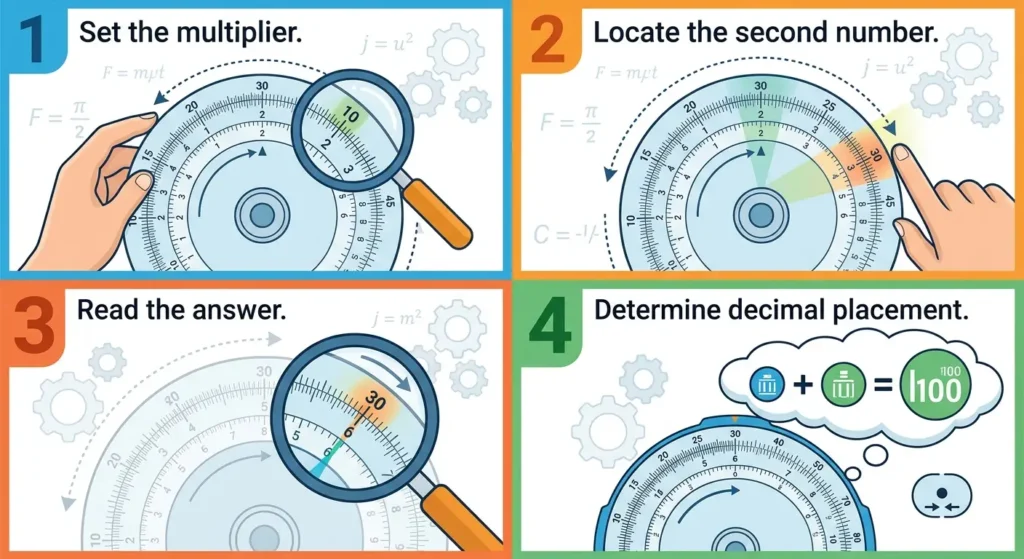
- Step 1: Rotate the outer bezel until the number 10 on the outer scale aligns with the first number to multiply on the inner scale
- Step 2: Locate the second number on the outer scale
- Step 3: Read the answer directly across from this number on the inner scale
- Step 4: Adjust the decimal point based on the magnitude of numbers being multiplied
For example, to multiply 15 × 4, align the outer bezel’s 10 with the inner scale’s 15. Then find 4 on the outer scale and read across to the inner scale, which shows 60. This same alignment works for 1.5 × 4 = 6, or 150 × 4 = 600, simply by adjusting decimal placement mentally.
The key principle involves treating the 10 marker as a starting reference point. This transforms the bezel into a mechanical calculator where the spacing between numbers represents their logarithmic relationships. Once this alignment technique becomes familiar, multiplication calculations take only seconds to complete.
Pro-Tip: Decimal Point Placement
Always estimate the answer’s magnitude before reading the bezel. If multiplying 23 × 3, recognize the answer should be near 69 (not 6.9 or 690). This quick mental check prevents decimal errors and ensures calculation accuracy, especially critical during flight when mistakes could affect navigation or fuel planning.
How to Perform Division Operations
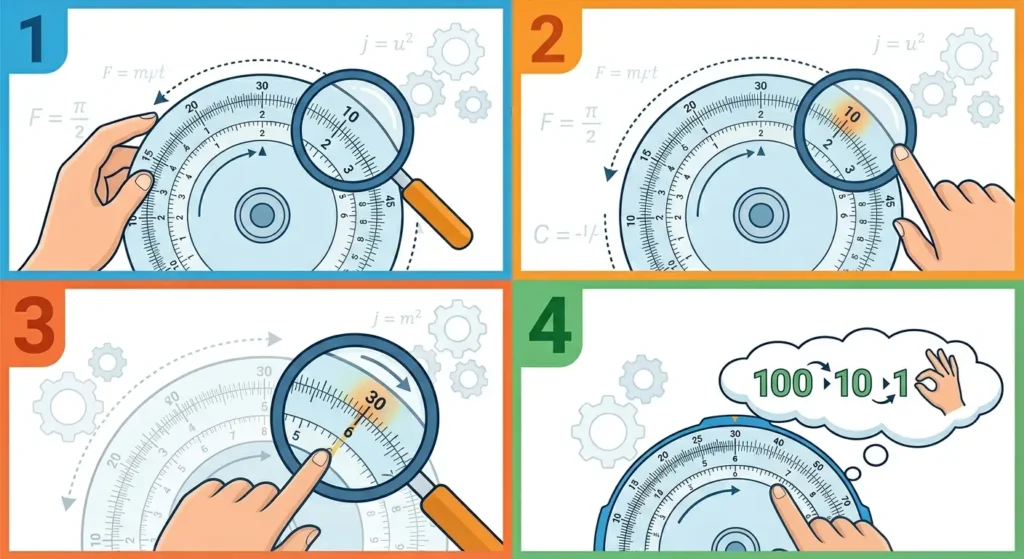
- Step 1: Align the divisor (number dividing by) on the outer scale with the dividend (number being divided) on the inner scale
- Step 2: Look at the outer scale’s 10 marker
- Step 3: Read the answer on the inner scale directly across from the 10
- Step 4: Apply appropriate decimal adjustment based on the numbers involved
To divide 80 by 4, rotate the bezel so the outer 4 lines up with the inner 80. Then find 10 on the outer scale and read across to the inner scale, showing 20. This method reverses the multiplication process, using the same logarithmic properties in the opposite direction.
Division proves particularly useful for calculating fuel consumption rates. If a flight consumed 240 gallons over 3 hours, align outer 3 with inner 24 (representing 240), then read across from outer 10 to find 8 on the inner scale, indicating 80 gallons per hour.
Calculating Speed, Distance, and Time
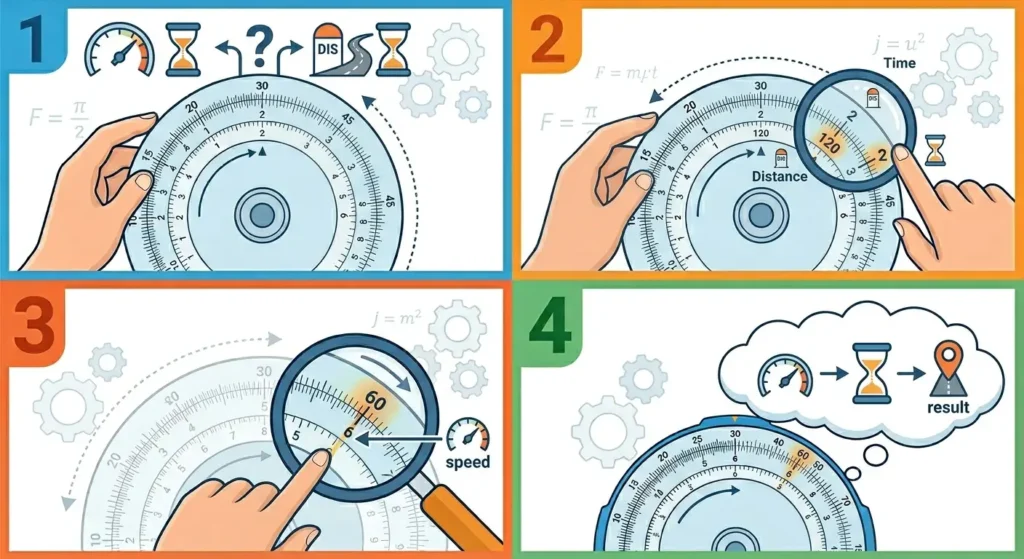
- Step 1: Identify which two variables are known (speed and time, or distance and time)
- Step 2: For speed calculation, align distance traveled on the inner scale with time taken on the outer scale
- Step 3: Read speed at the outer scale’s 60 marker (representing one hour)
- Step 4: For distance calculation, align known speed with the 60 marker, then read distance at the time marker
When traveling 180 nautical miles in 45 minutes, align inner 18 (representing 180) with outer 45. The inner scale reading at outer 60 shows approximately 24, meaning 240 knots. This calculation assumes the 60 position represents one hour, making the bezel a direct speed calculator.
Most pilots use this function more than any other bezel feature. Having a reliable timing tool becomes essential when performing these calculations during actual flight operations, as accurate time measurement directly affects the precision of speed and distance results.
Converting Between Units of Measurement
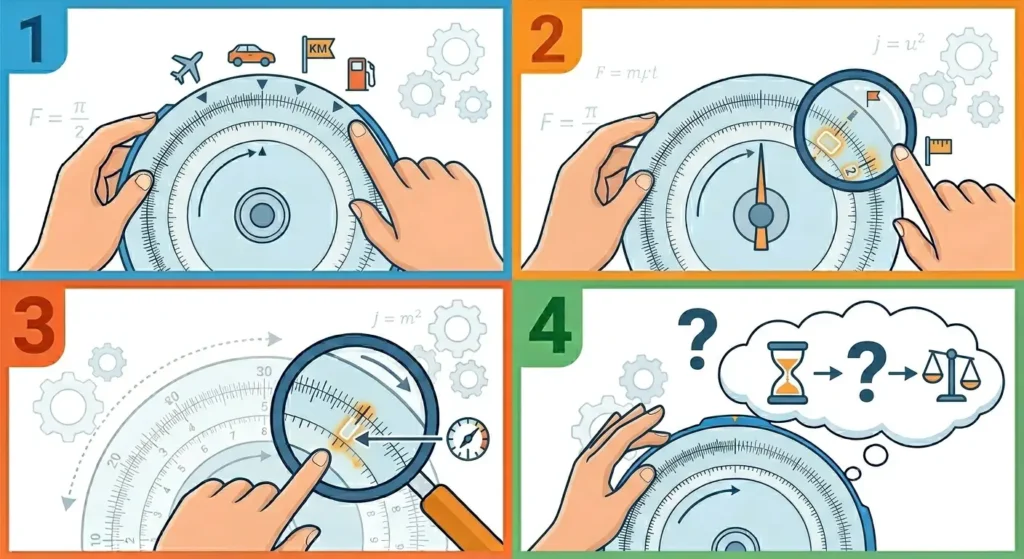
- Step 1: Locate the conversion marker on the bezel (NAUT, STAT, KM, or fuel indicators)
- Step 2: Align the known value on one scale with its corresponding unit marker
- Step 3: Read the converted value at the other unit marker
- Step 4: Verify the conversion makes logical sense given the conversion ratio
Converting 100 nautical miles to statute miles requires aligning the inner 10 (representing 100) with the NAUT marker. Reading across to the STAT marker gives approximately 11.5, meaning 115 statute miles. The bezel automatically applies the 1.15 conversion factor through its logarithmic spacing.
Fuel conversions work similarly when the bezel includes these markers. Watches designed for aviation often show conversions between US gallons, Imperial gallons, and liters. This eliminates the need for manual calculation when refueling at airports using different measurement systems.
Pro-Tip: Verify Conversion Markers
Different watch manufacturers place conversion markers at slightly different positions. Always check the specific markings on the bezel before relying on them for critical calculations. Some bezels include additional conversions for kilometers per hour to miles per hour, or other aviation-specific measurements that vary by model.
Reading the Bezel Accurately
Precision depends on careful alignment and interpretation. The graduated marks between major numbers represent incremental values. Between 10 and 11, for example, smaller marks typically indicate 10.2, 10.4, 10.6, and 10.8. Learning to interpolate between these marks improves calculation accuracy.
Parallax errors occur when viewing the bezel at an angle rather than straight-on. This slight misalignment can introduce reading errors of several percentage points. Always position the watch face perpendicular to the line of sight when taking readings, especially for calculations where precision matters.
The inner scale sometimes includes a tachymeter function on certain models, adding another calculation layer. This measures speed based on time to travel a fixed distance, typically one kilometer or mile. Understanding which scale performs which function prevents confusion when switching between different calculation types.
Tips for Mastering Slide Rule Bezel Calculations
Practice with known answers first. Calculate 12 × 5 using the bezel, knowing the answer should be 60. This verification process builds confidence and reveals any technique errors before attempting more complex calculations. Regular practice with simple multiplication and division establishes the muscle memory needed for quick field use.
Keep calculations within two significant figures for best accuracy. The bezel excels at quick estimates rather than precise mathematics. When extreme precision matters, electronic calculators remain the better choice. The slide rule bezel shines for rapid approximations during time-sensitive situations.
Compare different time zones and planning tools when preparing for long-distance flights. While the slide rule bezel handles calculations, modern pilots often combine it with digital resources for comprehensive flight planning. The bezel serves as an excellent backup when electronic devices fail or batteries die.
Clean the bezel regularly to ensure smooth rotation. Dirt, salt, or debris in the mechanism creates resistance and makes precise alignment difficult. Most aviation watches feature robust bezels, but regular maintenance keeps them operating at peak performance for years of reliable service.
Common Problems and Solutions
Method 1: Bezel Rotates Too Loosely
A loose bezel moves too easily and fails to hold position during calculations. This typically indicates worn internal components or insufficient spring tension. Professional watch service can tighten the bezel mechanism, though some pilots prefer slight resistance that prevents accidental movement during flight operations.
Method 2: Difficulty Reading Small Numbers
Poor lighting conditions or small print makes reading the bezel challenging. Many modern slide rule bezels include luminous markers on key numbers for low-light visibility. When natural lighting proves insufficient, using a dedicated clock display tool alongside the watch can help verify calculations until conditions improve.
Method 3: Inconsistent Calculation Results
Variations in answers for the same problem usually stem from misalignment or incorrect decimal placement. Double-check that the reference point (typically 10) aligns precisely with the starting number. Also verify the decimal adjustment matches the magnitude of numbers involved in the calculation.
Method 4: Bezel Feels Stiff or Stuck
A stiff bezel indicates corrosion, dried lubricant, or foreign material in the mechanism. Never force a stuck bezel, as this can damage the teeth or spring mechanism. Professional cleaning and relubrication typically restores smooth operation without risking permanent damage to the watch.
Frequently Asked Questions
What calculations can a slide rule bezel perform?
A slide rule bezel handles multiplication, division, speed calculations, fuel consumption rates, time-distance-speed problems, and unit conversions between nautical miles, statute miles, and kilometers. Some models include additional functions like currency conversion or specific aviation calculations relevant to flight planning.
How accurate are slide rule bezel calculations?
Slide rule bezels provide accuracy within 1-2% for most calculations, sufficient for aviation estimates and field calculations. The logarithmic scale limits precision to about two or three significant figures. For critical calculations requiring exact values, electronic calculators offer better precision than mechanical slide rules.
Can anyone learn to use a slide rule bezel?
Yes, anyone can master slide rule bezel operations with practice. The basic principles of multiplication and division remain consistent across all models. Starting with simple calculations and gradually progressing to complex problems builds proficiency over time, typically within a few hours of focused practice.
Do all pilot watches have the same slide rule bezel layout?
No, different manufacturers use varying designs and marker placements. While the basic logarithmic principle remains consistent, conversion markers, tachymeter scales, and special aviation functions differ between brands and models. Always familiarize yourself with the specific bezel layout before relying on it for calculations.
What is the difference between a slide rule bezel and a tachymeter bezel?
A tachymeter bezel measures speed over a fixed distance, typically showing numbers from 400 to 60 around the outer edge. A slide rule bezel features two logarithmic scales for performing mathematical calculations. Some watches combine both functions, placing a tachymeter on the inner scale with a slide rule on the rotating outer bezel.
Why do slide rule bezels rotate bidirectionally?
Bidirectional rotation allows easier alignment of numbers regardless of their position on the scale. Unlike dive watch bezels that rotate only counterclockwise for safety, slide rule bezels need movement in both directions to facilitate quick calculations without excessive rotation through the entire 360-degree range.
How do you adjust decimal points when using a slide rule bezel?
Mental estimation determines decimal placement. Before reading the bezel, approximate the answer’s magnitude. If multiplying 23 × 4, expect an answer near 92 (not 9.2 or 920). This mental check prevents decimal errors since the bezel only shows relative proportions, not absolute decimal positions.
Can a slide rule bezel replace electronic calculators for flight planning?
Slide rule bezels serve as excellent backup tools but should not completely replace electronic calculators for critical flight planning. They excel at quick estimates and emergency calculations when electronics fail, but lack the precision needed for fuel calculations where exact values ensure safe margins and regulatory compliance.
What maintenance does a slide rule bezel require?
Regular cleaning prevents dirt buildup that affects rotation smoothness. Rinse with fresh water after saltwater exposure, and periodically have the bezel mechanism serviced by a professional watchmaker. Avoid using harsh chemicals or excessive force when cleaning, as these can damage the finish or internal components.
Are slide rule bezels still relevant with modern aviation technology?
Yes, slide rule bezels remain relevant as backup calculation tools when electronic devices fail or batteries die. They provide redundancy in cockpits where equipment malfunctions can occur. Many pilots appreciate the mechanical reliability and the skill of performing calculations without depending on electronic systems that require power and can experience technical failures.