

Setting a day-date complication on a watch requires understanding the crown positions and proper timing to avoid damaging the mechanism. This guide covers the complete process for adjusting both day and date displays on watches with this popular complication.
Key Takeaways
- Never adjust day-date complications between 9 PM and 3 AM to prevent mechanism damage
- Pull the crown to position 2 (middle) for date adjustment and position 3 for time setting
- Turn clockwise or counterclockwise depending on the specific crown position
- Always set the time first, then adjust the date and day displays
- Use the world time comparison tool to verify accurate time zones when traveling
Setting the Day-Date Complication
Method 1: Setting the Time First
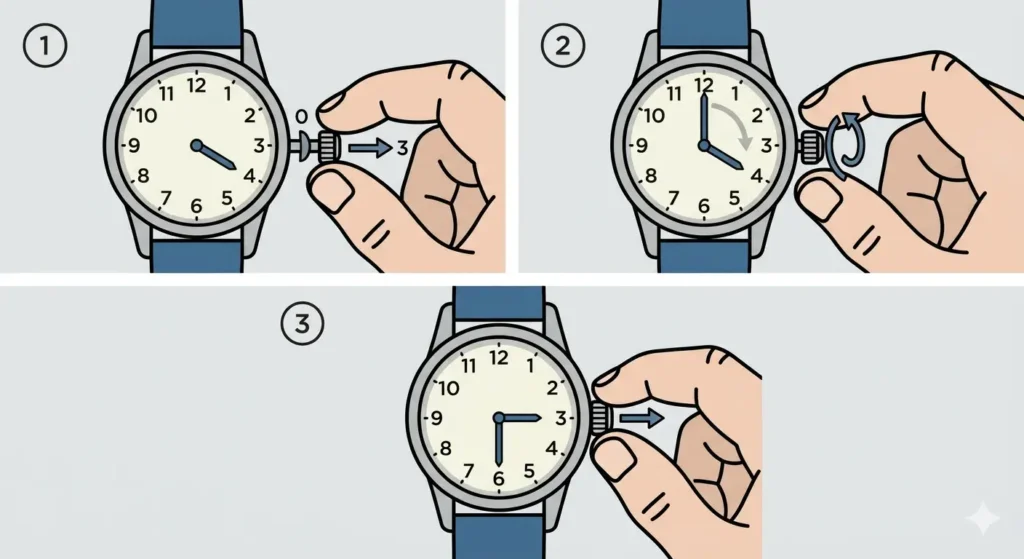
- Step 1: Pull the crown out to position 3 (furthest position from the case)
- Step 2: Turn the crown to set the correct time, making sure to pass through 12 o’clock at least twice to confirm AM or PM
- Step 3: Push the crown back to position 0 (neutral position against the case)
Method 2: Adjusting the Date
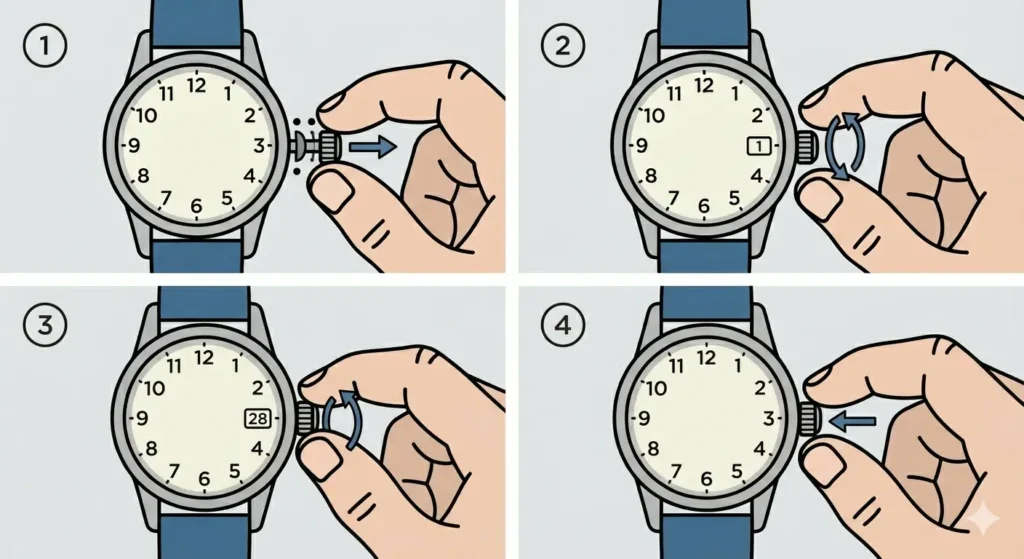
- Step 1: Pull the crown to position 2 (middle position, one click out)
- Step 2: Turn the crown forward (clockwise on most models) to advance the date display
- Step 3: Continue rotating until the correct date appears in the window
- Step 4: Push the crown back to position 0
Method 3: Adjusting the Day Display
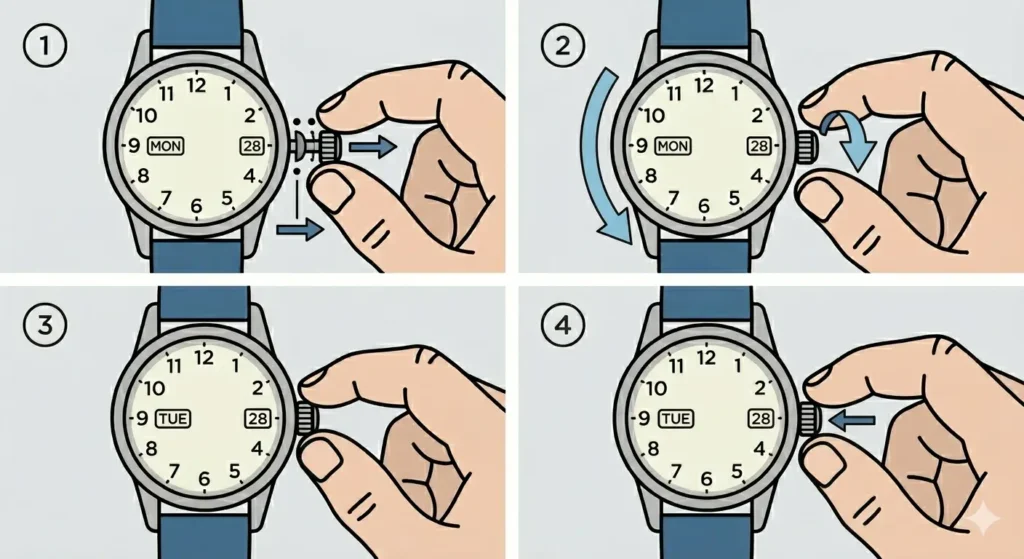
- Step 1: Pull the crown to position 2 (same as date adjustment)
- Step 2: Turn the crown backward (counterclockwise on most models) to cycle through the days
- Step 3: Stop when the correct day appears in the day window
- Step 4: Push the crown back to position 0 to complete the setting
Pro-Tip: If the watch has stopped completely, always set the time to 6:30 before adjusting the date or day. This position ensures the hands are clear of the date change mechanism and prevents any potential interference during adjustment.
Understanding Crown Positions
Most day-date watches have three distinct crown positions. Position 0 is the normal wearing position where the crown sits flush against the case. Position 1 (on watches with hand-wind movements) allows manual winding. Position 2 is the middle position for adjusting date and day complications. Position 3 is the outermost position for setting the time.
The crown typically requires gentle pulling to move between positions. A small click or resistance change indicates each position has been reached. Forcing the crown beyond its natural stopping points can damage the stem or movement.
Safe Adjustment Time Windows
The day-date mechanism begins its change process several hours before midnight and completes it several hours after. During this window (typically 9 PM to 3 AM), the gears are engaged and manually adjusting the complications can strip teeth or bend components.
The safest adjustment window runs from 6 AM to 6 PM. During these hours, the day-date mechanism is completely disengaged and manual adjustments pose no risk to the movement. For precise time synchronization across different zones, the clock tab provides real-time reference.
Tips for Day-Date Adjustment
- Always unscrew the crown fully on screw-down models before attempting any adjustments
- Turn the crown gently and smoothly without applying excessive force
- If resistance is felt during adjustment, stop immediately and check the current time
- Set the date one day early, then advance the time past midnight to ensure proper AM/PM alignment
- Screw the crown back down firmly on water-resistant models after completing all adjustments
- For watches with bilingual day displays, continue rotating backward to cycle through language options
- Keep track of timing with the online stopwatch when performing precision adjustments
Common Problems and Troubleshooting
Fix 1: Date Changes at Noon Instead of Midnight
This indicates the watch is set 12 hours off. Pull the crown to position 3 and advance the time by 12 hours. The date should now change at midnight instead of noon. Verify the AM/PM setting by checking when the date wheel advances.
Fix 2: Day or Date Stuck Between Two Positions
This occurs when adjustments are made during the danger zone (9 PM to 3 AM). Pull the crown to position 3 and advance the time forward past 3 AM. The mechanism will complete its cycle and settle into the correct position. Never force the day or date wheel manually when this happens.
Fix 3: Crown Difficult to Pull or Push
On screw-down crowns, ensure the crown is fully unscrewed before pulling. Turn counterclockwise until the crown lifts slightly from the case. If the crown remains stuck on a non-screw-down model, the stem may need professional inspection.
Fix 4: Day Display Shows Wrong Language
Continue rotating the crown backward in position 2. Most bilingual day-date watches cycle through both languages (often English and Spanish, or English and French). Keep turning until the preferred language appears.
Frequently Asked Questions
Can the day-date be adjusted at any time?
No, avoid adjusting the day-date complication between 9 PM and 3 AM. During this window, the automatic change mechanism is engaged and manual adjustment can damage the movement gears. Always adjust during the safe window of 6 AM to 6 PM.
Why does my date change at noon instead of midnight?
The watch is set exactly 12 hours off. Pull the crown to position 3 and advance the time by 12 hours. This will correct the AM/PM cycle so the date changes at midnight.
Which direction do I turn the crown for date vs day?
Most watches advance the date by turning the crown forward (clockwise) in position 2, and change the day by turning backward (counterclockwise). However, some models vary, so check the specific watch manual for exact directions.
What happens if I adjust the day-date during the danger zone?
Adjusting during the 9 PM to 3 AM window can strip gear teeth, bend components, or misalign the day-date mechanism. If accidental adjustment occurs during this time, advance the time past 3 AM to allow the mechanism to complete its cycle naturally.
How do I know which crown position is which?
Position 0 is fully pushed in against the case. Position 2 is one click out (middle position) for date and day adjustment. Position 3 is fully pulled out for time setting. Each position should have a distinct click or resistance point.
Can I move the date backward?
Most day-date watches only allow forward date advancement when in position 2. To set an earlier date, advance the time past midnight repeatedly until the correct date appears. Never force the crown backward if resistance is felt.
How often should I adjust my day-date watch?
Adjust whenever the watch has stopped, after battery replacement, or at the end of 30-day months. Months with fewer than 31 days require manual advancement to skip the non-existent dates (like adjusting from the 30th to the 1st after April).
What if the crown will not pull out?
On screw-down crowns, turn counterclockwise until the crown lifts from the case before pulling. If the crown remains stuck on a non-screw-down model, do not force it – seek professional service to avoid damaging the stem.
Is it normal for the day to change before midnight?
The day typically changes simultaneously with the date at midnight. If the day changes several hours early, the mechanism may be misaligned and requires professional adjustment to resynchronize both complications.
Can I damage my watch by adjusting it incorrectly?
Yes, adjusting the day-date during the danger zone (9 PM to 3 AM) or forcing the crown beyond its normal resistance can cause permanent damage to the movement. Always follow proper procedures and timing guidelines to protect the mechanism.