

Understanding how to use your watch operations and complications transforms a simple timepiece into a powerful tool for daily life. This comprehensive guide covers everything from basic time-setting to mastering complex features like chronographs, moon phases, and GMT functions, ensuring every watch owner can unlock the full potential of their timepiece.
Key Takeaways
- Watch complications are additional functions beyond basic timekeeping, including date displays, chronographs, and moon phases
- Crown positions vary by model – position 0 is fully pushed in, position 1 is first click out, position 2 is fully pulled
- Most watches require manual winding when first worn or after storage to ensure accurate timekeeping
- Digital watches use button combinations (typically mode, light, and set buttons) to access different functions
- Water resistance ratings must be checked before operating pushers or crown near water
- Regular maintenance every 3-5 years keeps complications functioning properly
Setting the Time on Analog Watches
The crown serves as the primary control mechanism for analog watches. Most timepieces feature a three-position crown system that controls different functions.
Using the Crown Positions
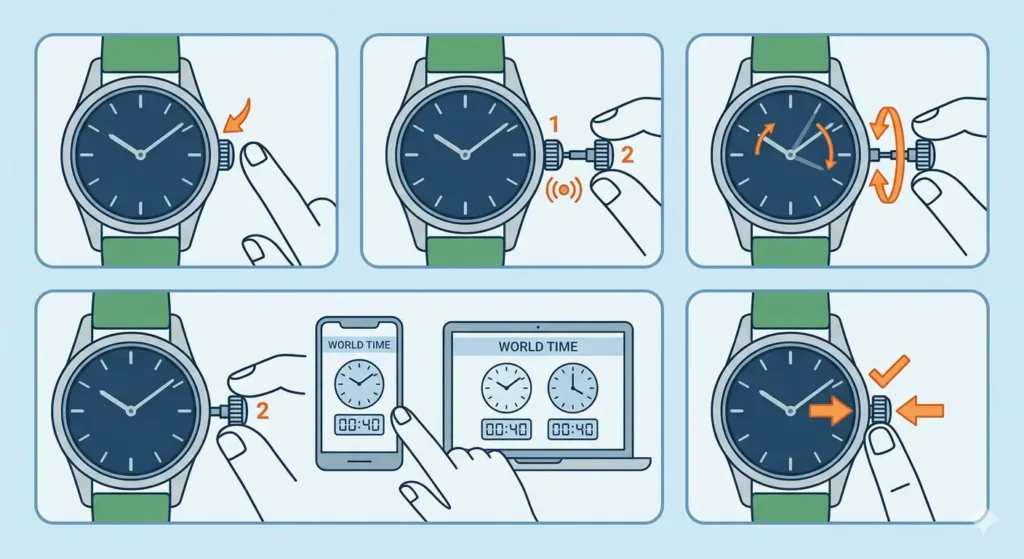
- Step 1: Locate the crown on the right side of the watch case (usually at 3 o’clock position)
- Step 2: Gently pull the crown to position 2 (fully extended position) – you should feel two distinct clicks as you pull outward
- Step 3: Rotate the crown clockwise or counterclockwise to move the hands forward or backward
- Step 4: Set the time accurately by referencing a reliable source like world time comparison tool for precise synchronization
- Step 5: Push the crown back to position 0 (fully pressed against the case) to resume normal operation
Pro-Tip: Always set the time by moving the hands forward (clockwise). Moving backward can damage the internal mechanism in some watch models, particularly those with complications.
Operating the Date Function
Date complications appear in various formats: single date window, day-date combination, or big date displays. Proper date setting prevents mechanism damage and ensures accuracy.
Standard Date Setting Procedure
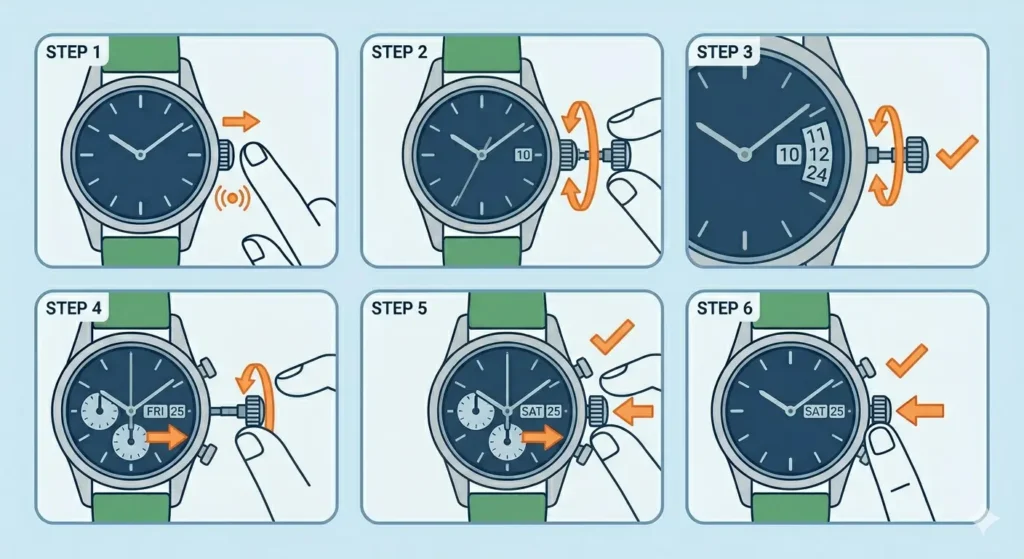
- Step 1: Pull the crown to position 1 (first click out) to access the date function
- Step 2: Rotate the crown in the direction that advances the date (usually clockwise, but varies by manufacturer)
- Step 3: Set the correct date by turning until the proper day appears in the window
- Step 4: If the watch shows day and date, continue rotating to align both correctly
- Step 5: Push the crown back to position 0 when finished
Never adjust the date between 9 PM and 3 AM (the ‘danger zone’), as the date mechanism is actively engaged during these hours. Changing the date during this period can strip gears and cause permanent damage.
Using Chronograph Functions
Chronographs add stopwatch capability to watches through additional pushers and subdials. These complications range from simple elapsed time measurement to complex split-seconds timing.
Basic Chronograph Operation
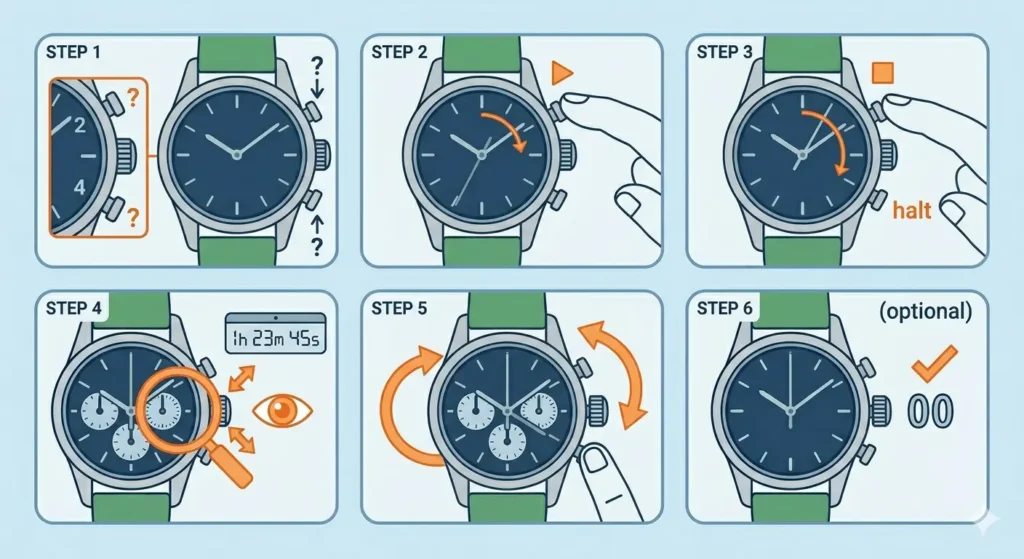
- Step 1: Identify the pushers – typically located at 2 o’clock (start/stop) and 4 o’clock (reset) positions
- Step 2: Press the top pusher once to start the chronograph seconds hand
- Step 3: Press the top pusher again to stop timing
- Step 4: Read the elapsed time from the chronograph subdials (typically showing seconds, minutes, and hours)
- Step 5: Press the bottom pusher to reset all chronograph hands to zero
The chronograph runs independently from the main timekeeping function. Running the chronograph continuously drains power reserve faster in automatic watches, so reset it when not actively timing events.
Understanding GMT and Dual Time Complications
GMT (Greenwich Mean Time) watches feature an additional hand that completes one rotation every 24 hours, allowing simultaneous tracking of two time zones. This proves essential for travelers and anyone coordinating across time zones.
Setting Up GMT Function
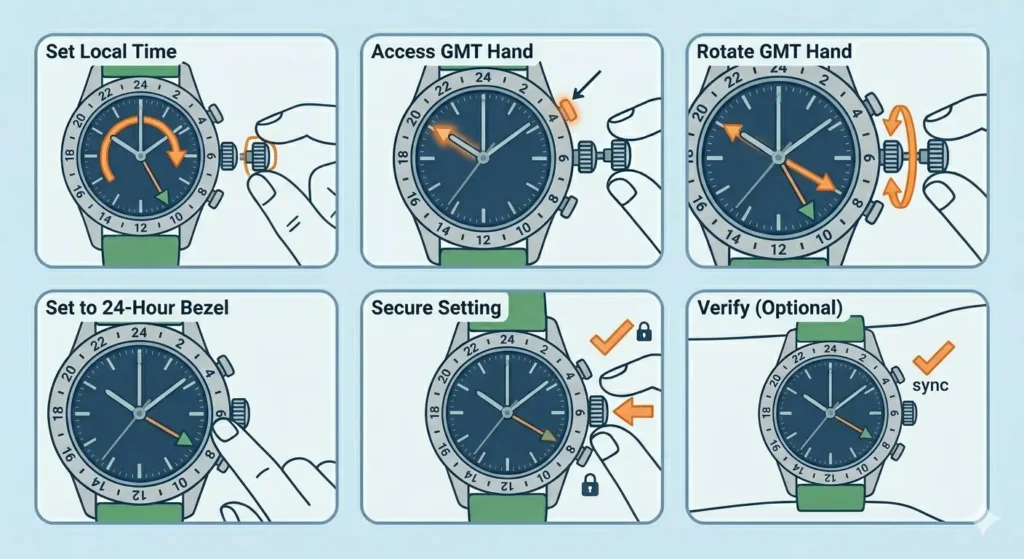
- Step 1: Set the local time using the standard crown position 2 method
- Step 2: Pull the crown to position 1 to access the GMT hand independently
- Step 3: Rotate the crown to move only the GMT hand (the triangle-tipped hand) to the desired second time zone
- Step 4: Use the 24-hour marking on the bezel or dial to set the correct time
- Step 5: Push the crown back to position 0 to secure the setting
Some GMT watches feature ‘jump hour’ functions where the local hour hand can be adjusted independently in one-hour increments without stopping the watch or affecting the GMT hand. This makes crossing time zones incredibly convenient.
Operating Moon Phase Complications
Moon phase displays show the current lunar cycle through a rotating disc visible in an aperture. While primarily aesthetic, these complications require specific setting procedures to maintain accuracy.
Setting the Moon Phase
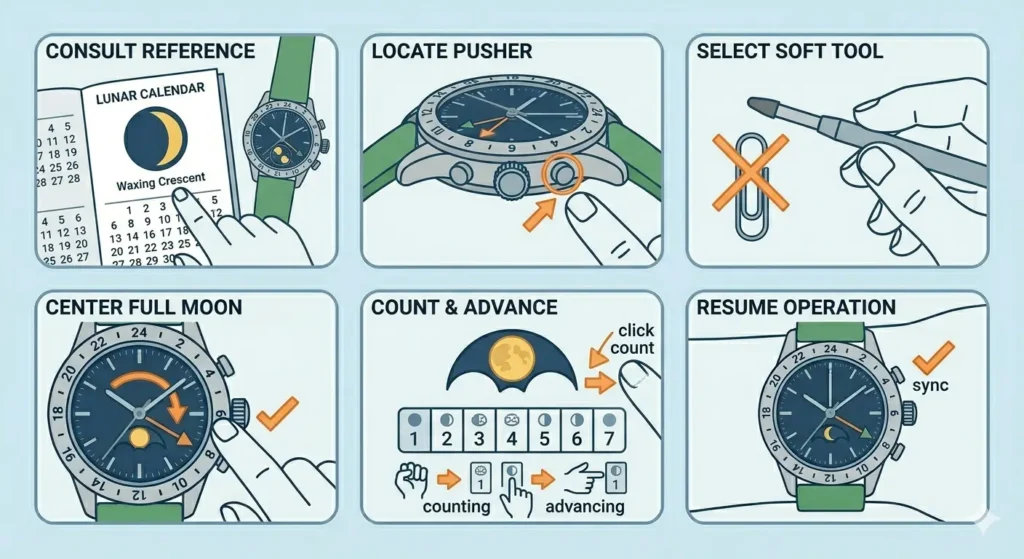
- Step 1: Determine the current moon phase using a lunar calendar or astronomy reference
- Step 2: Locate the moon phase adjuster – usually a small pusher or recessed button on the case side
- Step 3: Use a soft tool (never sharp objects) to press the adjuster repeatedly
- Step 4: Advance the moon disc until it shows the full moon centered in the aperture
- Step 5: Count the days since the last full moon and advance the disc accordingly (each press typically advances one day)
Moon phase complications typically drift one day every 2.5 years when using the standard 59-tooth gear system. High-precision moon phases may maintain accuracy for decades or even centuries before requiring adjustment.
Digital Watch Operations
Digital watches use button combinations to access various functions and modes. Understanding the button layout streamlines operation significantly.
Standard Button Functions
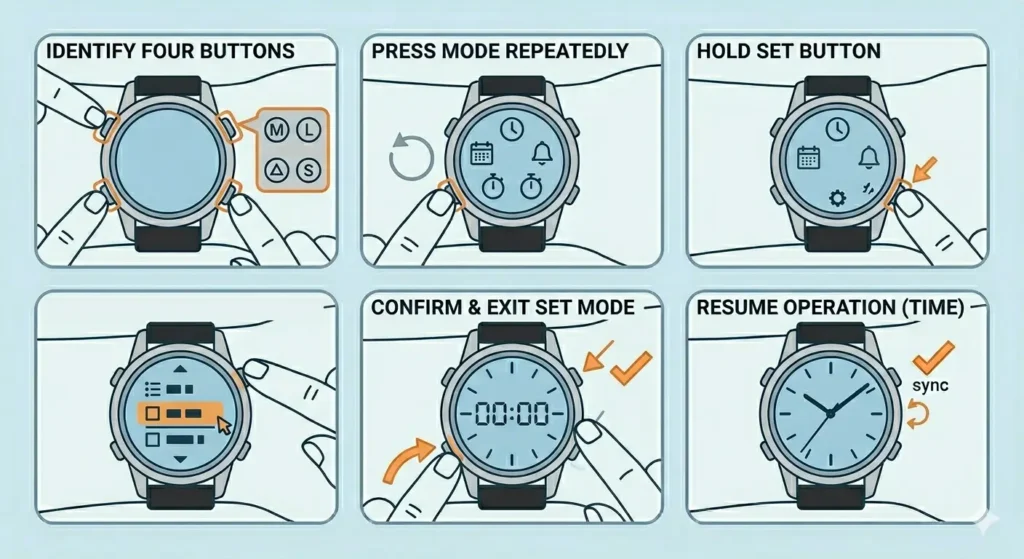
- Step 1: Identify the four main buttons – Mode (typically bottom left), Light (top left), Start/Stop (top right), and Reset/Set (bottom right)
- Step 2: Press Mode repeatedly to cycle through functions (time, date, alarm, stopwatch, timer)
- Step 3: Hold the Set button for 2-3 seconds to enter adjustment mode for the current function
- Step 4: Use Start/Stop to move between settings (hours, minutes, seconds, etc.)
- Step 5: Press Mode to confirm and exit setting mode
Digital watches often feature multiple alarms, countdown timers, and world time displays. Consult the specific manual for advanced functions like automatic daylight saving adjustment or perpetual calendar features.
Using Rotating Bezels
Rotating bezels serve various purposes from dive timing to calculating speed or distance. Unidirectional bezels (rotating only counterclockwise) prevent accidental extension of dive times, while bidirectional bezels offer more versatility.
Dive Bezel Operation
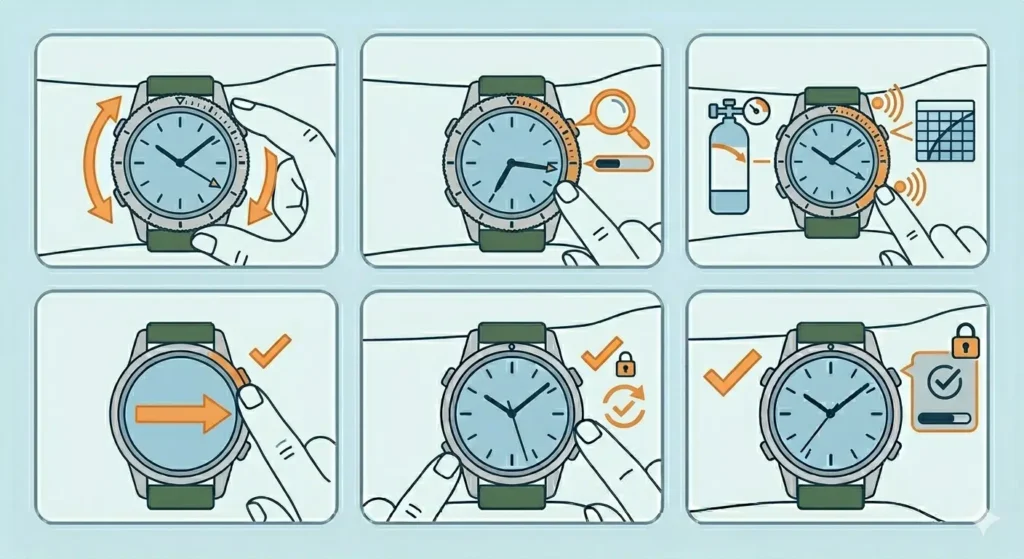
- Step 1: Rotate the bezel counterclockwise until the zero marker aligns with the minute hand
- Step 2: As time passes, read elapsed minutes where the minute hand points on the bezel
- Step 3: Monitor remaining air supply or decompression limits using the elapsed time
- Step 4: Reset the bezel to zero after completing the activity
Pro-Tip: The bezel click mechanism should feel firm and precise. If the bezel rotates too easily or feels loose, have it serviced before using the watch for any critical timing applications like diving.
Winding and Power Reserve Management
Mechanical watches require regular winding to maintain power reserve, whether manual or automatic. Understanding proper winding technique prevents damage and ensures consistent timekeeping.
Manual Winding Procedure
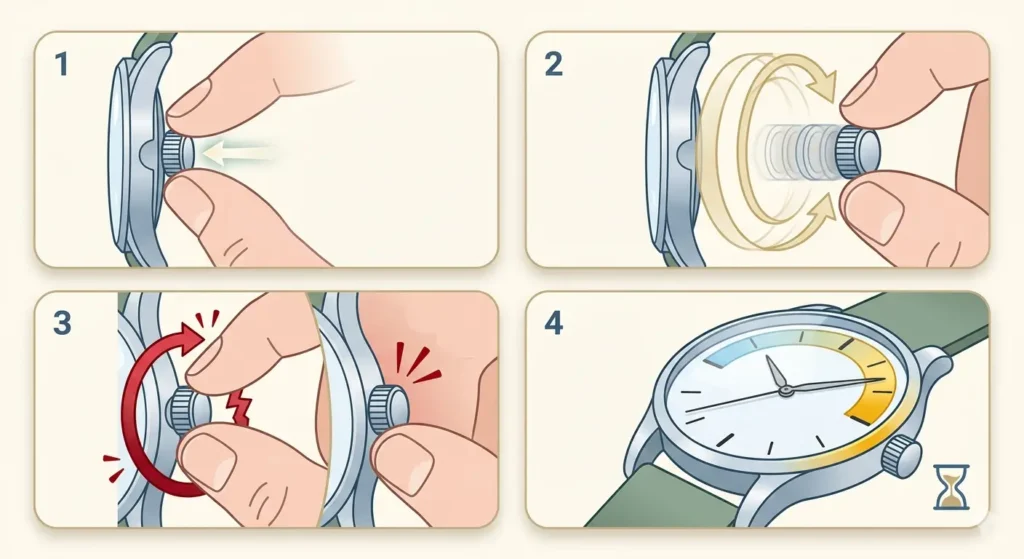
- Step 1: Ensure the crown is in position 0 (fully pushed in)
- Step 2: Rotate the crown clockwise in smooth, continuous motions (typically 30-40 full rotations for full wind)
- Step 3: Stop winding when resistance increases significantly – never force past this point
- Step 4: The watch should now run for the stated power reserve duration (typically 38-72 hours)
Automatic watches wind through wrist movement but benefit from manual winding when first worn or after storage. Wind automatic watches 20-30 times to establish initial power reserve, then let the rotor maintain the charge through normal wear.
Using Tachymeter Scales
Tachymeter bezels or scales calculate speed based on time traveled over a known distance, commonly found on chronograph watches. This function proves useful for motorsports, cycling, or any activity requiring speed calculation.
Calculating Speed with Tachymeter
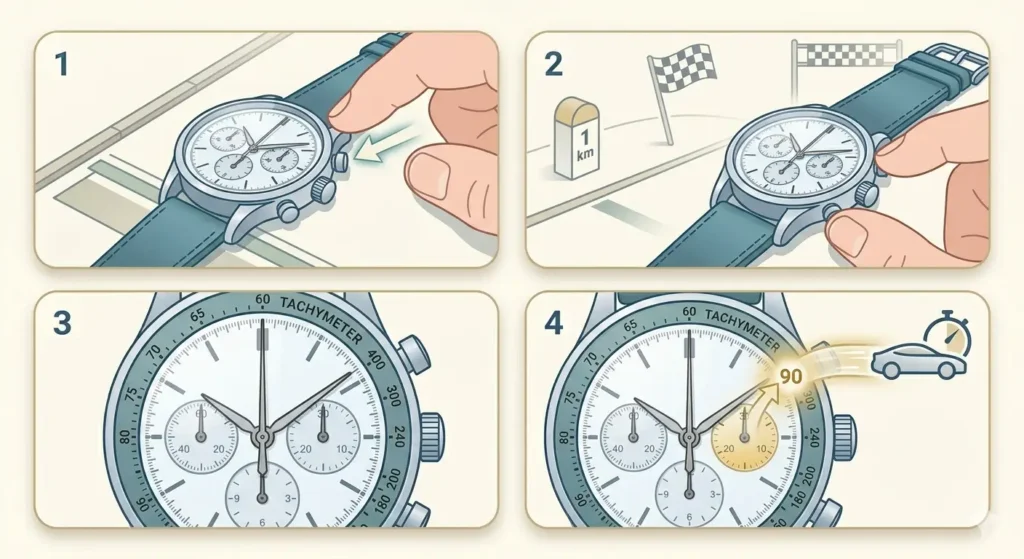
- Step 1: Start the chronograph when passing a starting point
- Step 2: Stop the chronograph after traveling exactly one kilometer or one mile
- Step 3: Read the number on the tachymeter scale where the chronograph seconds hand points
- Step 4: This number represents the average speed in kilometers or miles per hour
Tachymeters work most accurately between 60 and 400 units per hour. Outside this range, the scale becomes less precise due to the physical constraints of the dial layout.
Operating Perpetual Calendar Complications
Perpetual calendars automatically account for different month lengths and leap years, requiring adjustment only once every century or more. These complex complications demand careful handling during setting.
Setting Perpetual Calendar
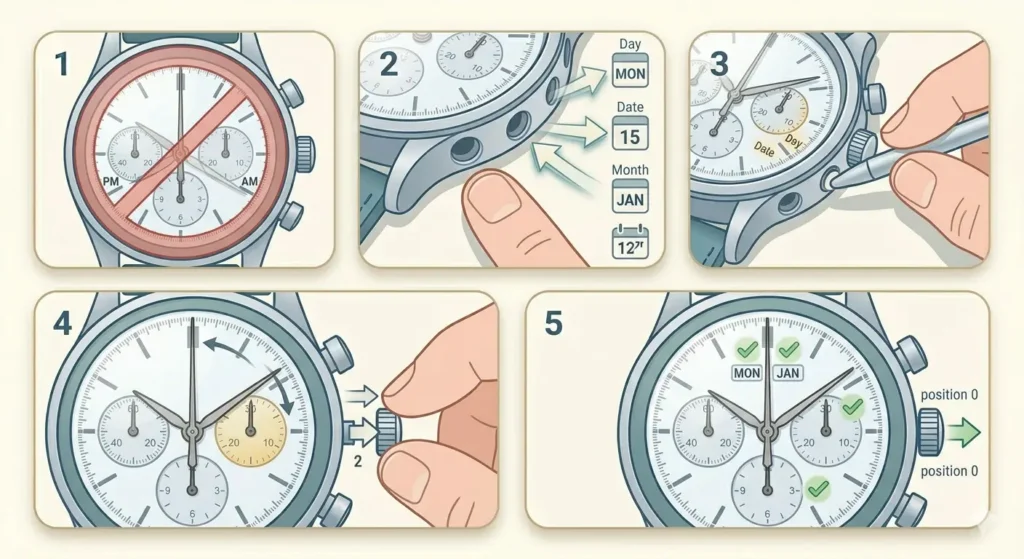
- Step 1: Never adjust any calendar function between 8 PM and 4 AM to avoid mechanism damage
- Step 2: Use dedicated pushers (usually recessed in the case) to advance day, date, month, and leap year indicators
- Step 3: Advance each display to the current setting using a soft pusher tool
- Step 4: Set the time last, using the crown in position 2
- Step 5: Verify all calendar displays show correct information before pushing the crown to position 0
If a perpetual calendar stops due to power reserve depletion, professional servicing is often recommended for resetting. The complexity of these mechanisms makes improper adjustment costly to repair.
Tips for Optimal Watch Operation
Proper watch care extends beyond basic operation. These practical tips maintain performance and longevity.
- Remove the watch before operating the crown or pushers to prevent accidental damage or crown stem bending
- Keep the watch wound regularly – completely stopped mechanical watches may require professional servicing to restart properly
- Avoid operating pushers or crown underwater unless the watch specifically allows it (indicated by screw-down pushers)
- Clean the crown and pusher area regularly using a soft brush to prevent dirt accumulation that affects operation
- Store watches in watch winders or rotate wearing schedule to keep automatic movements running
- Use clock tab tools to verify accuracy and track any timing drift over days or weeks
- Service mechanical watches every 3-5 years to maintain lubrication and prevent wear
- Magnetic fields can affect accuracy – keep watches away from speakers, phones, and magnetic clasps
Common Problems and Solutions
Understanding typical watch operation issues helps maintain proper function and identifies when professional service becomes necessary.
Date Changes at Wrong Time
When the date changes at noon instead of midnight, the 12-hour cycle is offset. Pull the crown to position 2 and advance the hands 12 hours forward. The date should now change at the correct time. This happens when setting the time without considering AM/PM indication.
Chronograph Won’t Reset to Zero
If chronograph hands fail to return to zero after pressing the reset pusher, the watch may need professional regulation. Some chronographs allow minor adjustment using the crown in a specific pulled position – consult the manual for model-specific procedures. Never force stuck chronograph hands.
Crown Feels Stuck or Difficult to Pull
Screw-down crowns must be unscrewed counterclockwise before pulling. If a push-pull crown feels stuck, dried lubricants or debris may be blocking movement. Never force a stuck crown – this can break the stem. Professional cleaning typically resolves this issue.
Watch Stops After Full Winding
A fully wound watch that stops running indicates internal mechanism problems requiring service. Check if the seconds hand moves at all. If it ticks briefly then stops, the mainspring may be broken or the escapement damaged. This requires immediate professional attention.
GMT Hand Moves with Regular Hands
Some GMT watches feature ‘caller’ GMT functions where the local hour hand jumps independently, while others have ‘flyer’ GMT where the GMT hand can be set separately. If the GMT hand moves when setting local time, this may be normal for that specific movement architecture. Verify against the manual for expected behavior.
Frequently Asked Questions
How often should a mechanical watch be wound?
Manual mechanical watches should be wound daily, preferably at the same time each day to maintain consistent power delivery. Automatic watches wind through wrist movement but benefit from 20-30 manual winds when first worn after storage. Most mechanical watches have 38-72 hour power reserves, so winding every 24 hours ensures optimal performance and accuracy.
Can you change the date on a watch at any time?
No, avoid changing the date between 9 PM and 3 AM (some manufacturers specify 8 PM to 4 AM). During these hours, the date change mechanism is engaged and actively preparing to flip. Adjusting the date during this period can strip gears, bend levers, or cause permanent damage to the calendar mechanism requiring expensive repair.
What is the difference between a complication and a function?
A complication refers to any feature beyond basic hours, minutes, and seconds display. Functions are the operations performed using these complications. For example, a chronograph is a complication, while starting, stopping, and resetting the timer are functions. The term ‘complication’ reflects the additional complexity added to the base movement.
How do you know when an automatic watch is fully wound?
Automatic watches do not provide clear indication of full wind state like manual watches do through increased resistance. Most automatic movements include slip mechanisms preventing overwinding. Generally, 30-40 full rotations of the crown provides sufficient power reserve. Check the seconds hand movement – smooth, consistent motion indicates adequate winding.
Why does my chronograph drain the battery or power reserve faster?
Running the chronograph increases energy consumption because additional wheels, gears, and components are engaged. In mechanical watches, this reduces power reserve duration by 20-30%. In quartz watches, continuous chronograph operation can reduce battery life from 2-3 years to 6-12 months. Reset the chronograph when not actively timing to conserve power.
Can you adjust a moon phase complication on any date?
Yes, moon phase complications can be adjusted any time, unlike date functions. The moon phase disc operates independently from the date change mechanism. However, accuracy depends on setting it correctly according to the current lunar cycle. Reference a lunar calendar to determine the exact moon phase before adjusting the complication.
What does a power reserve indicator show?
Power reserve indicators display the remaining running time before the watch stops. The display typically shows a range from 0 to the maximum reserve (commonly 38, 42, or 72 hours). As the mainspring unwinds, the indicator moves toward zero. This helps determine when winding is needed before the watch stops completely.
How accurate should a mechanical watch be?
Standard mechanical watches typically run within -10 to +30 seconds per day. COSC-certified chronometers meet stricter standards of -4 to +6 seconds per day. Factors affecting accuracy include winding state, position, temperature, and magnetization. Quartz watches are significantly more accurate, typically within ±15 seconds per month. Use timing tools like online stopwatch to measure accuracy over 24-hour periods.
Why does my watch gain or lose time in different positions?
Gravity affects mechanical movements differently depending on orientation. Watches are regulated in multiple positions during service, but some positional variation is normal. Watches typically run faster when crown-up or crown-down (vertical positions) compared to dial-up (horizontal position). High-quality movements minimize but cannot eliminate positional variance.
Can you use chronograph pushers underwater?
Only use chronograph pushers underwater if the watch features screw-down pushers and the manufacturer explicitly allows it. Regular pushers are not water-sealed and operating them underwater allows water ingress, damaging the movement. Even on dive chronographs with screw-down pushers, ensure they are fully tightened before water exposure and never operate them while submerged unless specifically designed for that purpose.
Conclusion
Mastering watch operations and complications enhances both the practical utility and appreciation of timepieces. From basic time-setting to complex perpetual calendars, each function serves specific purposes that extend far beyond simple timekeeping. Regular practice with these operations builds confidence and prevents costly mistakes, while proper maintenance ensures complications continue functioning accurately for generations. Whether using a simple three-hand watch or a grand complication with multiple functions, understanding proper operation protects the investment and maximizes the watch ownership experience.