
Blood oxygen monitoring has become a standard feature on modern smartwatches, allowing users to track their SpO2 levels directly from the wrist. This guide explains how to use blood oxygen (SpO2) monitoring on a smartwatch, covering the essential steps to measure, interpret, and optimize readings for better health insights.
Key Takeaways
- SpO2 monitoring measures the percentage of oxygen-saturated hemoglobin in the blood
- Normal blood oxygen levels range between 95-100%
- Accurate readings require proper watch placement and stillness during measurement
- Most smartwatches offer both manual and automatic SpO2 tracking options
- Results can be affected by movement, cold temperatures, and poor watch fit
Understanding Blood Oxygen Monitoring
Blood oxygen saturation, or SpO2, represents the percentage of hemoglobin in the blood carrying oxygen. Smartwatches use photoplethysmography (PPG) sensors that emit light through the skin to measure this level. The sensors detect how much light is absorbed, which varies based on oxygen saturation in the blood.
Most people maintain SpO2 levels between 95-100%. Readings below 90% may indicate potential health concerns and should prompt consultation with a healthcare professional. Athletes and individuals at high altitudes might experience slightly lower readings.
Activating SpO2 Monitoring on Your Smartwatch
The activation process varies slightly depending on the smartwatch brand, but the fundamental steps remain similar across devices.
Method 1: Manual Measurement
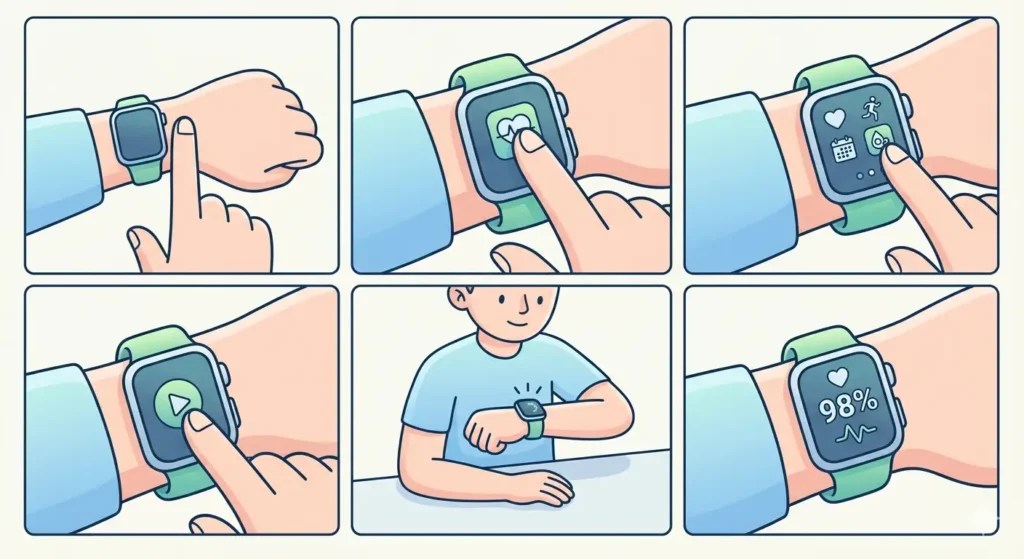
- Step 1: Ensure the smartwatch is positioned snugly on the wrist, about one finger-width above the wrist bone
- Step 2: Open the health or fitness app on the smartwatch
- Step 3: Navigate to the blood oxygen or SpO2 section
- Step 4: Tap ‘Measure’ or ‘Start’ to begin the reading
- Step 5: Keep the arm still and at heart level during the 15-30 second measurement
- Step 6: Wait for the reading to complete and display on screen
Method 2: Enabling Automatic Tracking
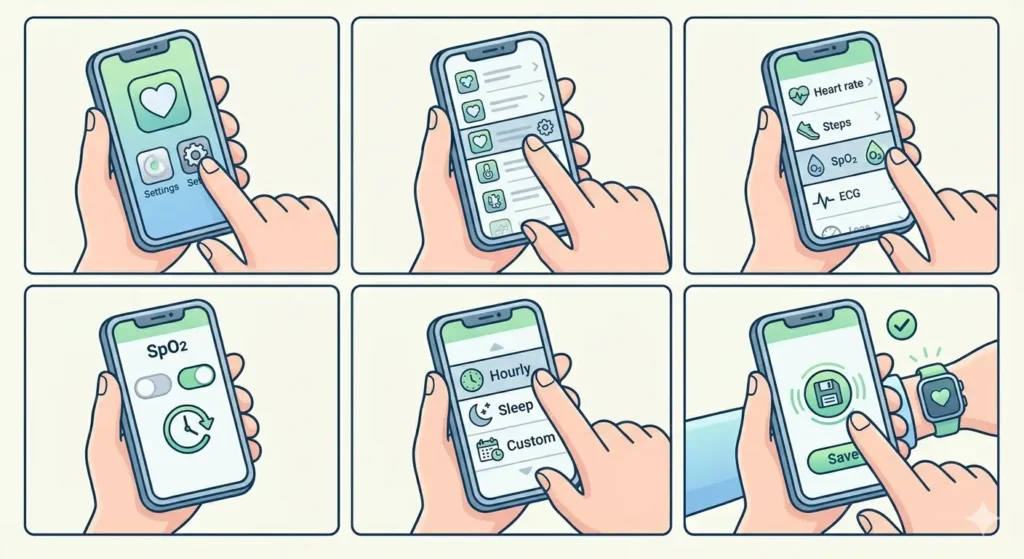
- Step 1: Open the companion app on the smartphone linked to the smartwatch
- Step 2: Access the health monitoring settings
- Step 3: Locate the blood oxygen or SpO2 monitoring option
- Step 4: Toggle on ‘Continuous Monitoring’ or ‘Auto Measurement’
- Step 5: Select the measurement frequency (every hour, during sleep, or custom intervals)
- Step 6: Save the settings to activate automatic tracking
Pro-Tip: For the most accurate SpO2 readings, take measurements when at rest and avoid taking readings immediately after physical activity. The body needs time to stabilize oxygen levels, and movement can interfere with the sensor’s ability to detect accurate light absorption patterns.
Optimizing Measurement Accuracy
Several factors influence the accuracy of SpO2 readings on smartwatches. Understanding these elements helps ensure reliable measurements.
Proper Watch Positioning
The smartwatch should fit snugly but not uncomfortably tight. A loose fit allows ambient light to interfere with the sensors, while an overly tight band can restrict blood flow. The ideal position is on the top of the wrist, where blood vessels are closer to the skin surface.
Environmental Considerations
Cold temperatures can constrict blood vessels, making readings less accurate. Taking measurements in a warm, comfortable environment produces better results. Bright sunlight or other strong light sources can also interfere with the optical sensors.
Body Positioning
Hold the arm steady at heart level during measurement. Raising the arm too high or letting it hang too low can affect blood flow and skew results. Sitting comfortably with the arm resting on a table provides the most stable position.
Interpreting Your SpO2 Results
Once the measurement completes, the smartwatch displays the SpO2 percentage along with a timestamp. Understanding what these numbers mean helps in making informed decisions about health.
Readings between 95-100% are considered normal for most healthy individuals. Values between 90-94% may warrant attention, especially if consistently low. Readings below 90% require immediate medical evaluation.
Many smartwatches also provide trend data, showing SpO2 levels over time. This historical view can reveal patterns related to sleep quality, altitude changes, or physical activity. Check the companion app for detailed charts and insights. For tracking these patterns alongside other time-based health metrics, tools like the world time comparison tool can help coordinate measurements across different time zones when traveling.
Using SpO2 Data for Sleep Tracking
Blood oxygen monitoring during sleep provides insights into sleep quality and potential breathing disruptions. Many smartwatches automatically track SpO2 throughout the night when sleep mode is enabled.
- Step 1: Enable sleep tracking in the smartwatch settings
- Step 2: Activate nighttime SpO2 monitoring in the health app
- Step 3: Wear the watch to bed with a comfortable but secure fit
- Step 4: Review morning reports in the companion app
- Step 5: Look for consistent dips in oxygen levels that may indicate sleep apnea or other conditions
Consistent drops in SpO2 during sleep, especially when accompanied by snoring or daytime fatigue, should be discussed with a healthcare provider.
Tips for Effective SpO2 Monitoring
Maximizing the benefits of smartwatch blood oxygen monitoring requires consistent practices and awareness of limitations.
Establish a Measurement Routine
Taking readings at the same time each day provides comparable data. Morning measurements, before caffeine or exercise, offer baseline readings. Evening measurements can show how the body responds to daily activities.
Keep the Sensors Clean
Dirt, sweat, or lotion residue on the sensors can interfere with measurements. Clean the back of the watch regularly with a soft, slightly damp cloth. Dry thoroughly before wearing.
Update Watch Software
Manufacturers regularly improve sensor algorithms through software updates. Keep the smartwatch firmware and companion app updated to ensure the most accurate measurements and newest features.
Track Patterns, Not Single Readings
One unusual reading does not necessarily indicate a problem. Look for trends over several days or weeks. Consistent abnormalities are more significant than isolated variations.
Coordinate with Other Health Metrics
SpO2 data becomes more valuable when viewed alongside heart rate, activity levels, and sleep patterns. Most smartwatch apps integrate these metrics for comprehensive health insights. Setting specific measurement times using an online stopwatch can help maintain consistency in tracking routines.
Common Problems and Solutions
Users occasionally encounter issues when measuring blood oxygen levels. These common problems have straightforward solutions.
Fix 1: Reading Shows ‘Measurement Failed’
This error typically occurs when the watch is too loose or the arm is moving. Tighten the band slightly and remain completely still during measurement. Ensure the watch face is in full contact with the skin.
Fix 2: Inconsistent or Fluctuating Results
Variations in readings often result from different measurement conditions. Take readings in similar circumstances – same time of day, same activity level, same position. Cold hands can cause variations, so warm up before measuring.
Fix 3: No SpO2 Data Appearing
Check that SpO2 monitoring is enabled in both the watch and companion app settings. Some devices require explicit permission to track this health metric. Verify that the watch has sufficient battery, as some models disable certain sensors when power is low.
Fix 4: Readings Seem Unusually Low
If readings consistently show below 95% but there are no symptoms, verify watch placement and sensor cleanliness. Dark skin tones or tattoos on the wrist can sometimes affect optical sensor accuracy. Taking readings on the opposite wrist or consulting the manufacturer’s guidelines may help.
Fix 5: Battery Drains Quickly with SpO2 Enabled
Continuous SpO2 monitoring consumes more battery than periodic measurements. If battery life becomes an issue, switch to manual measurements or reduce automatic tracking frequency. Most watches allow customization of monitoring intervals to balance data collection with battery conservation.
Pro-Tip: When troubleshooting persistent SpO2 measurement issues, restart the smartwatch completely. This simple step often resolves sensor calibration problems and clears temporary software glitches that affect reading accuracy.
Frequently Asked Questions
How accurate are smartwatch SpO2 readings compared to medical devices?
Smartwatch SpO2 sensors typically have an accuracy range of ±2-3% compared to medical-grade pulse oximeters. While useful for general health monitoring and trend tracking, smartwatches should not replace medical devices for clinical diagnosis. Medical pulse oximeters undergo rigorous testing and calibration standards that consumer devices do not meet.
Can blood oxygen monitoring drain my smartwatch battery faster?
Yes, continuous SpO2 monitoring uses the optical sensors frequently, which consumes additional battery power. Manual measurements have minimal impact on battery life. Most smartwatches allow users to adjust monitoring frequency – measuring every few hours instead of continuously can extend battery life while still providing useful data.
What should someone do if SpO2 readings are consistently below 95%?
Consistently low readings warrant consultation with a healthcare professional, especially if accompanied by symptoms like shortness of breath, fatigue, or dizziness. However, verify that the smartwatch is positioned correctly and sensors are clean before assuming a health issue. Some individuals, particularly those with certain lung conditions or living at high altitudes, may naturally have slightly lower readings.
Does tattoo ink affect blood oxygen measurements on smartwatches?
Yes, tattoos on the wrist can interfere with optical sensors because the ink absorbs and scatters light differently than untattooed skin. This can result in inaccurate or failed measurements. Wearing the watch on a non-tattooed wrist or positioning it between tattooed areas typically resolves this issue.
How often should blood oxygen levels be measured during the day?
For general health monitoring, 2-3 measurements per day is sufficient for most people – typically upon waking, mid-day, and before bed. Athletes or individuals with specific health concerns might benefit from more frequent monitoring. Continuous tracking is available on many devices but primarily serves specialized purposes like sleep apnea screening.
Can SpO2 monitoring detect sleep apnea?
Smartwatch SpO2 monitoring can indicate potential sleep-disordered breathing by detecting oxygen level drops during sleep. However, it cannot diagnose sleep apnea – only a sleep study administered by medical professionals can provide a definitive diagnosis. Consistent nighttime SpO2 drops should prompt discussion with a doctor about formal sleep testing.
Why do SpO2 readings vary between different smartwatch brands?
Different manufacturers use varying sensor technologies, algorithms, and calibration methods. Some use multiple LEDs at different wavelengths for improved accuracy, while others rely on simpler sensor arrays. Software processing also differs between brands. These variations can result in slightly different readings from the same person at the same time.
Is it normal for SpO2 levels to drop during exercise?
Healthy individuals typically maintain normal SpO2 levels during moderate exercise. During intense exercise, levels might temporarily drop slightly but should remain above 90%. Significant drops during light to moderate activity could indicate cardiovascular or respiratory issues and should be evaluated by a healthcare provider.
Can cold weather affect blood oxygen readings on a smartwatch?
Cold temperatures constrict blood vessels in the extremities, reducing blood flow to the wrist. This makes it harder for optical sensors to obtain accurate readings. Taking measurements indoors after allowing hands to warm up produces more reliable results. Some smartwatches display error messages or refuse to measure when skin temperature is too low.
Do smartwatches measure blood oxygen levels the same way medical pulse oximeters do?
Both devices use photoplethysmography, which measures light absorption through the skin. However, medical pulse oximeters typically measure at the fingertip where blood flow is more consistent, while smartwatches measure at the wrist. Medical devices also use more sophisticated sensors and undergo stricter calibration. The principle is the same, but implementation and accuracy standards differ.