
Learning how to use ECG on your smartwatch can help monitor heart health and detect irregular rhythms directly from the wrist. This feature transforms a smartwatch into a personal health monitoring device, providing medical-grade electrocardiogram readings in just 30 seconds. Most modern smartwatches with ECG capabilities can detect atrial fibrillation (AFib) and share results with healthcare providers.
Key Takeaways
- ECG functionality requires proper smartwatch setup and app installation before first use
- Accurate readings depend on correct finger placement and remaining still during the 30-second measurement
- Results are classified as Normal Sinus Rhythm, AFib, Inconclusive, or Low/High Heart Rate
- Regular ECG monitoring helps track heart health trends over time
- Smartwatch ECG is not a substitute for professional medical diagnosis
Setting Up ECG on Your Smartwatch
Before taking the first ECG reading, the smartwatch needs proper configuration. This setup process ensures accurate measurements and creates a baseline for future readings.
Initial Configuration Steps
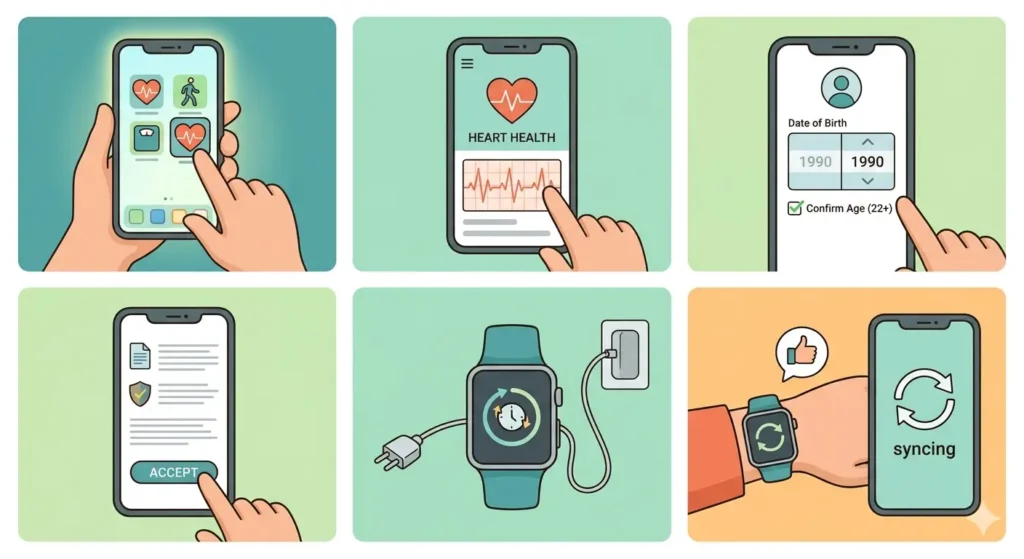
- Step 1: Open the companion health app on the smartphone (such as Samsung Health, Apple Health, or Fitbit app)
- Step 2: Navigate to the ECG or Heart Health section within the app
- Step 3: Follow the on-screen prompts to enter date of birth and confirm age eligibility (typically 22 years or older)
- Step 4: Read and accept the terms and conditions related to ECG usage
- Step 5: Ensure the smartwatch firmware is updated to the latest version
- Step 6: Sync the smartwatch with the smartphone to activate the ECG feature
The setup process typically takes 3-5 minutes. Some smartwatch models require a one-time calibration where baseline measurements are recorded for comparison with future readings.
Pro-Tip: Complete the ECG setup while sitting in a quiet environment. This helps establish an accurate baseline measurement when the body is at rest, making future readings more reliable for comparison.
Taking an ECG Reading
The actual ECG measurement process is straightforward but requires attention to proper technique. Incorrect positioning or movement during the reading can result in inconclusive results.
Proper Positioning for Accurate Results
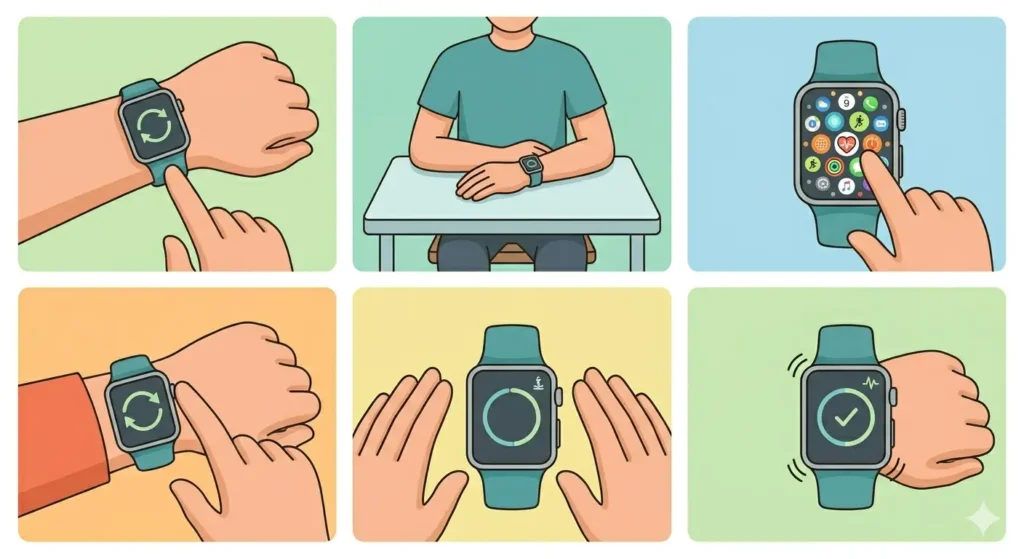
- Step 1: Ensure the smartwatch band is snug but comfortable on the wrist, positioned about one finger-width above the wrist bone
- Step 2: Sit down and rest both arms on a flat surface like a table or desk
- Step 3: Open the ECG app directly on the smartwatch (usually found in the health or heart section)
- Step 4: Place the opposite hand’s finger (typically the index finger) on the designated sensor, which is often the digital crown or a specific button
- Step 5: Keep the finger in contact with the sensor and remain completely still for the entire 30-second duration
- Step 6: Wait for the countdown to complete and the smartwatch to vibrate or display the results
During the measurement, the smartwatch captures electrical signals from the heart through both the wrist contact and the finger contact, creating a complete circuit similar to a traditional ECG machine.
Best Practices for Consistent Measurements
Consistency matters when tracking heart health over time. Taking readings under similar conditions helps identify genuine changes versus environmental variations.
- Take ECG readings at the same time each day, preferably in the morning after waking up
- Avoid taking measurements immediately after exercise, caffeine consumption, or stressful situations
- Ensure hands are warm, as cold temperatures can affect reading accuracy
- Remove any hand lotion or moisturizer that might interfere with sensor contact
- Keep the smartwatch screen clean and free from sweat or debris
Many users find it helpful to track readings using time comparison tools when coordinating measurements across different time zones or maintaining consistent schedules during travel.
Understanding ECG Results
After completing the 30-second reading, the smartwatch displays a classification based on the heart’s electrical activity. Understanding these results helps determine when to share findings with a healthcare provider.
Result Classifications Explained
Normal Sinus Rhythm: This indicates the heart is beating in a regular pattern between 50-100 beats per minute. The electrical signals show a consistent and healthy rhythm without irregularities.
Atrial Fibrillation (AFib): The smartwatch detected an irregular heart rhythm that could indicate AFib, a condition where the upper chambers of the heart beat irregularly. This result warrants consultation with a healthcare provider.
Inconclusive: The reading couldn’t be classified due to movement, poor sensor contact, or heart rates outside the detectable range. Retaking the measurement usually resolves this.
Low or High Heart Rate: The heart rate falls below 50 bpm or exceeds 100 bpm, making it difficult for the algorithm to determine rhythm regularity. These readings may still be normal depending on individual fitness levels.
Storing and Sharing ECG Data
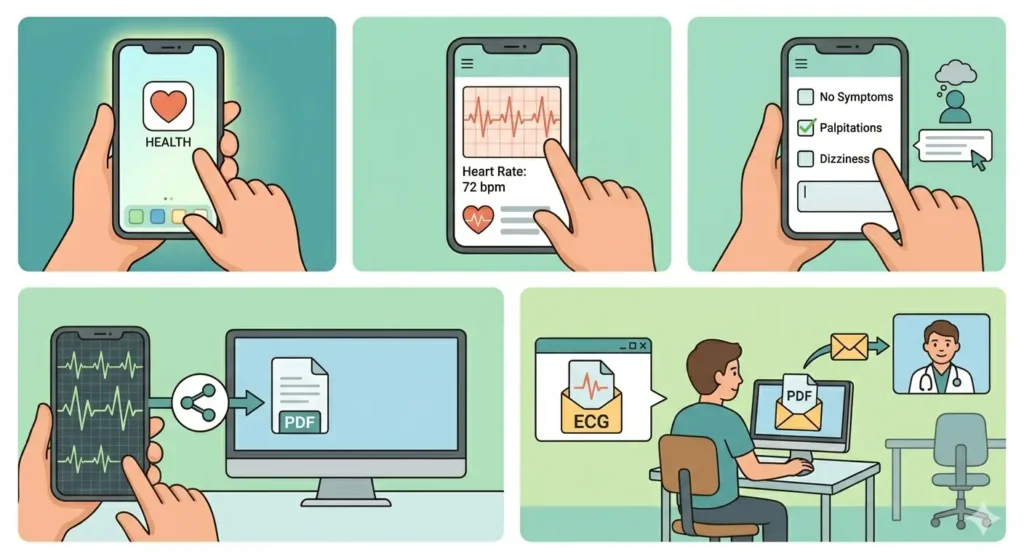
- Step 1: Access the health app on the smartphone after taking an ECG
- Step 2: Review the detailed waveform and heart rate information for the specific reading
- Step 3: Add notes or symptoms if experiencing any unusual feelings during the measurement
- Step 4: Export the ECG as a PDF file by selecting the share or export option
- Step 5: Send the PDF to a healthcare provider via email or patient portal for professional review
Most health apps automatically organize ECG readings by date, making it easy to track patterns over weeks or months. This historical data becomes valuable during medical consultations.
Tips for Effective ECG Monitoring
Maximizing the value of smartwatch ECG functionality requires developing good measurement habits and understanding the feature’s limitations.
- Take regular readings even when feeling fine to establish a personal baseline for comparison
- Record ECG measurements when experiencing palpitations, dizziness, or unusual heart sensations
- Keep the smartwatch charged above 20% battery, as low power can affect sensor accuracy
- Clean the watch back and sensors weekly with a soft, slightly damp cloth to maintain optimal contact
- Update the smartwatch and companion app regularly to access improved algorithms and features
- Set reminders using online timing tools to maintain consistent daily measurement schedules
- Avoid wearing the smartwatch too loosely, as this creates gaps that interfere with electrical signal detection
- Consider taking multiple readings if the first attempt is inconclusive rather than accepting unreliable data
Pro-Tip: Create a simple log noting activities, meals, or stress levels before each ECG reading. This context helps healthcare providers identify triggers for irregular rhythms and makes consultations more productive.
Common ECG Issues and Solutions
Even with proper technique, users occasionally encounter challenges when taking ECG readings. Most issues have straightforward solutions that restore functionality.
Fix 1: Repeated Inconclusive Results
When multiple attempts produce inconclusive readings, the problem usually relates to contact quality or environmental factors.
- Adjust the watch band tightness – it should be snug without restricting blood flow
- Warm up cold hands by rubbing them together or holding a warm beverage
- Try using a different finger on the sensor, as some fingers provide better electrical contact
- Move to a different location away from electronic devices that might cause interference
- Ensure the watch back is making full contact with the wrist without gaps
Fix 2: ECG Feature Not Available
Sometimes the ECG option appears grayed out or missing entirely from the smartwatch interface.
- Verify that the smartwatch model actually includes ECG hardware capability
- Check that the feature is legally available in the current country or region
- Confirm age eligibility requirements have been met during app setup
- Restart both the smartwatch and the paired smartphone to refresh connections
- Reinstall the companion health app if software corruption is suspected
Fix 3: Sync Issues Between Watch and Phone
ECG data failing to appear in the smartphone app prevents proper tracking and sharing.
- Check that Bluetooth is enabled on both devices and they are within range
- Force close and reopen the health app to trigger a manual sync
- Verify sufficient storage space exists on the smartphone for health data
- Disable battery optimization settings that might restrict background app activity
- Update both the smartwatch firmware and smartphone app to compatible versions
Frequently Asked Questions
Can smartwatch ECG detect heart attacks?
Smartwatch ECG cannot detect heart attacks. The feature specifically monitors heart rhythm irregularities like atrial fibrillation but does not measure blood flow blockages that cause heart attacks. Anyone experiencing chest pain, shortness of breath, or other heart attack symptoms should call emergency services immediately rather than relying on a smartwatch.
How often should ECG readings be taken on a smartwatch?
For general health monitoring, taking one ECG reading per week provides adequate tracking for most individuals. Those with known heart conditions or symptoms should follow their healthcare provider’s recommendations, which might include daily readings or measurements when specific symptoms occur.
Is smartwatch ECG as accurate as a hospital ECG?
Smartwatch ECG uses a single-lead measurement while hospital ECG machines use 12 leads, providing much more comprehensive heart activity data. Smartwatch readings are accurate for detecting certain rhythm irregularities but cannot replace comprehensive medical ECG testing for diagnosis or detailed cardiac evaluation.
Why does the ECG reading fail when moving during measurement?
Movement creates electrical noise and disrupts the sensor’s ability to detect the heart’s subtle electrical signals. Even small movements like talking, shifting position, or muscle tension can interfere with the reading. Remaining completely still for 30 seconds ensures clean signal capture without artifacts.
Can ECG be used while wearing the smartwatch on the right wrist?
Yes, ECG functionality works on either wrist. However, the companion app setup may ask which wrist the watch is worn on to adjust the algorithm accordingly. Some users find that consistent wrist placement (always left or always right) produces more comparable results over time.
What should be done if ECG shows atrial fibrillation?
Contact a healthcare provider to discuss the results and schedule appropriate follow-up testing. A single AFib reading does not necessarily indicate a serious problem, but medical evaluation is important. Avoid self-diagnosing or making treatment decisions based solely on smartwatch results.
Do all smartwatches have ECG capability?
No, ECG is a premium feature found only on specific smartwatch models from manufacturers like Apple, Samsung, Fitbit, and Withings. Budget and mid-range smartwatches typically lack the specialized sensors required for ECG measurement. Check product specifications before purchasing if ECG functionality is desired.
Can medications affect smartwatch ECG readings?
Yes, certain medications that affect heart rate or rhythm can influence ECG results. Beta-blockers, anti-arrhythmic drugs, and other cardiac medications may produce readings that differ from unmedicated baselines. Inform healthcare providers about all medications when discussing smartwatch ECG results.
How long does ECG data remain stored in the smartwatch?
Storage capacity varies by model, but most smartwatches retain ECG data in the companion smartphone app indefinitely rather than on the watch itself. The watch typically stores only the most recent readings, while the app maintains complete history. Regular syncing prevents data loss if the watch memory fills up.
Is it safe to take multiple ECG readings in a row?
Yes, taking consecutive ECG readings poses no health risks. The process is entirely passive and non-invasive. However, taking too many readings in quick succession provides limited additional value, as heart rhythm typically remains consistent over short periods unless symptoms change. Spacing readings apart by at least a few minutes makes more sense for monitoring purposes.