
Setting the time on a watch with a hacking movement requires a specific technique to achieve precise synchronization. A hacking movement stops the second hand when the crown is pulled out, allowing for exact time setting down to the second. This feature, originally developed for military use, ensures accuracy when coordinating timepieces. Understanding how to use this function properly makes a significant difference in maintaining perfect timekeeping.
Quick Summary
- Pull the crown to the second position to activate the hacking function and stop the second hand
- Wait for a reference time source to reach the exact minute
- Set the watch hands to match the reference time
- Push the crown back in at the precise moment the reference time reaches zero seconds
- The hacking movement allows accuracy within one second
- Always set time forward, never backward, to protect the movement
Understanding the Crown Positions
Most watches with hacking movements feature a crown with three distinct positions. The first position, when the crown sits flush against the case, is the normal wearing position where the watch runs continuously. Pulling the crown out one click reaches the second position on some models, which allows for date adjustment. The final position, pulled out completely, activates the hacking function and enables time setting.
The crown operates the internal mechanism that controls different functions. When pulled to the outermost position, it engages a small lever that physically stops the balance wheel or seconds hand, depending on the movement design. This stopping action defines the hacking feature and separates it from non-hacking movements that continue running even during time adjustment.
Preparing to Set the Time
Before adjusting the time, locate a reliable reference source. The world time comparison tool provides accurate atomic clock synchronization for precise setting. Television time displays, radio time signals, or smartphone clock apps also work well as reference sources.
Position the watch comfortably where both the dial and reference time source remain visible simultaneously. This setup eliminates the need to look back and forth, reducing the chance of missing the exact synchronization moment. Good lighting helps read the watch hands clearly during the process.
Setting the Time Step by Step

Follow these steps carefully to achieve precise time synchronization using the hacking movement feature.
- Step 1: Unscrew the crown if the watch has a screw-down crown by turning it counterclockwise until it pops out slightly
- Step 2: Gently pull the crown out to the final position until the second hand stops moving completely
- Step 3: Watch the reference time source and wait until it approaches the next full minute (when seconds show :00)
- Step 4: Turn the crown to set the hour and minute hands to match the reference time, positioning them just before the target time
- Step 5: Keep eyes on the reference source as it counts down the final seconds to :00
- Step 6: Push the crown back in firmly at the exact moment the reference time reaches zero seconds
- Step 7: Screw the crown back down clockwise if applicable, ensuring water resistance remains intact
The hacking feature makes this process remarkably accurate. When the crown returns to its normal position, the second hand immediately begins moving from wherever it stopped, synchronized perfectly with the reference time.
Direction of Time Setting
Always turn the crown clockwise to move the hands forward. Moving the hands backward, especially past midnight, can damage certain movement components, particularly the date mechanism. If the time passes the desired setting, continue moving forward through a full 12-hour cycle rather than reversing direction.
Some modern movements tolerate backward setting, but developing the habit of forward-only adjustment protects all watch types. This practice becomes particularly important with complications like annual calendars or moon phases that contain delicate gearing.
Pro-Tip: The 55-Minute Technique
Professional watchmakers often use the 55-minute technique for optimal accuracy. When the reference time shows 2:55:30, for example, set the watch hands to approximately 2:54:55, positioning them just before the target. As the reference time counts down from :55 to :00 of the next minute, fine-tune the minute hand position. This provides a 5-second buffer to make final adjustments before pushing the crown in at exactly 3:00:00. The technique reduces stress and allows for smoother synchronization, especially when learning the process.
Working with Different Movement Types
Mechanical hacking movements physically stop the balance wheel when the crown pulls out. This creates an immediate, complete halt of all motion. The clock tab offers a convenient reference for practicing synchronization with mechanical movements.
Quartz hacking movements stop the second hand electronically. These movements often provide smoother hacking action with less resistance when pulling the crown. The precision remains identical, though the feel differs from mechanical versions.
High-beat movements, running at 28,800 or 36,000 vibrations per hour, require special attention during setting. The second hand moves in very small increments, making it harder to see exactly where it stops. Extra lighting helps during synchronization with these movements.
Tips for Accurate Time Setting
- Set the time during daytime hours to avoid confusion about AM versus PM positioning
- Use consistent reference sources rather than switching between different time displays
- Practice the crown-pushing motion several times before attempting actual synchronization
- Account for the tiny delay between pushing the crown and the second hand restarting
- Check the date after setting time near midnight to ensure it changes at the correct moment
- Maintain a gentle grip on the crown throughout the process to avoid slipping
- Clean hands before handling the crown to prevent oil and debris from affecting crown operation
Maintaining Hacking Function Performance
Regular servicing keeps the hacking mechanism functioning properly. The lever that stops the balance wheel or second hand requires lubrication and adjustment every 3-5 years during standard movement service. Neglecting maintenance can cause the hacking function to become inconsistent or fail completely.
Avoid pulling the crown out repeatedly without purpose. Each hacking engagement creates wear on the stopping lever and related components. Setting the time only when necessary extends the lifespan of these delicate parts.
Water resistance testing becomes crucial after any crown operation. The gaskets that seal the crown tube can shift during pulling and pushing, potentially compromising water resistance. Annual pressure testing ensures the watch maintains its rated water resistance specifications.
Common Problems and Solutions
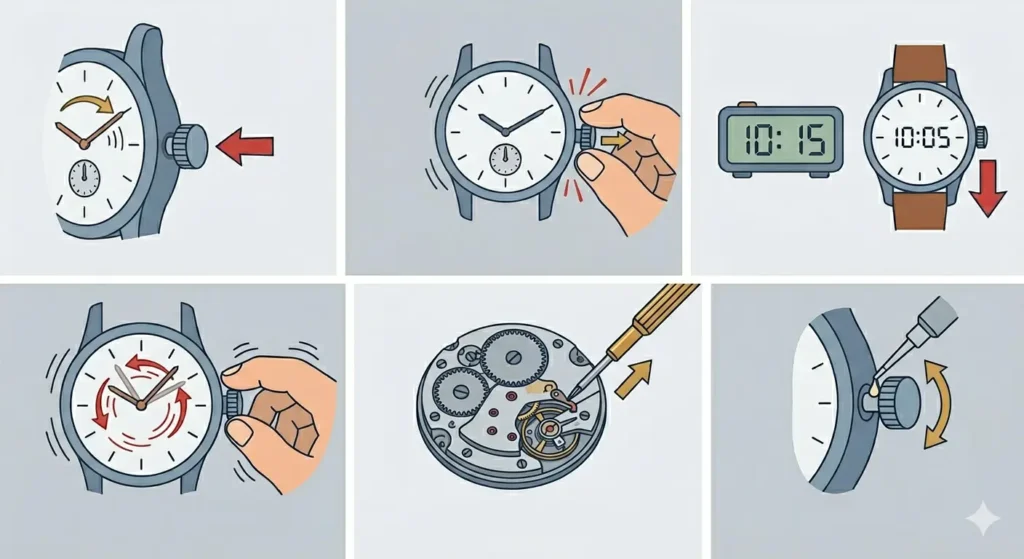
Fix 1: Second Hand Doesn’t Stop When Crown Pulls Out
When the second hand continues moving despite pulling the crown to the setting position, the hacking lever mechanism has failed or become disconnected. This requires professional repair, as the movement must be opened and the hacking components examined. Continuing to use the watch remains safe, but precise time setting becomes impossible until repair.
Fix 2: Crown Feels Stuck or Difficult to Pull
Stiff crown operation often indicates dried lubricant or debris in the crown tube. Avoid forcing the crown, as this can damage the stem or tube threads. Professional cleaning of the crown assembly typically resolves this issue. For screw-down crowns, ensure complete unscrewing before pulling.
Fix 3: Watch Loses Time After Setting
If the watch runs accurately but loses synchronization shortly after setting, the crown may not be pushing in completely. Check that the crown sits flush against the case and, for screw-down types, threads down fully. Incomplete crown seating can allow the setting mechanism to remain partially engaged, affecting timekeeping.
Fix 4: Hands Move Erratically During Setting
Jerky or inconsistent hand movement while turning the crown suggests worn gearing in the setting mechanism. This wear accelerates if force is applied during setting. Light, steady pressure on the crown during turning prevents additional damage. Professional service can replace worn keyless works components.
Advanced Synchronization Techniques
For extreme precision, some collectors synchronize multiple watches simultaneously using broadcast time signals. Coordinating several timepieces to a single reference source creates a matched set accurate to within fractions of a second. This technique works particularly well with online stopwatch tools that provide countdown features.
The anticipation method involves pushing the crown in slightly before the reference time reaches zero seconds, accounting for the mechanical delay in engagement. Advanced users develop a feel for this timing, achieving synchronization within 0.1 seconds. This technique requires practice but delivers exceptional accuracy.
Temperature compensation matters for precision setting. Mechanical movements run slightly faster in cold conditions and slower in heat. Setting the time in a stable room temperature environment, then allowing the watch to acclimate to wearing temperature, produces the most stable long-term accuracy.
Frequently Asked Questions
What exactly is a hacking movement in a watch?
A hacking movement contains a mechanism that stops the second hand when the crown pulls out to the time-setting position. This feature allows precise synchronization to a reference time source down to the exact second, eliminating the guesswork involved in setting non-hacking movements.
Can setting the time damage a hacking movement?
Setting the time forward causes no damage to hacking movements. However, turning the hands backward, especially across the midnight position, can damage date-changing mechanisms. Always set time by moving hands forward, even if this means advancing through a full 12-hour cycle.
How often should time be reset on a watch with hacking movement?
Reset the time whenever the watch shows noticeable deviation from accurate time, typically once every few weeks for quality mechanical movements. Quartz hacking movements may need adjustment only once or twice per year. Frequent unnecessary adjustments create unnecessary wear on the crown and setting mechanism.
Does the hacking function affect watch accuracy or power reserve?
The hacking function itself does not impact running accuracy or power reserve. However, keeping the crown pulled out for extended periods drains the power reserve without advancing time, effectively wasting energy. Complete the time-setting process promptly to avoid unnecessary power consumption.
Why does the second hand jump when pushing the crown back in?
The second hand may advance slightly when the crown returns to the running position due to the mechanical play in the hacking lever disengagement. This small jump, usually less than one second, is normal behavior and does not indicate a problem with the movement.
Can all watches with second hands use the hacking function?
Not all watches feature hacking movements. Many vintage and budget mechanical watches lack this function, meaning the second hand continues running during time setting. Check the watch specifications or test by pulling the crown out to confirm whether hacking capability exists.
Should the crown be pulled out quickly or slowly for hacking?
Pull the crown out with steady, moderate speed. Jerking the crown out quickly can stress the stem and setting mechanism, while pulling too slowly may not engage the hacking lever properly. A smooth, deliberate pull in one motion provides optimal results.
What happens if the crown is pushed in before the reference time reaches zero?
Pushing the crown in early means the watch starts running before the reference time reaches the target synchronization point. The watch will then run ahead of the correct time. Simply pull the crown out again and repeat the synchronization process at the next full minute.
Is it normal to hear a click when the hacking function engages?
Some movements produce an audible click or subtle feel when the hacking lever engages the balance wheel or seconds wheel. This tactile feedback is normal and indicates proper hacking function operation. The absence of this click does not necessarily indicate a problem if the second hand stops properly.
Can hacking movements be set while the watch is being worn?
Yes, hacking movements can be set while worn on the wrist, though removing the watch often provides better visibility and control. Ensure both the watch dial and reference time source remain clearly visible during the synchronization process regardless of whether the watch stays on or comes off the wrist.