

Setting the time on an Omega Speedmaster Professional requires understanding its manual-winding chronograph movement and proper crown operation. This iconic timepiece uses a traditional three-position crown system that controls time-setting, date adjustment (on models with date complications), and manual winding. The Speedmaster Professional, particularly the Moonwatch reference 3570.50 and newer caliber 3861 models, features a hesalite crystal and a mechanical movement that demands careful handling during time adjustments.
Quick Summary Table
- Crown Position 0: Pushed in completely – normal wearing position
- Crown Position 1: First pull – manual winding position (not used for time setting)
- Crown Position 2: Second pull – time-setting position
- Direction: Turn clockwise to advance time forward
- Average Time: 30-60 seconds to complete the process
- Recommended Frequency: Set time when accuracy drifts beyond acceptable range (typically ±5 seconds per day)
Step-by-Step Guide to Setting the Time
Method 1: Setting the Time on Standard Speedmaster Professional Models
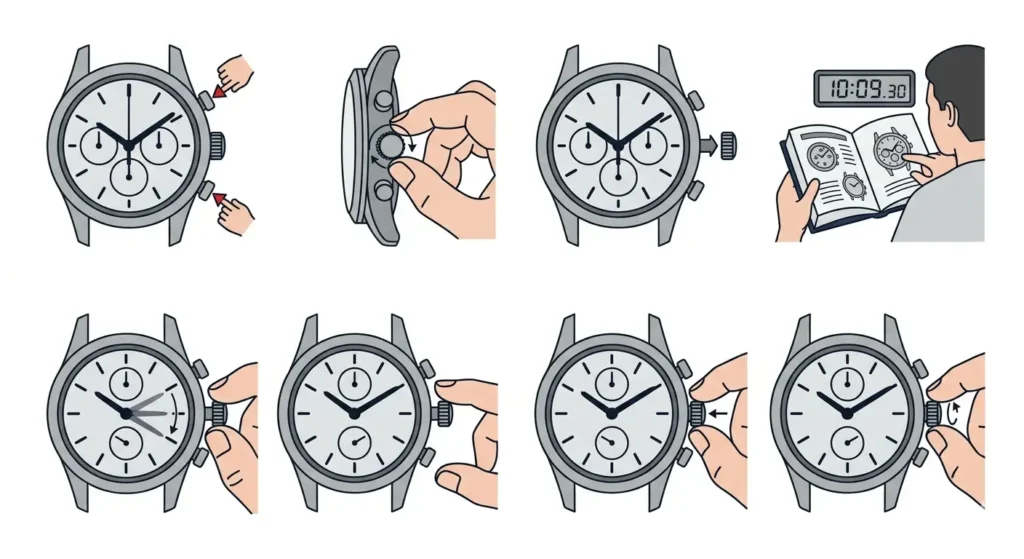
- Step 1: Ensure the chronograph is stopped and reset to zero position. Press the top pusher at 2 o’clock to stop the chronograph (if running), then press the bottom pusher at 4 o’clock to reset all chronograph hands to zero. This prevents any strain on the movement during time-setting.
- Step 2: Unscrew the crown by turning it counterclockwise until it releases from the case threads. The Speedmaster Professional features a screw-down crown for water resistance, so approximately 8-10 turns are needed until the crown pops out slightly.
- Step 3: Pull the crown out to the second position (the furthest position from the case). There should be two distinct positions – the first is for winding, and the second is for setting the time. Pull firmly but gently until the crown reaches the outer position where time-setting is enabled.
- Step 4: Note the current seconds hand position on a reference timepiece or accurate digital clock. This ensures precise time synchronization when setting the Speedmaster.
- Step 5: Turn the crown clockwise to advance the time forward. The seconds hand will not move during time-setting, but the hour and minute hands will advance smoothly. Rotate the crown steadily until the minute hand approaches the correct time.
- Step 6: Advance the time to approximately 5 minutes before the target time. When the reference timepiece reaches the exact second for time-setting, push the crown back in quickly to start the Speedmaster’s seconds hand at the precise moment.
- Step 7: Push the crown back in to position 0 (fully seated against the case). The movement will resume normal operation once the crown is returned to its resting position.
- Step 8: Screw the crown back down by pressing it gently toward the case while turning clockwise. Continue turning until the crown is finger-tight against the case, ensuring proper water resistance. Avoid over-tightening, which can damage the crown threads.
Pro-Tip: Never turn the crown counterclockwise when setting the time on a Speedmaster Professional. Always advance the time forward by turning clockwise. If the time is overshot, continue turning clockwise through a full 12-hour cycle rather than reversing direction, which can potentially damage the keyless works mechanism.
Method 2: Setting the Time on Speedmaster Models with Date Complications
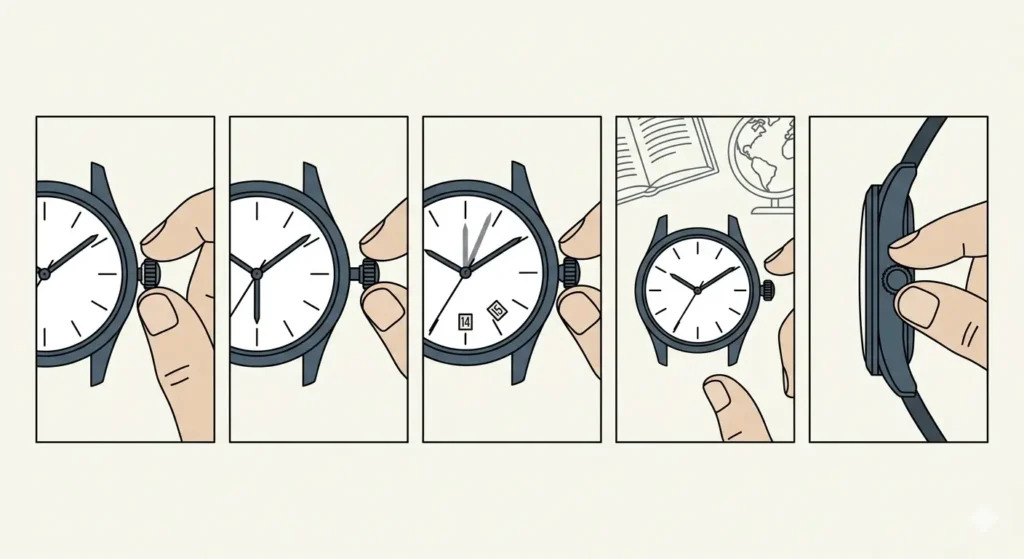
- Step 1: Unscrew the crown counterclockwise until it releases and pulls out to the first position. On date-equipped models like the Speedmaster Reduced or certain limited editions, the crown has an additional intermediate position for date adjustment.
- Step 2: Pull the crown to the second position (time-setting position), bypassing the first position used for date changes. The time-setting position is the outermost position where the seconds hand stops.
- Step 3: Turn the crown clockwise to advance the time past midnight at least twice if the date needs to change. Watch the date window to ensure the date clicks over at midnight, confirming proper AM/PM positioning.
- Step 4: Continue turning clockwise until the hands reach the correct time. Reference a world time comparison tool if setting the watch for a different time zone.
- Step 5: Push the crown back through both positions to the fully seated position, then screw it down clockwise until secure.
Pro-Tip: Avoid setting the date between 8:00 PM and 2:00 AM on date-equipped Speedmaster models. During this window, the date-change mechanism is engaged, and forcing a date change can damage the calendar wheels and clutch mechanism.
Understanding Crown Positions and Functions
The Speedmaster Professional crown operates in a three-position system, though only two positions are functional for most users. Position 0 is the fully pushed-in and screwed-down state for normal wear. Position 1, accessed by pulling the crown out one notch after unscrewing, is the manual-winding position where clockwise rotation winds the mainspring – this position does not affect time-setting. Position 2, the furthest pull position, stops the seconds hand and engages the time-setting mechanism.
The crown must be unscrewed before any adjustment can be made. This screw-down feature, introduced for improved water resistance, requires counterclockwise rotation while applying gentle outward pressure until the crown threads disengage. Most Speedmaster Professional models require 8-12 counterclockwise turns before the crown releases.
Tips for Accurate Time Setting
- Synchronize with atomic time sources using an online stopwatch or radio-controlled clock for maximum accuracy when setting the Speedmaster.
- Set the time in the morning or early afternoon to avoid the date-change danger zone (8 PM – 2 AM) on models with date complications.
- Wind the watch fully before setting the time to ensure the mainspring has adequate power reserve, which improves accuracy immediately after setting.
- Hold the watch at eye level during time-setting to read the dial position clearly and avoid overshooting the target time.
- Use smooth, consistent crown rotation rather than quick jerking motions, which can wear the keyless works components prematurely.
- Allow the watch to run for 24-48 hours after setting to verify accuracy before making additional adjustments.
- Keep the crown screwed down at all times during normal wear to maintain the watch’s stated water resistance rating.
- Service the watch every 5-7 years to maintain optimal time-setting smoothness and overall mechanical performance.
Common Problems and Troubleshooting
Fix 1: Crown Will Not Unscrew
When the crown refuses to unscrew, dried lubricants or cross-threading may be the cause. Apply gentle counterclockwise pressure while wiggling the crown slightly back and forth. Never force a stuck crown, as this can strip the threads. If resistance persists after several attempts, the watch requires professional service to avoid permanent damage to the case tube or crown threads.
Fix 2: Crown Pulls Out But Time Does Not Change
If the crown extends but turning it produces no movement of the hands, the clutch mechanism has likely disengaged from the keyless works. This typically occurs when the crown is not pulled out far enough to the second position. Pull the crown out firmly to the outermost position until a distinct click or increased resistance is felt, indicating proper engagement of the time-setting mechanism.
Fix 3: Seconds Hand Does Not Stop When Crown Is Pulled
The Speedmaster Professional uses a hack mechanism that should stop the seconds hand when the crown reaches position 2. If the seconds hand continues running, the hack feature may be defective or the crown may not be fully extended. Ensure the crown is pulled to its absolute furthest position. If the seconds hand still runs, the watch requires service to repair or replace the hacking lever assembly.
Fix 4: Time Loses Accuracy Shortly After Setting
Rapid time loss after setting indicates insufficient mainspring tension or magnetization. Wind the watch fully (approximately 40-50 clockwise turns from the first crown position) before setting the time. If accuracy problems persist, the watch may have become magnetized from exposure to electronic devices, speakers, or magnetic clasps. Professional demagnetization solves this issue without opening the case.
Fix 5: Date Changes at Noon Instead of Midnight
When the date changes at 12:00 PM rather than 12:00 AM, the watch is set 12 hours out of phase. Pull the crown to position 2 and advance the time forward by exactly 12 hours. Watch the date window as the hands pass midnight to confirm the date clicks over at the correct time. This problem commonly occurs after battery replacement on quartz models or after service on mechanical versions.
Frequently Asked Questions
How often should the time be set on an Omega Speedmaster Professional?
The time should be adjusted whenever accuracy drifts beyond acceptable limits, typically when the watch gains or loses more than 5-10 seconds per day. A properly serviced Speedmaster Professional with caliber 1861 or 3861 movement maintains accuracy of -1 to +11 seconds per day, though the newer Master Chronometer certified caliber 3861 achieves 0 to +5 seconds per day. Most owners set their watch once every few weeks or when synchronization with atomic time becomes necessary for specific activities.
Can the time be set backward on a Speedmaster Professional?
The time should never be set backward (counterclockwise) on a Speedmaster Professional. The movement’s keyless works are designed for forward time advancement only. Setting the time backward can damage the motion works, clutch wheels, and intermediate wheels. If the time is accidentally advanced too far, continue turning clockwise through a full 12-hour cycle to reach the correct time.
What happens if the chronograph is running while setting the time?
Setting the time while the chronograph is running places unnecessary stress on the movement and can potentially damage the chronograph mechanism. Always stop and reset the chronograph before pulling the crown out to set the time. The additional load from the running chronograph can cause the keyless works to bind or wear prematurely during time-setting operations.
Does pulling the crown out damage the water resistance?
Pulling the crown out for time-setting temporarily compromises water resistance, but does not cause permanent damage when done correctly. The watch should never be exposed to water when the crown is unscrewed or pulled out. After setting the time, ensure the crown is pushed fully in and screwed down completely to restore the stated water resistance rating of 50 meters on standard Speedmaster Professional models.
Why does the seconds hand jump when pushing the crown back in?
The seconds hand may jump slightly forward when the crown is pushed back to position 0 because the hacking mechanism releases and the balance wheel resumes oscillation from wherever it stopped in its arc. This minor jump of 1-2 seconds is normal and does not indicate a problem. For more precise synchronization, push the crown in exactly when the reference time source reaches a 5-second marker to minimize visible deviation.
How many turns does it take to wind a Speedmaster before setting the time?
A fully unwound Speedmaster Professional requires approximately 40-50 clockwise turns from crown position 1 to achieve full wind. The movement will reach maximum mainspring tension when the crown becomes noticeably harder to turn, though it will continue to rotate without slipping to prevent overwinding damage. For best results, fully wind the watch before setting the time to ensure optimal amplitude and accuracy.
Can the time be set while the watch is being worn?
The time can be set while wearing the watch, but removal provides better control and visibility. Setting the time on the wrist makes it difficult to see the dial clearly and requires awkward hand positions that can lead to imprecise adjustments. Additionally, body heat and motion can make the screw-down crown harder to operate smoothly. For best results, remove the watch and place it on a soft surface during time-setting.
What is the difference between setting time on caliber 1861 versus caliber 3861?
The time-setting procedure is identical for both caliber 1861 and caliber 3861 Speedmaster Professional models. Both movements use the same crown position system and require clockwise rotation for time advancement. The primary differences lie in the movements’ internal construction, with the caliber 3861 featuring a co-axial escapement and Master Chronometer certification, but these technical differences do not affect the external time-setting process that users perform.
Is it normal for the crown to feel stiff when setting the time?
Moderate resistance when turning the crown during time-setting is normal, as the crown drives multiple wheel sets in the motion works. However, excessive stiffness, grinding sensations, or sudden binding indicates problems with lubrication, worn components, or foreign debris in the keyless works. A properly serviced Speedmaster should have smooth, consistent crown rotation throughout the entire time-setting range. If the crown feels abnormally stiff or rough, the watch requires professional service before continued use causes additional damage.
Should the watch be set to exact atomic time or rounded to the nearest minute?
Setting the Speedmaster to exact atomic time provides maximum accuracy for activities requiring precise synchronization. The hack mechanism that stops the seconds hand when the crown is pulled to position 2 enables second-accurate time-setting when coordinated with an atomic time source. However, for daily wear, setting to the nearest minute is sufficient for most users. The choice depends on individual requirements and whether activities demand split-second accuracy or general timekeeping is adequate.