Setting up and managing alarms on a digital G-Shock watch is essential for staying on schedule throughout the day. This comprehensive guide covers everything needed to configure daily alarms, snooze settings, and hourly signals on these durable timepieces. Understanding the alarm functions transforms a G-Shock from a simple watch into a reliable time management tool.
Quick Summary Table
| Feature | What It Does | Key Button |
|---|---|---|
| Daily Alarm | Rings at set time every day | MODE + ADJUST |
| Snooze Function | 5-minute intervals after alarm | Any button during alarm |
| Hourly Signal | Beeps at top of each hour | Toggle in alarm mode |
| One-Time Alarm | Rings once, then auto-disables | Same as daily alarm setup |
Setting Up Daily Alarms
Most digital G-Shock models support between 4 to 5 individual alarms. Each alarm can be configured for specific times and enabled or disabled independently.
Accessing Alarm Mode
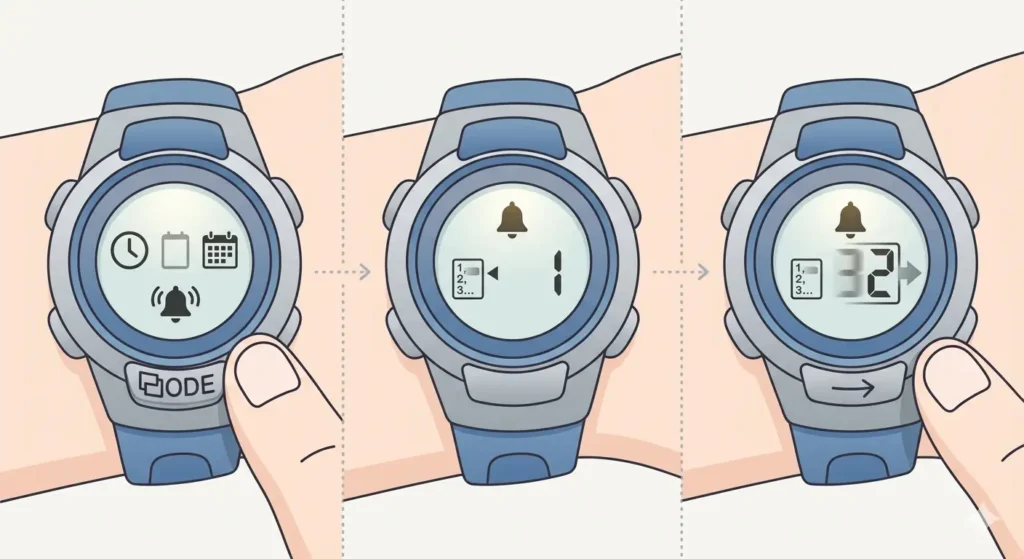
- Step 1: Press the MODE button repeatedly until ‘AL’ or an alarm icon appears on the display
- Step 2: The current alarm number (AL1, AL2, etc.) will show on screen
- Step 3: Press the ADJUST or SEARCH button to cycle through available alarm slots
Configuring Alarm Time
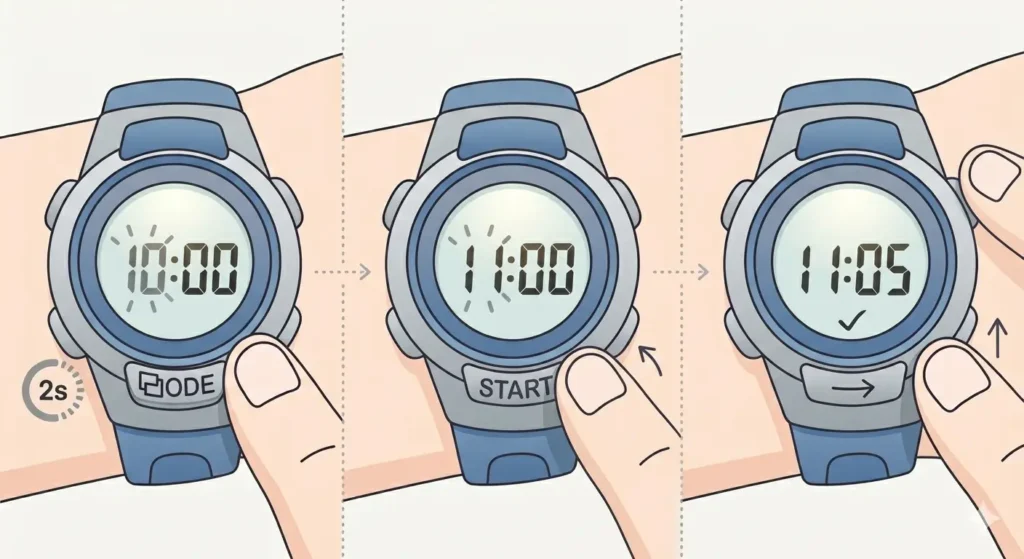
- Step 1: Hold down the ADJUST button for about 2 seconds until the hour digits start flashing
- Step 2: Press the START/STOP button to increase the hour value (or REVERSE/RESET to decrease on some models)
- Step 3: Press the MODE or ADJUST button once to move to the minutes setting
- Step 4: Use the START/STOP button to adjust the minutes
- Step 5: Press ADJUST again to confirm and save the settings
Pro Tip: When setting morning alarms, double-check the AM/PM indicator on 12-hour format displays. A common mistake is setting 7:00 PM instead of 7:00 AM, which means the alarm won’t sound when expected.
Enabling and Disabling Alarms
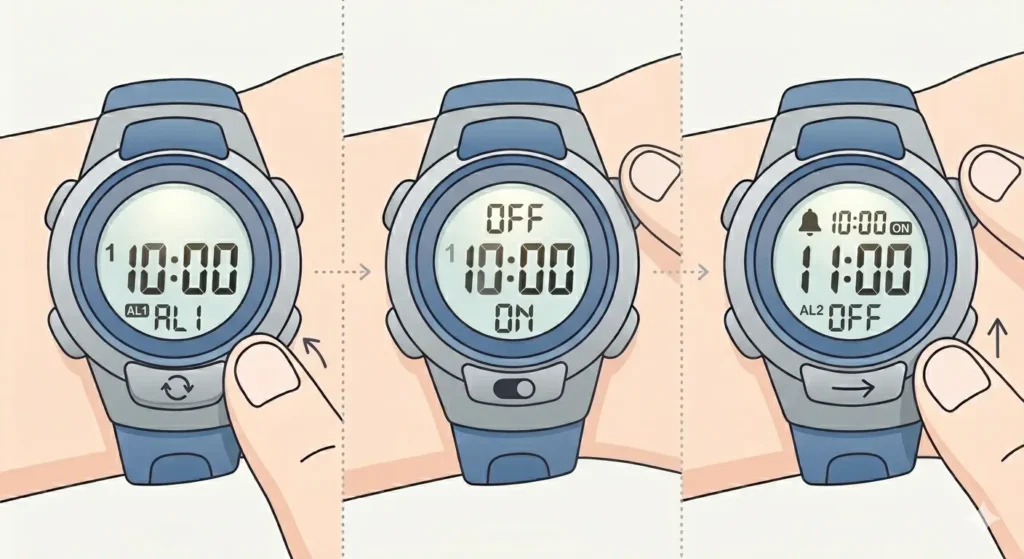
After programming alarm times, each alarm must be activated to function properly. The watch displays a small bell icon or ‘ALM’ indicator when alarms are active.
- Step 1: Navigate to the alarm you want to enable using the SEARCH or ADJUST button
- Step 2: Press the START/STOP button to toggle the alarm on or off
- Step 3: Check for the bell icon or ‘ON’ indicator next to the alarm number
- Step 4: Repeat for each alarm that needs activation
When an alarm is enabled, the bell icon remains visible in normal timekeeping mode, providing a quick visual confirmation that alarms are set.
Using the Snooze Feature
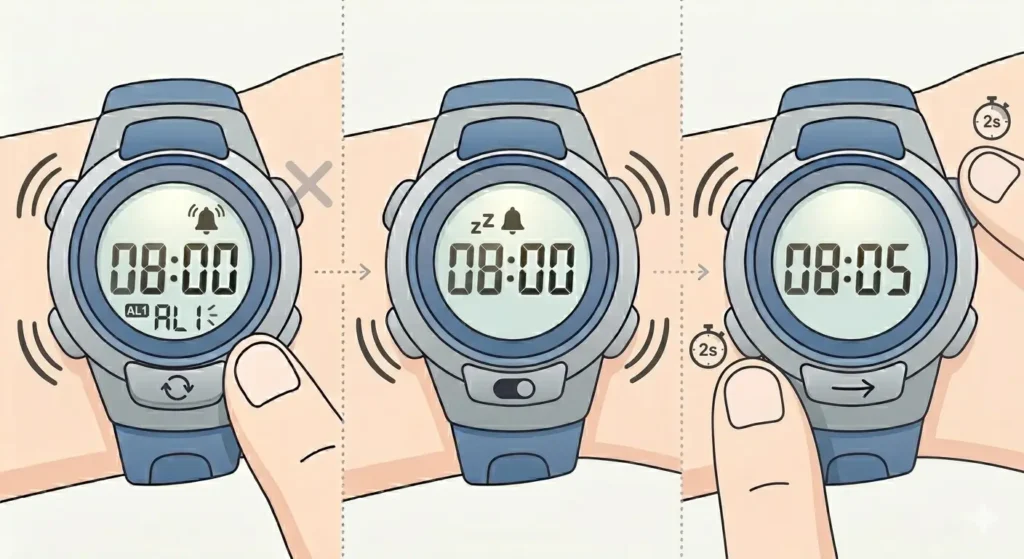
The snooze function allows for additional rest time after the initial alarm sounds. This feature automatically reactivates the alarm at 5-minute intervals.
- Step 1: When the alarm sounds, press any button except the LIGHT button
- Step 2: The alarm will temporarily stop and the snooze indicator appears
- Step 3: The alarm will sound again after approximately 5 minutes
- Step 4: To completely stop the alarm, press and hold the ADJUST button during the alarm sound
The snooze cycle can repeat up to 7 times on most G-Shock models before automatically stopping. This provides roughly 35 minutes of snooze time total.
Activating Hourly Time Signal
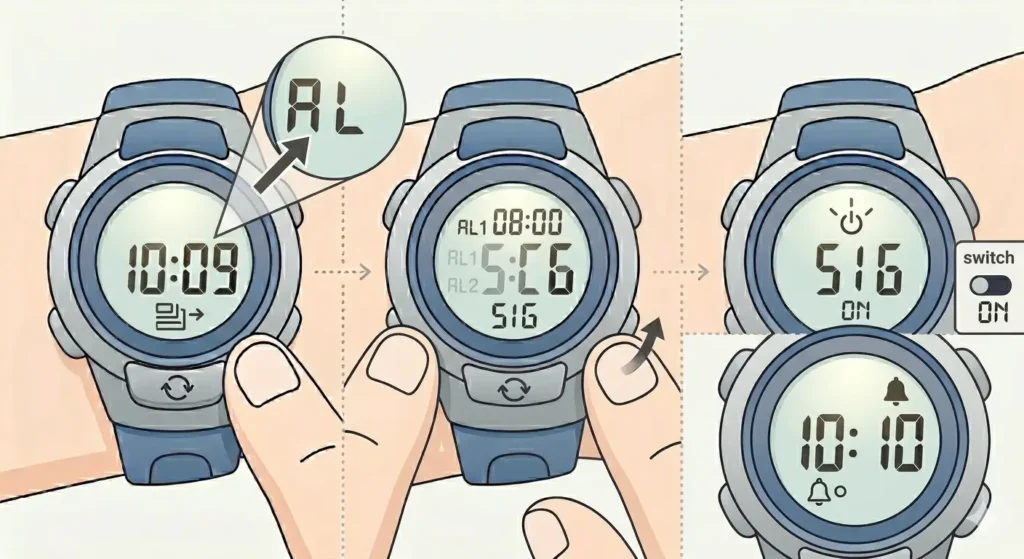
The hourly signal beeps at the start of every hour, helping maintain time awareness throughout the day without constantly checking the watch.
- Step 1: Enter alarm mode by pressing MODE until ‘AL’ appears
- Step 2: Press SEARCH or ADJUST until ‘SIG’ displays on screen
- Step 3: Press START/STOP to toggle the hourly signal on or off
- Step 4: Look for the hourly signal icon (usually resembles a small bell with ‘H’ or just ‘SIG’)
When enabled, a brief beep sounds at the beginning of each hour during the day. This feature uses minimal battery power and can be left on continuously.
Setting One-Time Alarms
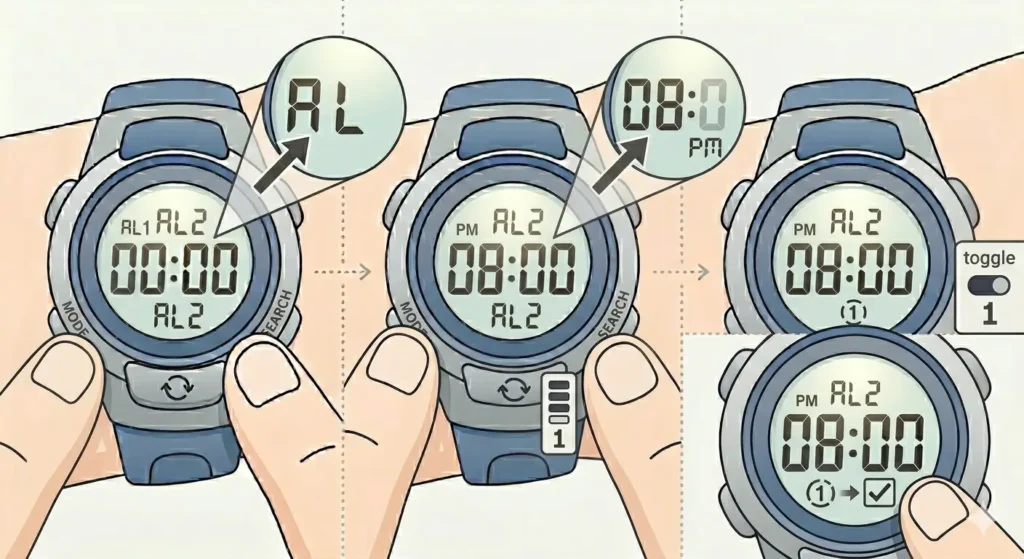
Some G-Shock models include a one-time alarm feature that automatically disables after ringing once, perfect for unique appointments or reminders.
- Step 1: Access alarm mode and select an unused alarm slot
- Step 2: Set the desired time following the standard alarm configuration steps
- Step 3: When enabling the alarm, look for a ‘1-TIME’ or similar indicator option
- Step 4: Toggle this setting if available on the specific G-Shock model
After the one-time alarm sounds and is dismissed, it automatically switches to the off position, preventing it from repeating the next day.
Tips for Effective Alarm Management
Maximizing the alarm functionality on a G-Shock requires understanding a few practical strategies that enhance daily use.
- Set alarms in 5-10 minute intervals for important morning routines to ensure timely wake-up
- Use different alarm slots for weekday versus weekend schedules, toggling them on and off as needed
- Label alarm purposes mentally (AL1 for wake-up, AL2 for medication, AL3 for meetings) to maintain organization
- Test new alarm settings during the day before relying on them for critical morning wake-ups
- Consider disabling the hourly signal during meetings or quiet environments to avoid disruptions
- Regularly check that alarms remain enabled, as accidental button presses can deactivate them
Many users find success by checking their world time comparison tool when traveling to ensure alarms adjust correctly for new time zones.
Pro Tip: Keep at least one alarm slot empty or set to a neutral time. This provides flexibility for last-minute reminders or temporary scheduling needs without having to reconfigure existing alarms.
Common Problems and Solutions
Fix 1: Alarm Not Sounding at Set Time
When an alarm fails to ring at the programmed time, several factors could be responsible. First, verify the alarm is actually enabled by checking for the bell icon in normal time mode. Navigate to alarm mode and confirm the ON indicator appears next to the specific alarm number.
Check the actual time setting against the alarm time. Ensure the AM/PM designation matches the intended alarm time, especially for 12-hour format displays. The watch may also be in silent mode if a ‘Mute’ or similar indicator appears on screen.
Fix 2: Cannot Enter Alarm Setting Mode
If the watch refuses to enter alarm editing mode when holding ADJUST, the button lock feature may be activated. Look for a ‘LOCK’ indicator on the display. Deactivate button lock by holding the LIGHT button for several seconds, or following the specific unlock procedure for that G-Shock model.
Some models require being in alarm mode first before the ADJUST button will enter edit mode. Press MODE to cycle to alarm display, then attempt holding ADJUST again.
Fix 3: Alarm Sounds Too Quietly
G-Shock alarms have a fixed volume that cannot be adjusted. If the alarm seems too quiet, ensure nothing is covering the speaker opening on the watch case. The alarm speaker is typically located on the top or side of the case.
Consider placing the watch on a hard surface like a nightstand or inside a metal bowl to amplify the sound through resonance. Some users position the watch near their pillow but not under it to maximize alarm effectiveness.
Fix 4: Snooze Not Working Properly
When pressing buttons during the alarm but snooze doesn’t activate, the specific button being pressed might be the issue. Avoid using the LIGHT button, as this typically stops the alarm completely on many models. Press START/STOP or MODE instead to trigger snooze.
If snooze activates but doesn’t sound again after 5 minutes, check the battery level. Low battery can cause irregular alarm and snooze behavior. Replace the battery if the low battery indicator appears.
Fix 5: Hourly Signal Sounds During Night Hours
The hourly signal operates 24 hours when enabled. To prevent nighttime beeping, manually disable the hourly signal before sleep using the signal toggle in alarm mode. Alternatively, establish a routine of turning it off around bedtime and back on in the morning.
Some users utilize a stopwatch function as a temporary reminder tool instead of leaving hourly signals enabled overnight.
Frequently Asked Questions
How many alarms can be set on a digital G-Shock?
Most digital G-Shock models support 4 to 5 independent daily alarms. Entry-level models typically have 3 alarms, while advanced models may offer up to 5 alarm slots. Each alarm can be individually programmed and toggled on or off without affecting the others.
Do G-Shock alarms work when the watch is in a different time zone?
Alarms are tied to the currently displayed time on the watch. If the time zone is changed to reflect a new location, alarms will sound according to the new local time. This means a 7:00 AM alarm will ring at 7:00 AM in whatever time zone the watch is currently set to display.
How long does a G-Shock alarm sound before stopping automatically?
G-Shock alarms typically sound for 10 seconds, then pause for 1 second, and repeat this cycle for approximately 20 seconds total before automatically stopping. If snooze is not activated, the alarm will cease after this duration. The snooze feature extends this by reactivating the alarm every 5 minutes for up to 7 cycles.
Can alarms be set for specific days of the week?
Standard G-Shock alarms are daily alarms that ring every day when enabled. They do not have built-in day-of-week programming. To create a weekday-only schedule, manually enable alarms on Sunday evening and disable them on Friday evening. Some advanced G-Shock models with enhanced features may offer more complex scheduling options.
Will alarms still function if the watch battery is low?
Alarms may become unreliable or stop working entirely when battery power drops to critically low levels. The watch typically displays a battery indicator when power is running low. Replace the battery promptly when this indicator appears to ensure alarms continue functioning properly. Most G-Shock batteries last 2-10 years depending on the model and feature usage.
How do you differentiate between multiple alarms when they sound?
G-Shock alarms produce the same beep pattern regardless of which alarm is sounding. The only way to identify which alarm activated is to check the watch display during or immediately after the alarm sounds. The screen will show which alarm number (AL1, AL2, etc.) is currently active.
Can the alarm sound be changed to a different tone or melody?
Digital G-Shock watches do not offer customizable alarm tones. All alarms use the same standard beep pattern programmed into the watch. This ensures consistency and reliability but means the alarm sound cannot be personalized or changed to music or alternative tones.
What happens if two alarms are set for the same time?
If multiple alarms are programmed for identical times and all are enabled, the watch will typically sound only one alarm. The lowest alarm number (AL1 has priority over AL2, etc.) will activate. After dismissing or snoozing the first alarm, the second alarm will not trigger since the programmed time has passed.
How accurate are G-Shock alarms for time-critical activities?
G-Shock alarms are highly accurate and will sound within 1 second of the programmed time, assuming the watch itself maintains accurate time. For maximum precision, consider using a synchronized clock tab to verify the watch time periodically. Standard quartz G-Shock models maintain accuracy within ±15 seconds per month, while atomic or GPS models auto-sync for perfect accuracy.
Do alarms work when the watch is in stopwatch or timer mode?
Alarms function independently of the current display mode. Even when using the stopwatch, countdown timer, or viewing world time, enabled alarms will still sound at their programmed times. The alarm system operates continuously in the background regardless of which mode is actively displayed on the screen.
Conclusion
Mastering the alarm functions on a digital G-Shock transforms daily time management and ensures important events are never missed. From setting multiple daily alarms to utilizing snooze features and hourly signals, these durable timepieces offer reliable reminder capabilities for various schedules and routines. Regular practice with the alarm settings builds familiarity and confidence in using all available features effectively.