

How to use a GMT watch to track a second (or third) time zone is simpler than most people think. GMT watches feature an additional hand and a 24-hour bezel that allow travelers, remote workers, and anyone coordinating across time zones to monitor multiple locations simultaneously without mental math or pulling out a phone.
Key Takeaways
- GMT watches use a dedicated 24-hour hand and rotating bezel to track up to three time zones at once
- The primary time zone displays on the main hour and minute hands, while the GMT hand shows a second zone
- Rotating the bezel allows tracking of a third time zone using the same GMT hand
- Setting up requires syncing the GMT hand to a reference time zone, usually UTC or home time
- Most GMT watches operate on either ‘caller’ or ‘flyer’ movements, each suited to different travel styles
Understanding GMT Watch Components
A GMT watch contains several key elements that work together to display multiple time zones. The main hour and minute hands show local time, just like a standard watch. The distinguishing feature is the additional GMT hand, which completes one full rotation every 24 hours instead of 12. This hand typically appears in a contrasting color – often red or orange – making it easy to distinguish from the regular hands.
The 24-hour bezel surrounds the watch face and displays numbers from 1 to 24 (or 0 to 23). This bezel can rotate bidirectionally, allowing adjustment without changing the actual timekeeping mechanism. When the GMT hand points to a number on this bezel, it indicates the hour in the tracked time zone.
The date complication, found on most GMT watches, typically changes at midnight in the local time zone shown by the main hands. This detail matters when tracking dates across multiple zones where the calendar day differs.
Setting Your GMT Hand to a Reference Time Zone

The foundation of using a GMT watch effectively starts with properly setting the GMT hand. This hand should be set to a reference time zone that remains constant, even when traveling or adjusting the main hands.
- Step 1: Pull the crown out to the second position (the position used for setting the time)
- Step 2: Rotate the crown to move all hands until the GMT hand points to the correct hour in the chosen reference time zone on the 24-hour bezel
- Step 3: Continue rotating until the main hour hand shows the correct local time
- Step 4: Set the minutes by continuing to rotate the crown
- Step 5: Push the crown back to the normal position to resume timekeeping
Most people set their GMT hand to UTC (Coordinated Universal Time) since it never changes with daylight saving time and serves as a universal reference point. Others prefer setting it to their home time zone for quick reference while traveling. The world time comparison tool helps verify the current time in different zones before setting the watch.
Pro-Tip: When setting the GMT hand, always rotate the crown forward (clockwise) to avoid putting backward pressure on the movement. If the GMT hand passes the target hour, continue rotating forward through a full 24-hour cycle rather than reversing direction.
Tracking a Second Time Zone
Once the GMT hand is set to a reference zone, tracking a second time zone becomes straightforward. The GMT hand continuously displays the hour in that reference zone while the main hands show local time.
For example, if the GMT hand is set to UTC and the main hands show local time in New York (UTC-5), the GMT hand will always be 5 hours ahead. When the local time reads 3:00 PM, the GMT hand points to 20 (8:00 PM) on the 24-hour bezel. This setup works perfectly for anyone who needs to coordinate with a team in a different region or track market opening hours across continents.
The 24-hour format eliminates AM/PM confusion. When the GMT hand points to numbers 1-12, it indicates morning/daytime hours in that zone. Numbers 13-24 represent afternoon and evening hours. This visual clarity helps avoid scheduling mistakes when setting up calls or meetings.
Adding a Third Time Zone Using the Rotating Bezel
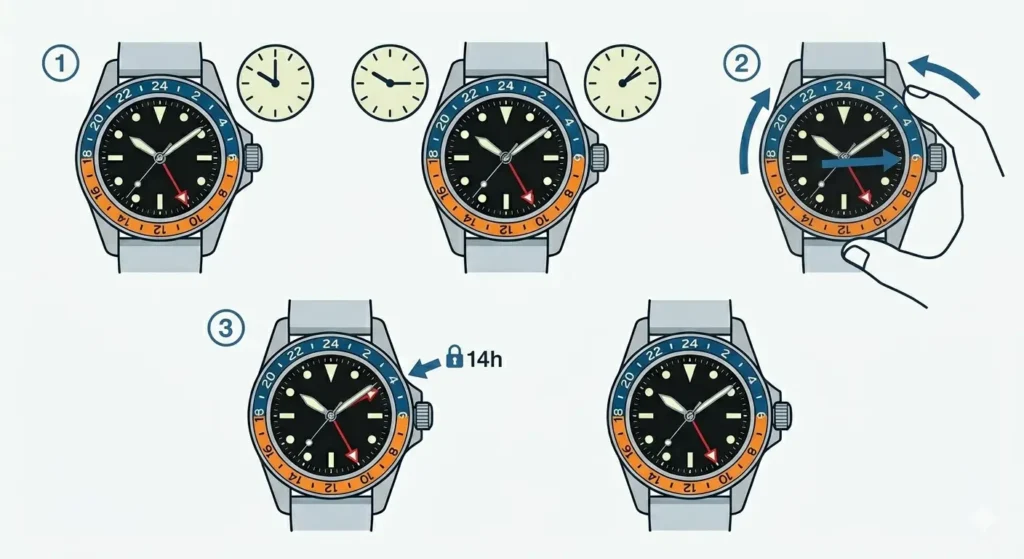
The rotating bezel unlocks the ability to track a third time zone without any additional complications. This technique uses the existing GMT hand as a reference for calculating another zone.
- Step 1: Determine the time difference between the GMT hand’s reference zone and the third zone being tracked
- Step 2: Rotate the bezel counterclockwise (to move time forward) or clockwise (to move time backward) by the number of hours difference
- Step 3: Read the third time zone by checking where the GMT hand points on the rotated bezel
Here’s a practical example: The GMT hand is set to UTC, the main hands show New York time, and a third time zone in Tokyo (UTC+9) needs tracking. Rotate the bezel 9 hours forward (counterclockwise). Now when the GMT hand points to the bezel, it shows Tokyo time. The main hands still display New York time, and quick mental reference to the GMT hand’s original position gives UTC.
This method requires remembering which bezel position corresponds to which time zone, but with practice it becomes second nature. Many travelers mark common time zones with small stickers or mental landmarks on the bezel for quick reference.
Caller vs. Flyer GMT Movements
GMT watches come in two main movement types, each designed for different use patterns. Understanding the difference helps choose the right watch and use it more efficiently.
Caller GMT Movement
Caller movements allow independent adjustment of the local hour hand without stopping the watch or affecting the GMT hand. Pulling the crown to the first position lets the hour hand jump forward or backward in one-hour increments. The minute hand, second hand, and GMT hand continue running normally.
This design suits people who stay in one primary location but frequently communicate with contacts in other time zones. When traveling, adjusting to a new time zone takes seconds – simply pull the crown and jump the hour hand to local time. The GMT hand maintains its reference to the home time zone or UTC.
Flyer GMT Movement
Flyer movements link the GMT hand to the local hour hand. When adjusting the time, both the main hour hand and GMT hand move together. The bezel must be rotated to set the GMT hand’s reference time zone.
This configuration works better for frequent travelers who change time zones often but want the GMT hand to always show home time. The bezel stays set to the home time zone offset, and both hands adjust together when crossing time zones. For tracking time back home, simply check where the GMT hand points on the bezel.
Neither type is objectively better – the choice depends on travel patterns and which time zones matter most for daily reference.
Practical Tips for Daily GMT Watch Use
Using a GMT watch effectively involves developing a few practical habits that make time zone tracking feel natural rather than complicated.
When coordinating meetings across time zones, use the clock tab tool alongside the GMT watch to verify times before sending invitations. This double-check prevents embarrassing scheduling errors, especially during daylight saving time transitions when some regions change and others don’t.
Keep the bezel aligned to the most frequently referenced third time zone. For someone based in London who regularly works with teams in New York and Singapore, setting the GMT hand to UTC and rotating the bezel to Singapore’s offset (+8) provides instant reference to all three zones: London on the main hands, UTC on the GMT hand at the 12 o’clock bezel position, and Singapore on the GMT hand at the rotated bezel position.
During airline travel, adjust the watch when the plane lands rather than mid-flight. This prevents confusion about which time zone currently applies and keeps the watch synchronized with the actual environment. Some travelers prefer adjusting when crossing time zones in flight, but this approach can lead to errors if connections or delays change the arrival time.
The date complication changes at midnight in the local time zone shown on the main hands. When the local time is early morning but the GMT hand shows late evening in another zone, remember that the date shown applies to the local time, not the GMT time. This matters when scheduling dated events or tracking deadlines across zones.
Common Problems and Solutions
Issue 1: GMT Hand Not Aligning Properly After Setting
Sometimes after setting the time, the GMT hand doesn’t point exactly to an hour marker on the 24-hour bezel. This usually happens when the hands weren’t fully synchronized during initial setup.
The fix involves resetting all hands to midnight (12:00) when both the hour hand and GMT hand should point straight up. Pull the crown to the time-setting position and rotate until both hands align at 12. If they don’t align perfectly, the watch may need professional adjustment, as the GMT hand’s position is typically factory-set and not user-adjustable on most models.
Issue 2: Bezel Rotation Feels Too Loose or Too Tight
The rotating bezel should turn with moderate resistance – firm enough to prevent accidental movement but smooth enough for easy adjustment. A bezel that spins freely or requires excessive force indicates a problem.
Loose bezels often result from worn bezel springs or accumulated debris. Remove the bezel (on models where this is possible) and clean the space between the bezel and case with a soft cloth. For tight bezels, a small amount of silicone lubricant applied to the bezel assembly can restore smooth operation. Persistent issues require professional servicing.
Issue 3: Confusion During Daylight Saving Time Changes
Daylight saving time creates temporary confusion because different regions change on different dates, and some regions don’t observe it at all. The GMT hand set to UTC avoids this problem entirely since UTC never changes.
For watches with the GMT hand set to a time zone that observes daylight saving, manually adjust the GMT hand forward or backward one hour when that zone changes. Caller-style movements make this easy with the independent hour-jump feature. Flyer-style movements require rotating the bezel to compensate for the one-hour shift.
Issue 4: Difficulty Reading the 24-Hour Bezel
The 24-hour format takes adjustment for those accustomed to 12-hour displays. Numbers above 12 seem abstract at first – seeing ’19’ on the bezel requires translating to ‘7 PM’ mentally.
Practice by using the online stopwatch to time various activities throughout the day while checking the GMT hand position. After a few weeks, reading 24-hour time becomes automatic. Many people find it helpful to memorize a few key conversions: 13 = 1 PM, 18 = 6 PM, 21 = 9 PM.
Frequently Asked Questions
Can a GMT watch track more than three time zones?
Standard GMT watches are limited to three time zones: one on the main hands, one on the GMT hand, and one using the GMT hand with a rotated bezel. Some advanced watches include additional complications like world-time bezels or multiple GMT hands, but traditional GMT watches max out at three simultaneous zones.
Does the GMT hand move continuously or jump between hours?
The GMT hand moves continuously, completing one full 24-hour rotation each day. It doesn’t jump between hours like a digital display. This smooth movement means the GMT hand points between hour markers when showing times with minutes past the hour.
Should the GMT hand be set to UTC or home time?
This depends on personal preference and travel patterns. Setting to UTC provides a universal reference that never changes with daylight saving time, making it ideal for people who frequently switch between multiple time zones. Setting to home time helps travelers maintain connection to their primary location. Neither choice is wrong – pick whichever feels more intuitive for daily use.
What happens to the date when traveling across time zones?
The date complication changes at midnight according to the time shown on the main hour and minute hands (local time). When traveling east and jumping forward in time, the date may need manual advancement. When traveling west and going backward, the date should be left alone unless crossing the international date line. Most GMT watches allow independent date adjustment through the crown’s first position.
Can the GMT bezel rotation damage the watch?
Normal bezel rotation won’t damage a GMT watch – the bezel is designed for frequent adjustment. However, forcing a stuck bezel or rotating it with excessive pressure can damage the internal click spring or ratchet mechanism. If the bezel doesn’t rotate smoothly, have it serviced rather than forcing it.
How accurate is GMT hand timekeeping compared to the main hands?
The GMT hand operates on the same movement as the main hands, so its accuracy is identical. If the watch gains or loses time, all hands will be affected equally. The GMT hand’s 24-hour rotation simply displays the same time information in a different format.
Do all GMT watches have rotating bezels?
Most GMT watches feature rotating 24-hour bezels, but some models use fixed bezels instead. Watches with fixed bezels can only track two time zones simultaneously – the main hands and the GMT hand. The rotating bezel is what enables third time zone tracking, making it a valuable feature for serious travelers.
Can the bezel be used to track elapsed time like a dive watch bezel?
While technically possible to use the 24-hour bezel for elapsed time tracking, it’s not practical for short durations. The 24-hour scale makes it difficult to read intervals shorter than an hour with precision. Dive watch bezels with 60-minute markings are far better suited for timing short events.
What is the best way to remember which bezel position represents which time zone?
Create mental associations with specific bezel positions for frequently tracked zones. For example, if Tokyo is always tracked at the +9 position, that number becomes associated with Tokyo time. Some people place small marks or use existing bezel features as memory aids. After regular use, these associations become automatic.
How often should a GMT watch be serviced?
GMT watches should receive professional servicing every 5-7 years, similar to standard mechanical watches. The additional GMT complication doesn’t significantly increase wear, but the bezel mechanism may need occasional cleaning and lubrication. Watches exposed to water, dust, or frequent bezel adjustments may benefit from more frequent maintenance.