
Setting the time on a G-Shock DW-5600 is a straightforward process once the button functions are understood. This classic digital watch uses a simple four-button system that controls all settings, including time adjustment. The process takes less than a minute and requires no tools or special equipment.
Quick Summary Table
| Step | Action | Button to Press |
|---|---|---|
| 1 | Enter timekeeping mode | Press MODE until time display appears |
| 2 | Access settings | Hold ADJUST (bottom left) for 2 seconds |
| 3 | Navigate fields | Press MODE to move through settings |
| 4 | Change values | Press START/STOP (top right) to increase |
| 5 | Exit settings | Press ADJUST to save and exit |
Setting the Time on Your G-Shock DW-5600
The DW-5600 features four buttons positioned around the case. The top left button is LIGHT, bottom left is ADJUST, top right is START/STOP, and bottom right is MODE. Understanding these button positions makes the entire process much simpler.
Method 1: Manual Time Setting
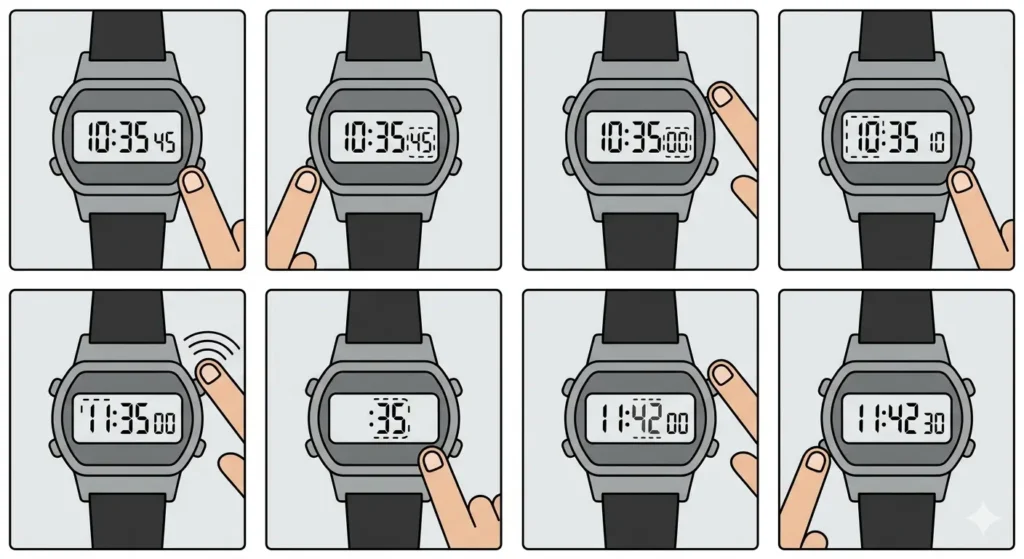
- Step 1: Press the MODE button (bottom right) repeatedly until the normal timekeeping screen appears with hours, minutes, and seconds displayed.
- Step 2: Press and hold the ADJUST button (bottom left) for approximately 2 seconds until the seconds digits begin to flash on the display.
- Step 3: Press the START/STOP button (top right) to reset the seconds to ’00’. This step helps synchronize the watch with an accurate time source.
- Step 4: Press the MODE button once to move to the hour setting. The hour digits will now flash.
- Step 5: Press the START/STOP button repeatedly to increase the hour value. Each press advances the hour by one.
- Step 6: Press the MODE button again to move to the minutes setting. The minute digits will flash.
- Step 7: Press the START/STOP button to adjust the minutes to the correct value.
- Step 8: Press the ADJUST button to save the settings and exit the adjustment mode. The watch will return to normal timekeeping display.
Pro-Tip: When setting the time, use a reliable reference like the world time comparison tool to ensure accuracy. The DW-5600 can lose or gain a few seconds per month, so periodic adjustment maintains precision.
Additional Time Settings
Beyond hours and minutes, the DW-5600 allows customization of several time-related features that enhance daily use.
12-Hour vs 24-Hour Format
- Step 1: Enter the time adjustment mode by holding ADJUST for 2 seconds.
- Step 2: Press MODE repeatedly until the 12H or 24H indicator flashes.
- Step 3: Press START/STOP to toggle between 12-hour and 24-hour time display formats.
- Step 4: Press ADJUST to save and exit.
Setting the Date
- Step 1: From the time adjustment mode (hold ADJUST for 2 seconds), press MODE to navigate past the time settings.
- Step 2: Continue pressing MODE until the year digits flash.
- Step 3: Use START/STOP to set the correct year.
- Step 4: Press MODE to move to month, then day settings, adjusting each with START/STOP.
- Step 5: Press ADJUST to save all changes.
Tips for Accurate Timekeeping
Maintaining accurate time on the DW-5600 becomes easier with a few practical habits.
- Set the time using an atomic clock reference or online time service for maximum accuracy
- Reset seconds to ’00’ when synchronizing with an external time source – this eliminates cumulative error
- Check and adjust the time monthly, as the quartz movement typically drifts 15-30 seconds per month
- Note that extreme temperatures can affect accuracy temporarily, though the watch returns to normal precision once temperature stabilizes
- Keep the watch away from strong magnetic fields, which can interfere with the quartz movement
- Use the clock tab feature as a quick reference when making adjustments
Pro-Tip: The DW-5600 uses a quartz movement rated at ±15 seconds per month. For activities requiring precise timing, verify the watch against an accurate source before use, especially if several weeks have passed since the last adjustment.
Common Problems and Solutions
Most time-setting issues stem from simple button confusion or incorrect mode selection. These solutions address the typical challenges users encounter.
Fix 1: Display Not Responding to Button Presses
When buttons seem unresponsive, the watch is likely in the wrong mode. Press MODE repeatedly to cycle through all modes (timekeeping, stopwatch, timer, alarm) and return to the main time display. Then attempt the time-setting process again from the beginning.
Fix 2: Cannot Enter Adjustment Mode
The ADJUST button must be held for a full 2 seconds to enter setting mode. Pressing too briefly will not activate the adjustment function. Hold the button firmly until the display begins to flash, indicating successful entry into adjustment mode.
Fix 3: Time Changes Unexpectedly
Accidental button presses can change settings without realizing it. The watch has no button lock function, so contact with clothing or accidental touches can trigger changes. Always verify the time display after removing the watch and check settings if unexpected changes occur.
Fix 4: AM/PM Setting Incorrect in 12-Hour Mode
The 12-hour format uses a small ‘P’ indicator for PM times. If the time appears correct but is 12 hours off, the AM/PM setting needs adjustment. Increase the hour value by 12 using the START/STOP button to switch between AM and PM.
Fix 5: Settings Not Saving
Changes only save when exiting adjustment mode properly by pressing ADJUST. If the battery dies or the MODE button is pressed too many times, the watch exits without saving. Always exit using ADJUST after making all desired changes.
Understanding the Button Functions
Each button on the DW-5600 serves specific functions that become intuitive with practice.
The LIGHT button (top left) activates the electro-luminescent backlight for visibility in darkness. The ADJUST button (bottom left) enters and exits setting modes when held, and confirms selections. The START/STOP button (top right) increases values during adjustment and controls stopwatch functions in other modes. The MODE button (bottom right) cycles through different watch modes and navigates between setting fields during adjustment.
The combination of MODE for navigation and START/STOP for value changes forms the core of all watch adjustments. This consistent pattern applies across all settings, not just time adjustment.
Battery Considerations
The DW-5600 uses a CR2016 battery that typically lasts 2-3 years with normal use. When battery power drops, the display may dim or the watch may lose time accuracy. A flashing display or unresponsive buttons often indicates low battery power requiring replacement.
Battery replacement requires removing the case back, which demands specific tools and care to maintain water resistance. Professional battery replacement ensures proper sealing and continued water resistance to 200 meters. Attempting battery replacement without proper tools or knowledge can compromise the watch’s durability features.
Time Zone Adjustments for Travel
When traveling across time zones, the simplest approach involves adjusting the hour setting forward or backward as needed. The DW-5600 does not have a dedicated world time function, so all time zone changes require manual adjustment through the standard time-setting procedure.
For frequent travelers, using the online stopwatch alongside the watch helps track elapsed time in multiple zones simultaneously. This combination proves particularly useful during international travel or when coordinating across different time zones.
Maintaining Long-Term Accuracy
Regular verification against accurate time sources keeps the DW-5600 running precisely. Monthly checks take only seconds but prevent significant drift over time. Recording adjustment dates helps establish the watch’s personal drift rate, allowing prediction of when future adjustments become necessary.
The quartz movement responds to consistent temperature ranges with more stable timekeeping. Watches worn regularly tend to maintain better accuracy than those stored in varying temperature environments. Body heat provides relatively stable operating temperature, improving long-term precision.
Frequently Asked Questions
How often should the time be adjusted on a G-Shock DW-5600?
The DW-5600 typically requires time adjustment every 1-2 months to maintain accuracy within a few seconds. The watch’s quartz movement has a rated accuracy of ±15 seconds per month, so monthly checks ensure the displayed time remains precise for daily use.
Can the DW-5600 automatically adjust for daylight saving time?
No, the DW-5600 does not automatically adjust for daylight saving time. Manual adjustment of the hour setting is required twice yearly when daylight saving time begins and ends. The process takes less than a minute using the standard time-setting procedure.
What happens if the ADJUST button is pressed during normal use?
A brief press of the ADJUST button during normal timekeeping mode has no effect. The button must be held for approximately 2 seconds to enter adjustment mode, preventing accidental setting changes during daily wear.
Why does the time flash when ADJUST is held?
Flashing digits indicate the watch has entered adjustment mode and that specific setting is ready for modification. The flashing shows which value (seconds, hours, or minutes) will change when the START/STOP button is pressed.
Is it possible to damage the watch by pressing buttons incorrectly?
No, incorrect button presses cannot damage the DW-5600. The watch’s digital system only responds to specific button combinations, and any unintended changes can be reversed by re-entering the adjustment mode and setting the correct values.
How accurate is the DW-5600 compared to atomic clocks?
The DW-5600 uses a quartz movement accurate to ±15 seconds per month, while atomic clocks maintain accuracy to within nanoseconds. For practical daily use, the DW-5600 provides sufficient precision, but it requires periodic manual adjustment to match atomic clock accuracy.
Can the watch be set while underwater?
Yes, the DW-5600’s buttons function underwater, but setting the time while submerged is impractical due to limited visibility of the display. The watch maintains its 200-meter water resistance regardless of button operation, but adjustments are best made in normal conditions.
Does the backlight affect time accuracy?
No, using the backlight does not affect timekeeping accuracy. The electro-luminescent backlight operates independently of the timekeeping circuit. However, frequent backlight use does drain the battery faster, potentially shortening the interval between battery replacements.
Why does the watch show the wrong time after battery replacement?
Battery replacement resets all settings to default values, requiring complete reconfiguration of time, date, and format preferences. After any battery change, follow the standard time-setting procedure to restore correct time display and verify all other settings.
What is the fastest way to set the time accurately?
The fastest method involves synchronizing with an accurate time source while in adjustment mode. Enter the setting mode a few seconds before the reference time reaches the next minute, reset seconds to ’00’, set the correct hour and minutes, then press ADJUST exactly when the reference time reaches the set minute to minimize error.
Can holding START/STOP make the numbers change faster?
No, holding the START/STOP button does not accelerate value changes on the DW-5600. Each press advances the value by one increment, requiring repeated individual presses to make large adjustments. This design prevents accidental overshooting of desired values.