

Learning how to set and use a world timer watch opens up efficient time tracking across multiple time zones simultaneously. This essential guide covers everything needed to configure and operate these sophisticated timepieces, from basic setup to advanced features that help travelers, business professionals, and aviation enthusiasts stay synchronized with global time.
Quick Summary Table
| Task | Average Time Required | Difficulty Level |
|---|---|---|
| Setting Home Time | 2-3 minutes | Easy |
| Configuring World Time Cities | 3-5 minutes | Easy to Moderate |
| Switching Between Time Zones | 30 seconds | Easy |
| Reading Multiple Time Zones | 10 seconds | Easy |
| Adjusting for Daylight Saving Time | 1-2 minutes | Easy |
Understanding World Timer Watch Basics
A world timer watch displays time across multiple time zones through a rotating bezel, sub-dials, or digital display showing major cities representing each time zone. Unlike simple dual-time watches that show only two zones, world timers provide instant access to all 24 time zones simultaneously.
The watch face typically features a city ring with major cities representing different time zones, a 24-hour ring or scale, and the main time display. Some models include additional complications like date windows, chronographs, or GMT hands. Understanding these components makes setup and daily use significantly easier.
Setting the Home Time Zone
The foundation of using any world timer watch starts with correctly setting the home time zone – the primary location from which all other zones will be referenced.
Method 1: Crown-Based Setting (Analog Models)
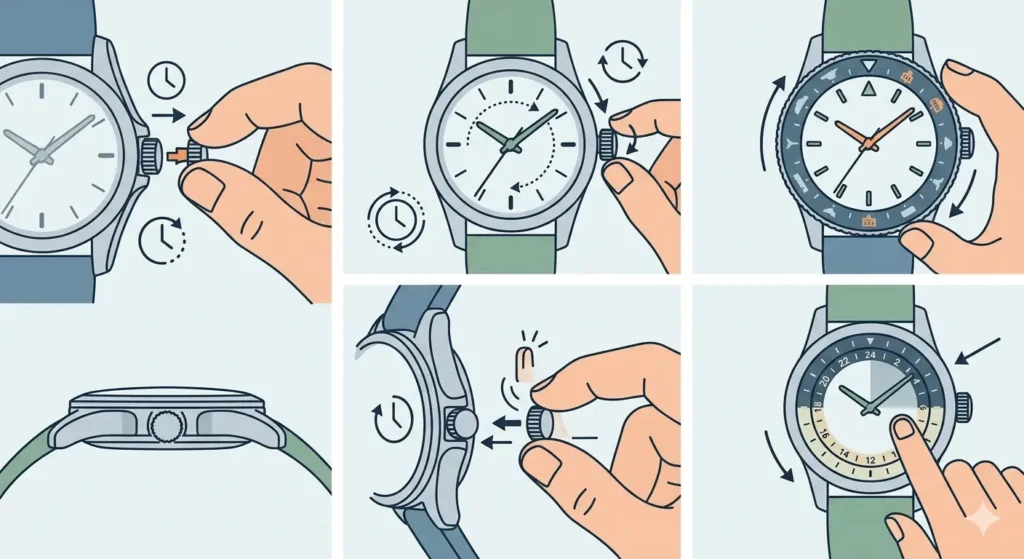
- Step 1: Pull the crown out to the second position (time-setting position) until the seconds hand stops moving
- Step 2: Rotate the crown clockwise to advance the hour and minute hands to the current local time
- Step 3: Locate the city ring on the bezel or dial and rotate it until the home city aligns with the 12 o’clock position or the current hour marker
- Step 4: Push the crown back to the normal position to resume timekeeping
- Step 5: Verify that the 24-hour ring correctly shows AM or PM by checking if the hour hand points to the appropriate half of the day
Pro-Tip: Always set the time by moving the hands forward (clockwise) rather than backward to protect the movement’s delicate gears and prevent potential damage to the date mechanism.
Method 2: Pusher-Based Setting (Digital/Hybrid Models)
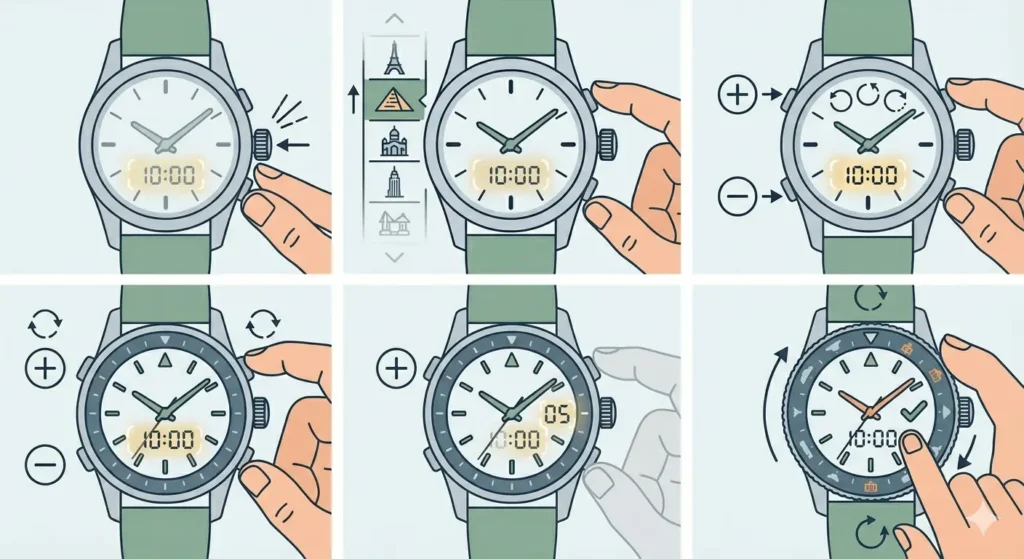
- Step 1: Press and hold the mode button until the time display starts flashing, indicating edit mode
- Step 2: Use the up/down pushers or buttons to select the home city from the list of available locations
- Step 3: Press the mode button again to advance to hour setting, then adjust using the increment buttons
- Step 4: Repeat for minutes, and if applicable, seconds
- Step 5: Press and hold the mode button to save settings and exit to normal display mode
Configuring Additional Time Zones
Once the home time is set, configuring additional time zones becomes straightforward. Most world timer watches automatically display all zones once the home city is selected, but understanding how to read and access them optimizes functionality.
Reading the City Ring Display
- Step 1: Identify the city ring on the watch bezel or outer dial section, which lists major cities representing each time zone
- Step 2: Locate the 24-hour scale positioned inside or outside the city ring
- Step 3: To find the current time in any city, trace an imaginary line from the desired city to the corresponding hour on the 24-hour scale
- Step 4: Note whether the indicated hour falls in the light or dark section of the 24-hour ring to determine if it is daytime or nighttime in that location
Rotating the Bezel for Quick Reference
- Step 1: Grasp the outer bezel ring firmly between thumb and forefinger
- Step 2: Rotate the bezel counterclockwise or clockwise to align different cities with the hour markers
- Step 3: Position frequently referenced cities at prominent positions like 12, 3, 6, or 9 o’clock for easier reading
- Step 4: Some models feature a locking mechanism – press down while rotating if the bezel feels resistant
Switching Your Primary Time Zone While Traveling
When traveling to a different time zone, world timer watches allow quick adjustment of the primary display without losing track of the home time.
- Step 1: Pull the crown to the first position (not the full time-setting position)
- Step 2: Rotate the crown to advance the hour hand in one-hour increments without affecting the minute hand
- Step 3: Count the number of time zones crossed and rotate accordingly – each click represents one hour
- Step 4: Simultaneously rotate the city ring so the new local city aligns with the 12 o’clock position
- Step 5: Push the crown back to the normal position
- Step 6: The home city now appears elsewhere on the city ring, still showing the correct home time
Pro-Tip: When crossing the International Date Line, manually adjust the date using the date-setting crown position, as automatic date mechanisms only advance forward during regular timekeeping.
Adjusting for Daylight Saving Time
Daylight Saving Time changes require manual adjustment on most world timer watches, as the mechanical or quartz movements do not automatically account for these seasonal shifts.
- Step 1: Determine which cities on the watch currently observe Daylight Saving Time by checking a reliable world time comparison tool
- Step 2: Pull the crown to the first position to adjust the hour hand independently
- Step 3: Advance the hour hand one hour forward when Daylight Saving Time begins, or one hour backward when it ends
- Step 4: For cities that do not observe DST, the 24-hour ring will now be offset by one hour – mentally add or subtract one hour when reading those zones
- Step 5: Some advanced models have a second time zone hand or city disc that can be independently adjusted – consult the manual for model-specific instructions
Using Digital World Timer Functions
Digital world timer watches offer different interfaces but provide the same core functionality with added features like alarms and multiple saved cities.
- Step 1: Press the mode button repeatedly to cycle through different display modes until reaching ‘World Time’ or ‘WT’ mode
- Step 2: Use the forward/backward buttons to scroll through the list of available cities and time zones
- Step 3: To set a city as the alternate display, press and hold the select button when the desired city appears
- Step 4: Toggle between home time and world time displays by pressing the swap or exchange button
- Step 5: Some models allow saving multiple favorite cities – enter the settings menu and add cities to the quick-access list
Reading Multiple Time Zones Simultaneously
Maximizing the efficiency of a world timer watch involves developing quick visual scanning techniques to read multiple zones without confusion.
- Step 1: Start by confirming the home city position and current home time on the main display
- Step 2: Identify the target city on the city ring that needs to be checked
- Step 3: Follow the alignment from the city name to the 24-hour scale to determine the hour in that location
- Step 4: Check the minute hand position, which remains the same for all time zones
- Step 5: Note the color or shading on the 24-hour ring – darker sections typically indicate nighttime hours (18:00-06:00), lighter sections indicate daytime
- Step 6: For precision, some watches include sub-dials showing exact times for specific zones – read these like standard analog watches
Maintaining Accuracy Across Time Zones
Keeping a world timer watch accurate requires periodic adjustments and understanding the limitations of mechanical and quartz movements.
- Step 1: Set the watch using an accurate time source like an atomic clock tab or official time server
- Step 2: Check the watch daily for the first week to establish the movement’s accuracy rate
- Step 3: Mechanical watches typically gain or lose 2-10 seconds per day – note the pattern and adjust weekly if necessary
- Step 4: Quartz world timers maintain accuracy within 15-30 seconds per month – adjust monthly or when drift exceeds tolerance
- Step 5: Service the watch every 3-5 years for mechanical movements, or every 2-3 years for quartz movements to maintain optimal performance
Tips for Effective World Timer Use
Getting the most from a world timer watch involves strategic setup and understanding practical applications for different scenarios.
- Position the three most frequently referenced cities at 12, 3, and 9 o’clock positions for instant recognition during quick glances
- Keep a small reference card in a wallet listing which cities represent which time zones, especially for less common zones like Adelaide or Newfoundland
- When scheduling international calls or meetings, use the watch to identify windows when both locations have business hours – typically when both cities show hours between 9 and 17 on the 24-hour ring
- Match the city ring to the nearest major city in the same time zone, even if the exact destination is not listed – for example, use Dubai for anywhere in UAE, or Singapore for Malaysia and western Indonesia
- Set timing alarms or use a connected online stopwatch for countdown reminders to important events in different time zones
- Double-check time zone changes during international travel by confirming with local sources, as political changes occasionally shift time zones
- Learn the UTC offset system to mentally calculate any time zone not listed on the city ring – most world timer watches show UTC/GMT as a reference point
Common Problems and Solutions
Fix 1: City Ring Does Not Align Properly
When the city ring appears misaligned with the 24-hour scale, the issue typically stems from incorrect initial setup rather than mechanical failure.
- Step 1: Pull the crown to the full time-setting position
- Step 2: Rotate the crown to move the hour hand to exactly 12 o’clock while checking that the minute hand points to 12 as well
- Step 3: Rotate the city ring until the home city aligns precisely with the 12 o’clock marker or the current hour
- Step 4: Now set the actual correct time by advancing the hour hand the appropriate number of hours
- Step 5: Verify alignment by checking a known time zone – if London shows 15:00 when it should be 15:00 GMT, the alignment is correct
Fix 2: Date Changes at Wrong Time
Date mechanisms in world timer watches advance based on the primary time display, which can cause confusion when the displayed time does not match the home location.
- Step 1: Determine if the primary display shows the actual local time or a foreign time zone
- Step 2: The date will change at midnight according to the displayed time, not the home time
- Step 3: If this creates issues, swap the primary display to show the local time zone using the city ring adjustment
- Step 4: Alternatively, accept that the date changes at an unusual hour and mentally note when the actual local date changes
- Step 5: Some watches offer independent date adjustment – pull the crown to the first position and rotate counterclockwise to advance the date manually if needed
Fix 3: Confusion Between AM and PM Hours
The 24-hour display eliminates AM/PM confusion, but interpreting it correctly requires understanding the visual cues built into the watch design.
- Step 1: Locate the color change or shading on the 24-hour ring – most watches use darker colors for hours 18-06 (nighttime) and lighter colors for hours 06-18 (daytime)
- Step 2: If the target city aligns with a number in the dark section, that city is experiencing nighttime hours
- Step 3: For cities in the light section, the time is during daytime business hours
- Step 4: When the hour hand points between the 06 and 18 positions, it is daytime at the home location; between 18 and 06 indicates nighttime
- Step 5: Cross-reference with known information – if it is 14:00 in New York, it should be daytime, confirming the watch reading is correct
Fix 4: Watch Loses Time After Crown Adjustment
Time loss after adjusting the crown usually indicates the crown was not fully pushed back to the normal position, leaving the movement partially disengaged.
- Step 1: Check if the crown is fully pushed in and flush with the case – even a 1mm gap prevents proper operation
- Step 2: For screw-down crowns, ensure the crown is screwed clockwise until resistance is felt and it cannot turn further
- Step 3: Listen for the seconds hand – if it does not tick audibly or move smoothly, the crown may not be engaged
- Step 4: Pull the crown out slightly and push it back in firmly while applying gentle pressure
- Step 5: If the problem persists, the crown tube or stem may be damaged and requires professional watchmaker attention
Frequently Asked Questions
What is the difference between a world timer and a GMT watch?
A GMT watch displays two or three time zones using additional hands on the same dial, while a world timer shows all 24 time zones simultaneously through a city ring and 24-hour scale. World timers offer instant access to any global time zone, making them ideal for frequent international travelers, whereas GMT watches provide simpler dual-time tracking suitable for monitoring one or two specific zones.
Can a world timer watch automatically adjust for time zone changes?
Traditional mechanical and quartz world timer watches require manual adjustment when changing time zones – the wearer must rotate the city ring or adjust the hour hand to reflect the new location. However, some modern smartwatches and connected world timers with GPS functionality automatically detect location changes and update the displayed time accordingly without manual intervention.
How do you read the time in a city not listed on the watch?
To read the time for a city not listed on the world timer, identify the nearest major city in the same time zone and use that reference. For example, if Bangkok appears on the city ring but Ho Chi Minh City does not, use Bangkok since both cities share the same UTC+7 time zone. Alternatively, determine the UTC offset of the unlisted city and calculate from the UTC/GMT position on the watch.
Why does the date change at the wrong time on a world timer watch?
The date complication on a world timer watch changes at midnight according to the primary displayed time, not necessarily the home time or current location time. If the primary display shows a foreign time zone, the date will advance at midnight in that zone, which may be midday or another hour in the actual location. Adjusting the primary display to show local time resolves this issue.
Do world timer watches account for Daylight Saving Time automatically?
Most mechanical and standard quartz world timer watches do not automatically adjust for Daylight Saving Time – manual adjustment is required by advancing or setting back the hour hand by one hour when DST begins or ends. Some high-end electronic or smartwatch world timers include DST databases that update automatically, but these remain exceptions rather than standard features.
How accurate are world timer watches compared to standard watches?
World timer watches maintain the same accuracy standards as their movement type – mechanical world timers typically achieve -2 to +10 seconds per day, while quartz models maintain 15-30 seconds per month. The additional complication of world time display does not affect timekeeping accuracy, as the city ring and 24-hour scale function as static reference points rather than active timing mechanisms.
Can you use a world timer watch for business calls across time zones?
World timer watches excel at coordinating international business communications by showing multiple time zones simultaneously. To schedule calls, check the 24-hour ring positions of both cities to identify overlapping business hours – when both locations show hours between 9 and 17, it indicates suitable times for professional communication. The visual reference prevents scheduling errors common with mental time zone calculations.
What happens to the world timer function when the battery dies?
In quartz world timer watches, when the battery dies, all functions stop including the main timekeeping and any digital displays. However, the city ring and 24-hour scale remain as visual references. After battery replacement, the watch requires complete reconfiguration including setting the time, date, and realigning the city ring to restore full world timer functionality.
How do you handle time zones with 30 or 45-minute offsets on a world timer?
Time zones with non-standard offsets like India (UTC+5:30) or Nepal (UTC+5:45) appear on world timer watches with their major cities on the ring. Since the hour markings only show full hours, users must mentally add the additional minutes. When the city ring shows Delhi aligned with 12, and the time reads 12:00, the actual time in Delhi is 12:30 due to the half-hour offset from the standard time zone.
Is it necessary to service a world timer watch more frequently than regular watches?
World timer watches require the same service intervals as standard watches of the same movement type – every 3-5 years for mechanical movements and every 2-3 years for quartz movements. The world time complication does not create additional wear since the city ring and 24-hour display operate independently of the core timekeeping mechanism. However, models with rotating bezels may need occasional lubrication of the bezel mechanism during regular service.
Conclusion
Mastering how to set and use a world timer watch transforms global time tracking from a mental challenge into an effortless glance at the wrist. The combination of properly configured home time, accurate city ring alignment, and practiced reading techniques enables confident coordination across all 24 time zones. Whether managing international business, planning travel itineraries, or staying connected with distant contacts, a well-maintained world timer watch serves as an indispensable tool for navigating the complexities of modern global schedules.