
Capturing stunning watch photos for Instagram requires the right techniques, lighting, and composition. This step-by-step guide shows exactly how to photograph your watch like a professional, from setting up proper lighting to editing the final image. Whether showcasing a luxury timepiece or a casual everyday watch, these proven methods will help create scroll-stopping content that attracts engagement and builds a strong watch photography portfolio on social media.
Key Takeaways
- Natural window light creates the most flattering watch photos without expensive equipment
- Clean the watch crystal and case thoroughly before every shoot to avoid visible smudges
- Position the watch at 10:10 on the dial for the most aesthetically pleasing composition
- Use a simple, uncluttered background to keep focus on the timepiece
- Shoot in portrait mode or manual focus to blur the background and emphasize the watch
- Edit photos minimally to maintain authenticity and avoid over-processed images
Preparing Your Watch and Workspace
The foundation of great watch photography starts before the camera comes out. Proper preparation ensures the timepiece looks its absolute best and the shooting environment supports professional results.
Cleaning the Watch
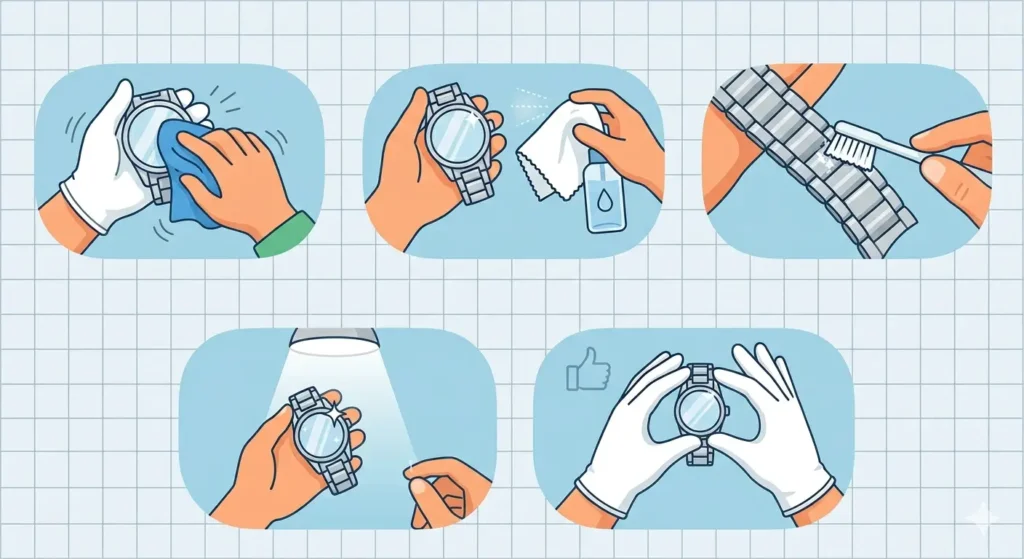
Fingerprints, dust, and oils show up dramatically in close-up photography. The watch crystal, case, and bracelet need thorough cleaning before shooting.
- Step 1: Use a microfiber cloth to wipe down the entire watch, paying special attention to the crystal
- Step 2: For stubborn smudges, lightly dampen the cloth with water or use a lens cleaning solution
- Step 3: Clean between bracelet links using a soft-bristled brush
- Step 4: Do a final inspection under bright light to catch any remaining marks
- Step 5: Handle the watch by the edges or wear cotton gloves to prevent new fingerprints
Setting Up the Background
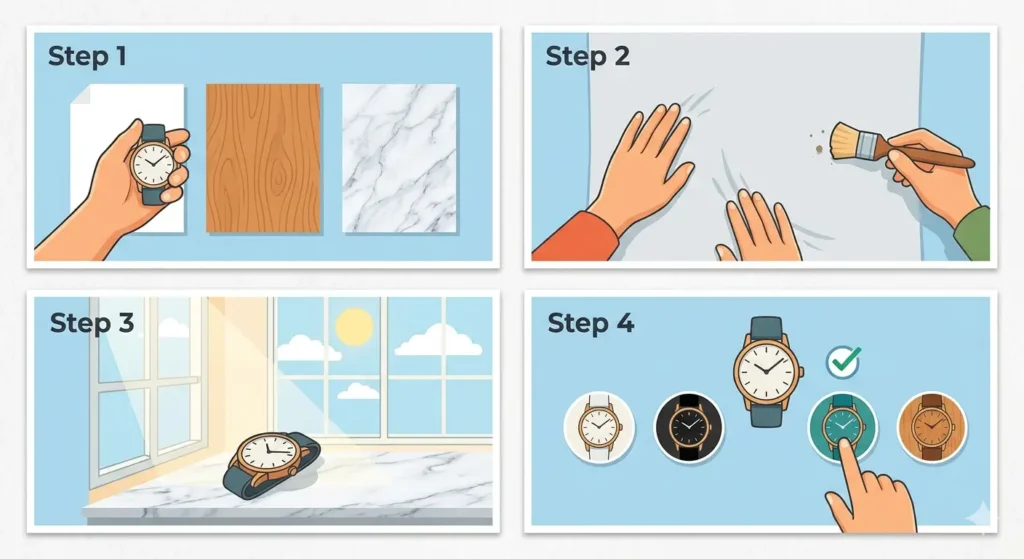
The background should complement the watch without competing for attention. Simple, clean surfaces work best for Instagram watch photography.
- Step 1: Choose a neutral surface like white paper, wood, marble, or fabric
- Step 2: Ensure the background is clean and free from wrinkles, scratches, or distracting elements
- Step 3: Position the background near a natural light source like a window
- Step 4: Test different background colors to see what complements the watch best
Pro-Tip: White and light gray backgrounds make the watch pop and are easier to edit later. Dark backgrounds create drama but require more careful lighting to avoid losing detail in black watch cases.
Setting Up Proper Lighting
Lighting makes or breaks watch photography. The goal is to show the watch details clearly while avoiding harsh reflections on the crystal and polished surfaces.
Using Natural Light
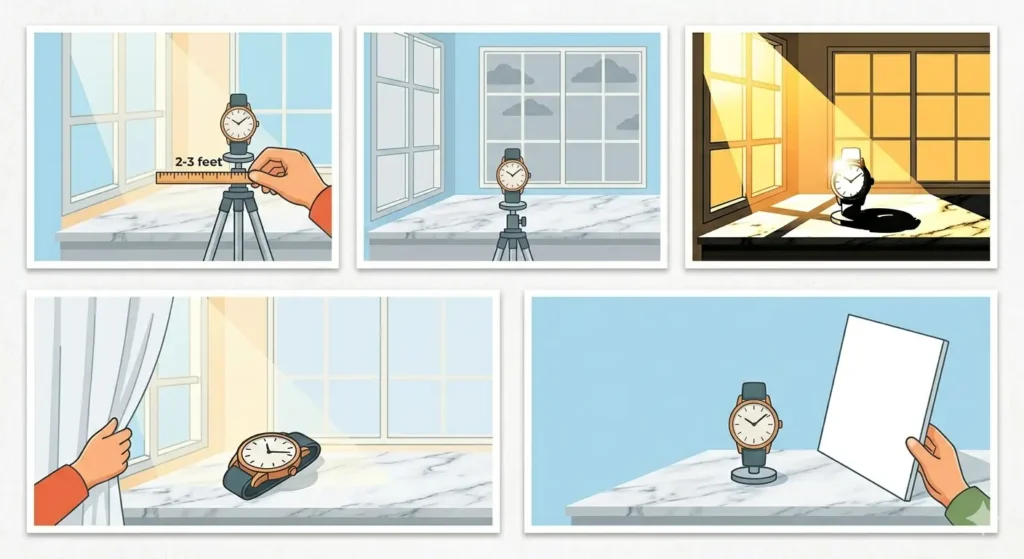
Window light provides the most accessible and flattering illumination for watch photos. Most people find that shooting near a window during daytime produces professional-looking results without additional equipment.
- Step 1: Position the setup 2-3 feet from a large window
- Step 2: Shoot during overcast days or when the sun is not directly hitting the window for soft, even light
- Step 3: Avoid direct sunlight, which creates harsh shadows and blown-out highlights
- Step 4: If the light is too harsh, hang a white sheet or translucent curtain over the window to diffuse it
- Step 5: Place a white reflector or foam board opposite the window to fill in shadows
Avoiding Reflections
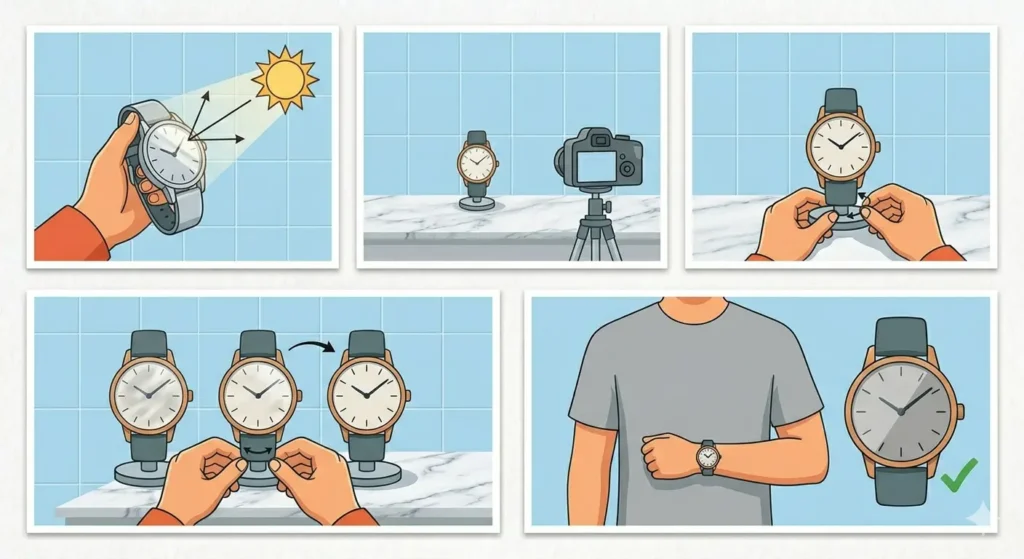
Watch crystals act like mirrors, reflecting everything in the environment including the camera and photographer.
- Step 1: Angle the watch slightly away from the light source rather than facing it directly
- Step 2: Position yourself so reflections show the clean background rather than your phone or face
- Step 3: Adjust the watch angle in small increments until reflections are minimal
- Step 4: Wear neutral-colored clothing to minimize colored reflections in the crystal
Composing the Perfect Shot
Composition determines whether the photo looks amateur or professional. Following established watch photography conventions creates images that feel polished and intentional.
Watch Positioning
The traditional 10:10 position (hands at 10 and 2) has been the industry standard for decades because it creates visual balance and frames the brand logo.
- Step 1: Set the watch hands to 10:10 on the dial
- Step 2: Position the watch face-up with the crown at 3 o’clock (right side)
- Step 3: Ensure the watch is completely level to avoid a tilted appearance
- Step 4: Leave the bracelet or strap partially visible to show context
Camera Angle and Distance
The angle and distance determine how much of the watch is in focus and how the proportions appear in the final image.
- Step 1: Hold the camera directly above the watch for a flat lay shot, or at a 45-degree angle for more depth
- Step 2: Fill the frame with the watch, leaving minimal empty space around the edges
- Step 3: Get close enough to show dial details like text and markers clearly
- Step 4: Enable grid lines on the camera to keep the watch centered and level
- Step 5: Take multiple shots from slightly different angles to have options during editing
Pro-Tip: The key is to shoot more photos than needed. Taking 20-30 shots from different angles and positions ensures at least several excellent options to choose from during the selection process.
Camera Settings and Techniques
Using the right camera settings brings out watch details and creates that professional blur effect seen in top Instagram watch accounts.
Focus and Depth of Field
Sharp focus on the dial while the background softly blurs creates visual separation and draws attention to the watch.
- Step 1: Tap on the watch dial to set focus when using a smartphone
- Step 2: Enable portrait mode if available to blur the background automatically
- Step 3: For manual camera apps, set a wide aperture (low f-number like f/2.8) to create background blur
- Step 4: Keep the entire watch face in focus while allowing the strap and background to blur slightly
- Step 5: Take test shots and zoom in to verify the text on the dial is crisp and readable
Exposure and White Balance
Proper exposure ensures the watch is neither too dark nor washed out, while correct white balance keeps colors accurate.
- Step 1: Adjust exposure so the watch case shows detail without blown-out highlights
- Step 2: Set white balance to daylight or auto when shooting near windows
- Step 3: Slightly underexpose rather than overexpose, as detail can be recovered in editing
- Step 4: Check the histogram to ensure no information is lost in highlights or shadows
Creative Composition Ideas
Beyond the standard flat lay, these creative approaches add variety to an Instagram watch feed and showcase different aspects of the timepiece.
Wrist Shots
Showing the watch on the wrist provides scale and demonstrates how it looks when worn.
- Step 1: Position the wrist naturally, avoiding awkward angles or tension
- Step 2: Keep the background simple and uncluttered
- Step 3: Ensure proper focus on the watch face rather than the hand or arm
- Step 4: Try different hand positions like resting on a table or holding a complementary object
Lifestyle Context Shots
Placing the watch in a lifestyle setting tells a story and creates aspirational content that performs well on Instagram.
- Step 1: Pair the watch with relevant items like a laptop, coffee cup, notebook, or car keys
- Step 2: Arrange props to look natural rather than staged
- Step 3: Keep the watch as the focal point while props add context
- Step 4: Use props that match the watch style (formal watch with pen and leather goods, sports watch with athletic items)
Editing Your Watch Photos
Light editing enhances the photo while maintaining authenticity. Over-editing makes watches look unrealistic and damages credibility.
Basic Adjustments
Start with fundamental edits that improve the image without dramatically altering it.
- Step 1: Straighten and crop the image to improve composition
- Step 2: Increase brightness slightly if the watch appears too dark
- Step 3: Add a small amount of contrast to make the watch pop
- Step 4: Adjust shadows to reveal detail in darker areas of the case
- Step 5: Fine-tune highlights to prevent blown-out areas on polished surfaces
Color and Clarity
Color adjustments ensure the watch looks accurate to real life, while clarity brings out fine details.
- Step 1: Adjust white balance if colors look too warm (yellow) or cool (blue)
- Step 2: Increase clarity or structure slightly to sharpen dial text and markers
- Step 3: Reduce saturation if colors appear too intense
- Step 4: Use selective editing to brighten only the watch while keeping the background neutral
- Step 5: Compare the edited version with the original to avoid over-processing
Tips for Better Watch Photography
- Shoot in the highest resolution available to allow cropping and maintain quality when posting to Instagram
- Use a tripod or prop the phone against stable objects to eliminate camera shake and blur
- Clean the camera lens before shooting to avoid soft, hazy images
- Experiment with different times of day to find the best natural light in the space
- Study successful watch Instagram accounts to understand what compositions and styles perform well
- Maintain consistency in editing style to create a cohesive feed aesthetic
- Shoot square (1:1) or portrait (4:5) formats optimized for Instagram display
- Save editing presets to apply consistent looks across multiple watch photos efficiently
- Track which photos get the most engagement using tools like the world time comparison tool to post at optimal times across different time zones
Common Problems and Solutions
Blurry Photos
Blurry images result from camera shake, poor focus, or insufficient light. Tap the screen to set focus on the watch dial, hold the phone steady or use a tripod, and ensure adequate lighting by moving closer to the window or increasing ambient light.
Harsh Reflections on Crystal
When bright reflections obscure the dial, adjust the watch angle slightly, move the light source farther away or diffuse it with a thin white fabric, and position the camera so reflections show the clean background instead of the room or photographer.
Uneven Lighting
One side of the watch appears too dark while the other is properly lit. Place a white card or foam board on the dark side to bounce light back onto the watch, move the watch farther from the window for more even light distribution, or shoot during overcast conditions when light is naturally softer.
Colors Look Wrong
The watch appears too yellow, blue, or otherwise color-shifted. Adjust white balance in camera settings before shooting or during editing, avoid shooting in mixed lighting (window light plus indoor bulbs), and check that the monitor or phone screen is displaying colors accurately.
Background Looks Messy
Distracting elements in the background pull attention from the watch. Use a larger background surface so edges do not show in frame, ensure the background is completely smooth without wrinkles or texture, and shoot with a wider aperture or portrait mode to blur the background more effectively.
Frequently Asked Questions
What is the best time of day to photograph a watch?
Mid-morning to early afternoon provides the best natural window light for watch photography. The light is bright enough to show details clearly but not so harsh that it creates strong shadows. Overcast days work exceptionally well because clouds act as a natural diffuser, creating soft, even lighting throughout the day. Avoid shooting during golden hour (sunset/sunrise) unless specifically going for a warm, dramatic look, as the orange tones can make accurate color representation difficult.
Do expensive cameras produce better watch photos than smartphones?
Modern smartphones produce excellent watch photos that are perfectly suitable for Instagram. The key factors are proper lighting, composition, and technique rather than camera cost. Smartphones with portrait mode or manual controls offer enough capability for social media watch photography. Dedicated cameras provide advantages in low light and allow more control over depth of field, but most Instagram users will not notice the difference when viewing on mobile screens. Focus on mastering lighting and composition before investing in expensive camera equipment.
Should watch photos be edited before posting to Instagram?
Light editing improves watch photos by correcting exposure, enhancing clarity, and ensuring accurate colors. However, heavy editing that dramatically alters the watch appearance damages trust and credibility. Adjust brightness, contrast, and sharpness moderately while keeping the watch looking realistic. Avoid filters that change the watch color or excessive smoothing that removes texture from the dial and case. The goal is to make the photo look as good as the watch does in person, not to create an unrealistic representation.
What backgrounds work best for watch photography?
Simple, uncluttered backgrounds keep focus on the watch. White, light gray, and natural wood are the most versatile options that work with any watch style. Marble adds elegance for dress watches, while darker backgrounds create drama for tool watches and dive watches. Avoid busy patterns, bright colors, or textured surfaces that compete for attention. The background should enhance the watch presentation without becoming a focal point itself. Using a clock tab can help plan the perfect shooting schedule for consistent results.
How close should the camera be to the watch?
Position the camera close enough that the watch fills most of the frame with minimal empty space around it, but not so close that details become distorted. For most smartphone cameras, 6-12 inches provides the ideal distance to capture the entire watch face clearly while maintaining proper proportions. Getting too close can cause focus issues and lens distortion that makes the watch look warped. Leave a small margin around the watch to allow for slight cropping adjustments during editing without cutting off any part of the timepiece.
What makes a watch photo perform well on Instagram?
High-performing watch photos combine sharp focus, clean composition, and authentic presentation. The watch should be the clear focal point with no distracting elements. Good lighting that shows dial details and case finishing attracts engagement. Consistency in editing style helps build a recognizable feed aesthetic. Photos that show the watch in context (on wrist or with lifestyle props) tend to generate more engagement than flat lays alone. Posting at optimal times when followers are active, which can be tracked using an online stopwatch for timing experiments, also significantly impacts performance.
How can reflections on the watch crystal be minimized?
Reflections are controlled by adjusting the watch angle and light position rather than eliminating light entirely. Tilt the watch slightly so the crystal reflects the clean background instead of the camera or surroundings. Position lighting at an angle rather than directly above or in front of the watch. Using diffused light from a window with a sheer curtain creates softer reflections that are less distracting. In some cases, a small reflection adds depth and dimension to the photo, so complete elimination is not always necessary or desirable.
Should the watch be set to a specific time for photos?
Setting the watch to 10:10 is the traditional standard in watch photography because the hands create a symmetrical, balanced composition that frames the brand logo. Some photographers prefer 10:08 or 10:09 for a slightly different look. The specific time matters less than ensuring the hands do not cover important dial elements like the date window, subdials, or brand name. Avoid times where the hands overlap or create awkward angles like 6:00 or 12:00, as these compositions feel static and less visually appealing.
What editing apps work best for watch photography?
Lightroom Mobile offers the most comprehensive editing tools while remaining free and accessible on smartphones. It provides precise control over exposure, color, clarity, and selective adjustments. Snapseed is another excellent free option with powerful tools like selective editing and healing brush. VSCO provides stylish presets but requires careful adjustment to avoid over-processing. For quick edits, Instagram’s built-in editor handles basic adjustments adequately. The best app is the one that feels comfortable to use consistently while achieving a natural, authentic look that represents the watch accurately.
How important is cleaning the watch before photography?
Cleaning is critically important because close-up photography magnifies every fingerprint, smudge, and dust particle. What appears minor to the naked eye becomes highly visible in photos, especially on polished cases and crystals. A thoroughly cleaned watch looks professional and well-maintained, which enhances perceived value and desirability. Taking two minutes to properly clean the watch before shooting saves significant time trying to remove marks during editing, and some smudges are impossible to fix convincingly in post-processing. This works best when making cleaning part of the pre-shoot routine for every photo session.