

Changing the battery in a Timex Weekender is a straightforward task that takes just a few minutes with the right tools and technique. This step-by-step guide walks through the entire process, from removing the case back to securing the new battery, ensuring the watch continues to keep accurate time for years to come.
Quick Summary Table
| Task | Replace Timex Weekender battery |
| Time Required | 5-10 minutes |
| Tools Needed | Small flathead screwdriver or case knife, tweezers |
| Battery Type | SR626SW (varies by model) |
| Difficulty Level | Easy |
| Cost | $2-5 for battery |
Tools and Materials Needed
Before starting the battery replacement process, gather these essential items:
- Small flathead screwdriver or watch case knife
- Tweezers (preferably non-magnetic)
- New SR626SW battery (check the old battery for exact model)
- Soft cloth or microfiber towel
- Good lighting source
Most Timex Weekender models use an SR626SW battery, but checking the existing battery first ensures getting the correct replacement. Hardware stores, watch repair shops, and online retailers stock these common button cell batteries at affordable prices.
Step-by-Step Battery Replacement Guide
Removing the Watch Band
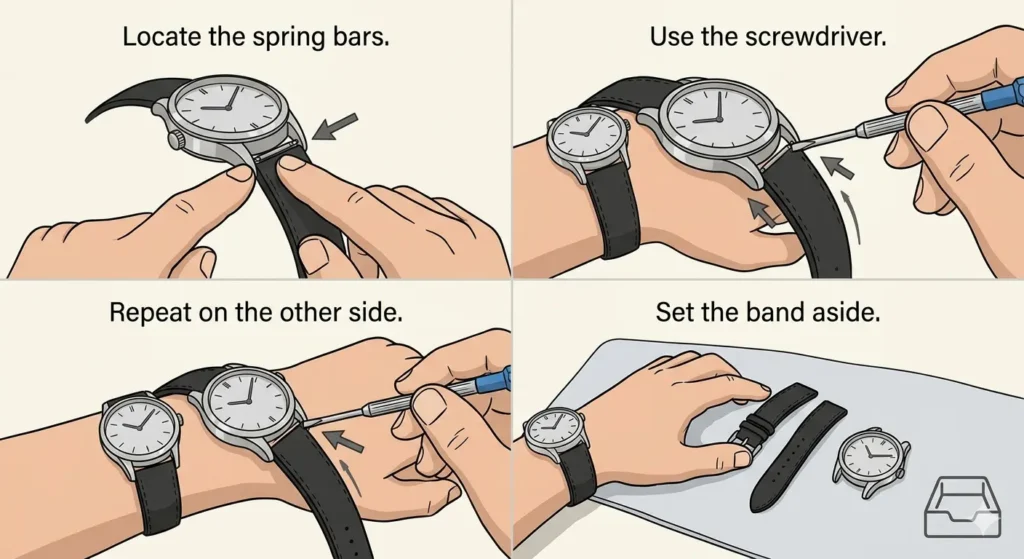
While not always necessary, removing the watch band provides better access to the case back and prevents accidental damage to the strap.
- Step 1: Locate the spring bars on both sides of the watch case where the band attaches
- Step 2: Use the flathead screwdriver to gently push the spring bar inward while pulling the band away
- Step 3: Repeat on the other side to completely remove the band
- Step 4: Set the band aside in a safe location
Opening the Case Back
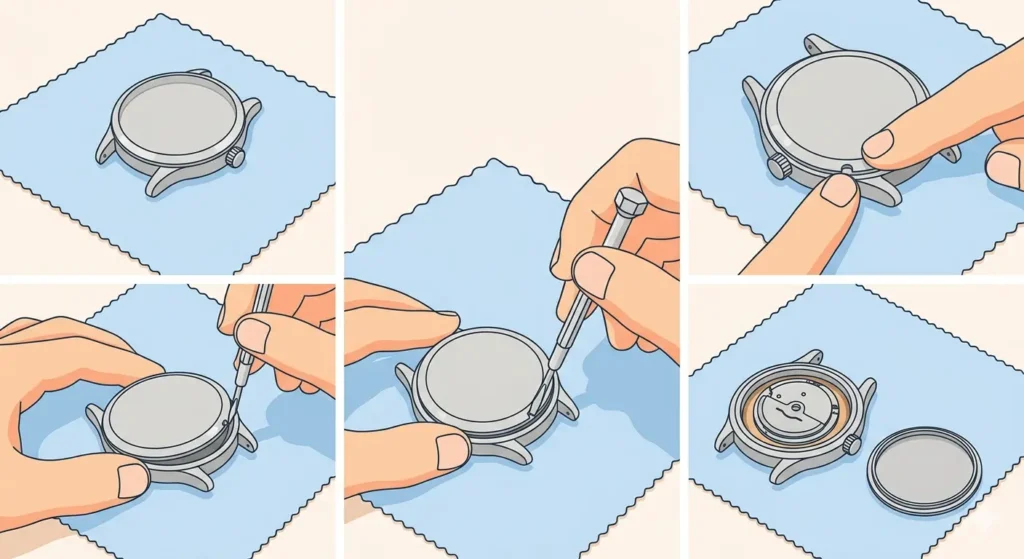
The Timex Weekender features a snap-on case back that pops off with gentle pressure applied at the correct angle.
- Step 1: Place the watch face-down on a soft cloth to protect the crystal
- Step 2: Locate the small notch or groove on the edge of the case back
- Step 3: Insert the flathead screwdriver or case knife into the notch at a shallow angle
- Step 4: Apply gentle upward pressure while twisting slightly until the case back pops off
- Step 5: Carefully remove the case back and set it aside
Pro Tip: Work slowly and avoid forcing the screwdriver too deeply, as this can scratch the case or damage the internal components. The case back should release with moderate pressure once the tool is positioned correctly in the notch.
Removing the Old Battery
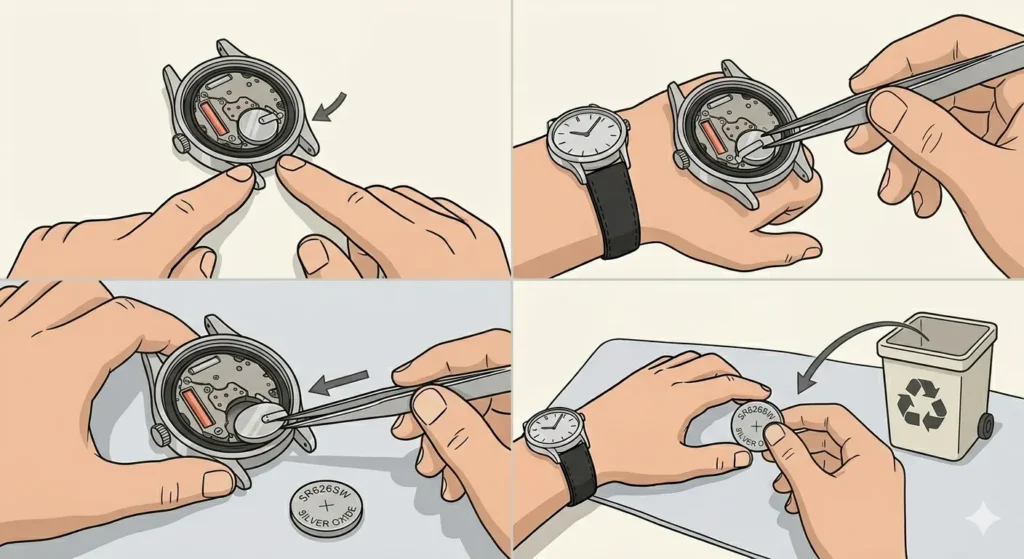
With the case back removed, the battery becomes visible along with a small plastic retaining clip.
- Step 1: Observe how the battery sits in its compartment and note the position of the retaining clip
- Step 2: Use tweezers to gently lift the retaining clip away from the battery
- Step 3: Slide the old battery out from under the clip using the tweezers
- Step 4: Check the battery for its model number (typically SR626SW or similar)
- Step 5: Dispose of the old battery properly at a recycling center
Installing the New Battery
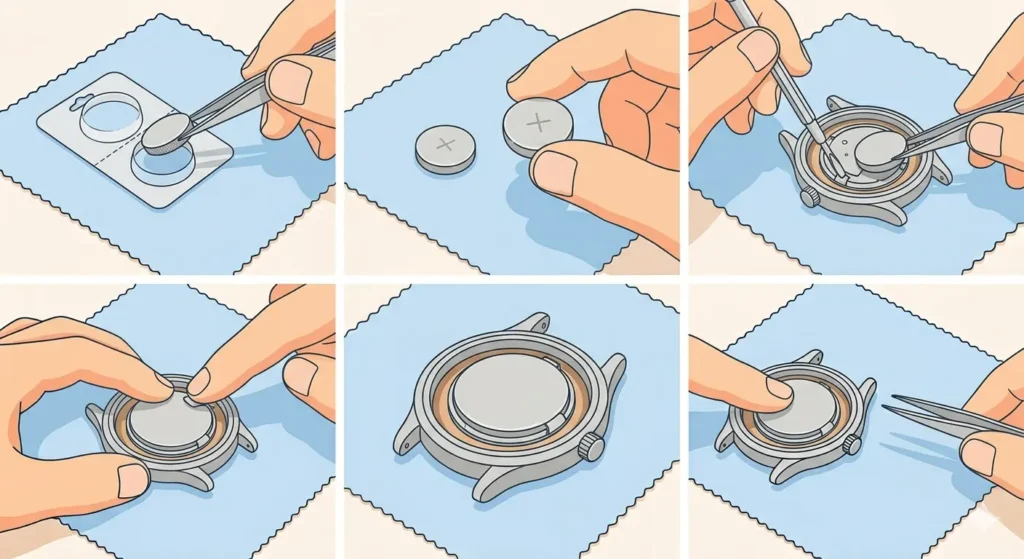
Proper battery installation ensures reliable timekeeping and prevents damage to the watch movement.
- Step 1: Remove the new battery from its packaging, handling it by the edges
- Step 2: Verify the positive (+) side faces upward (check the orientation of the old battery if uncertain)
- Step 3: Slide the new battery under the retaining clip using tweezers
- Step 4: Press down gently on the clip to secure the battery in place
- Step 5: Verify the battery sits flush and the clip holds it firmly
The watch should start ticking immediately once the new battery makes contact with the terminals. If there is no movement after 10-15 seconds, double-check that the battery is properly seated and the positive side faces the correct direction.
Closing the Case Back
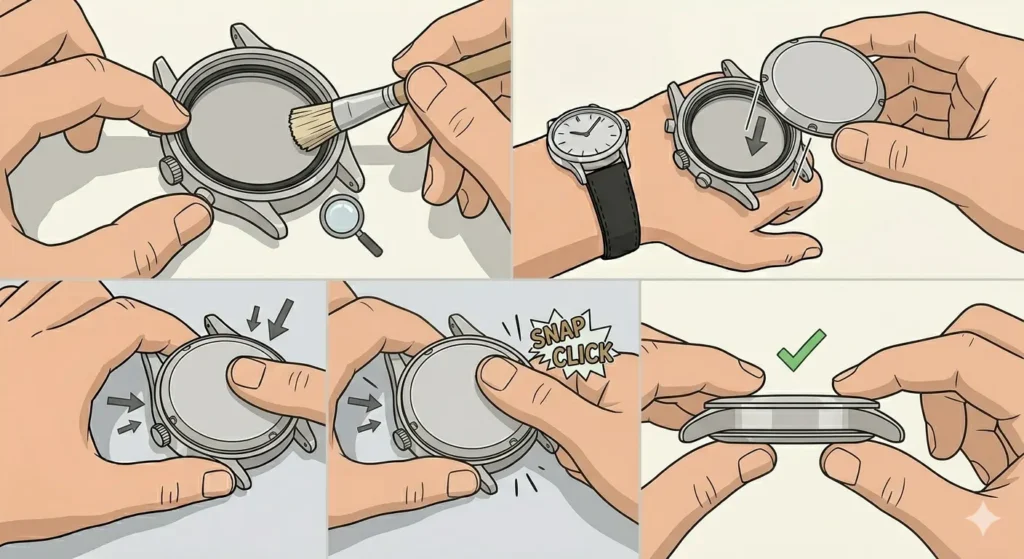
Sealing the watch properly protects the internal components from dust and moisture.
- Step 1: Inspect the rubber gasket on the case back for any damage or debris
- Step 2: Align the case back with the case body, ensuring proper orientation
- Step 3: Press down firmly around the edges of the case back with both thumbs
- Step 4: Apply even pressure until hearing a satisfying click sound
- Step 5: Check that the case back sits flush all around the perimeter
Reattaching the Watch Band
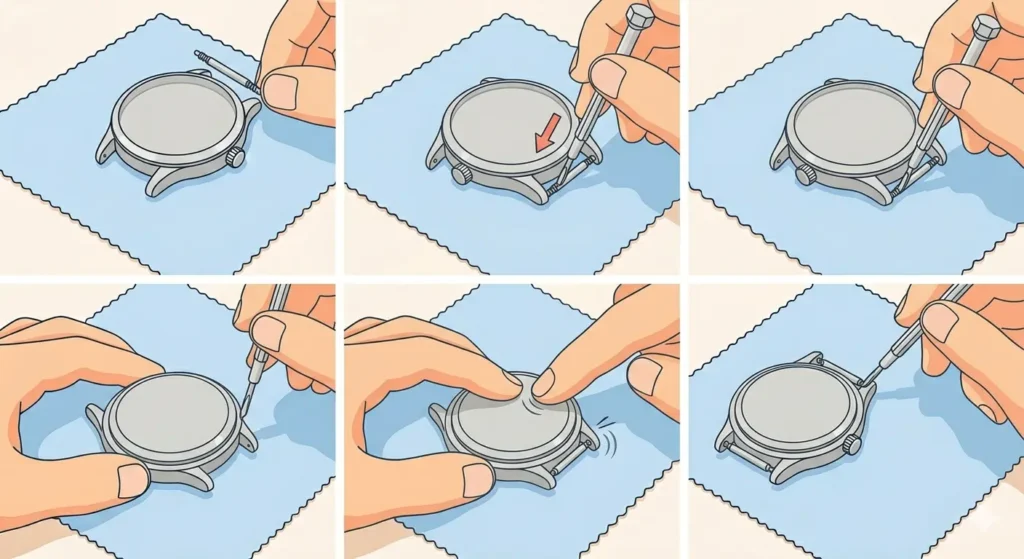
Once the case is sealed, the band can be reinstalled.
- Step 1: Insert one end of the spring bar into the lug hole on one side
- Step 2: Compress the other end of the spring bar with the screwdriver
- Step 3: Guide the compressed end into the opposite lug hole
- Step 4: Release the spring bar and ensure it clicks into place
- Step 5: Repeat for the other side of the band
Tips for Successful Battery Replacement
These practical tips help avoid common mistakes and ensure a smooth battery replacement process:
- Work in a well-lit area to see small components clearly
- Use a soft surface to prevent scratching the watch crystal
- Avoid touching the battery terminals with bare fingers, as oils can reduce battery life
- Keep track of small parts by working over a white cloth or tray
- Test the watch immediately after closing the case back
- Purchase quality batteries from reputable brands for longer life
- Consider setting the time using an online stopwatch for precise synchronization
Pro Tip: Replace the battery in a clean, dry environment away from sinks or areas where small parts could easily fall and get lost. A desk with good overhead lighting works perfectly for this task.
Common Problems and Solutions
Watch Not Running After Battery Replacement
If the watch fails to start after installing a new battery, several quick fixes usually resolve the issue:
- Verify the battery orientation – the positive side should face upward
- Check that the battery sits properly under the retaining clip
- Ensure the battery model matches the specification (SR626SW for most Weekender models)
- Confirm the battery is fresh and not expired
- Inspect the battery contacts for corrosion or debris
Case Back Won’t Snap Closed
When the case back resists closing, these steps typically solve the problem:
- Check for proper alignment of the case back with the case body
- Ensure no debris or components obstruct the closing
- Verify the gasket sits correctly in its groove
- Apply firm, even pressure around the entire perimeter
- Listen for the click indicating a proper seal
Battery Drains Quickly
A battery that dies within weeks or months instead of lasting 2-3 years suggests these potential issues:
- Low-quality or expired battery from unreliable source
- Contamination of battery terminals from skin oils
- Internal movement damage requiring professional service
- Incorrect battery type installed
Frequently Asked Questions
What type of battery does a Timex Weekender use?
Most Timex Weekender models use an SR626SW battery, also known as a 377 battery. This silver oxide button cell provides reliable power for 2-3 years of normal use. Always check the existing battery before purchasing a replacement to confirm the exact model number.
How long does a Timex Weekender battery last?
A quality SR626SW battery typically lasts between 2 to 3 years in a Timex Weekender under normal wearing conditions. Factors like temperature extremes, frequent use of the Indiglo backlight, and storage conditions can affect battery life. Some users report getting 18-24 months from standard batteries.
Can the battery be changed without removing the watch band?
Yes, the battery can be replaced without removing the band, though removing it provides better access and reduces the risk of damaging the strap. Many people successfully change the battery with the band attached by carefully positioning the watch face-down and working around the band.
Where can Timex Weekender batteries be purchased?
SR626SW batteries are widely available at drugstores, hardware stores, watch repair shops, electronics retailers, and online marketplaces. Prices typically range from $2 to $5 per battery. Buying from reputable brands like Energizer, Renata, or Sony ensures better quality and longer life.
How much does professional battery replacement cost?
Professional battery replacement at a watch repair shop or jewelry store typically costs between $10 and $20, including the battery and labor. While more expensive than doing it yourself, professional service includes testing and ensures proper sealing, which can be worth the cost for those uncomfortable with DIY repairs.
Will changing the battery void the warranty?
Timex watches typically come with a 1-year warranty that covers manufacturing defects. Opening the case back to replace the battery does not automatically void the warranty for unrelated issues, though Timex recommends professional service. Always check the specific warranty terms included with the watch.
What tools are absolutely necessary for battery replacement?
The minimum tools needed are a small flathead screwdriver or watch case knife to open the snap-back case, and tweezers to handle the small battery. Optional but helpful items include a soft cloth to protect the crystal, good lighting, and a magnifying glass for those with vision difficulties. Most households already have these basic tools.
How can the watch be set to the correct time after battery replacement?
After installing a new battery, pull the crown out to the time-setting position (usually two clicks outward) and rotate it to set the correct time. For precise synchronization, reference an accurate time source like an online clock or use a world time comparison tool for different time zones. Push the crown back in when finished to start the watch running.
Is it normal for the second hand to jump when installing a new battery?
Yes, the second hand may jump or move erratically for a few seconds immediately after installing a new battery as the movement adjusts to the fresh power source. This is completely normal. The hand should settle into smooth, regular ticks within 10-15 seconds. If irregular movement continues, the battery may not be properly seated.
Can rechargeable batteries be used in a Timex Weekender?
No, rechargeable batteries should not be used in a Timex Weekender or any quartz watch designed for single-use button cells. Rechargeable batteries have different voltage characteristics and can damage the watch movement. Always use the specified silver oxide battery type (SR626SW) for optimal performance and longevity.