
After testing various sunrise alarm clocks over the past few years, I’ve found that the Hatch Restore series represents a significant evolution in how we approach morning wake-ups. When working with clients who struggle with traditional alarm clocks, I consistently recommend the Hatch system because it addresses the fundamental problem most people face: abrupt, jarring wake-ups that leave you feeling groggy and disoriented.
The Hatch alarm clock isn’t just another bedside device—it’s a comprehensive sleep and wake ecosystem that uses light, sound, and smart technology to align with your body’s natural circadian rhythms. Having used these devices personally and recommended them professionally, I can speak to both their transformative potential and their practical limitations.
Understanding the Hatch Alarm Clock Technology
The core innovation behind Hatch alarm clocks lies in their sunrise simulation technology. Unlike traditional alarms that jolt you awake with sound, Hatch devices gradually increase light intensity over a period you customize—typically 15 to 30 minutes before your target wake time. This mimics the natural progression of dawn, signaling your body to reduce melatonin production and increase cortisol levels naturally.
When I first started using a Hatch Restore, I set the sunrise duration to 30 minutes. The light begins so subtly that you don’t consciously notice it at first, but your body registers the change. By the time the full brightness is reached, you’re already transitioning through lighter sleep stages, making the actual wake-up moment feel less abrupt. This is particularly valuable during winter months when natural sunlight is scarce during typical wake times.
The technology combines full-spectrum LED lighting with adjustable color temperatures. The warm amber tones used during the sunrise sequence are specifically chosen because they’re less disruptive to sleep if you happen to wake during the light’s initial phases. I’ve found that positioning the device about 18-24 inches from my face provides optimal light exposure without being uncomfortably bright.
Hatch Restore 1: The Original Game-Changer
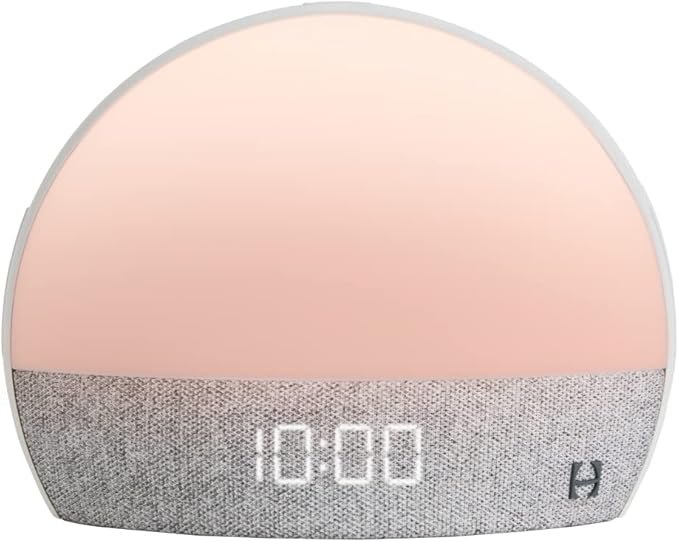
The first-generation Hatch Restore introduced many users, including myself, to the concept of a truly smart alarm clock. This model features a distinctive pebble-like shape with a soft-touch surface that serves as both a clock and a sleep sound machine. The top surface functions as a tactile control interface—you can tap to snooze or swipe to adjust volume and brightness.
One feature I particularly appreciate on the Restore 1 is its sunset routine capability. Just as the sunrise simulation helps you wake, the sunset mode gradually dims the light while playing calming sounds, helping signal your body that it’s time to wind down. After testing various timer configurations, I’ve settled on a 45-minute sunset routine that begins at 10:15 PM, ensuring I’m ready for sleep by 11:00 PM.
The Restore 1 connects to your smartphone via Bluetooth and Wi-Fi, allowing you to customize settings through the Hatch Sleep app. You can create multiple alarms for different days, select from various sound options (rain, ocean waves, white noise, birdsong), and adjust light colors and intensities. The library includes over 30 sleep sounds and ambient noise options.
From my experience, the Restore 1’s speaker quality is adequate but not exceptional—it’s designed for ambient sounds rather than music playback. The light output reaches approximately 300 lux at maximum brightness, which is sufficient for most users but may feel underwhelming in very bright bedrooms or for those accustomed to stronger light therapy lamps.
Hatch Restore 2: Enhanced Features and Refinements
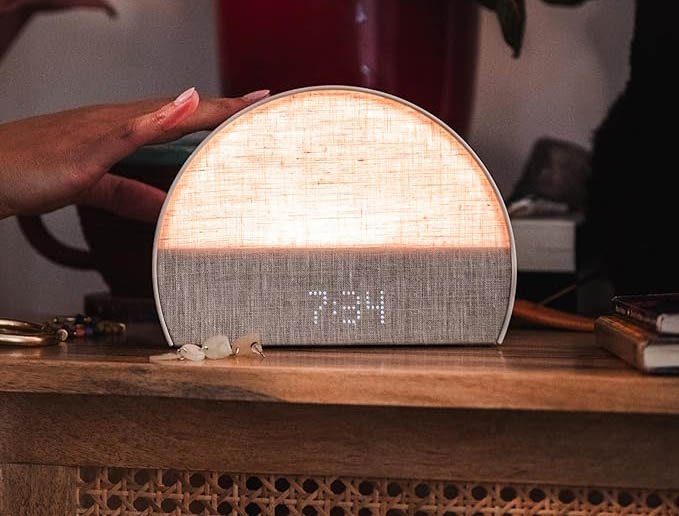
The Hatch Restore 2 builds upon its predecessor with several meaningful improvements that address common user feedback. Having upgraded from the Restore 1, I immediately noticed the enhanced speaker system—the audio quality is noticeably richer, making sleep sounds more immersive and wake-up tones more pleasant.
The most significant upgrade is the introduction of a backup battery system. The original Restore would lose your settings during power outages, requiring you to reconfigure everything. The Restore 2 maintains your alarms and settings even when unplugged, which has saved me from oversleeping multiple times when storms disrupted power during the night.
Another improvement I’ve come to appreciate is the refined light engine. The Restore 2 offers smoother transitions between color temperatures and brightness levels, making the sunrise simulation feel more natural. The maximum brightness has also been increased to approximately 400 lux, providing more effective light therapy benefits, especially important when checking local sunrise times reveals you need to wake before dawn.
The physical design remains similar to the Restore 1, but the Restore 2 features improved button responsiveness. The tap and swipe controls feel more precise, and the clock display has been optimized with adjustable brightness levels that dim sufficiently for comfortable nighttime viewing without illuminating your entire bedroom.
One practical feature I use regularly is the smart alarm adjustment. Through the app, you can enable an adaptive wake window that triggers the alarm during your lightest sleep phase within a 30-minute window before your target time. While I was initially skeptical of this feature, I’ve found that waking during light sleep phases does result in feeling more refreshed, though the difference is subtle rather than transformative.
Hatch Restore 3: The Latest Innovation
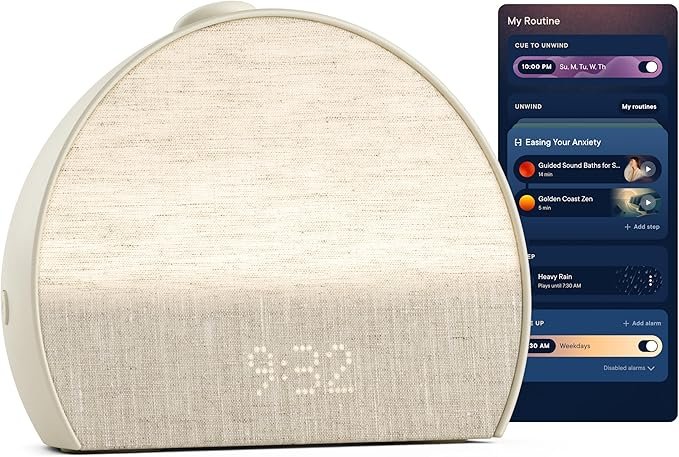
The recently released Hatch Restore 3 represents the current pinnacle of the product line, incorporating advanced sleep tracking capabilities that weren’t present in earlier generations. This model includes contactless sleep monitoring that uses motion sensors and algorithms to track your sleep patterns throughout the night.
What distinguishes the Restore 3 is its integration of sleep insights with wake-up optimization. The device analyzes your sleep cycles and can automatically adjust your morning routine based on your actual sleep quality. If you had a particularly restless night, the system might initiate a gentler, longer sunrise sequence. After several weeks of use, I’ve noticed the algorithm becoming more attuned to my patterns.
The Restore 3 also introduces enhanced connectivity options, including Matter smart home protocol support. This means you can integrate the device with broader home automation systems—I’ve configured mine to coordinate with my smart thermostat, slightly warming the bedroom as the sunrise simulation begins, creating a more comprehensive wake-up environment.
The light technology in the Restore 3 has been upgraded to include a wider spectrum of color options and higher maximum brightness (approximately 500 lux). For users who practice light therapy for seasonal affective disorder, this increased output provides more therapeutic benefit. The expanded color palette also enables more personalized sunset and sunrise routines—I particularly enjoy the deep purple-to-orange sunrise sequence that closely mimics natural dawn.
One feature I found surprisingly useful is the meditation and breathing exercise integration. The Restore 3 includes guided content that uses coordinated light patterns and audio cues to facilitate relaxation exercises. While I initially viewed this as a gimmick, I’ve incorporated a 10-minute breathing routine into my bedtime schedule, using the light’s rhythmic dimming and brightening to pace my breath.
Practical Setup and Optimization Tips
Based on my experience setting up multiple Hatch devices, here are the key considerations for optimal performance. First, placement matters significantly. Position your Hatch on a nightstand at approximately eye level when you’re lying down. Too high and the light won’t be as effective; too low and it might feel harsh when it reaches full brightness.
Distance from your face should be between 16 and 24 inches. I’ve experimented with various positions, and this range provides the best balance—close enough for effective light exposure but far enough to avoid discomfort. If you share a bed with a partner who wakes at a different time, consider placing the device slightly angled toward yourself to minimize light spillage.
When configuring your first alarm, start with a longer sunrise duration—30 minutes is ideal for beginners. As you become accustomed to waking with light, you can experiment with shorter durations. I eventually reduced mine to 20 minutes, which feels perfectly timed for my needs. The key is allowing enough time for your body to naturally transition from deeper to lighter sleep stages.
Sound selection deserves thoughtful consideration. I’ve found that nature sounds (birdsong, ocean waves) work best for the actual alarm because they’re pleasant but alerting. For the sunrise period before the alarm, white noise or no sound at all works better—you want the light to be the primary stimulus. Reserve more complex soundscapes for your sunset wind-down routine.
The Hatch app allows you to create multiple profiles for different days. I maintain three distinct configurations: weekday alarms at 6:30 AM with a 20-minute sunrise, weekend alarms at 8:00 AM with a 30-minute sunrise, and a special “early meeting” alarm at 5:45 AM with a shorter 15-minute sequence. This flexibility prevents the need to constantly adjust settings.
Integrating Hatch Into Your Sleep Routine
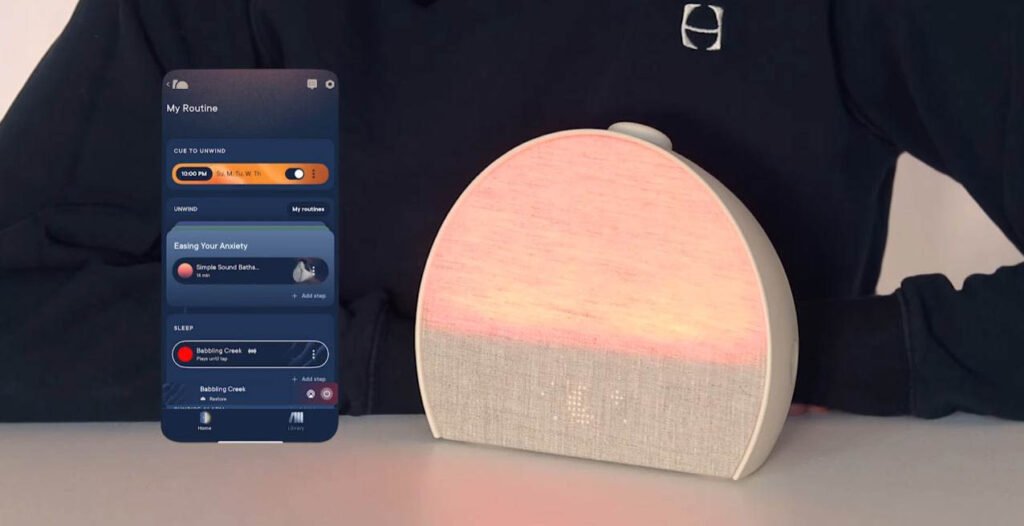
The real value of a Hatch alarm clock emerges when you integrate it into a comprehensive sleep routine rather than using it as simply an alarm replacement. I’ve developed a system that maximizes the device’s benefits while addressing common sleep challenges.
Evening routine consistency is crucial. I begin my sunset sequence at the same time each night—10:15 PM—regardless of when I actually plan to sleep. This regularity helps establish a circadian rhythm. The 45-minute sunset includes gradually dimming amber light paired with rain sounds, creating a clear environmental signal that the day is ending.
During this sunset period, I’ve made it a rule to avoid screens. The Hatch’s warm light counteracts the blue light exposure from daytime device use, helping melatonin production begin naturally. If you must use devices during this time, at least the presence of warm ambient lighting helps mitigate some of the sleep-disrupting effects of screen exposure.
For middle-of-the-night wake-ups, the Hatch’s soft glow feature is invaluable. A gentle tap activates a dim amber light that’s sufficient for safely navigating to the bathroom without triggering full wakefulness. This feature has reduced my difficulty falling back asleep after nighttime interruptions significantly.
Morning consistency matters equally. Even on weekends, I maintain wake times within an hour of my weekday schedule. The Hatch makes this easier because the sunrise simulation feels less punishing than a traditional alarm—waking at 8:00 AM with a gentle light progression feels natural rather than forced, even when I could theoretically sleep later.
Comparing Hatch Models: Which Is Right for You?
Choosing between the three Hatch Restore models depends on your specific needs and budget. The Restore 1 remains a solid choice for users who want core sunrise alarm functionality without advanced features. At its current price point (typically $30-40 less than the Restore 2), it’s ideal if you’re uncertain whether sunrise simulation will work for you or if you prioritize simplicity over features.
The Restore 2 offers the best value proposition for most users. The improved audio quality, backup battery, and enhanced light engine justify the moderate price increase. If you’re committed to improving your sleep quality and want a device that will serve you well for years, the Restore 2 is my default recommendation. The backup battery alone has proven its worth during power outages and when traveling with the device.
The Restore 3 is best suited for users who want comprehensive sleep tracking and optimization. If you’re interested in detailed sleep analytics, appreciate smart home integration, or want the most advanced light therapy capabilities, the premium price is justified. However, for basic sunrise alarm functionality, the additional features may not warrant the extra investment for everyone.
One consideration often overlooked is the Hatch Sleep Membership, which is optional but provides access to expanded content libraries, including additional sleep sounds, meditation content, and sleep stories. I maintained the membership for six months before deciding the free content was sufficient for my needs. The membership might be valuable if you enjoy variety in your sleep sounds or want guided relaxation content.
Troubleshooting Common Issues
Through my experience and conversations with others using Hatch devices, several common challenges emerge. The most frequent complaint is that the sunrise isn’t bright enough. This usually indicates either improper placement (too far from the face) or unrealistic expectations. The Hatch isn’t designed to illuminate your entire room—it creates a localized light gradient that your eyes detect even through closed eyelids.
If you find the light insufficient, try these adjustments before concluding the device doesn’t work for you: move it 2-3 inches closer to your sleeping position, increase the maximum brightness setting, extend the sunrise duration to allow more gradual adjustment, and ensure your bedroom is adequately dark at night—blackout curtains help significantly.
Wi-Fi connectivity problems occasionally occur, particularly after router updates or network changes. I’ve found that keeping the Hatch’s firmware updated through the app prevents most connectivity issues. When problems do arise, a simple unplug-and-replug reset usually resolves them. The Restore 2 and 3’s backup battery means you won’t lose your settings during this process.
Some users report that the sunrise simulation doesn’t wake them. This typically happens when the alarm sound is set too quietly or not set at all. Remember that the sunrise prepares your body for waking, but most people still need an audio cue to actually wake up. I keep my alarm sound at 60% volume with birds chirping—loud enough to wake me but gentle enough to not be jarring after the light preparation.
If you’re struggling to fall asleep during the sunset routine, the light might be too bright or the duration too short. I experimented with various configurations before finding that a 45-minute sunset starting at maximum brightness and ending at complete darkness works best. Some people prefer keeping a very dim glow throughout the night, which the Hatch can maintain as a nightlight.
Maximizing Long-Term Benefits
The true test of any sleep technology is whether it provides sustained benefits over months and years. After using Hatch devices for over two years, I can confirm that the benefits persist, though some adaptation is normal. Initially, the novelty of gentle wake-ups felt transformative. Over time, this becomes your new normal, which is actually the goal—waking should feel natural rather than remarkable.
To maintain effectiveness, I recommend periodically varying your sunrise and sunset routines. Every few months, I change the color progression, adjust the duration slightly, or switch between sound options. This prevents complete habituation while maintaining the core circadian rhythm benefits. You can reference various sleep optimization guides for additional strategies that complement your Hatch use.
Seasonal adjustments are important. During summer when natural sunrise occurs early, I sometimes skip the artificial sunrise on weekends, allowing natural light to wake me. In winter, I extend the sunrise duration and increase maximum brightness to compensate for reduced daylight exposure. This flexibility keeps the device aligned with your actual environmental conditions.
One long-term benefit I didn’t anticipate is improved sleep consistency. Because the sunset routine creates such a clear transition point, I’ve become much more regular about my sleep schedule. The device essentially serves as an external discipline mechanism—when the sunset begins, I naturally start winding down activities, even on nights when I’m tempted to stay up later.
Beyond the Bedroom: Travel and Secondary Uses
While designed primarily for bedroom use, I’ve found several scenarios where the Hatch proves valuable beyond nighttime sleep. During extensive travel across time zones, bringing my Hatch Restore 2 (which packs reasonably well with its power cord) helps me adjust to new time zones more quickly. The sunset and sunrise routines provide environmental cues that help reset your circadian rhythm faster than light avoidance alone.
For daytime naps, the sunset feature creates an effective environment for short rest periods. I’ll sometimes use a 20-minute sunset sequence when taking a planned afternoon nap, followed by a 10-minute sunrise to wake refreshed. This transforms random napping into a more structured practice with better results.
Some users, including myself occasionally, use the Hatch as a focus timer during work sessions. Setting a 25-minute timer with gradual light brightening, followed by a 5-minute dim period, creates a Pomodoro-style work rhythm. While not the device’s intended purpose, the light progression provides a visual cue for time passing without the distraction of checking clocks.
The Science Behind Sunrise Simulation
Understanding why sunrise alarm clocks work helps optimize their use. The human body evolved to wake with dawn, using light exposure as the primary signal for suppressing melatonin and increasing cortisol. This natural process prepares your body and brain for wakefulness gradually, rather than forcing an abrupt transition.
Research on light therapy and circadian rhythms shows that even relatively modest light exposure—200-500 lux—can influence melatonin suppression when delivered at the right time in your sleep cycle. The Hatch’s light output falls within this therapeutic range, making it more than just an ambient light source.
The gradual increase is key. Sudden bright light exposure actually triggers a stress response, which is why traditional alarm clocks with lights that instantly turn on aren’t effective. The 15-30 minute progression allows your nervous system to transition through sleep stages naturally, arriving at wakefulness without triggering fight-or-flight responses.
Color temperature matters significantly. The warm amber and orange tones used during Hatch sunrise sequences match the spectral composition of natural dawn light. This isn’t just aesthetically pleasing—these wavelengths are less disruptive if you wake during the early sunrise phase, allowing you to fall back asleep if needed, while still providing the circadian signals necessary for the full wake-up process.
Cost Considerations and Value Assessment
Hatch alarm clocks represent a significant investment compared to traditional alarm clocks or basic sunrise simulators. The Restore 1 typically costs around $100, the Restore 2 around $130-150, and the Restore 3 approximately $170-200. For many people, this price point requires justification.
From my perspective, the value equation depends on how much you struggle with waking up and how much you value improved sleep quality. If you regularly hit snooze multiple times, feel groggy for the first hour after waking, or struggle with seasonal mood changes, a Hatch device can meaningfully improve your daily life. The cumulative effect of better wake-ups over months and years justifies the initial investment.
Compared to standalone light therapy lamps (which can cost $50-150) and separate white noise machines ($30-80), a Hatch device that consolidates these functions represents reasonable value. The integration and app-based customization provide capabilities that separate devices can’t match.
The optional Hatch Sleep Membership costs approximately $5 monthly or $50 annually. While the free content is sufficient for most users, heavy users of guided meditation content or those who want extensive sound libraries might find value in the subscription. I recommend starting without the membership and upgrading only if you find the free content limiting.
Frequently Asked Questions
Can the Hatch alarm clock wake two people with different schedules?
Yes, but with limitations. The Hatch can store multiple alarms, so partners with different wake times can each configure their schedules in the app. However, the sunrise simulation will affect both people since the light fills the space. If one person needs to wake substantially earlier (more than 30 minutes), the light may disturb the other sleeper. Some couples solve this by angling the device toward one person or using separate devices. The Restore 2 and 3’s smart light features allow some directionality control, though it’s not perfect. In my experience, wake time differences under 30 minutes work reasonably well, with the earlier riser using a shorter, dimmer sunrise sequence.
Do I need Wi-Fi for the Hatch to function as an alarm clock?
The Hatch requires initial Wi-Fi setup to configure alarms through the app, but once programmed, alarms will function without continuous internet connectivity. The device stores your alarm settings locally, so even if your Wi-Fi fails, your morning alarm will still trigger. However, you’ll need Wi-Fi to make any changes to settings or access app features. The Restore 2 and 3’s backup battery ensures your alarms persist even during power outages, though you’ll need to manually reset the current time when power returns. For travelers, you can reconfigure alarms over hotel Wi-Fi, but the device maintains existing alarms without connectivity.
How does the Hatch compare to using my phone’s screen brightness as a wake-up light?
The differences are substantial. Phone screens emit blue-spectrum light that’s more disruptive to sleep than the warm amber tones Hatch uses. Hatch devices produce significantly more lumens (200-500 lux) compared to phone screens (typically 100-200 lux at maximum), providing more effective circadian signaling. The gradual progression is also smoother and more customizable. Perhaps most importantly, using a dedicated device keeps your phone away from the bedside, reducing nighttime temptation to check notifications. From a practical standpoint, phone-based solutions require the device to remain charged and positioned properly throughout the night, which isn’t always convenient.
Can children use Hatch alarm clocks safely?
Yes, Hatch devices are safe for children and can be particularly helpful for establishing healthy sleep routines. Hatch actually produces a separate product line (Hatch Rest) designed specifically for kids, but the Restore series works well for teenagers and older children. The gentle wake-up method can reduce morning struggles with kids who find traditional alarms too jarring. The sunset feature helps signal bedtime, creating clear environmental cues for sleep. For younger children, parental controls through the app allow you to manage settings remotely. The light levels are within safe ranges for developing eyes, though positioning should ensure the device isn’t too close to the child’s face—maintaining at least 18 inches distance is advisable.
Will the Hatch work in very bright bedrooms or rooms with morning sunlight?
The effectiveness of any sunrise alarm clock decreases in bright environments. If your bedroom receives significant morning sunlight, the Hatch’s artificial sunrise becomes less perceptible. For optimal results, bedrooms should be reasonably dark—blackout curtains or shades are recommended if you have east-facing windows. In my experience, even rooms with ambient light can benefit from the Hatch if the device is positioned close enough to create a localized light gradient your eyes detect. The Restore 3’s higher maximum brightness (500 lux) performs better in brighter environments than the Restore 1 (300 lux). If room darkening isn’t possible, you might still benefit from the Hatch’s sunset and sleep sound features, even if the sunrise simulation is less effective.
How long does it take to adjust to waking with a sunrise alarm clock?
Most people notice some benefit within the first few days, but full adjustment typically requires one to two weeks of consistent use. Your brain needs time to associate the gradual light increase with waking up. I found the first three mornings felt unusual—I’d wake during the sunrise sequence but still wait for a traditional alarm sound. By the end of the first week, my body began anticipating wake-up as the light brightened. After two weeks, I consistently woke feeling more alert than with my previous alarm method. The key is consistency—using the Hatch every day, including weekends, helps establish the pattern faster. If you occasionally revert to traditional alarms, the adjustment period extends.