
Choosing the right smartwatch for your needs requires understanding key features like compatibility, battery life, fitness tracking capabilities, and budget considerations. This guide walks through the essential factors to evaluate before making a purchase, helping buyers select a device that matches their lifestyle and requirements.
Quick Summary Table
| Factor | What to Consider |
|---|---|
| Compatibility | Match smartwatch OS with smartphone (iOS/Android) |
| Battery Life | 1-2 days (full-featured) or 5-7 days (basic models) |
| Fitness Features | Heart rate, GPS, sleep tracking, workout modes |
| Design | Size, weight, strap material, display type |
| Budget | $100-$200 (basic), $300-$500 (premium), $500+ (luxury) |
Method 1: Determine Smartphone Compatibility

The first step involves checking which smartwatches work with the current smartphone. Apple Watch requires an iPhone, while most Android-based smartwatches (Samsung Galaxy Watch, Google Pixel Watch, others) work best with Android phones. Some models offer limited cross-platform functionality, but features become restricted when pairing incompatible devices.
- Step 1: Identify the smartphone’s operating system (iOS or Android)
- Step 2: Check the smartwatch manufacturer’s compatibility list on their official website
- Step 3: Verify minimum OS version requirements (for example, watchOS 10 requires iOS 17 or later)
- Step 4: Confirm which features work cross-platform if considering a different ecosystem
Pro-Tip: Sticking with the same ecosystem (Apple-to-Apple or Android-to-Android) ensures full feature access, including call handling, message replies, and app synchronization.
Method 2: Assess Battery Life Requirements

Battery performance varies significantly across smartwatch models. Full-featured devices with always-on displays, continuous heart rate monitoring, and GPS typically last 18-48 hours. Basic fitness trackers or hybrid smartwatches can run 5-14 days on a single charge.
- Step 1: List daily activities that will use the smartwatch (workouts, sleep tracking, notifications)
- Step 2: Check manufacturer battery specifications under typical use conditions
- Step 3: Read verified user reviews about real-world battery performance
- Step 4: Consider charging habits – whether daily charging is acceptable or week-long battery is necessary
Models with shorter battery life usually offer more advanced features like ECG monitoring, blood oxygen tracking, and third-party app support. Those prioritizing convenience over features should look at extended-battery options or hybrid models.
Method 3: Evaluate Fitness and Health Tracking Features

Different smartwatches excel at different health metrics. Serious athletes need built-in GPS, advanced workout modes, and accurate heart rate sensors. Casual users might only need step counting and basic activity reminders.
- Step 1: Identify which health metrics matter most (heart rate, sleep quality, stress levels, blood oxygen, ECG)
- Step 2: Check if the watch includes built-in GPS or relies on phone GPS for route tracking
- Step 3: Review the number and types of workout modes available (running, cycling, swimming, strength training)
- Step 4: Verify water resistance rating if swimming or water sports are regular activities (5ATM minimum for swimming)
- Step 5: Look for third-party app compatibility if using specific fitness platforms like Strava or MyFitnessPal
Premium models often include medical-grade sensors for ECG readings and irregular heart rhythm notifications. These features can be valuable for monitoring cardiovascular health but come at higher price points.
Method 4: Consider Design and Comfort

A smartwatch stays on the wrist throughout the day, making comfort and style essential factors. Case size, weight, strap material, and display type all impact daily wearability.
- Step 1: Measure wrist size to determine appropriate case diameter (38-42mm for smaller wrists, 44-49mm for larger)
- Step 2: Choose between round or square display based on personal preference
- Step 3: Select strap material – silicone for workouts, leather for formal occasions, metal for versatility
- Step 4: Decide between AMOLED (vibrant colors, deep blacks) and LCD (better outdoor visibility, lower power consumption)
- Step 5: Check if the model offers interchangeable straps for different occasions
Lighter watches (under 40 grams) tend to be more comfortable for all-day wear and sleep tracking. Heavier models with premium materials may feel substantial but can become uncomfortable during extended use.
Method 5: Set a Realistic Budget

Smartwatch prices range from under $100 to over $1,000. Understanding what features each price tier offers helps narrow down options without overspending.
- Step 1: Define the maximum budget before browsing to avoid impulse purchases
- Step 2: Research what features are available at different price points:
- $100-$200: Basic fitness tracking, notifications, 3-7 day battery
- $200-$400: Advanced health sensors, GPS, 1-2 day battery, quality build
- $400-$600: Premium materials, comprehensive health suite, cellular connectivity
- $600+: Luxury brands, titanium/sapphire materials, extensive customization
- Step 3: Compare previous generation models that often offer 90% of current features at 30-50% lower prices
- Step 4: Factor in additional costs like extra straps, screen protectors, or cellular data plans
Pro-Tip: Previous-generation flagship models from reputable brands typically provide better value than current budget options, offering superior build quality and longer software support.
Method 6: Check Smart Features and Notifications
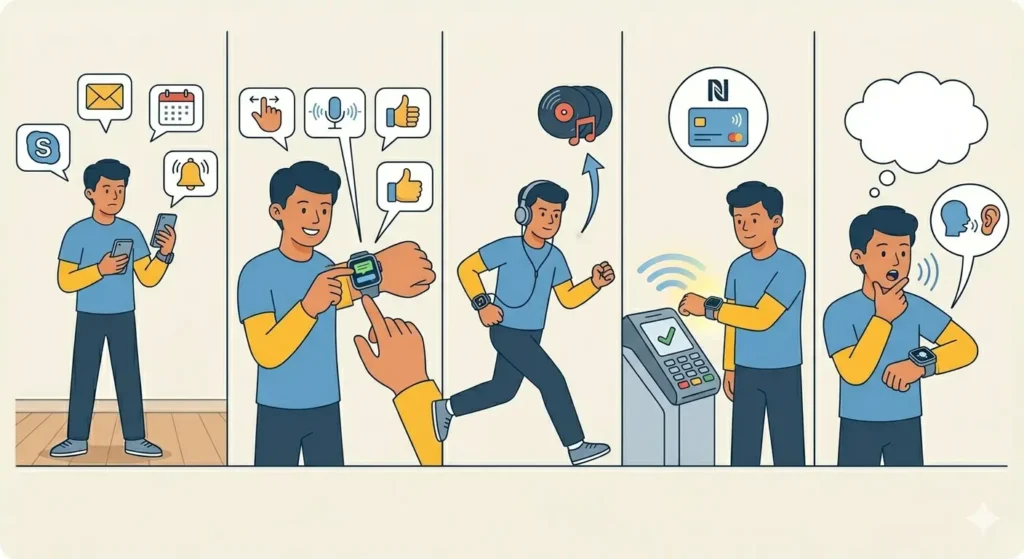
Beyond fitness tracking, smartwatches serve as notification hubs and productivity tools. The usefulness of these features depends on how the device integrates with daily workflows.
- Step 1: List which apps send frequent notifications (messages, emails, calendar, social media)
- Step 2: Verify the watch supports responding to messages from the wrist (quick replies, voice dictation, or emoji)
- Step 3: Check if the model offers music storage and playback controls for workouts without a phone
- Step 4: Determine if NFC payment support (Apple Pay, Google Pay, Samsung Pay) is important for contactless purchases
- Step 5: Review voice assistant integration (Siri, Google Assistant, Alexa) for hands-free control
Some users find extensive notifications distracting during focused work periods. Most smartwatches allow customizing which apps can send alerts, making it possible to balance connectivity with productivity.
Method 7: Research Brand Reputation and Software Updates

Long-term satisfaction with a smartwatch depends heavily on ongoing software support and manufacturer reliability. Brands with strong track records provide security patches and feature updates for several years after purchase.
- Step 1: Check how long the manufacturer supports previous models with software updates
- Step 2: Read reviews about customer service experiences and warranty claim processes
- Step 3: Verify the app ecosystem quality – number of available apps and regular updates
- Step 4: Look for user community size, as larger communities provide better troubleshooting resources
Apple, Samsung, and Garmin consistently provide 4-5 years of software support. Lesser-known brands may only update devices for 1-2 years, limiting security and feature improvements.
Tips for Making the Final Decision
- Visit physical stores to try on different models and experience actual size, weight, and interface responsiveness
- Set up time comparisons when researching international brand reviews to understand regional availability
- Read multiple professional reviews from tech publications, not just manufacturer marketing materials
- Check return policies before purchasing, allowing time to test the watch in real-world conditions
- Consider refurbished or certified pre-owned options from official channels for significant savings
- Avoid buying based solely on a single standout feature – overall balance matters more for daily satisfaction
- Use an online stopwatch to test actual battery drain during typical activities before committing to a purchase
Common Problems and Solutions
Fix 1: Smartwatch Not Syncing with Phone
Connection issues between smartwatch and smartphone often stem from Bluetooth interference or outdated apps. Restart both devices, ensure Bluetooth is enabled, and update the companion app to the latest version. Moving away from other wireless devices can also improve connection stability.
Fix 2: Inaccurate Fitness Tracking Data
Incorrect heart rate or step count readings usually indicate improper watch positioning. The sensor should sit flush against the wrist, about one finger’s width above the wrist bone. Tightening the strap during workouts and keeping the sensor clean improves accuracy significantly.
Fix 3: Faster Than Expected Battery Drain
Several features consume excessive power when left enabled continuously. Disable always-on display, reduce screen brightness, limit background app refresh, and turn off GPS when not actively tracking outdoor activities. Most smartwatches include battery usage statistics to identify power-hungry features.
Fix 4: Notifications Not Appearing on Watch
Missing notifications typically result from incorrect app permissions. Open the companion app on the phone, navigate to notification settings, and ensure all desired apps have permission to send alerts to the watch. Some phones also require battery optimization exceptions for the companion app.
Frequently Asked Questions
Can smartwatches work without a smartphone?
Most smartwatches require initial setup with a smartphone, but cellular models can function independently for calls, messages, and music streaming after setup. GPS-only models need a phone connection for full functionality but can track workouts offline and sync data later.
How long do smartwatches typically last before needing replacement?
Quality smartwatches generally last 3-5 years with proper care. Battery degradation becomes noticeable after 2-3 years, and software support usually ends around the 4-5 year mark. Physical durability varies by build quality, with premium models lasting longer than budget alternatives.
Are expensive smartwatches worth the higher price?
Premium smartwatches justify higher costs through better build materials, more accurate sensors, longer software support, and superior battery technology. However, mid-range options ($200-$400) often provide 80-90% of flagship features at significantly lower prices, making them better value for most users.
Do smartwatches accurately track sleep quality?
Modern smartwatches track sleep stages (light, deep, REM) with reasonable accuracy, though not at medical-grade precision. The data helps identify sleep patterns and trends over time. For clinical sleep issue diagnosis, professional sleep studies remain necessary.
Can smartwatches measure blood pressure?
Most consumer smartwatches do not measure blood pressure accurately. Some Samsung models offer blood pressure monitoring but require calibration with a traditional cuff and are not available in all regions due to regulatory restrictions. Dedicated blood pressure monitors remain more reliable for medical purposes.
How often should smartwatch software be updated?
Install software updates as soon as they become available. Updates include security patches, bug fixes, and new features. Most smartwatches notify users when updates are ready and can install overnight while charging. Keeping software current ensures optimal performance and security.
Are smartwatches waterproof enough for swimming?
Smartwatches rated 5ATM (50 meters) or higher are suitable for swimming in pools and shallow water. Models with IP68 ratings resist water but are not designed for swimming. Always check specific water resistance ratings before submerging any smartwatch, and rinse with fresh water after ocean or pool use.
Can multiple smartwatches pair with one smartphone?
iPhones support pairing multiple Apple Watches simultaneously, switching between them as needed. Android phones can pair multiple Wear OS watches but typically maintain only one active connection at a time. Check specific manufacturer documentation for multi-device pairing capabilities.
Do smartwatches interfere with pacemakers or other medical devices?
Smartwatches contain magnets and emit electromagnetic signals that can potentially interfere with pacemakers and implantable cardioverter defibrillators. Keep smartwatches at least 6 inches away from such devices. Anyone with implanted medical devices should consult their physician before using a smartwatch.
How much storage space does a smartwatch need?
For basic use (notifications, fitness tracking, limited apps), 4-8GB suffices. Users planning to store music locally for phone-free workouts should look for 16GB or more. Streaming music directly from the watch to wireless earbuds requires cellular connectivity but minimal storage.