
Changing the battery in a G-Shock DW-5600 is a straightforward process that can be done at home with minimal tools. This guide walks through each step of replacing the battery safely, ensuring the watch maintains its water resistance and continues functioning properly for years to come.
Quick Summary Table
| Task | Details |
|---|---|
| Battery Type | CR2016 lithium coin cell |
| Tools Required | Small Phillips screwdriver, tweezers, soft cloth |
| Time Required | 10-15 minutes |
| Difficulty Level | Easy to Moderate |
| Water Resistance | Requires proper gasket seal |
Tools and Materials Needed
Before starting the battery replacement process, gather these essential items:
- Small Phillips head screwdriver (size #00 or #000)
- CR2016 lithium battery (replacement)
- Plastic tweezers or non-metallic prying tool
- Soft microfiber cloth
- Small container for screws
- Magnifying glass (optional but helpful)
Step-by-Step Battery Replacement Guide
Removing the Case Back
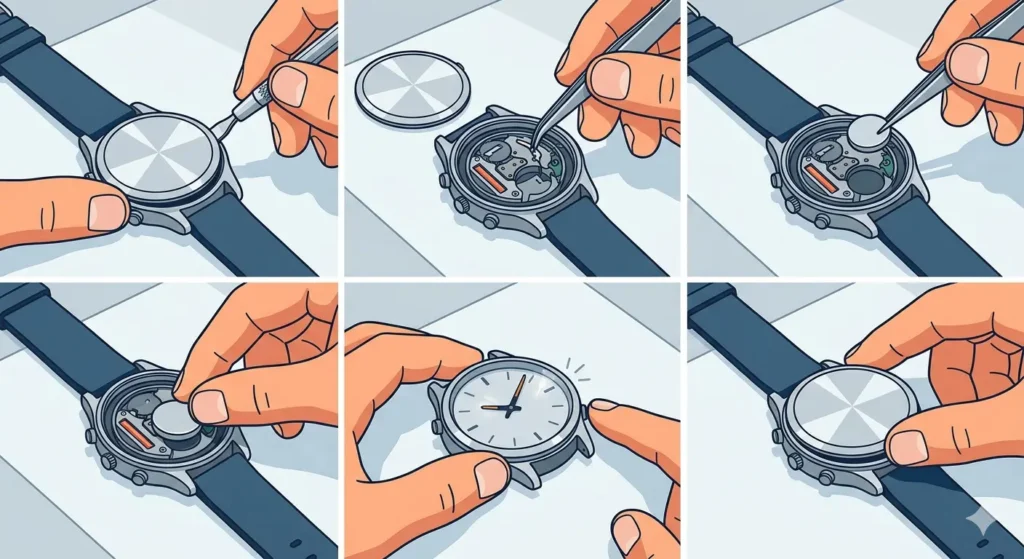
- Step 1: Place the G-Shock face-down on a soft cloth to prevent scratching the display.
- Step 2: Locate the four small Phillips screws on the case back. These screws secure the metal plate covering the battery compartment.
- Step 3: Using the small Phillips screwdriver, carefully unscrew each of the four screws in a cross pattern (opposite corners) to maintain even pressure.
- Step 4: Place the screws in a small container to prevent losing them during the process.
- Step 5: Gently lift the metal case back plate off the watch. The gasket (rubber seal) may stick slightly – use gentle pressure to separate it.
Accessing the Battery
- Step 6: Once the case back is removed, locate the battery held in place by a small metal retaining clip or bracket.
- Step 7: Carefully note the position of the battery and how the retaining clip secures it. Taking a quick photo with a phone can help remember the configuration.
- Step 8: Using plastic tweezers or a non-metallic tool, gently push the retaining clip to the side to release pressure on the battery.
Removing the Old Battery
- Step 9: Once the clip is moved aside, carefully lift the old CR2016 battery out of its compartment using tweezers.
- Step 10: Note the orientation of the battery – the positive (+) side typically faces up, but verify this before proceeding.
- Step 11: Set the old battery aside and check the battery compartment for any debris or corrosion.
Pro-Tip: Never use metal tools to remove the battery as they can cause short circuits or damage the delicate contacts. Plastic tweezers are the safest option for handling coin cell batteries in watches.
Installing the New Battery
- Step 12: Remove the new CR2016 battery from its packaging, handling it by the edges to avoid fingerprints on the contact surfaces.
- Step 13: Position the new battery in the compartment with the correct orientation (positive side up in most cases).
- Step 14: Gently press the battery down into place, ensuring it sits flat in the compartment.
- Step 15: Slide the metal retaining clip back over the battery to secure it firmly in position.
Testing the Watch
- Step 16: Before reassembling, press any button on the watch to verify the display lights up and functions properly.
- Step 17: If the display does not activate, double-check the battery orientation and ensure the retaining clip is making proper contact.
- Step 18: Once confirmed working, check the current time display. The watch may need to be reset using the world time comparison tool to verify accuracy across time zones.
Reassembling the Watch
- Step 19: Inspect the rubber gasket on the case back for any cracks, wear, or deformation. This gasket maintains water resistance.
- Step 20: Clean the gasket and the sealing surface on both the case back and watch body with a soft, dry cloth.
- Step 21: Position the gasket correctly in its groove on the case back or watch body (depending on the design).
- Step 22: Carefully align the case back plate over the watch body, ensuring the gasket seats evenly all around.
- Step 23: Insert the four Phillips screws by hand to ensure they thread properly before using the screwdriver.
- Step 24: Tighten the screws in a cross pattern (opposite corners) to distribute pressure evenly. Do not overtighten – firm and snug is sufficient.
Pro-Tip: Overtightening the case back screws can crack the plastic case or damage the threads. Apply just enough pressure until resistance is felt, then give a small additional turn.
Tips for Successful Battery Replacement
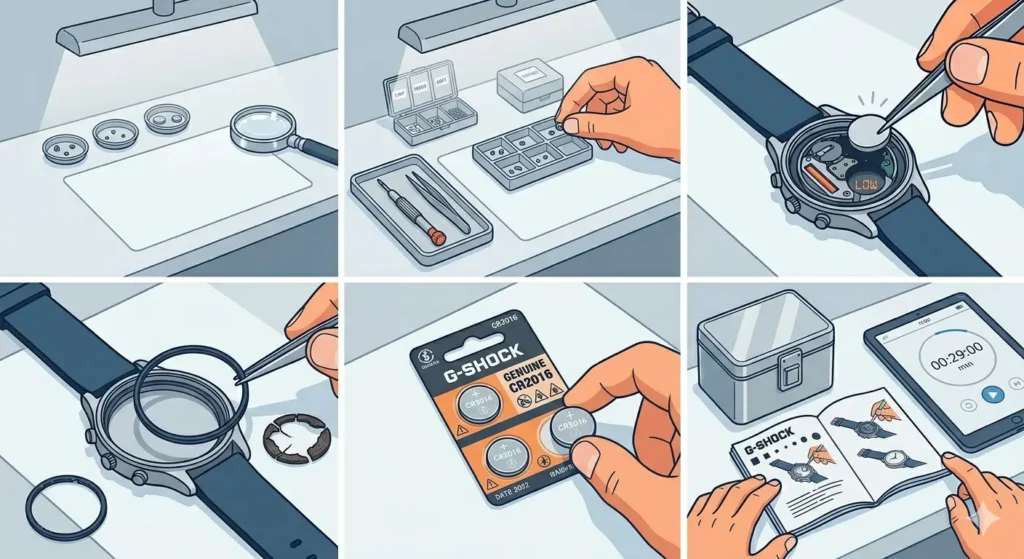
- Work in a well-lit area to see small components clearly
- Keep the workspace clean and organized to prevent losing tiny screws
- Replace the battery as soon as the low battery indicator appears to prevent potential leakage
- Consider replacing the gasket if it shows signs of wear or has been in use for several years
- Purchase genuine CR2016 batteries from reputable brands for longer life and reliability
- Store spare batteries in a cool, dry place away from metal objects
- If unsure about any step, consult the official G-Shock manual for the specific model
- Use an online stopwatch to time the replacement process – it typically takes 10-15 minutes for first-time attempts
Common Problems and Solutions
Display Does Not Turn On After Battery Installation
This usually indicates incorrect battery orientation or poor contact with the retaining clip. Remove the battery and verify the positive (+) side faces the correct direction. Ensure the retaining clip firmly presses against the battery surface.
Case Back Screws Won’t Tighten Properly
Cross-threaded screws can occur if forced at an angle. Back out the screw completely and restart, ensuring it threads smoothly by hand first. If a screw spins without tightening, the plastic threads may be stripped and require professional repair.
Watch Works But Loses Water Resistance
An improperly seated gasket is the most common cause. Remove the case back again and inspect the gasket for correct positioning in its groove. The gasket must sit evenly around the entire perimeter without twists or gaps.
Battery Drains Quickly After Replacement
Low-quality or counterfeit batteries often fail prematurely. Always purchase CR2016 batteries from trusted suppliers. Additionally, verify no moisture entered the case during the replacement process, as this can cause corrosion and increased power drain.
Screws Are Too Tight to Remove
Apply steady, firm pressure while turning counterclockwise. If screws resist, ensure the screwdriver bit fits snugly in the screw head. A slightly larger or worn screwdriver can slip and strip the screw head.
Maintaining Water Resistance
The DW-5600 offers 200-meter water resistance when properly sealed. After battery replacement, the gasket must create a complete seal to maintain this rating. While home battery replacement is possible, the watch should undergo a pressure test at a watch shop if it will be used for swimming or diving. Professional testing ensures the seal remains intact and water-tight.
For everyday wear and occasional water exposure, a properly installed gasket provides adequate protection. Avoid exposing the watch to hot water or steam immediately after battery replacement, as temperature changes can affect seal integrity.
When to Seek Professional Service
While battery replacement is manageable for most people, certain situations warrant professional attention. If the watch has sentimental value, serves as a primary timekeeping tool for work, or will be used in water activities, professional service provides peace of mind. Watch repair shops have specialized tools for pressure testing and gasket replacement that ensure complete water resistance.
Additionally, if corrosion is visible in the battery compartment, or if the watch has experienced water damage previously, a professional can clean and inspect internal components thoroughly. The cost of professional battery replacement typically ranges from $10 to $25, which includes testing and verification.
Battery Life Expectations
A CR2016 battery in a G-Shock DW-5600 typically lasts 2 to 3 years under normal use. Factors affecting battery life include frequency of backlight use, alarm settings, and environmental temperature. Heavy use of the illumination feature can reduce battery life to 18-24 months.
The watch displays a low battery indicator (typically ‘BT’ or a flashing display) when approximately 10-15% of battery capacity remains. Replacing the battery promptly after this warning appears prevents unexpected failure and reduces the risk of battery leakage, which can damage internal components.
For those who frequently check different time zones, keeping track of battery replacement dates using a clock tab feature can help plan timely replacements before the battery fully depletes.
Frequently Asked Questions
What type of battery does the G-Shock DW-5600 use?
The DW-5600 uses a CR2016 lithium coin cell battery. This is a 3-volt battery measuring 20mm in diameter and 1.6mm in thickness. Using the correct battery type ensures proper fit and optimal performance.
How long does a G-Shock DW-5600 battery last?
Under typical usage conditions, the battery lasts approximately 2 to 3 years. Heavy use of features like the backlight, alarms, and stopwatch functions can reduce this to 18-24 months.
Can battery replacement void the G-Shock warranty?
Most G-Shock warranties cover manufacturing defects but not battery replacement, which is considered routine maintenance. However, damage caused during improper battery replacement would not be covered. Check the specific warranty terms for the watch model.
Will the watch lose its water resistance after changing the battery at home?
Water resistance can be maintained if the gasket is properly cleaned, positioned, and sealed. However, without professional pressure testing, there is no guarantee the seal is completely water-tight. For activities involving water submersion, professional service with pressure testing is recommended.
What happens if the wrong battery type is installed?
Installing a CR2025 or CR2032 (thicker batteries) will not fit properly and may damage the retaining clip or case. Using a lower voltage battery will result in weak or no display. Always verify the correct CR2016 specification before installation.
How can someone tell if the battery is installed correctly?
The watch display should activate immediately when a button is pressed after battery installation. If the display is dim, flickers, or does not appear, the battery orientation may be incorrect or the contacts may not be properly aligned.
Is it safe to use rechargeable CR2016 batteries in a G-Shock?
No, G-Shock watches are designed for non-rechargeable lithium batteries. Rechargeable versions have different voltage characteristics (typically 3.6V vs 3.0V) and can damage the watch circuitry or provide inconsistent performance.
What should be done if the gasket appears worn or damaged?
Replace the gasket before reassembling the watch. Replacement gaskets are available from watch supply shops or online retailers. Using a worn gasket compromises water resistance and allows moisture to enter the case.
Can the battery be replaced while the watch is still running?
While technically possible, it is better to replace the battery when the low battery indicator appears. This prevents the risk of unexpected battery depletion and potential leakage, which can corrode internal components.
Why does the watch sometimes reset to 12:00 after battery replacement?
Complete power loss during battery removal causes the watch to reset to its default time. This is normal behavior. Simply set the correct time and date after confirming the new battery is functioning properly.
Final Thoughts
Replacing the battery in a G-Shock DW-5600 is a practical skill that saves time and money while extending the life of a reliable timepiece. With careful attention to detail, proper tools, and patience, the process takes just 10-15 minutes and restores full functionality to the watch. Following the steps outlined ensures the battery is installed correctly, the gasket maintains its seal, and the watch continues to perform dependably for another 2-3 years.