
Setting the time on a Timex Indiglo watch is a straightforward process that takes just a few minutes. Whether the watch has been sitting unused or the time needs adjusting after a battery change, this guide covers the exact steps to get the display showing the correct time quickly and accurately.
Quick Summary Table
| Watch Type | Main Steps | Time Needed |
|---|---|---|
| Digital Timex Indiglo | Mode button → Set button → Adjust hours/minutes | 1-2 minutes |
| Analog Timex Indiglo | Pull crown out → Rotate to set time → Push crown back | 30 seconds |
| Combo (Analog + Digital) | Separate procedures for each display | 2-3 minutes |
Setting Time on Digital Timex Indiglo Watches
Digital Timex Indiglo models feature button controls on the sides of the case. The process varies slightly depending on the specific model, but most follow a similar pattern.
Method 1: Standard Four-Button Digital Models
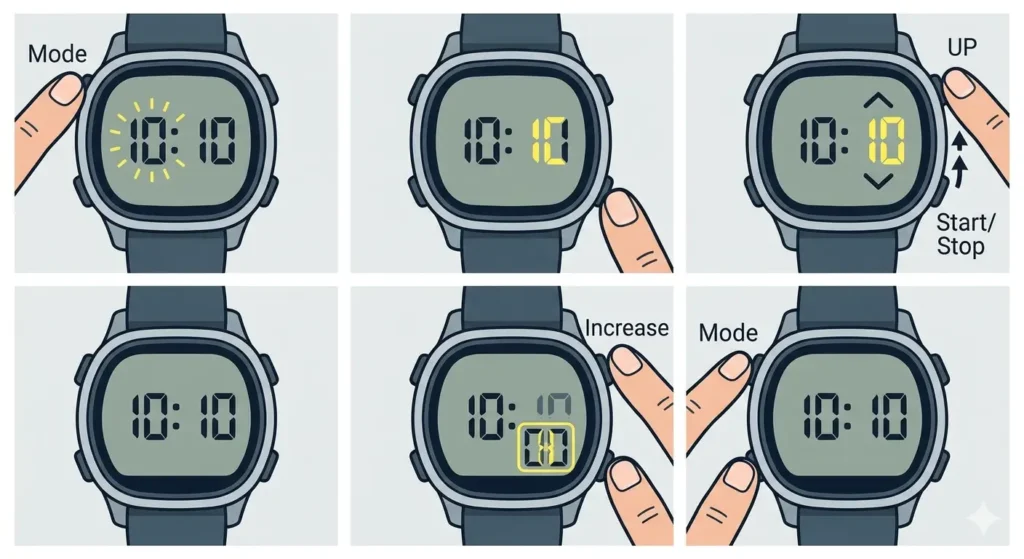
- Step 1: Press the ‘Mode’ button (usually upper left) repeatedly until the time display begins flashing. This indicates the watch has entered time-setting mode.
- Step 2: Press the ‘Set’ or ‘Start/Stop’ button (typically lower right) to select which time component to adjust. The flashing element indicates what’s currently being modified – hours, then minutes, then seconds.
- Step 3: Use the ‘Increase’ button (upper right) to change the flashing numbers. Press repeatedly to move through values quickly.
- Step 4: Once the hours show the correct value, press ‘Set’ again to move to minutes. Adjust using the same ‘Increase’ button.
- Step 5: After setting minutes, press ‘Set’ once more to reach seconds. Most users reset seconds to ’00’ for accuracy when syncing with a reliable time source like an online clock display.
- Step 6: Press ‘Mode’ to exit setting mode and return to normal time display. The watch will automatically save changes.
Pro-Tip: When setting the time, sync with an accurate reference source to ensure precision. The seconds reset function helps achieve exact synchronization – press the ‘Increase’ button when the reference clock shows exactly zero seconds.
Method 2: Three-Button Digital Models
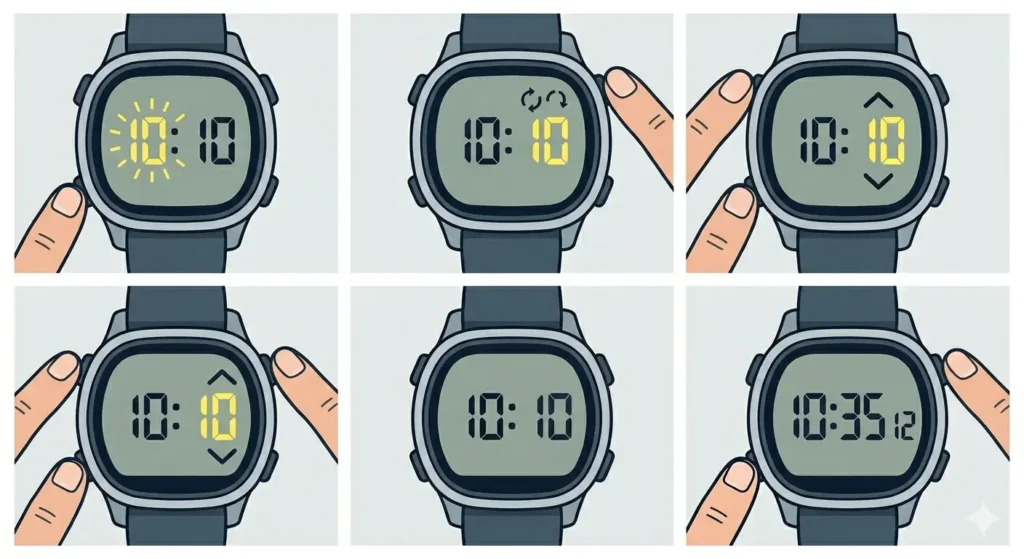
- Step 1: Hold down the ‘Set’ button (lower left) for approximately 2-3 seconds until the display starts flashing.
- Step 2: Press the ‘Mode’ button (upper right) to cycle between hours, minutes, and seconds.
- Step 3: Use the ‘Light’ button (upper left) to increase values for the currently flashing component.
- Step 4: Continue cycling and adjusting until all time components display correctly.
- Step 5: Press ‘Set’ again to confirm and exit setting mode.
Setting Time on Analog Timex Indiglo Watches
Analog Timex watches with Indiglo backlighting use the crown (the small knob on the right side) for time adjustment. This mechanical approach is simpler than digital models.
Standard Crown Adjustment Method
- Step 1: Locate the crown on the right side of the watch case. This is the small circular knob used for winding and setting.
- Step 2: Gently pull the crown straight out to the second position (the furthest position from the case). The watch may have two positions – the first adjusts date, the second adjusts time.
- Step 3: Rotate the crown clockwise or counterclockwise to move the hour and minute hands. Turn slowly and deliberately to avoid overshooting the correct time.
- Step 4: When the hands display the correct time, push the crown firmly back against the case. This resumes normal operation and ensures water resistance (if applicable).
- Step 5: Verify the hands continue moving smoothly, confirming the crown is fully engaged.
Pro-Tip: Always move analog watch hands forward (clockwise) when possible, especially past midnight. Moving hands backward can damage the internal mechanism in some watch models. If overshooting the time, continue forward through the full 12-hour cycle rather than reversing direction.
Setting Time on Combination (Analog/Digital) Timex Indiglo Watches
Some Timex Indiglo models feature both analog hands and a digital display. These require separate procedures for each component.
- Step 1: Set the analog time first using the crown method described above. Pull the crown to the time-setting position and rotate to adjust the hands.
- Step 2: Push the crown back to its normal position once analog time is correct.
- Step 3: Use the button-based method to set the digital display time. Press ‘Mode’ until the digital time begins flashing, then adjust using ‘Set’ and ‘Increase’ buttons.
- Step 4: Ensure both displays show matching times for consistency.
Understanding 12-Hour vs 24-Hour Format
Most digital Timex Indiglo watches allow switching between 12-hour (AM/PM) and 24-hour (military) time formats. This setting appears during the time-setting sequence.
- When the hours are flashing during setup, look for a small ‘P’ (PM), ‘A’ (AM), or 24-hour indicator on the display.
- Press the ‘Increase’ or ‘Light’ button to toggle between 12-hour and 24-hour formats.
- For 12-hour format, continue adjusting to set AM or PM correctly.
- For 24-hour format, hours display from 00:00 (midnight) to 23:59 (11:59 PM).
Useful Tips for Setting Timex Indiglo Watches
- Sync with reliable sources: Use official time references rather than phones or computers that might not be synchronized. Consider using a world time comparison tool when traveling or adjusting for different time zones.
- Account for date changes: When setting time near midnight, verify whether the date advances correctly. If the date changes at noon instead of midnight, the watch is 12 hours off.
- Test the Indiglo function: After setting time, press the Indiglo button (usually upper left on digital models or the crown on analog) to ensure the backlight works properly.
- Document button functions: Different Timex models use varying button layouts. Take note of which button performs each function for future adjustments.
- Set multiple alarms correctly: If adjusting time also requires resetting alarms, enter alarm mode separately after time-setting is complete.
- Consider daylight saving changes: Mark calendar reminders for spring and fall time changes to adjust the watch promptly.
Common Problems When Setting Timex Indiglo Watches
Certain issues appear frequently when adjusting Timex Indiglo watches. Here are the most common problems and their solutions.
Problem 1: Buttons Not Responding
When pressing buttons produces no response, several factors might be responsible. The watch may be in a locked mode (check for a lock icon on display), or the battery might be critically low. Try holding buttons for 2-3 seconds rather than quick presses, as some models require sustained pressure to enter setting mode. If buttons remain unresponsive, battery replacement is likely needed.
Problem 2: Time Keeps Resetting
A watch that loses time settings after adjustment usually indicates a failing battery. Even if the display still functions, insufficient power prevents the watch from maintaining settings. Replace the battery with a fresh one – most Timex Indiglo watches use CR2016 or CR2025 batteries. After replacement, reset the time and monitor for 24 hours to confirm the issue is resolved.
Problem 3: Crown Won’t Pull Out or Push In
Analog models occasionally have crown resistance issues. Never force a stuck crown, as this damages internal components. If the crown won’t pull out, try rotating it gently counterclockwise while applying light outward pressure. For crowns that won’t push back in, ensure no thread misalignment has occurred – gently rotate while pressing inward. Persistent crown problems require professional watch service.
Problem 4: Display Shows Wrong Time Format
Digital models sometimes display time in an unexpected format (24-hour instead of 12-hour, or vice versa). Re-enter time-setting mode and look for the format toggle function. This usually appears when hours are flashing – press the designated button (often ‘Light’ or ‘Mode’) to cycle between formats before adjusting the actual time values.
Problem 5: Date Changes at Wrong Time
When the date advances at noon instead of midnight, the watch hands are positioned 12 hours incorrectly. To fix this without potentially damaging the mechanism, advance the time forward 12 hours. Alternatively, move the hands through a complete 24-hour cycle, watching when the date changes to confirm proper midnight positioning.
Problem 6: Seconds Won’t Reset to Zero
Some digital models don’t have a seconds reset function, while others require specific button combinations. Check whether the ‘Increase’ button held for several seconds triggers a reset when seconds are flashing. If no reset function exists, simply set seconds as close to ’00’ as possible when synchronizing with a reference time source.
Frequently Asked Questions
How often should a Timex Indiglo watch be adjusted for accuracy?
Most Timex Indiglo watches maintain accuracy within 15-30 seconds per month. Check and adjust the time monthly if precision matters for daily activities. Quartz movements in these watches provide excellent reliability, but battery age and temperature variations can affect timekeeping. For activities requiring split-second accuracy, consider using a digital stopwatch tool as a supplement.
Can water exposure affect time-setting functions on Timex Indiglo watches?
Water-resistant Timex Indiglo watches maintain their time-setting capabilities after water exposure, provided seals remain intact. However, never attempt to pull the crown or press buttons while the watch is wet or submerged, as this compromises water resistance and allows moisture into the case. Always dry the watch thoroughly before making any adjustments.
Do all Timex Indiglo watches set the same way?
No, Timex produces dozens of Indiglo models with varying control schemes. While general principles remain consistent (buttons for digital, crown for analog), specific button combinations and sequences differ between models. The methods described in this guide cover the most common variations, but always refer to the specific model manual for exact procedures.
What does it mean when the display flashes during time setting?
Flashing indicates which time component is currently selected for adjustment. On digital models, the hours, minutes, or seconds flash to show active selection. This visual feedback confirms the watch has entered setting mode and shows exactly which value will change when adjustment buttons are pressed. No flashing means the watch is in normal display mode.
Is it harmful to change time on a Timex Indiglo watch frequently?
No, frequent time changes do not damage Timex Indiglo watches. The electronic components in digital models handle unlimited adjustments without wear. Analog models with mechanical movements tolerate regular crown adjustments as well, though excessive force should always be avoided. Adjust time as often as needed for accuracy or time zone changes without concern.
Why does the time setting not save on a Timex Indiglo watch?
Failed time saving usually indicates incomplete exit from setting mode or critically low battery power. Ensure the final step of pressing ‘Mode’ or pushing the crown fully home is completed. If settings still don’t save, replace the battery immediately. Some watches also reset if buttons are pressed in incorrect sequences – follow the exact procedure for the specific model.
How long does the battery last in a Timex Indiglo watch?
Standard Timex Indiglo batteries last 2-4 years depending on Indiglo usage frequency. Heavy backlight use drains batteries faster than normal timekeeping alone. When time-setting functions become unreliable or the display dims noticeably, battery replacement is due. Proactive replacement every 3 years prevents unexpected failures and time loss.
Can a Timex Indiglo watch be set to different time zones?
Basic Timex Indiglo models display one time zone only, requiring manual adjustment when traveling. Some advanced models include dual-time or world-time features, allowing storage of multiple zones. For standard models, simply add or subtract hours when crossing time zones. Remember to adjust both the time display and any set alarms to match the new timezone.
What should be done if buttons are stuck after time setting?
Stuck buttons often result from dirt, moisture, or debris accumulation around button edges. Clean around buttons gently with a soft, slightly damp cloth, avoiding excess moisture. For persistent sticking, use a wooden toothpick to carefully clean button edges without scratching the case. If buttons remain stuck after cleaning, professional service is recommended to prevent internal damage from forced pressing.
Does the Indiglo light affect timekeeping accuracy?
The Indiglo backlight does not impact timekeeping accuracy directly. However, frequent Indiglo use drains the battery faster, and a weak battery can eventually cause time drift. The electroluminescent technology behind Indiglo operates independently from the quartz timekeeping circuit, so activating the light does not interfere with the oscillator that maintains accurate time.