

Setting the time and date on a MoonSwatch (Bioceramic Speedmaster) is straightforward once the crown functions are understood. This iconic Swatch x Omega collaboration features a three-position crown system that controls time, date, and winding. The watch operates on a quartz movement, making it more user-friendly than mechanical alternatives while maintaining the classic Speedmaster aesthetic.
Quick Summary Table
| Crown Position | Function | Action |
|---|---|---|
| Position 0 (Pushed In) | Normal Wear | Crown flush against case |
| Position 1 (First Click) | Date Setting | Pull out one click, rotate clockwise |
| Position 2 (Fully Pulled) | Time Setting | Pull out completely, rotate either direction |
Setting the Time on Your MoonSwatch
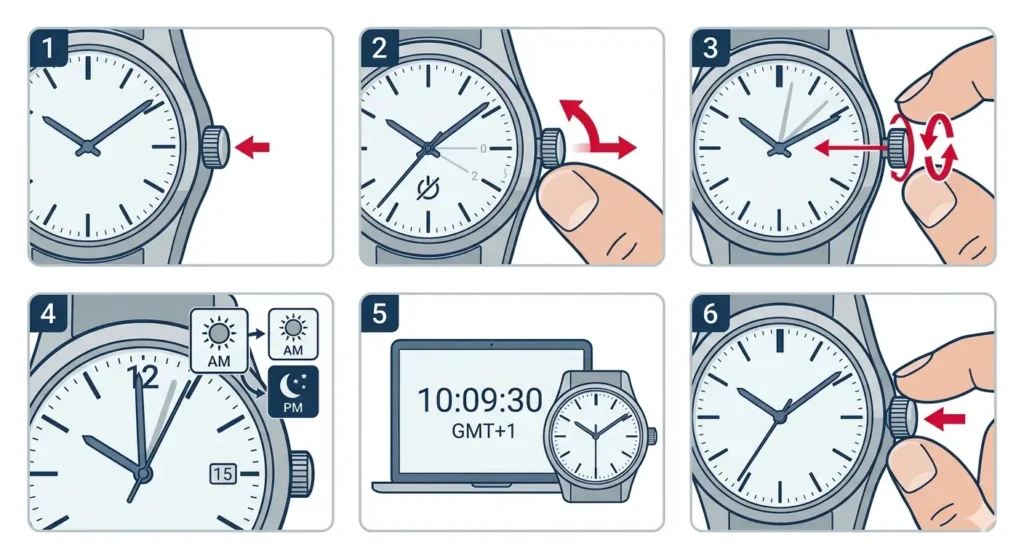
The time-setting process uses the crown at the 3 o’clock position. Unlike mechanical watches, the MoonSwatch quartz movement allows for quick adjustments without concerns about damaging internal mechanisms.
- Step 1: Locate the crown on the right side of the watch case at the 3 o’clock position.
- Step 2: Gently pull the crown out to position 2 (the furthest position). The second hand will stop moving when the crown reaches this position.
- Step 3: Rotate the crown clockwise or counterclockwise to move the hour and minute hands to the desired time.
- Step 4: If setting the time in the afternoon or evening, ensure the hour hand passes the 12 o’clock mark to switch from AM to PM. The date should change when passing midnight.
- Step 5: For precise time setting, use a reliable time reference like an online clock tool to sync your watch accurately.
- Step 6: Once the correct time is displayed, push the crown back to position 0 (flush against the case) to resume normal timekeeping.
Pro-Tip: When setting the time to match a precise reference, pull the crown out to position 2 when the second hand reaches 12 o’clock. Set the time, then push the crown back in exactly when the reference time reaches the next minute. This ensures accuracy to the second.
Setting the Date on Your MoonSwatch
The date window at the 6 o’clock position displays the current day of the month. Adjusting this feature requires using the crown’s middle position.
- Step 1: Pull the crown out to position 1 (the first click). This is halfway between the normal position and the time-setting position.
- Step 2: Rotate the crown clockwise slowly. Each full rotation advances the date by one day.
- Step 3: Continue rotating until the correct date appears in the date window.
- Step 4: Push the crown back to position 0 to complete the date setting.
Pro-Tip: Never adjust the date between 8:00 PM and 2:00 AM. During this period, the date mechanism is already engaged in changing to the next day, and forcing it can damage the gears. If the watch shows a time within this range, first advance the time to 6:00 AM, then set the date.
Understanding Crown Positions
Position 0 – Normal Operation
When the crown is pushed completely against the case, the watch operates normally. All functions run as designed, and the watch maintains water resistance. This is the position for everyday wear.
Position 1 – Date Adjustment
The first click outward from the case activates the date-setting function. Only clockwise rotation works in this position. The watch continues to run while adjusting the date, though water resistance is compromised when the crown is pulled out.
Position 2 – Time Setting
Pulling the crown to its fullest extent stops the second hand and allows time adjustment. Both clockwise and counterclockwise rotation work in this position, giving flexibility when setting the time.
Tips for Maintaining Accurate Time
- Quartz movements in the MoonSwatch typically gain or lose 10-20 seconds per month. Regular adjustments keep the watch precise.
- Avoid exposing the watch to extreme temperatures, as this can temporarily affect quartz accuracy.
- The battery typically lasts 2-3 years. When the second hand starts jumping in 4-second intervals, battery replacement is needed soon.
- Store the watch away from magnetic fields (speakers, laptop magnets, phone cases with magnets) as these can temporarily affect accuracy.
- Compare your watch time regularly using tools like a world time comparison tool when traveling across time zones.
- The Bioceramic case material is durable but can scratch. Handle the crown gently to avoid damage to the stem.
Common Problems and Solutions
Fix 1: Crown Won’t Pull Out
If the crown feels stuck, do not force it. The crown may be cross-threaded or debris may be blocking movement. Gently wiggle the crown while pulling outward with minimal force. If resistance continues, visit a watch service center rather than risk damaging the crown stem.
Fix 2: Date Changes at Noon Instead of Midnight
This indicates the watch is set 12 hours off. Pull the crown to position 2 and rotate the hands forward 12 hours. The date should click forward when passing 12 o’clock. If it clicks during this adjustment, the time was in AM when it should be PM (or vice versa). Continue setting to the correct time.
Fix 3: Date Won’t Advance
First, verify the crown is at position 1, not position 0 or 2. If the crown position is correct but the date still won’t change, the watch may be in the danger zone (8:00 PM – 2:00 AM). Advance the time to 6:00 AM using position 2, then return to position 1 to set the date.
Fix 4: Crown Feels Loose
A loose crown typically indicates wear on the crown tube or stem. This requires professional service. Continue wearing the watch carefully until servicing, but avoid pulling the crown unnecessarily and minimize water exposure.
Fix 5: Second Hand Doesn’t Stop When Crown is Pulled
The crown may not be pulled fully to position 2. Ensure a firm but gentle pull to the furthest position. If the second hand continues running despite the crown being fully extended, the movement may need professional inspection.
Frequently Asked Questions
Can the MoonSwatch be set backwards?
Yes, when the crown is at position 2, the time can be set both forwards and backwards by rotating the crown in either direction. This flexibility makes quick adjustments easier, especially when crossing time zones.
How often should the MoonSwatch be adjusted for accuracy?
Most quartz movements drift 10-20 seconds per month. Checking and adjusting monthly keeps the watch accurate. For those requiring precision timing, weekly checks against a reference like an online stopwatch ensure optimal accuracy.
Does pulling the crown damage water resistance?
Pulling the crown out does temporarily compromise water resistance. Always push the crown back to position 0 after adjustments. The MoonSwatch has basic splash resistance, but swimming or showering with the crown out can allow water entry.
What happens if the date is set during the danger zone hours?
Setting the date between 8:00 PM and 2:00 AM can damage the date-change mechanism. The gears are already engaged for the automatic midnight transition, and manual adjustment forces them in conflicting directions. This can strip gear teeth or misalign the date wheel.
Why does the date sometimes change at different times?
If the date changes noticeably before or after midnight, the watch time is set slightly fast or slow. The date mechanism begins engaging around 11:45 PM and completes by 12:15 AM. Precise time setting ensures the date changes as close to midnight as possible.
Can the crown be pulled too hard?
Yes, excessive force can detach the crown from the stem or damage internal components. The crown should move with gentle, steady pressure. If significant force is needed, something is wrong and professional service is required.
How do you know which position the crown is in?
Position 0 has the crown flush against the case. Position 1 clicks once and sits about 1-2mm from the case. Position 2 clicks again and extends approximately 3-4mm from the case. The tactile clicks and visual distance help identify each position.
Does the MoonSwatch need to be wound?
No, the MoonSwatch uses a quartz battery-powered movement, not a mechanical movement. It requires no winding. The crown does not wind the movement when rotated in position 0, unlike mechanical chronographs.
What if the date is stuck between two numbers?
This usually means the date was changed during the danger zone or the watch was impacted while the date was changing. Pull the crown to position 2 and rotate the hands forward past 12 o’clock to complete the date change. If the date remains stuck, professional service is needed to realign the date wheel.
Can time zones be changed without affecting the date?
Yes, but careful attention is needed. If changing time zones requires moving the hour hand backward and the date has already changed, first advance the time past midnight to click the date forward, then set back to the correct time. This prevents the date from being one day ahead.