

Performing an all-reset on a Citizen Eco-Drive chronograph restores the watch’s functions to factory settings, resolving issues like misaligned hands or unresponsive buttons. This comprehensive guide walks through the exact steps needed to complete a successful all-reset procedure on most Citizen Eco-Drive chronograph models.
Quick Summary Table
- Time Required: 3-5 minutes
- Difficulty Level: Easy
- Tools Needed: None (just the watch)
- Key Steps: Pull crown to position 2, press and hold both pushers simultaneously, observe needle sweep, reset hands to 12 o’clock position
- Success Indicator: All chronograph hands sweep to 12 o’clock and stop
Understanding the All-Reset Function
The all-reset function clears all stored data in the chronograph module and returns every hand to its zero position. This procedure differs from a simple time adjustment because it recalibrates the internal reference points that the watch uses to track chronograph measurements. Most people find that performing an all-reset solves problems with stuck chronograph hands, incorrect timing measurements, or buttons that seem unresponsive.
Step-by-Step All-Reset Procedure
Follow these steps carefully to perform a complete all-reset on the Citizen Eco-Drive chronograph:
Method 1: Standard All-Reset Process
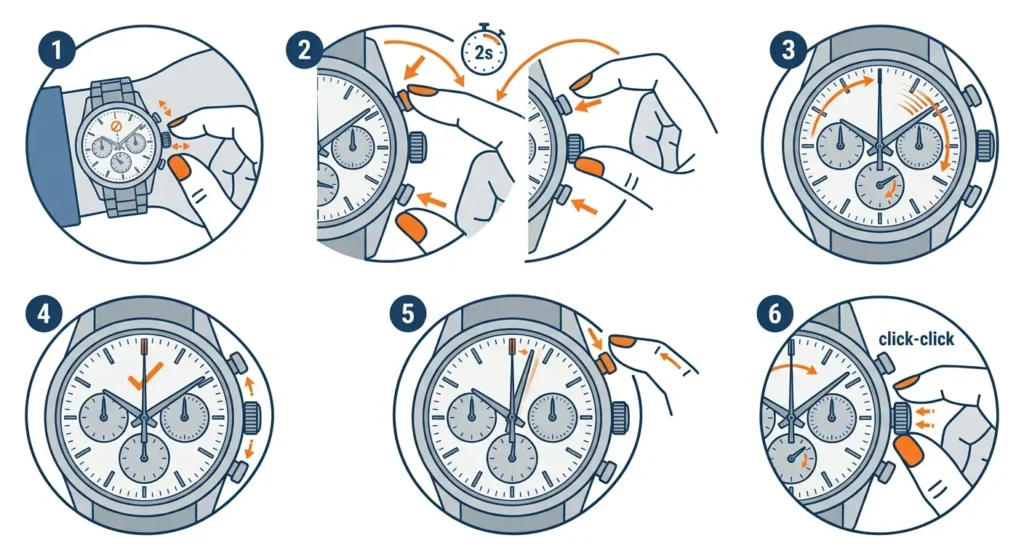
- Step 1: Pull the crown out to the second position (time-setting position). The second hand should stop moving when the crown reaches this position.
- Step 2: Press and hold both the upper and lower chronograph pushers simultaneously for at least 2 seconds. Continue holding until the next step occurs.
- Step 3: Watch for all chronograph hands to start moving. They should sweep clockwise and return to the 12 o’clock position automatically.
- Step 4: Release both pushers once all chronograph hands have stopped at the 12 o’clock position.
- Step 5: If any chronograph hand did not return to exactly 12 o’clock, use the pushers to manually adjust them to the correct zero position.
- Step 6: Push the crown back to the normal position to complete the reset process.
Pro-Tip: Before starting the all-reset procedure, make sure the watch has sufficient charge. Place it under bright light or near a window for 30 minutes if the second hand has been moving in 2-second intervals, which indicates low power. A low battery can prevent the all-reset from completing properly.
Adjusting Chronograph Hands After Reset
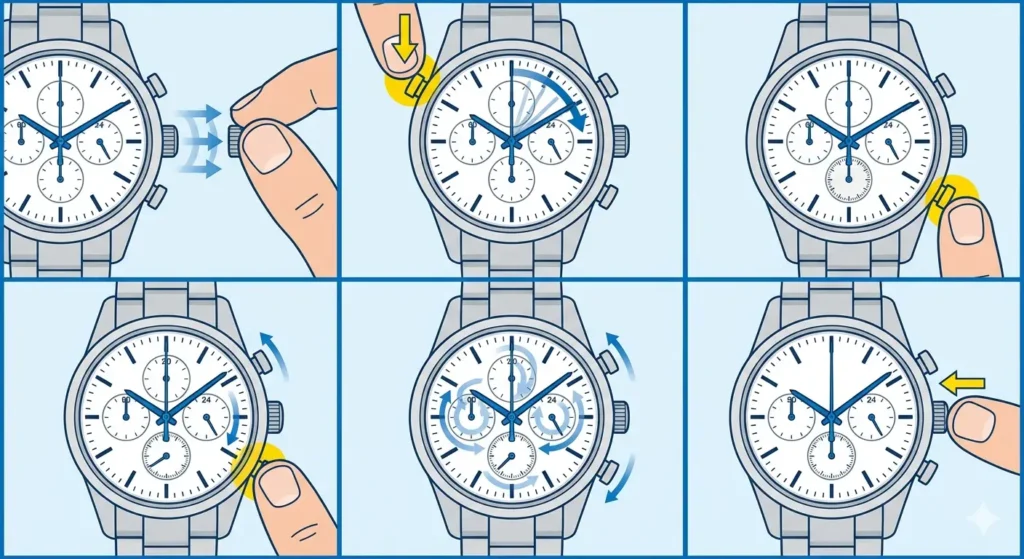
Sometimes chronograph hands need manual correction after the automatic sweep. Here’s how to fine-tune each hand:
- Step 1: Keep the crown in the second position after completing the all-reset.
- Step 2: Press the upper pusher (typically labeled A) to move the chronograph second hand. Each press advances the hand incrementally.
- Step 3: Press the lower pusher (typically labeled B) to move the chronograph minute hand to the 12 o’clock position.
- Step 4: For models with a 1/20-second hand or 24-hour hand, continue using the designated pusher until all hands align at zero.
- Step 5: Push the crown back to the normal position once all hands are correctly positioned.
Verifying the Reset Was Successful
After completing the all-reset procedure, test the chronograph functions to confirm everything works properly. Press the upper pusher once to start the chronograph – the second hand should begin moving smoothly from the 12 o’clock position. Press the same pusher again to stop it, then press the lower pusher to reset. The hand should snap back to 12 o’clock instantly. This works best when the watch has adequate light exposure in the hours following the reset.
Most people find that checking the chronograph immediately after resetting helps catch any remaining alignment issues before regular use begins. For precise timing needs, tools like an online stopwatch can help verify the chronograph’s accuracy against a reference standard.
Tips for Maintaining Chronograph Accuracy
- Avoid pressing chronograph pushers underwater, even on water-resistant models, as this can allow moisture to enter the case
- Keep the watch exposed to light regularly – Eco-Drive models need consistent charging to maintain all functions
- Perform an all-reset every 2-3 years as preventive maintenance, even without obvious problems
- Store the watch in a location with ambient light rather than a dark drawer to prevent power depletion
- If the watch will not be worn for extended periods, place it near a window or under a desk lamp periodically
Pro-Tip: Setting a reminder using a clock tab helps maintain a regular charging schedule for Eco-Drive watches, preventing power-related chronograph issues before they start.
Common Problems and Solutions
Chronograph Hands Won’t Return to Zero
When chronograph hands fail to return to the 12 o’clock position during the all-reset, the watch likely needs charging. Place it under direct sunlight or a bright LED lamp for 5-6 hours, then repeat the all-reset procedure. The key is to ensure adequate power reaches the solar cell before attempting any calibration functions.
Pushers Feel Stuck or Unresponsive
Pusher resistance usually indicates dirt or dried lubricants around the button mechanisms. Gently press each pusher several times to work through the resistance. For persistent stiffness, professional service is recommended rather than forcing the buttons, which could damage internal components.
Second Hand Moves in 2-Second Intervals
This insufficient charge indicator means the watch needs immediate light exposure. The all-reset procedure should not be attempted when this warning appears. Charge the watch under bright light for several hours until the second hand returns to normal 1-second movements, then proceed with the reset.
All-Reset Doesn’t Complete Automatically
If the chronograph hands don’t sweep automatically after holding both pushers, release the buttons and try again with firmer, simultaneous pressure. Both pushers must be pressed at exactly the same moment and held continuously. Some models require 3-4 seconds of holding rather than just 2 seconds.
Time Keeps Resetting After All-Reset
Repeated time loss after an all-reset suggests the watch needs professional service. The movement may have magnetization issues or internal component wear that prevents proper timekeeping. This situation requires examination by an authorized Citizen service center.
Frequently Asked Questions
How often should an all-reset be performed on a Citizen Eco-Drive chronograph?
An all-reset should be performed only when chronograph functions show signs of misalignment or malfunction. Routine all-resets are unnecessary for normal operation. However, performing one every 2-3 years as preventive maintenance can help maintain optimal chronograph accuracy, especially for watches used frequently for timing activities.
Will an all-reset affect the regular timekeeping of the watch?
No, the all-reset procedure only affects chronograph functions and hand positions. The watch will continue keeping regular time normally, though the time display will need to be reset to the correct hour and minute after completing the all-reset since pulling the crown stops the movement temporarily.
Can an all-reset fix a chronograph that won’t start?
Yes, an all-reset often resolves issues with chronograph functions that won’t start or stop properly. The procedure clears the internal reference positions and can resolve electronic glitches that prevent normal chronograph operation. If the chronograph still doesn’t work after a proper all-reset, the watch likely needs professional service.
Does the watch need to be fully charged before performing an all-reset?
The watch should have at least a moderate charge level before attempting an all-reset. If the second hand is moving in 2-second intervals (indicating low power), charge the watch under bright light for several hours first. Insufficient power can prevent the all-reset from completing properly or cause chronograph hands to stop in incorrect positions.
What’s the difference between an all-reset and a regular chronograph reset?
A regular chronograph reset (pressing the lower pusher) simply returns the chronograph hands to zero after a timing measurement. An all-reset completely recalibrates the internal reference points for all chronograph hands and clears any stored data or misalignments. The all-reset is a more comprehensive procedure used for troubleshooting rather than routine operation.
Can an all-reset damage the watch if done incorrectly?
The all-reset procedure itself cannot damage the watch when performed as directed. The process uses normal crown and pusher operations that the watch is designed to handle. However, forcing stuck pushers or attempting the procedure with insufficient battery charge may cause hands to stop in incorrect positions, requiring manual adjustment or professional service.
Why do some chronograph hands need manual adjustment after an all-reset?
Manual adjustment becomes necessary when hands don’t sweep to exactly 12 o’clock during the automatic reset sequence. This can happen due to low battery power, slight mechanical resistance, or accumulated operating tolerances over time. The manual adjustment feature allows precise zero-position setting that the automatic sweep might miss by a fraction of a degree.
How long does a complete all-reset procedure take?
The basic all-reset procedure takes approximately 30 seconds to 1 minute. If manual hand adjustment is needed afterward, the complete process may take 3-5 minutes. The key is to work methodically and confirm each chronograph hand reaches the correct zero position before finishing.
Will an all-reset clear recorded lap times or split times?
Standard Citizen Eco-Drive chronographs don’t store lap times or split times in memory – these watches perform real-time chronograph functions only. The all-reset clears the current hand positions and internal reference points but doesn’t affect any data storage since these models don’t have that feature.
Should an all-reset be performed after battery replacement?
Citizen Eco-Drive watches don’t have replaceable batteries – they use a rechargeable power cell that lasts for decades. However, if a capacitor replacement was performed during service, an all-reset is recommended to recalibrate the chronograph functions and ensure all hands are properly aligned to their zero positions.
When to Seek Professional Service
Most chronograph issues resolve with a proper all-reset, but some situations require professional attention. If the all-reset procedure doesn’t resolve hand misalignment after multiple attempts, or if pushers remain stuck even after charging, the watch needs service center evaluation. Unusual sounds during chronograph operation, hands that move erratically, or complete chronograph failure despite a successful all-reset indicate internal mechanical issues beyond user-level troubleshooting.
Authorized Citizen service centers have specialized tools for diagnosing movement issues, replacing worn components, and performing factory-level calibrations. Attempting repairs beyond the all-reset procedure risks damaging the precise mechanical components inside the chronograph module. For coordinating service appointments across different time zones, a world time comparison tool helps schedule calls with service centers in other regions.
Final Thoughts
The all-reset procedure is a straightforward maintenance task that restores Citizen Eco-Drive chronograph functions to factory-correct operation. With proper charging and occasional all-reset calibration, these watches deliver reliable chronograph performance for many years. The procedure requires no special tools or technical expertise – just careful attention to the sequence of steps and confirmation that all hands return to their proper zero positions. Regular light exposure and preventive all-resets every few years keep the chronograph module operating at peak accuracy.