

Setting the time on a Citizen Eco-Drive watch is a straightforward process that takes just a few minutes. Whether dealing with a standard three-hand model or a more advanced chronograph, the steps remain consistent across most Eco-Drive timepieces. This guide walks through the exact process to adjust your watch accurately.
Quick Summary Table
| Watch Type | Crown Positions | Time to Complete |
|---|---|---|
| Standard 3-Hand | 2 positions | 1-2 minutes |
| Date Display | 3 positions | 2-3 minutes |
| Chronograph | 2-3 positions | 2-4 minutes |
Key Takeaways
- Pull the crown out to the second position to adjust time
- Turn clockwise to move hands forward
- Push crown back in completely after setting
- Avoid setting date between 9 PM and 1 AM
- Ensure watch has sufficient charge before adjusting
Setting the Time on a Standard Citizen Eco-Drive Watch
Most Citizen Eco-Drive watches feature a simple crown mechanism located on the right side of the case. The crown typically has two or three positions depending on the model’s functions.
Basic Time Setting Procedure
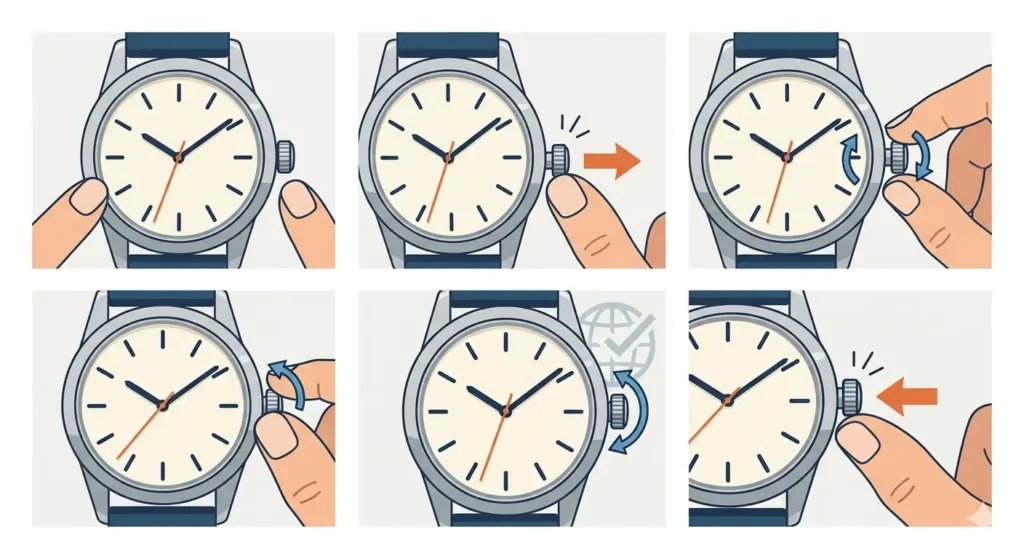
- Step 1: Locate the crown on the right side of the watch case at the 3 o’clock position.
- Step 2: Gently pull the crown out to the second position. You should feel a distinct click when it reaches this setting position.
- Step 3: Rotate the crown clockwise to advance the hands forward, or counterclockwise to move them backward.
- Step 4: Set the hands to the correct time by checking against a reliable time source like world time comparison tool.
- Step 5: Push the crown back in completely against the case until it clicks into the normal position.
Pro-Tip: Always set the time by moving the hands forward (clockwise) past 12 o’clock twice to ensure AM/PM accuracy. This prevents confusion and ensures the date changes at midnight rather than noon.
Setting Time on Eco-Drive Watches with Date Display
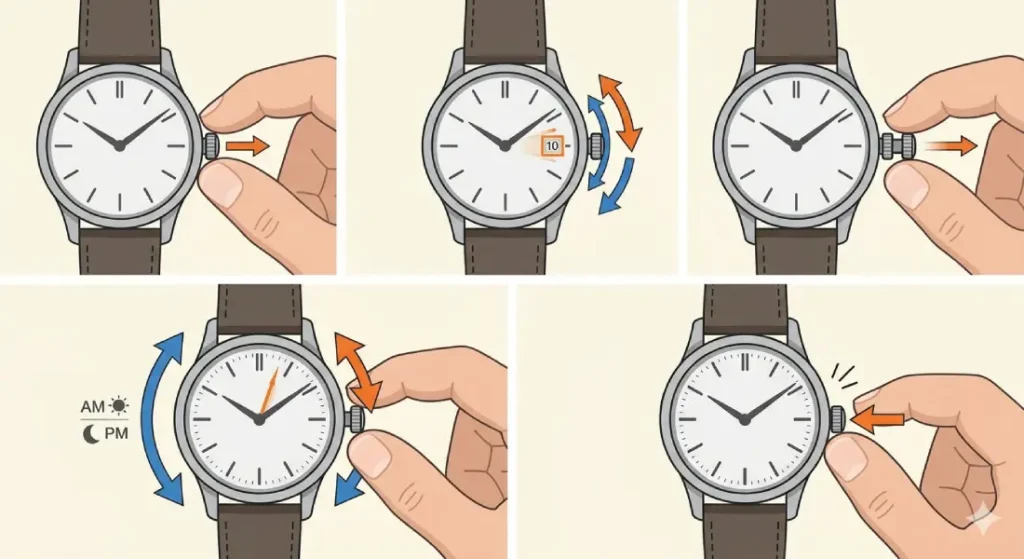
Citizen Eco-Drive models with date complications require an additional step to adjust the date window properly.
- Step 1: Pull the crown out to the first position (one click out from the case).
- Step 2: Rotate the crown clockwise to advance the date display until it shows the correct date.
- Step 3: Pull the crown out to the second position (another click outward).
- Step 4: Turn the crown to set the correct time, ensuring you pass through 12 o’clock to verify proper AM/PM setting.
- Step 5: Push the crown back through both positions until it sits flush against the case.
Important Date Setting Considerations
Never adjust the date when the time shows between 9:00 PM and 1:00 AM. During this window, the date mechanism is already engaged and preparing to change. Forcing the date adjustment during this period can damage the internal gears and compromise the watch’s accuracy.
Setting Time on Citizen Eco-Drive Chronograph Models
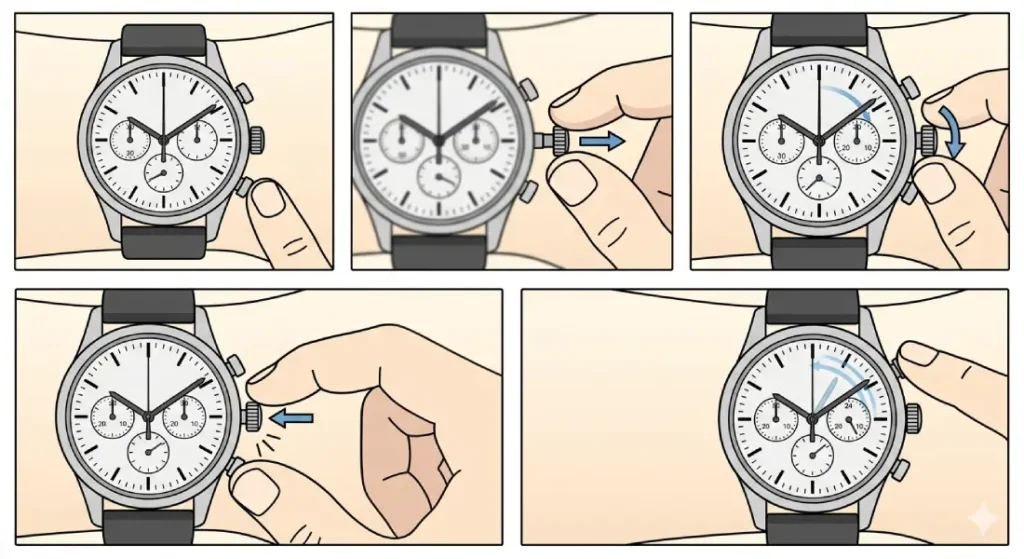
Chronograph models add complexity with additional pushers and subdials, but time setting remains similar to standard models.
- Step 1: Ensure all chronograph functions are stopped and reset to zero.
- Step 2: Pull the crown to the second position for time adjustment.
- Step 3: Rotate the crown to set the correct time, watching the main hands and subdials.
- Step 4: Push the crown back in completely.
- Step 5: Test the chronograph pushers to confirm normal operation after time setting.
Understanding Crown Positions
The crown serves as the primary control interface for Citizen Eco-Drive watches. Understanding each position prevents accidental adjustments and protects the watch mechanism.
Position 0 (Normal Position)
This is the crown’s resting state, pushed completely against the case. In this position, the watch maintains water resistance and operates normally. The crown may be screw-down on certain models, requiring counterclockwise rotation before pulling.
Position 1 (Date Setting)
The first click outward from the case activates date adjustment on models with this feature. The watch continues running while the date can be changed independently of the time.
Position 2 (Time Setting)
The fully extended position stops the second hand and allows time adjustment. The watch stops running temporarily until the crown returns to position 0.
Pro-Tip: When pulling the crown to position 2, wait until the second hand reaches the 12 o’clock position before pulling. This allows for precise time setting down to the second when using a clock tab reference.
Tips for Accurate Time Setting
- Reference an atomic clock or reliable online time source for precision
- Set the watch 30 seconds ahead, then push the crown in exactly when the reference time catches up
- Avoid setting the time while wearing the watch to prevent crown damage
- Keep the watch charged by exposing it to light regularly before and after setting
- Handle the crown gently – excessive force can strip threads or damage seals
- Clean hands before touching the crown to prevent dirt entering the case
- Note the direction that feels smoother when turning the crown and use that primarily
Common Problems and Troubleshooting
Issue 1: Hands Not Moving When Crown is Pulled
The watch likely has insufficient charge. Place the Eco-Drive watch under direct light for several hours. The power reserve may be depleted, preventing time adjustment until recharged.
Issue 2: Crown Feels Stuck or Hard to Pull
Check if the model features a screw-down crown. Rotate the crown counterclockwise several turns before attempting to pull it out. If resistance continues, moisture or debris may be present – professional service is recommended.
Issue 3: Time Loses Accuracy After Setting
Low power causes Eco-Drive watches to enter power-saving mode, affecting timekeeping. Charge the watch fully under bright light for 8-10 hours. Most models need exposure to 3,000 lux or higher for optimal charging.
Issue 4: Date Changes at Noon Instead of Midnight
The AM/PM setting is incorrect. Pull the crown to position 2 and advance the hands forward by 12 hours. Watch the date window – it should change when hands pass through 12 o’clock at the correct midnight hour.
Issue 5: Crown Won’t Push Back In
The crown may not be aligned with the stem properly. Gently rotate the crown while applying light inward pressure. For screw-down crowns, ensure threads align before turning clockwise to secure.
Maintaining Proper Watch Function
Regular maintenance extends the life and accuracy of Citizen Eco-Drive watches beyond simple time setting.
Charging Requirements
Eco-Drive technology converts light into electrical energy. Expose the watch face to light sources regularly – direct sunlight provides the fastest charge, while indoor lighting works but takes longer. A fully charged watch runs for months in darkness.
Water Resistance Care
Never pull the crown when the watch is wet or underwater. Water resistance ratings apply only when the crown sits in position 0. After beach or pool exposure, rinse the watch with fresh water and dry completely before adjusting time.
Service Intervals
Citizen recommends professional service every 5-7 years. This includes gasket replacement, movement cleaning, and accuracy adjustment. Regular service maintains water resistance and prevents internal damage from aged lubricants.
Using Time References for Precision
Accurate time setting depends on reliable reference sources. Online tools provide atomic clock synchronization that surpasses traditional methods. When setting your Eco-Drive watch, use an online stopwatch to measure seconds precisely while adjusting.
Radio-controlled and GPS-enabled devices serve as excellent references. Smartphones sync with network time servers automatically, making them convenient for quick adjustments. For ultimate precision, official time services like NIST or USNO provide millisecond accuracy.
Frequently Asked Questions
How often should time be adjusted on a Citizen Eco-Drive watch?
Most Eco-Drive watches maintain accuracy within 15 seconds per month when fully charged. Check and adjust the time every 2-3 months, or whenever you notice it drifting from the correct time. Well-maintained models may only need adjustment twice yearly.
Can the crown be damaged by pulling it too hard?
Yes, excessive force can strip the crown tube threads, bend the stem, or damage internal components. Always pull gently with steady pressure. If unusual resistance occurs, stop and consult a watchmaker rather than forcing the mechanism.
Why does the second hand skip every two seconds?
This indicates low power reserve. The watch enters power-saving mode to conserve energy. Charge the watch under bright light for several hours until the second hand returns to normal one-second intervals.
Is it safe to set the time backwards?
Yes, turning the crown counterclockwise to move hands backward is safe on modern Citizen Eco-Drive watches. However, moving forward is generally preferred as it reduces wear on the gear train and prevents date mechanism issues.
What happens if the crown is left pulled out overnight?
The watch stops running when the crown sits in position 2, draining the power reserve without recharging. Additionally, leaving the crown extended exposes internal components to dust and moisture, potentially compromising water resistance and movement cleanliness.
Do all Citizen Eco-Drive models set time the same way?
Most models follow the standard procedure, but specialized collections like Satellite Wave or Radio-Controlled models include additional features. Always consult the specific manual for your model number to confirm the correct procedure.
How can you tell if the watch is fully charged before setting time?
A fully charged Eco-Drive watch shows smooth second-hand movement without skipping. Some models include a power reserve indicator subdial. If uncertain about charge level, place the watch under bright light for 2-3 hours before adjusting time.
Should the watch be removed from the wrist when setting time?
Yes, removing the watch prevents accidental crown damage and allows better grip and visibility. Setting time while wearing the watch increases the risk of cross-threading screw-down crowns or applying uneven pressure to the stem.
Can temperature affect time setting accuracy?
Extreme temperatures can temporarily affect quartz accuracy. Set the time when the watch is at room temperature (20-25°C or 68-77°F) for best results. Cold conditions may make the crown mechanism stiffer, while heat can expand components slightly.
What should be done if the time won’t stay set?
Persistent timekeeping problems indicate either insufficient charge or internal mechanical issues. First, fully charge the watch under bright light for 8-10 hours. If problems continue after charging, professional service is needed to check the movement and replace the capacitor if necessary.