

Learning how to set the GMT hand on a Rolex GMT-Master II allows tracking two time zones simultaneously with precision and ease. This iconic timepiece features a 24-hour hand and rotating bezel designed specifically for travelers and professionals who need reliable dual-time functionality. The process requires understanding the crown’s three positions and using them correctly to adjust the GMT hand independently from local time.
Key Takeaways
- The GMT hand displays a second time zone on the 24-hour scale
- The crown has three positions: fully screwed down (position 0), first click (position 1), and second click (position 2)
- Position 1 allows independent GMT hand adjustment without stopping the watch
- The 24-hour bezel rotates bidirectionally to track a third time zone
- Always screw down the crown completely after adjustments to maintain water resistance
Understanding the GMT-Master II Components
The Rolex GMT-Master II features several key elements that work together for dual-time display. The main hour hand shows local time on the 12-hour dial, while the red arrow-tipped GMT hand completes one full rotation every 24 hours. This GMT hand points to the 24-hour scale printed on the bezel or chapter ring, allowing simultaneous tracking of home time or a second time zone.
The bidirectional rotating bezel adds a third time zone capability. By rotating this bezel to align with the GMT hand, travelers can reference an additional time zone without making any crown adjustments. This feature proves particularly useful for comparing multiple time zones during international business calls or coordinating with teams across continents.
The screw-down crown protects the movement and maintains the watch’s water resistance rating. This crown operates in three distinct positions, each serving a specific adjustment function. Position 0 keeps everything locked and protected, position 1 adjusts the GMT hand independently, and position 2 allows setting both the hour hand and time simultaneously.
Setting the GMT Hand Step by Step
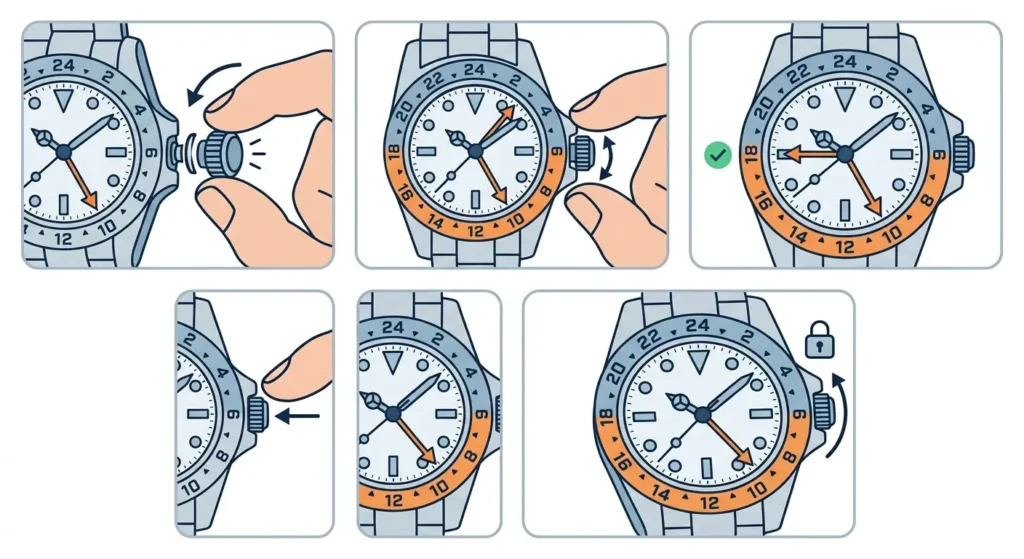
The process begins with unscrewing the crown from its locked position. Turn the crown counterclockwise until it releases from the case threads and pops out slightly to position 1. The watch continues running during this operation, ensuring no interruption to the seconds hand or overall timekeeping accuracy.
- Step 1: Unscrew the crown by turning it counterclockwise until it disengages from the threads and springs out to the first position
- Step 2: Rotate the crown slowly in either direction to move the GMT hand around the 24-hour scale
- Step 3: Align the GMT hand to point at the desired hour on the 24-hour scale (for example, if the reference time zone is 6 hours ahead, position the GMT hand 6 hours forward from local time)
- Step 4: Once the GMT hand shows the correct reference time, push the crown back to position 0
- Step 5: Screw the crown down clockwise firmly but without excessive force until it sits flush against the case
The GMT hand moves independently in one-hour increments with each turn of the crown. This jumping hour mechanism ensures precise adjustment without affecting the minute hand or seconds. Each click represents exactly one hour on the 24-hour scale, making it easy to count positions when setting the reference time zone.
Pro-Tip: Setting Home Time During Travel
When traveling to a new time zone, keep the GMT hand on home time and adjust only the local hour hand. Pull the crown to position 2, then turn it to move the hour hand forward or backward in one-hour jumps. This method preserves the home time reference on the GMT hand while quickly updating local time, and the date changes correctly when crossing midnight in the local time zone.
Using the Rotating Bezel for a Third Time Zone
The bidirectional bezel expands functionality beyond two time zones. After setting the GMT hand to reference time, rotate the bezel to align its 24-hour markings with a third location. For instance, if the GMT hand tracks London time and local time shows New York, the bezel can be rotated to display Tokyo time by offsetting it the appropriate number of hours.
Grip the bezel firmly between thumb and forefinger, then rotate it in either direction. The bezel clicks smoothly with 120 positions around the full 360-degree rotation. Each click represents a small increment, allowing precise alignment with any hour marker on the 24-hour scale. This feature requires no crown adjustment and can be changed instantly whenever monitoring different time zones becomes necessary.
Calculating the bezel offset requires knowing the hour difference between the GMT hand reference time and the desired third zone. Rotate the bezel so its hour markers shift accordingly. A quick check using an online clock display helps verify the correct alignment when setting up multiple time zones for the first time.
Adjusting Both Hour Hand and GMT Hand Together
Some situations require synchronizing both the local hour hand and GMT hand to the same time zone before separating them. This typically happens during initial setup or after service. Pull the crown out to position 2, which stops the seconds hand completely and allows full time setting control.
At position 2, rotating the crown moves both the hour hand and minute hand together. The GMT hand remains synchronized with the hour hand during this adjustment, maintaining their relationship. Set the correct time by advancing the hands clockwise past midnight if necessary to ensure the date changes at the proper moment. Once the time is accurate, push the crown back through position 1 to position 0 and screw it down.
After establishing the base time, separate the GMT hand from local time by pulling the crown to position 1 again. Now adjust only the GMT hand to reflect the reference time zone, following the steps outlined earlier. This two-stage process ensures both complications are properly set and functioning correctly.
Tips for Accurate GMT Hand Settings
Always make adjustments slowly and deliberately to avoid skipping past the intended hour. The GMT hand jumps in one-hour increments, so rushing can lead to overshooting the target position. Taking time to count each click ensures precision, especially when setting time zones with unusual half-hour or 45-minute offsets that require careful bezel compensation.
Avoid adjusting any hands when the displayed time falls between 8 PM and 4 AM. During this window, the date change mechanism engages internally, and hand adjustments might damage delicate components. If corrections are needed during these hours, advance the time past 4 AM, make the adjustment, then set it back to the correct time. Using a reliable timing reference helps coordinate precise adjustments.
Regular practice with the crown positions builds familiarity and confidence. The GMT-Master II crown operates smoothly when handled correctly, and understanding the tactile feedback from each position prevents accidental over-pulling or improper threading. Keep the crown clean and free from debris to maintain smooth operation and proper water resistance.
Consider writing down the specific time zones being tracked, especially when using the bezel for a third zone. A simple note listing which hand or bezel position represents each location eliminates confusion during quick glances. This becomes particularly helpful when frequently switching between multiple international time zones throughout the day.
Common Problems and Solutions
GMT Hand Not Moving at Position 1
When the crown is pulled to position 1 but the GMT hand remains stationary, the crown may not be fully extended to the correct position. Push the crown back in completely, then unscrew and pull it out again, ensuring it reaches the first distinct click. Sometimes the crown stops between positions, requiring a slight additional pull to engage the GMT adjustment mechanism properly.
Crown Difficult to Unscrew
A tight crown typically indicates dried lubricants or debris in the threads. Never force a stuck crown, as this risks damaging the tube or stripping threads. Apply gentle counterclockwise pressure while pulling slightly outward. If resistance persists, professional service is necessary to clean and relubricate the crown assembly. Attempting to force it may compromise water resistance or break internal components.
GMT Hand Jumping Multiple Hours
Rapid crown rotation can cause the GMT hand to skip multiple positions in quick succession. This happens because the mechanism responds to each turn, and fast movements stack multiple jumps together. Slow down the crown rotation to one deliberate turn per second, allowing each hour jump to complete before initiating the next movement. This controlled approach ensures accurate positioning.
Date Changes at Wrong Time
When the date flips at noon instead of midnight, the hour hand is set 12 hours off from the internal date mechanism. Pull the crown to position 2 and advance the hands through a full 12-hour cycle, watching for the date to change. That change indicates midnight. Adjust the time from that midnight reference point to set the correct hour. This recalibrates the date function to change at the proper moment.
Crown Will Not Screw Down
Cross-threading occurs when the crown is pushed in at an angle or forced while misaligned. Never push and turn simultaneously. Instead, hold the crown gently against the case without pressure, then rotate it counterclockwise until feeling a slight click – this click indicates the threads have aligned. Now turn clockwise smoothly, and the crown should thread down easily. Forcing a misaligned crown will damage the threads permanently.
Frequently Asked Questions
What is the difference between GMT-Master and GMT-Master II?
The GMT-Master II features an independently adjustable hour hand via the crown’s intermediate position, allowing the GMT hand to remain on reference time while changing local time zones. The original GMT-Master requires adjusting both hands together, making quick time zone changes less convenient for travelers.
Can the GMT hand be set to half-hour time zones?
The GMT hand itself only moves in one-hour increments and cannot be positioned between hour markers. However, the rotating bezel compensates for half-hour offsets by turning it 30 minutes (15 clicks) from the standard position, allowing accurate tracking of locations like India (UTC+5:30) or Newfoundland (UTC-3:30).
Does adjusting the GMT hand stop the watch?
No, the watch continues running when the crown is at position 1 for GMT hand adjustment. Only pulling the crown to position 2 stops the seconds hand. This feature allows travelers to update the GMT reference without interrupting the watch’s timekeeping accuracy or losing seconds during adjustment.
How often should the GMT hand be adjusted?
Adjust the GMT hand whenever the reference time zone changes or when traveling. For those who monitor a fixed second time zone (like home while traveling), the GMT hand may remain set for weeks or months. The adjustment mechanism is designed for frequent use without causing wear or requiring special maintenance intervals.
What happens if the crown is not screwed down properly?
An improperly secured crown compromises water resistance completely, potentially allowing moisture to enter the case and damage the movement. Always verify the crown is fully threaded and sits flush against the case before any water exposure. Even light rain or hand washing can introduce moisture through an unsecured crown.
Can the bezel be removed for cleaning?
The bezel is designed as a permanently mounted component and should only be removed by authorized Rolex service technicians. Attempting to pry or force the bezel off will damage the case, bezel assembly, and potentially the movement. Professional service includes proper bezel cleaning without removal risks.
Why does the GMT hand have a red arrow tip?
The distinctive red arrow makes the GMT hand instantly recognizable against the dial and other hands. This high-contrast color ensures quick visual identification when reading the second time zone, even in low light conditions. The arrow shape points precisely to the 24-hour markers for accurate reading.
Should the GMT hand match AM or PM time?
The GMT hand operates on a 24-hour scale, eliminating AM/PM confusion entirely. When the reference time is 2:00 PM, position the GMT hand at 14 on the 24-hour scale. Morning hours (1 AM through 11 AM) correspond to positions 1 through 11, while afternoon hours (1 PM through 11 PM) align with positions 13 through 23.
Can the GMT function be serviced separately from the main movement?
The GMT complication integrates directly into the main movement and cannot be serviced as an isolated component. Complete movement service addresses all functions simultaneously, including the GMT mechanism, hour jump system, and date function. Rolex recommends full service intervals of approximately 10 years for optimal performance.
Is it normal for the GMT hand to move slightly when setting other functions?
Minimal GMT hand movement during other adjustments can occur due to the mechanical linkage between components. As long as the GMT hand returns to its set position and maintains accuracy, this slight movement is normal. Excessive or continuous drifting indicates a problem requiring professional attention from an authorized service center.