

Setting the time and date on a Seiko 5 watch with the 7S26 movement is a straightforward process that takes just a few minutes. The 7S26 movement, found in most Seiko 5 models, features a reliable automatic mechanism with a distinctive crown positioning system. This guide walks through the exact steps to adjust both the date and time accurately on this popular watch movement.
Quick Summary Table
| Crown Positions | 2 positions (normal and time-setting) |
| Date Adjustment | Manual advance only (no quick-set) |
| Time Setting | Pull crown out fully and rotate |
| Winding Method | Automatic (self-winding through wrist movement) |
| Avoid Date Change | Between 9 PM and 3 AM |
Understanding the 7S26 Movement Crown System
The Seiko 7S26 movement uses a two-position crown system. Unlike many modern watches, this movement does not have a separate quick-set date function. The crown operates in two distinct positions: the normal running position (pushed all the way in) and the time-setting position (pulled out completely). There is no intermediate position for date adjustment, which means the date must be changed by advancing the hour hand through multiple 24-hour cycles.
How to Set the Date on Your Seiko 5
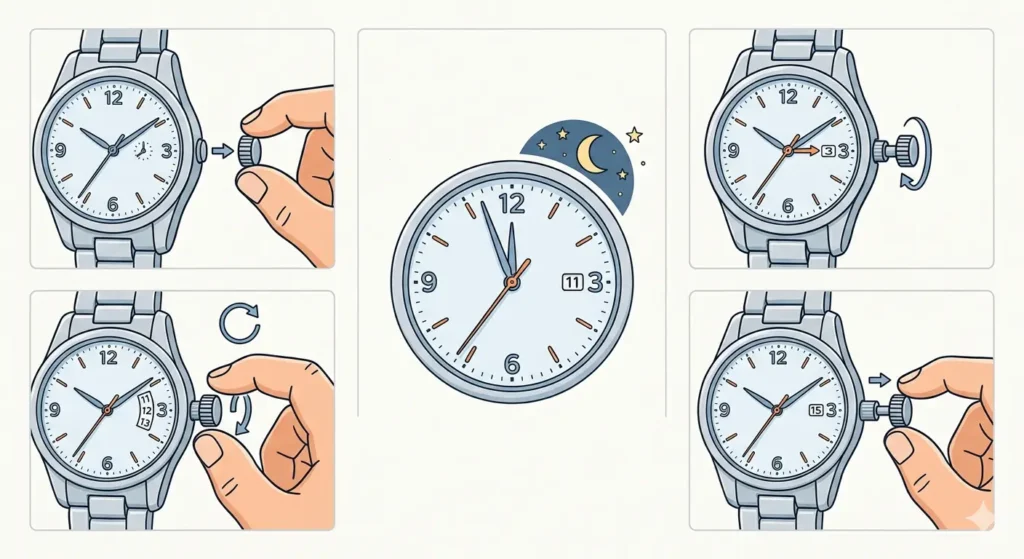
The date on a 7S26 movement requires a specific approach since quick-set functionality is not available. This method ensures accurate date setting without damaging the internal mechanism.
- Step 1: Pull the crown out to the furthest position to stop the seconds hand.
- Step 2: Rotate the crown clockwise to advance the hour hand forward.
- Step 3: Continue rotating until the date changes at midnight (the hour hand will pass 12 o’clock twice for each date change).
- Step 4: Repeat this process until the correct date appears in the date window.
- Step 5: Once the correct date is set, continue to the time-setting steps below.
Pro Tip: Never attempt to change the date between 9 PM and 3 AM, as the date mechanism is already engaged during this period. Forcing a date change during these hours can damage the internal gears and compromise the movement’s accuracy. Always advance the time to 6 AM or 6 PM before adjusting the date.
How to Set the Time on Your Seiko 5
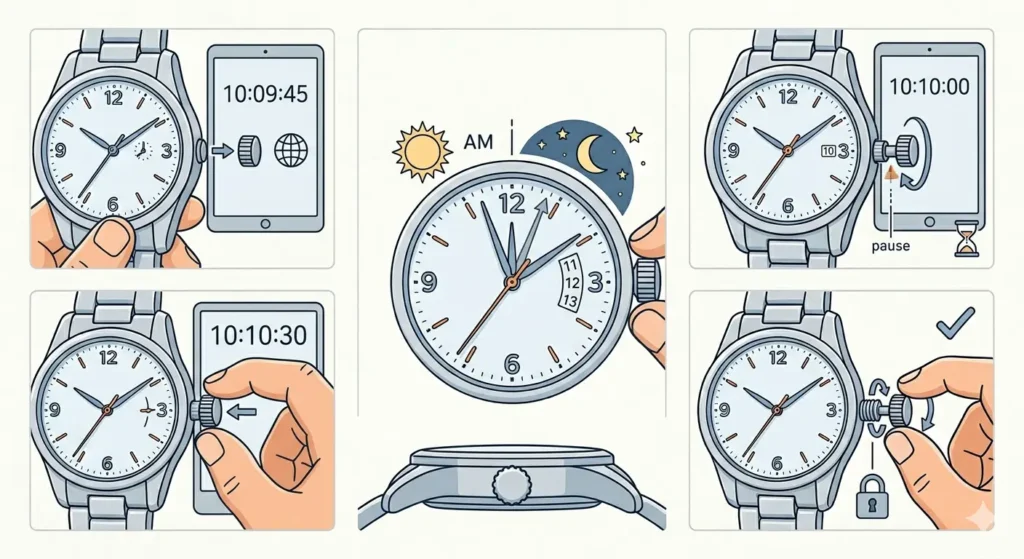
After setting the date, adjusting the time is the final step to get the watch running accurately. This process is simple and can be synchronized with an accurate time source for precision.
- Step 1: With the crown still pulled out to the time-setting position, reference an accurate time source like an online clock to ensure precision.
- Step 2: Rotate the crown clockwise or counterclockwise to move the hands to the correct time.
- Step 3: Pay attention to AM and PM – remember that the date changes when the hour hand passes 12 midnight, not noon.
- Step 4: Set the time approximately 30 seconds ahead of the actual time.
- Step 5: Wait for the reference time to catch up to the watch time, then push the crown back in completely to restart the watch.
- Step 6: Ensure the crown is pushed in fully and, if the model has a screw-down crown, screw it back down clockwise until secure.
Using a reliable time reference like an online stopwatch helps achieve accuracy down to the second. This synchronization method works best when setting the watch in the morning or evening when most people have access to their devices.
Day-Date Models: Additional Setting Steps
Some Seiko 5 models feature both day and date complications. On these watches, the day wheel changes simultaneously with the date during the midnight transition. The 7S26 movement in day-date configurations typically offers the day display in multiple languages, which can be cycled through by advancing the time past midnight repeatedly. Each pass through midnight will change both the day and date, allowing selection of the preferred language for the day display.
Tips for Maintaining Accurate Time and Date
Keeping the Seiko 5 running accurately requires regular wear and proper maintenance habits.
- Wear the watch regularly to keep the automatic movement wound and running
- If the watch stops due to inactivity, wind it by advancing the time through several hours before setting the correct time
- Check and adjust the time monthly, as automatic movements can gain or lose several seconds per day
- Avoid exposing the watch to strong magnetic fields, which can affect timekeeping accuracy
- Store the watch in a watch winder if it will not be worn for extended periods
- Compare the watch time against world time references when traveling across time zones
- Service the movement every 3-5 years to maintain optimal performance
Pro Tip: The 7S26 movement typically runs at +/- 15 to 30 seconds per day when new, which is normal for this caliber. Setting the time slightly behind can compensate for watches that tend to run fast, while setting slightly ahead works for watches that run slow. Track the watch’s accuracy over a week to understand its natural rate.
Common Problems and Troubleshooting
Fix 1: Watch Stops Running After Setting
If the watch stops after setting the time and date, the automatic movement likely needs winding. The 7S26 has no manual winding function, so energize the mainspring by gently shaking the watch in a figure-eight motion for 30-60 seconds, or simply wear it for a few hours to build up power reserve.
Fix 2: Date Changes at Noon Instead of Midnight
This indicates the watch is set 12 hours off. Pull the crown out and advance the time by exactly 12 hours. The date should now change at the correct time. Verify by advancing the hands past midnight to confirm the date advances properly.
Fix 3: Crown Feels Stuck or Difficult to Pull
The crown on a 7S26 movement should pull out smoothly with moderate force. If resistance is felt, check that the crown is not a screw-down type that needs to be unscrewed first by rotating counterclockwise. Never force a stuck crown, as this can damage the stem or crown tube.
Fix 4: Date Wheel Shows Between Two Dates
A partially changed date indicates the watch was set during the danger zone (9 PM to 3 AM) or the time is set incorrectly. Advance the time by 6-12 hours to allow the date mechanism to complete its cycle, then verify the time is set to the correct AM or PM period.
Fix 5: Seconds Hand Moves But Watch Loses Time Rapidly
This symptom suggests the watch needs professional servicing. The movement may require cleaning, lubrication, or parts replacement. A watchmaker can diagnose and repair issues affecting timekeeping accuracy.
Frequently Asked Questions
Can the 7S26 movement be manually wound?
No, the Seiko 7S26 movement does not have a manual winding function. The watch must be wound through wearing it on the wrist, which causes the automatic rotor to spin and wind the mainspring. Alternatively, the watch can be gently shaken or placed in a watch winder to build power reserve.
Why doesn’t the Seiko 5 have a quick-set date function?
The 7S26 movement was designed as a reliable, cost-effective automatic caliber. Omitting the quick-set date function simplifies the mechanism, reduces manufacturing costs, and minimizes potential points of failure. This design choice makes the Seiko 5 more affordable while maintaining durability.
How long does it take to change the date manually on a 7S26?
Changing the date by one day requires advancing the time through approximately 24 hours (two full rotations of the hour hand past 12 o’clock). Setting the date forward by several days can take 5-10 minutes of continuous crown rotation. Most people find it faster to adjust the date at the beginning of each month rather than after long periods of the watch sitting unworn.
What happens if the date is changed during the danger zone hours?
Changing the date between 9 PM and 3 AM can damage the date mechanism because the gears are already engaged in preparation for the automatic midnight date change. This can strip teeth from the date wheel or intermediate gears, resulting in a misaligned or non-functioning date complication that requires professional repair.
How accurate is the Seiko 7S26 movement?
The 7S26 typically runs within +/- 15 to 30 seconds per day when new and properly maintained. This is considered acceptable accuracy for an automatic movement in this price range. Individual watches may vary, with some running faster or slower depending on position, temperature, and power reserve level.
Should the crown be in any specific position when wearing the watch?
The crown should always be pushed in completely to the normal running position when wearing the watch. This ensures water resistance is maintained and prevents damage to the crown or stem. On models with screw-down crowns, the crown must be screwed down tightly after setting the time.
Can the hands be moved backwards on a 7S26 movement?
Yes, the hands can be rotated both clockwise and counterclockwise when the crown is pulled out. However, the key is to avoid moving the hands backwards through the midnight position when the date is changing, as this can potentially damage the date mechanism. Moving the hands counterclockwise is safe during other times of the day.
How often should the time be adjusted on a Seiko 5?
Most Seiko 5 owners adjust their watch time every 1-2 weeks, depending on how much daily variance is acceptable. Since the movement can gain or lose up to 30 seconds per day, time adjustments become necessary when the accumulated error reaches a noticeable amount. Setting the watch weekly ensures accuracy within a minute.
What is the power reserve of the 7S26 movement?
The Seiko 7S26 movement has approximately 41 hours of power reserve when fully wound. This means the watch will continue running for about 41 hours after being taken off the wrist, assuming it was fully wound through regular wear. After this period, the watch will stop and need to be reset.
Is it normal for the date to change slowly on a 7S26?
Yes, the date change on a 7S26 movement is not instantaneous. The date wheel begins to advance around 11:30 PM and completes the change by 12:30 AM, with the most visible movement occurring right at midnight. This gradual change is normal for this movement design and does not indicate a problem.