
Setting up fall detection on a smartwatch can provide crucial safety monitoring, especially for elderly users or those with medical conditions. This feature automatically detects when someone falls and can alert emergency contacts or services. Modern smartwatches make this process straightforward, taking just a few minutes to configure properly.
Quick Summary Table
| Key Point | Details |
|---|---|
| Setup Time | 5-10 minutes |
| Compatible Devices | Apple Watch Series 4+, Samsung Galaxy Watch 4+, Fitbit Sense, Google Pixel Watch |
| Age Requirement | Typically 18+ (some brands 55+) |
| Emergency Contact | Must be configured before activation |
| Cellular Connection | Recommended but not always required |
Setting Up Fall Detection on Apple Watch
Apple Watch offers one of the most reliable fall detection systems available. The feature works on Series 4 and newer models, automatically detecting hard falls and initiating emergency calls when needed.
Method 1: Enable Fall Detection Through iPhone
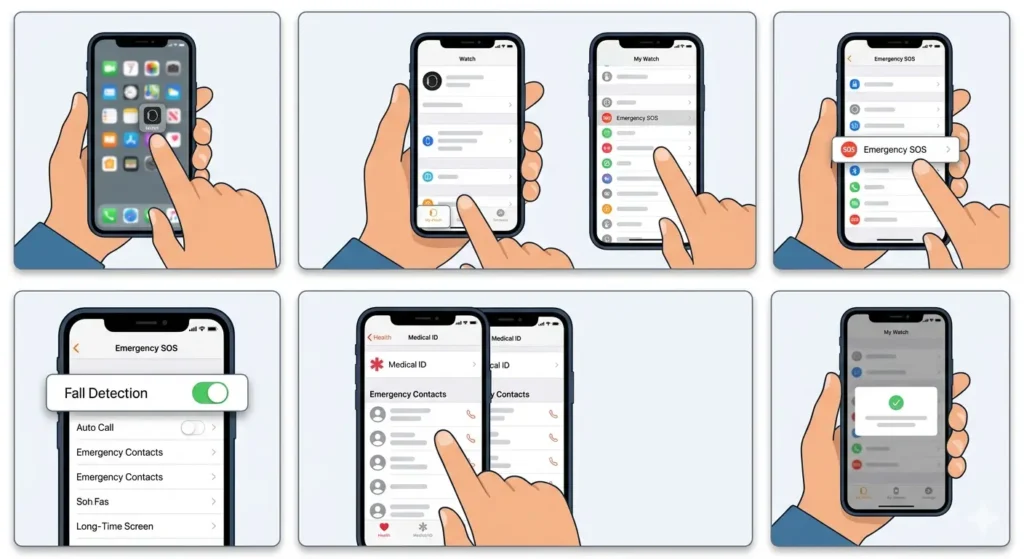
- Step 1: Open the Watch app on the paired iPhone
- Step 2: Tap ‘My Watch’ at the bottom of the screen
- Step 3: Scroll down and select ‘Emergency SOS’
- Step 4: Toggle on ‘Fall Detection’
- Step 5: Confirm emergency contacts are added in the Health app
- Step 6: Test the setup by reviewing the confirmation message
Pro-Tip: Fall detection automatically turns on for users aged 55 and older. For younger users, the feature must be manually enabled. The watch uses accelerometer and gyroscope data to distinguish between regular movement and actual falls, which explains why age plays a role in automatic activation.
Method 2: Configure Emergency Contacts
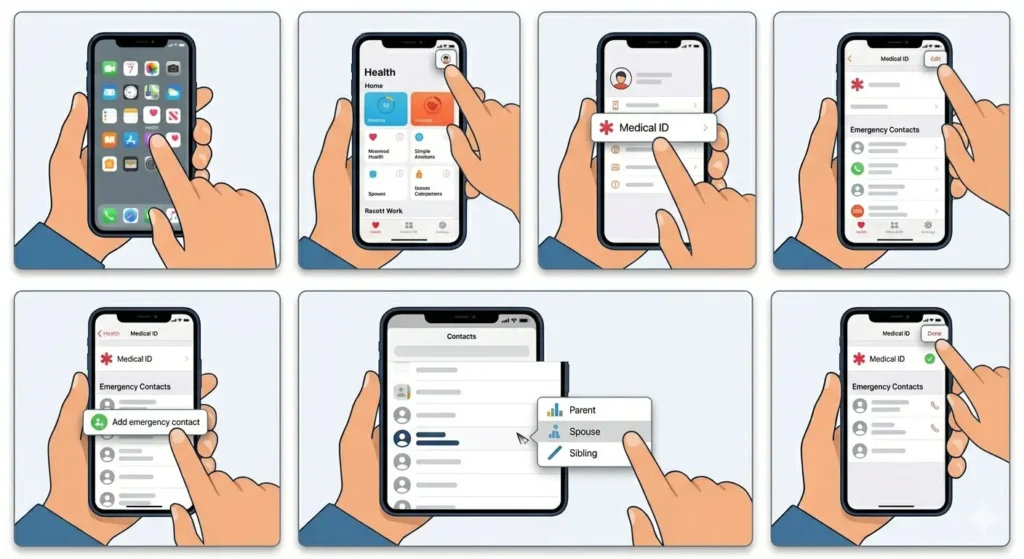
- Step 1: Open the Health app on the iPhone
- Step 2: Tap the profile picture in the upper right corner
- Step 3: Select ‘Medical ID’
- Step 4: Tap ‘Edit’ in the upper right corner
- Step 5: Scroll to ‘Emergency Contacts’ and tap ‘Add emergency contact’
- Step 6: Choose a contact and define the relationship
- Step 7: Tap ‘Done’ to save changes
Setting Up Fall Detection on Samsung Galaxy Watch
Samsung Galaxy Watch 4 and newer models include SOS features with fall detection capabilities. The system works through the Galaxy Wearable app and requires proper configuration to function correctly.
Method 1: Activate SOS Settings
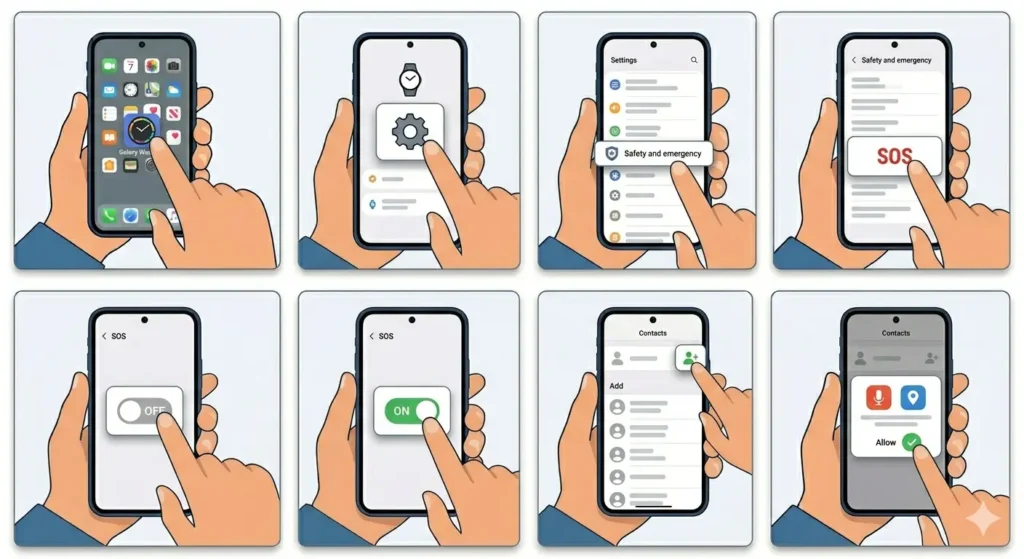
- Step 1: Open the Galaxy Wearable app on the connected smartphone
- Step 2: Tap ‘Watch settings’
- Step 3: Select ‘Safety and emergency’
- Step 4: Tap ‘SOS’ or ‘Send SOS messages’
- Step 5: Toggle the feature on
- Step 6: Add emergency contacts by tapping ‘Add’ or ‘Send messages to’
- Step 7: Grant necessary permissions when prompted
Method 2: Enable Hard Fall Detection
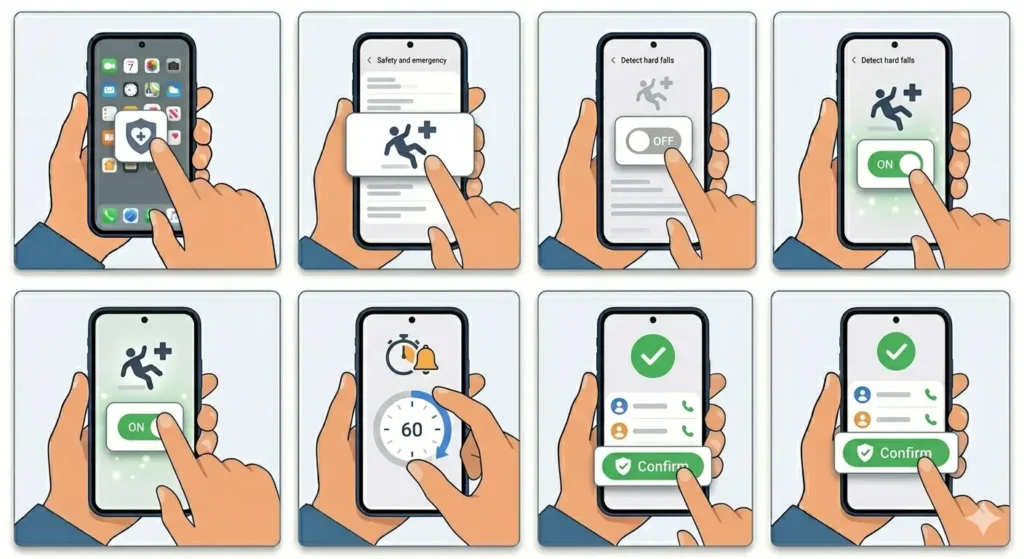
- Step 1: Navigate to ‘Safety and emergency’ in Galaxy Wearable app
- Step 2: Look for ‘Detect hard falls’ or similar option
- Step 3: Toggle the setting on
- Step 4: Configure the countdown timer (usually 60 seconds)
- Step 5: Review and confirm emergency contact list
Most people find that checking time zone settings helps ensure emergency contacts receive alerts at appropriate hours, especially when contacts live in different regions.
Setting Up Fall Detection on Fitbit Devices
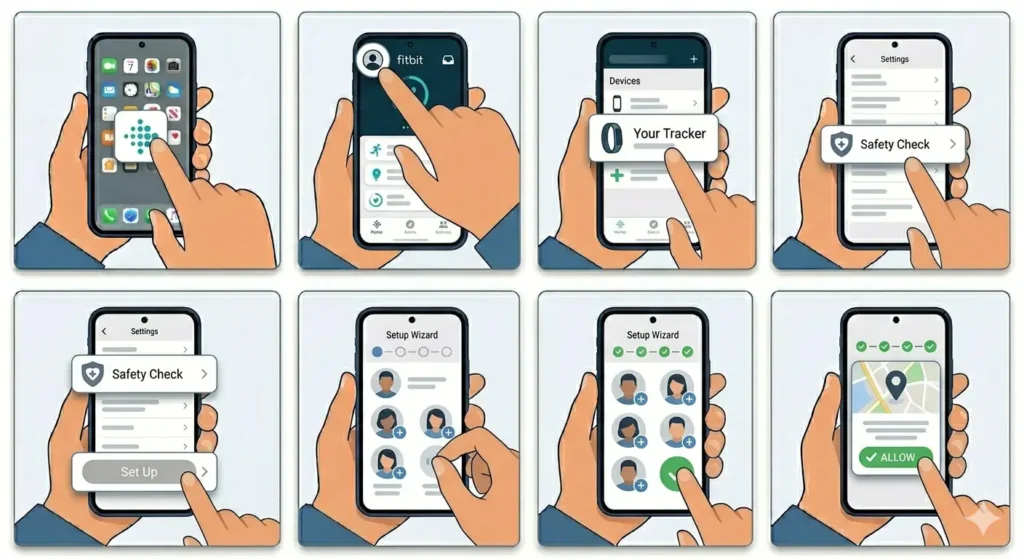
Fitbit Sense and some Versa models offer fall detection through their Personal Safety features. This requires a Fitbit Premium subscription and proper setup through the mobile app.
- Step 1: Open the Fitbit app on the smartphone
- Step 2: Tap the profile icon in the upper left corner
- Step 3: Select the device name
- Step 4: Scroll to ‘Personal Safety’ or ‘Safety Check’
- Step 5: Tap ‘Set Up’ and follow the prompts
- Step 6: Add up to five emergency contacts
- Step 7: Enable location sharing permissions
- Step 8: Complete the setup wizard
Setting Up Fall Detection on Google Pixel Watch
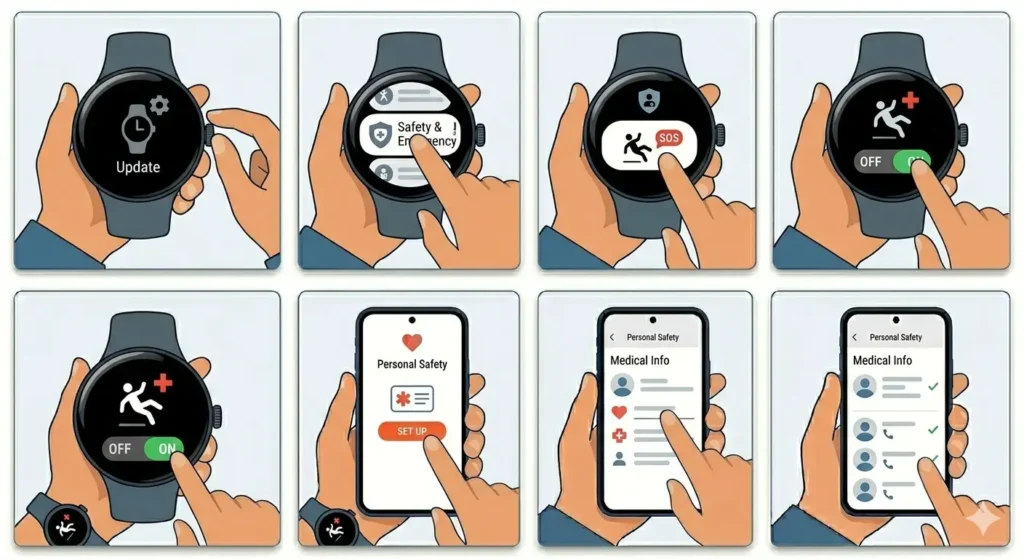
Google Pixel Watch includes fall detection as part of its Personal Safety app integration. The feature connects directly with Android emergency services.
- Step 1: Ensure the watch is updated to the latest Wear OS version
- Step 2: Open Settings on the Pixel Watch
- Step 3: Scroll to ‘Safety & emergency’
- Step 4: Tap ‘Fall detection’
- Step 5: Toggle the feature on
- Step 6: Set up emergency info in the Personal Safety app on the phone
- Step 7: Add medical information and emergency contacts
Pro-Tip: Always wear the smartwatch snugly on the wrist for accurate fall detection. A loose watch can register false movements or fail to detect actual falls. The sensors need consistent contact with skin to measure impact forces correctly.
Tips for Optimal Fall Detection Performance
Maximizing fall detection accuracy requires understanding how the technology works and maintaining proper device settings.
- Keep the smartwatch charged above 20% battery level at all times
- Wear the watch on the non-dominant wrist for better detection accuracy
- Update the watch firmware regularly to receive improved detection algorithms
- Test emergency contacts periodically to ensure they receive alerts
- Enable location services for faster emergency response
- Consider cellular models for coverage when away from the phone
- Review privacy settings to balance safety with personal data preferences
- Adjust the watch band tightness – it should be snug but comfortable
- Disable workout modes during high-impact activities to prevent false alarms
- Configure ‘Do Not Disturb’ exceptions for emergency contacts
Setting aside time on a stopwatch helps when performing initial testing of fall detection features, as most watches provide a 30-60 second response window.
Common Problems and Solutions
Fix 1: Fall Detection Not Activating
Verify age settings in the health profile. Some devices only auto-enable for users 55 and older. Check battery level, as many watches disable fall detection below 10% charge. Ensure the latest software update is installed through the companion app.
Fix 2: Too Many False Alarms
Tighten the watch band to reduce movement. Disable fall detection during high-impact workouts or activities. Adjust sensitivity settings if available in the device options. Consider switching the watch to the other wrist.
Fix 3: Emergency Contacts Not Receiving Alerts
Confirm contact information is current in both the watch app and phone contacts. Check that contacts have not blocked the number. Verify cellular or Wi-Fi connectivity on the watch. Re-add emergency contacts if necessary.
Fix 4: Feature Unavailable or Grayed Out
Check device compatibility – not all watch models support fall detection. Verify that location services are enabled. Update the companion app on the smartphone. Restart both watch and phone.
Fix 5: Delayed Alert Responses
Enable background app refresh for the watch companion app. Check notification permissions are granted. Verify cellular plan is active for LTE models. Consider upgrading to a model with built-in cellular.
Frequently Asked Questions
Does fall detection work without cellular service?
Fall detection can work without cellular service if the watch is connected to the paired phone via Bluetooth. However, if the phone is out of range during a fall, the watch needs cellular connectivity to contact emergency services. Wi-Fi calling may work as an alternative in some models.
Will fall detection drain the smartwatch battery faster?
Fall detection uses minimal battery power since it relies on motion sensors already active for step counting. Most users report no noticeable battery drain. The feature typically consumes less than 1-2% additional battery per day.
Can fall detection distinguish between actual falls and high-impact exercises?
Modern smartwatches use advanced algorithms to differentiate between falls and intentional movements. However, activities like jumping rope, plyometrics, or contact sports may occasionally trigger false alarms. Enabling workout mode during exercise can reduce false positives.
What happens when the watch detects a fall?
The watch displays an alert asking if assistance is needed. Tapping ‘I’m OK’ cancels the alert. If there’s no response within 30-60 seconds (varies by model), the watch automatically calls emergency services and sends location data to emergency contacts.
Is fall detection available in all countries?
Fall detection availability varies by region and depends on local emergency service compatibility. Apple Watch fall detection works in most countries where emergency calling is supported. Samsung and Google watches have more limited regional availability. Check the manufacturer’s website for specific country support.
Can multiple people monitor the same watch user?
Most smartwatches allow adding multiple emergency contacts who will all receive alerts simultaneously. Apple Watch supports up to five emergency contacts through Medical ID. Samsung and Fitbit also support multiple contacts, though exact limits vary by model.
Does fall detection work while sleeping?
Fall detection remains active 24/7, including during sleep. However, most devices are sophisticated enough to recognize lying down versus falling. Sleep movements rarely trigger false alarms because the impact force and trajectory differ from actual falls.
What information do emergency contacts receive?
Emergency contacts typically receive a text message or app notification stating that a fall was detected, along with GPS coordinates and a map link. Some watches also send current heart rate data and medical information stored in the health profile.
Can fall detection be temporarily disabled?
Yes, fall detection can be toggled off at any time through the watch settings or companion app. This works best when planning activities that might trigger false alarms. Remember to re-enable the feature afterward for continued protection.
Do all smartwatches have fall detection?
No, fall detection is only available on select models. Apple Watch Series 4 and newer, Samsung Galaxy Watch 4 and newer, Fitbit Sense, Google Pixel Watch, and some Garmin models include this feature. Budget smartwatches and older models typically lack fall detection capabilities.