
Sleep tracking on a smartwatch provides valuable insights into sleep patterns, quality, and duration. This technology monitors movements, heart rate, and other metrics throughout the night to deliver actionable data for improving rest and overall health. Setting up this feature takes just a few minutes and works across most modern smartwatch models.
Quick Summary Table
| Key Step | What to Do | Time Required |
|---|---|---|
| Initial Setup | Enable sleep tracking in smartwatch settings | 2-3 minutes |
| Wear Position | Secure watch snugly on wrist, one finger-width above wrist bone | 30 seconds |
| Sync Data | Connect to companion app each morning | 1-2 minutes |
| Review Insights | Check sleep stages, duration, and quality scores | 3-5 minutes |
Enabling Sleep Tracking on Your Smartwatch
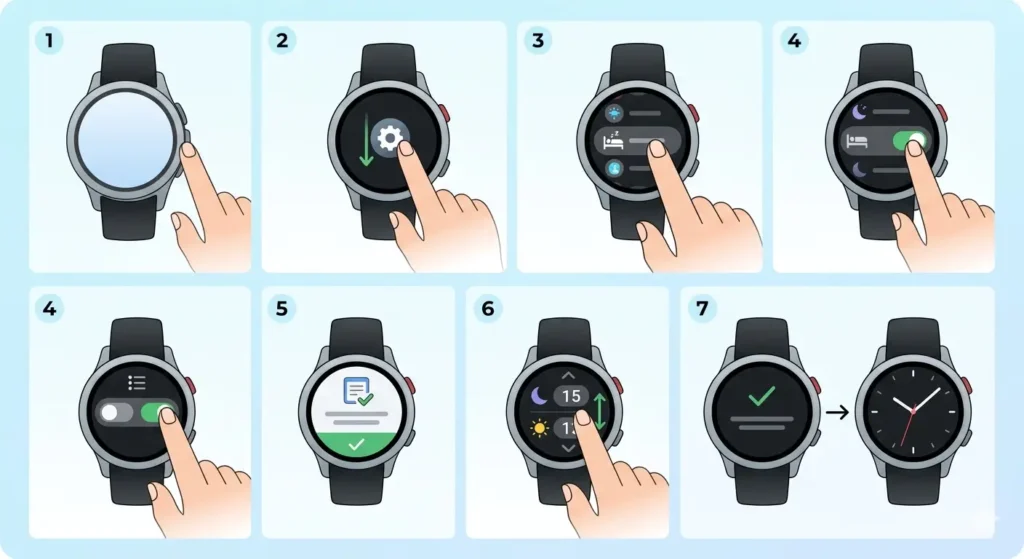
The first step involves accessing the sleep tracking feature through the device settings. Most smartwatches have this option clearly labeled within the health or wellness section of their interface.
- Step 1: Press the home button or wake the smartwatch display
- Step 2: Navigate to Settings by swiping down or tapping the settings icon
- Step 3: Locate the Health, Wellness, or Sleep section in the menu
- Step 4: Toggle the Sleep Tracking option to ‘On’ or ‘Enabled’
- Step 5: Grant necessary permissions for heart rate monitoring and motion detection
- Step 6: Set your typical sleep schedule (bedtime and wake time) for automatic detection
- Step 7: Confirm the settings and exit to the main screen
Pro Tip: Automatic sleep detection works best when the smartwatch learns typical patterns over 3-5 nights. Manual sleep mode can be activated for naps or irregular schedules by accessing quick settings and tapping the sleep icon.
Configuring the Companion Mobile App
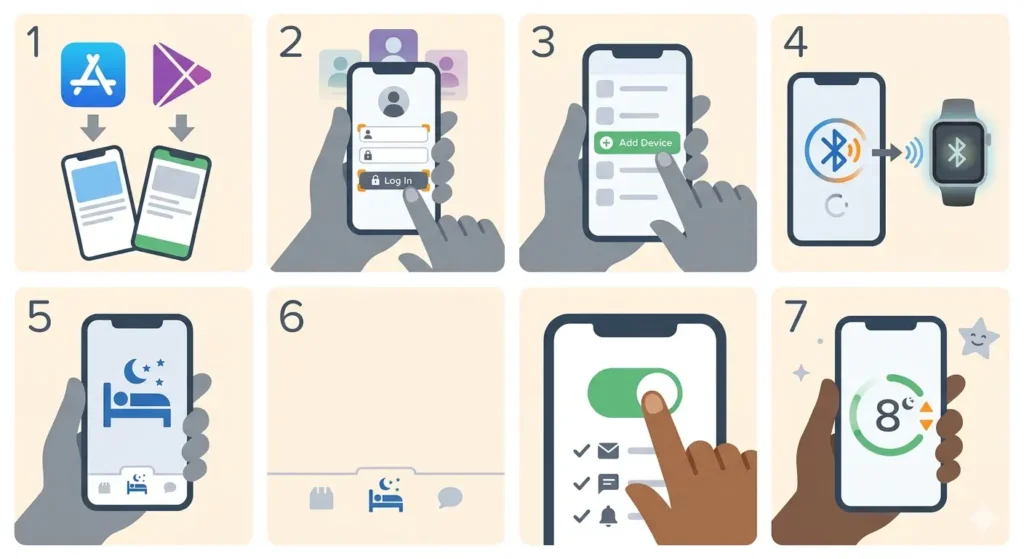
The companion app serves as the central hub for viewing detailed sleep analytics. This software must be properly connected to the smartwatch for data synchronization.
- Step 1: Download the official companion app from the App Store or Google Play Store
- Step 2: Open the app and sign in with the account credentials
- Step 3: Select ‘Add Device’ or ‘Pair Smartwatch’ from the main menu
- Step 4: Follow the on-screen pairing instructions, ensuring Bluetooth is enabled
- Step 5: Navigate to the Sleep or Health tab within the app
- Step 6: Enable sleep tracking if prompted, and customize notification preferences
- Step 7: Set sleep goals such as target hours per night (typically 7-9 hours for adults)
The app interface displays sleep stages including light sleep, deep sleep, REM sleep, and awake periods. Many apps also calculate a sleep score based on duration and quality metrics.
Optimizing Smartwatch Fit for Accurate Tracking
Proper watch placement significantly affects tracking accuracy. The sensors need consistent contact with skin to measure heart rate variability and detect micro-movements throughout the night.
Correct Wrist Position
Position the smartwatch approximately one finger-width above the wrist bone. The device should feel snug without causing discomfort or restricting blood flow. A properly fitted watch stays in place during sleep movements but allows the skin to breathe.
Band Adjustment Guidelines
Tighten the band enough that the watch does not slide more than half an inch up or down the wrist. Silicone and sport bands work better than metal links for sleep tracking because they maintain consistent sensor contact. Consider using a clock tab to track how long it takes to find the optimal fit – most people need 2-3 nights of adjustment.
Understanding Sleep Tracking Metrics
Smartwatches measure several key indicators to build a comprehensive sleep profile. Understanding these metrics helps make sense of the nightly data.
Sleep Stages Breakdown
Light Sleep: This stage typically comprises 50-60% of total sleep time. The body relaxes, heart rate slows, and muscles may occasionally twitch.
Deep Sleep: Accounting for 15-25% of sleep, this restorative phase supports physical recovery, immune function, and memory consolidation.
REM Sleep: Making up 20-25% of sleep, REM (Rapid Eye Movement) stage involves vivid dreams and plays a crucial role in emotional processing and learning.
Awake Time: Brief periods of wakefulness are normal. The smartwatch records these moments, which typically total less than 5% of time in bed.
Additional Metrics Explained
Sleep duration measures total time asleep versus time in bed. Sleep efficiency calculates the percentage of time actually sleeping when lying down. Resting heart rate during sleep indicates cardiovascular health, with lower rates generally suggesting better fitness levels.
Reviewing and Interpreting Sleep Data
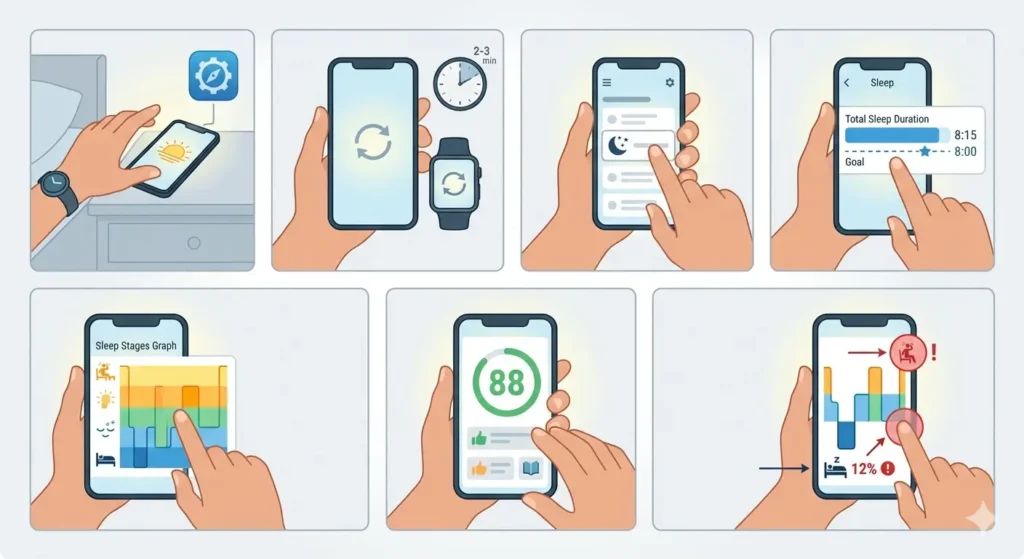
Morning analysis provides actionable insights for improving sleep quality. The companion app organizes this information into easy-to-read charts and summaries.
- Step 1: Open the companion app upon waking
- Step 2: Allow 2-3 minutes for the smartwatch to sync overnight data
- Step 3: Navigate to the Sleep section to view the previous night’s report
- Step 4: Review total sleep duration and compare it to the set goal
- Step 5: Examine the sleep stages graph to identify patterns
- Step 6: Check the sleep score and read personalized recommendations
- Step 7: Note any irregularities such as extended awake periods or low deep sleep percentage
Weekly and monthly trends reveal patterns that single-night data might miss. Look for consistent bedtimes, adequate deep sleep, and minimal disruptions as indicators of healthy sleep habits.
Maximizing Battery Life During Sleep Tracking
Continuous overnight monitoring consumes battery power. A few adjustments ensure the smartwatch lasts through the night without requiring a mid-sleep charge.
Pre-Sleep Charging Strategy
Charge the smartwatch to at least 30% before bedtime. Most devices use 8-15% battery during 7-8 hours of sleep tracking. Evening charging windows work well – connect the charger during dinner preparation or while using a online stopwatch for a 30-minute charging session.
Power-Saving Settings
Disable always-on display mode before sleep. Turn off unnecessary notifications that might wake the screen. Lower screen brightness to minimum levels. These small changes can reduce overnight battery drain by 30-40%.
Tips for Improving Sleep Tracking Accuracy
- Wear the smartwatch consistently every night for at least two weeks to establish baseline patterns
- Keep the watch clean, especially the sensor area on the back, using a soft, slightly damp cloth
- Avoid wearing the watch too loosely, as gaps between sensors and skin reduce accuracy
- Update the smartwatch firmware regularly to access improved tracking algorithms
- Sync data daily rather than waiting several days, as this prevents data loss
- Set realistic sleep schedules in the app that match actual habits, not ideal goals
- Avoid alcohol close to bedtime, as it affects heart rate variability and skews readings
- Keep the bedroom temperature between 60-67°F (15-19°C) for optimal sleep and sensor performance
Pro Tip: Cross-reference sleep data with daily activities using time comparison tools. A world time comparison tool helps identify how travel across time zones affects sleep patterns and jet lag recovery.
Common Problems and Troubleshooting
Fix 1: Sleep Data Not Recording
Verify that sleep tracking is enabled in both the smartwatch settings and companion app. Check that the watch has sufficient battery charge before bedtime. Ensure the watch is worn snugly throughout the night. Restart both the smartwatch and phone, then attempt to sync again.
Fix 2: Inaccurate Sleep Stage Detection
Clean the back sensors thoroughly to remove sweat, lotion, or debris. Adjust the band tightness – too loose causes sensor gaps. Update the smartwatch software to the latest version. Wear the watch on the non-dominant wrist if accuracy issues persist, as this wrist typically moves less during sleep.
Fix 3: App Not Syncing Sleep Data
Confirm Bluetooth is enabled on the phone and smartwatch. Force close and reopen the companion app. Check that background app refresh is permitted for the companion app in phone settings. Delete and reinstall the app only as a last resort, as this may erase historical data.
Fix 4: Battery Dies Before Morning
Charge the smartwatch to 50% or higher before sleep. Disable features like always-on display, Wi-Fi, and cellular data during sleep hours. Enable airplane mode or Do Not Disturb mode to prevent background processes. Consider upgrading to a newer smartwatch model if the battery consistently fails to last through the night.
Frequently Asked Questions
Does wearing a smartwatch to bed disrupt sleep quality?
Most users adapt to wearing a smartwatch within 2-3 nights. Modern smartwatches are lightweight and designed with sleep comfort in mind. Choosing a soft silicone band and ensuring proper fit minimizes any awareness of the device during sleep. Studies show that the sleep tracking benefits outweigh minor initial discomfort for the majority of users.
How accurate is smartwatch sleep tracking compared to medical sleep studies?
Smartwatches achieve 80-90% accuracy for detecting sleep versus wake states. Sleep stage detection accuracy ranges from 65-85% when compared to polysomnography (medical sleep studies). While not medical-grade, smartwatches provide sufficient data for identifying trends and making lifestyle improvements. Individuals with diagnosed sleep disorders should consult healthcare providers rather than relying solely on smartwatch data.
Can sleep tracking work with afternoon naps?
Yes, most smartwatches detect naps lasting 20 minutes or longer. Manual sleep mode can be activated for shorter naps. The companion app typically separates nap data from nighttime sleep, allowing tracking of total daily rest. Some devices require naps to occur during specific daytime hours to differentiate them from nighttime sleep sessions.
How long does it take for a smartwatch to learn sleep patterns?
Basic pattern recognition begins after 3-5 nights of consistent wear. Comprehensive baseline establishment takes 2-4 weeks of regular use. The smartwatch algorithms improve accuracy over time by learning individual movement patterns, heart rate variations, and typical sleep schedules. Consistency is key – skipping nights delays the learning process.
Will sleep tracking drain my smartwatch battery faster?
Sleep tracking uses approximately 8-15% battery over an 8-hour period, depending on the model and enabled features. This is comparable to daytime activity tracking. Disabling unnecessary features like always-on display during sleep minimizes battery drain. Most smartwatches with all-day battery life handle sleep tracking without requiring mid-day charging.
Should the smartwatch be worn on a specific wrist for sleep tracking?
Either wrist works effectively for sleep tracking. The non-dominant wrist (left for right-handed people) often provides slightly better accuracy because it experiences less movement during sleep. Configure the wrist setting in the companion app to ensure algorithms account for the chosen wrist. Switching wrists occasionally prevents skin irritation.
Can smartwatch sleep tracking detect sleep disorders?
Smartwatches identify irregular patterns such as frequent awakenings, low sleep efficiency, or unusual heart rate variations. These indicators may suggest conditions like sleep apnea or insomnia, but smartwatches cannot diagnose medical conditions. Consistently poor sleep metrics warrant consultation with a healthcare provider who can order proper diagnostic testing.
How does sleep tracking affect smartwatch performance during the day?
Sleep tracking runs in the background and does not impact daytime features. The watch continues to track steps, heart rate, and workouts normally. Data processing occurs during sync periods, which typically happen automatically throughout the day. Users experience no performance degradation from enabling sleep tracking.
What is a good sleep score on a smartwatch?
Sleep scores typically range from 0-100, with 70-84 considered good and 85+ excellent. Scores below 60 indicate poor sleep quality requiring attention. Individual factors like age, fitness level, and health conditions influence ideal scores. Focus on improving personal trends rather than comparing scores with others.
Can sleep tracking continue without a phone nearby?
Yes, smartwatches store sleep data locally and sync with the phone when reconnected. Bluetooth range limitations do not affect overnight tracking since the watch operates independently during sleep. Data transfers to the companion app during the morning sync or whenever the devices reconnect. This feature makes sleep tracking reliable even when the phone is in another room.