
Setting an ‘atomic’ radio-controlled watch is simpler than most people think. These watches automatically sync with radio signals from atomic clocks, ensuring precise timekeeping without manual adjustments. The key is to position the watch correctly and allow it to receive the signal, typically during nighttime hours when reception is strongest.
Quick Summary Table
| Key Point | Details |
| Best Signal Time | Between 12 AM – 6 AM |
| Optimal Position | Near window, face up, away from electronics |
| Average Sync Time | 2-10 minutes |
| Signal Range | Varies by region (500-1,500 miles from transmitter) |
| Manual Trigger | Hold receive button 2-3 seconds |
Understanding Radio-Controlled Watch Basics
Radio-controlled watches receive time signals from atomic clock transmitters located in different regions worldwide. The main transmitters include WWVB in Colorado (USA), DCF77 in Germany (Europe), MSF in the UK, and JJY in Japan. These transmitters broadcast ultra-precise time signals that the watch decodes and uses to automatically adjust its display.
Most atomic watches attempt to sync automatically once or twice daily, usually during nighttime when radio interference is minimal. The watch contains a small antenna that picks up these low-frequency signals, processes the information, and updates the time, date, and sometimes daylight saving settings without any user intervention.
Initial Setup Process
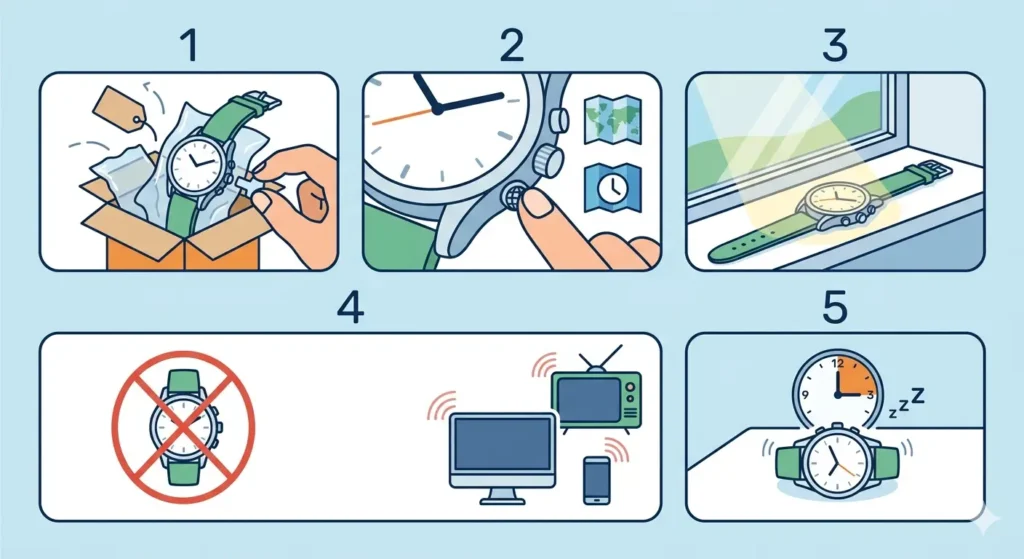
When first wearing a radio-controlled watch or after replacing the battery, the watch needs to complete an initial synchronization. This process establishes the correct time zone and base time settings.
- Step 1: Remove all packaging materials and pull out the crown or protective tab if present
- Step 2: Set the correct time zone using the mode button (refer to the watch manual for specific button combinations)
- Step 3: Place the watch near a window with the face pointing up
- Step 4: Keep the watch away from electronic devices like computers, TVs, or mobile phones
- Step 5: Leave the watch undisturbed for at least 10-15 minutes
During this initial setup, the watch indicator will typically display an antenna symbol or ‘receiving’ icon. Some models blink or animate this symbol while attempting to sync. Once successful, the watch will display the correct time automatically.
Manual Signal Reception
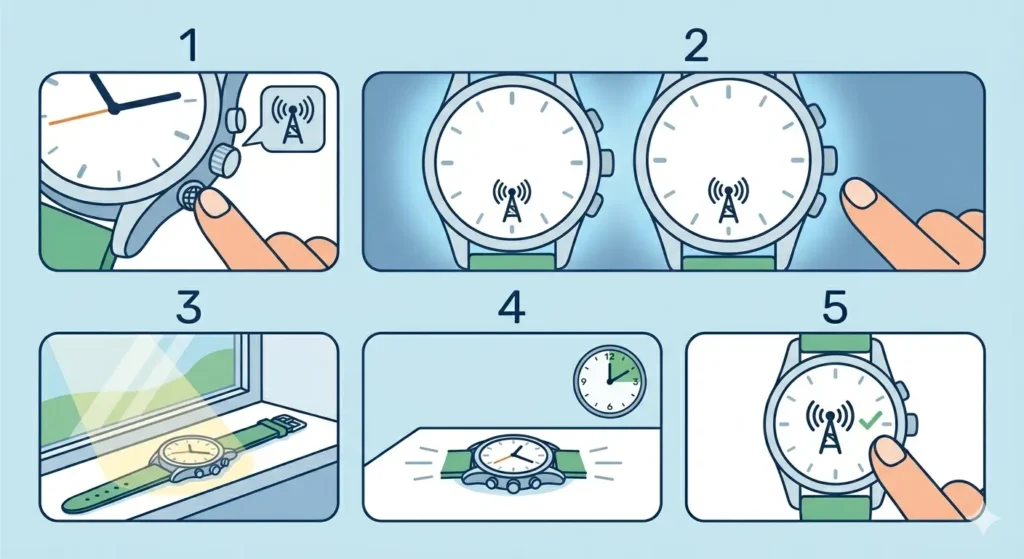
Sometimes the automatic sync doesn’t occur as expected, or the time needs immediate updating after travel. Most radio-controlled watches include a manual receive function that forces the watch to search for the signal immediately.
- Step 1: Locate the receive button (often labeled ‘RCV’, ‘RC’, or marked with an antenna icon)
- Step 2: Hold the button for 2-3 seconds until the antenna symbol appears on the display
- Step 3: Place the watch in an optimal position near a window
- Step 4: Keep the watch stationary for 5-10 minutes
- Step 5: Check for the success indicator (usually a steady antenna icon or ‘OK’ message)
The manual receive function is particularly useful when traveling across time zones or after daylight saving time changes. This works best when initiated during evening or early morning hours.
Pro-Tip: Always perform manual signal reception between midnight and 6 AM for the highest success rate. During these hours, radio interference from other devices and atmospheric conditions is at its lowest, allowing the watch to lock onto the atomic signal much faster and more reliably.
Optimal Positioning for Signal Reception
The positioning of a radio-controlled watch significantly affects its ability to receive time signals. Proper placement can make the difference between successful synchronization and failed attempts.
Place the watch on a flat surface near a window, preferably on the side of the building facing the nearest transmitter. For those in the United States, this means positioning the watch on the west-facing side for better WWVB reception from Colorado. The watch face should point upward, as the antenna is typically located in the band or case back.
Avoid placing the watch near these interference sources:
- Desktop computers and laptops
- Television sets and monitors
- Mobile phones and tablets
- Microwave ovens
- Wireless routers and modems
- Metal filing cabinets or safes
- Thick concrete or steel-reinforced walls
Most people find that leaving the watch on a bedroom nightstand near a window provides excellent reception during overnight automatic sync attempts. Check the world time comparison tool to verify if the time displayed matches the correct global standard after synchronization.
Time Zone Configuration
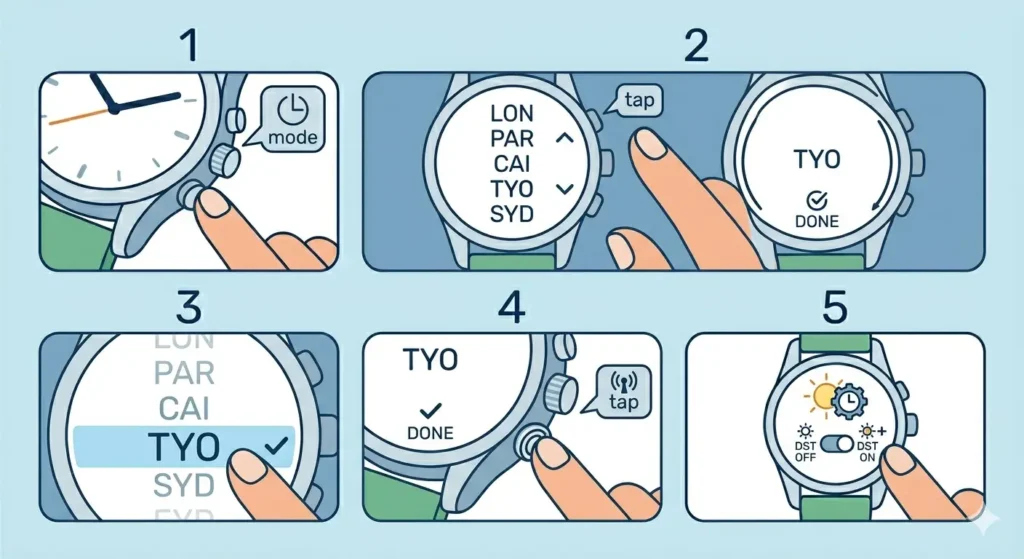
Setting the correct time zone is essential for the watch to display accurate local time after receiving the atomic signal. The watch receives universal time data and then applies the time zone offset to show the correct local time.
- Step 1: Press the mode button until the time zone setting appears (usually indicated by city codes like LAX, NYC, LON, TYO)
- Step 2: Use the adjust buttons to scroll through available time zones
- Step 3: Select the time zone corresponding to the current location
- Step 4: Confirm the selection by pressing the mode button again
- Step 5: Enable or disable daylight saving time (DST) if applicable
Some advanced models automatically adjust for daylight saving time based on the received signal, while others require manual DST settings. Check the watch specifications to understand which features are automatic versus manual.
Verifying Successful Synchronization
After attempting signal reception, the watch provides feedback about whether synchronization was successful. Understanding these indicators helps confirm the watch is functioning correctly.
Common success indicators include:
- Solid antenna icon (not blinking)
- ‘OK’ or ‘GET’ message on the display
- Time adjustment occurring automatically
- Last reception time stamp updating
If synchronization fails, the watch typically displays ‘ERR’, ‘NO’, or a blinking antenna icon. This indicates the watch couldn’t decode a valid signal. The watch will continue using its internal quartz timekeeping until the next successful reception. Use an online stopwatch to test if the watch maintains accurate timing between sync attempts.
Tips for Better Signal Reception
Maximizing signal reception success requires understanding environmental factors and implementing best practices. These tips help ensure consistent synchronization.
Timing Matters: Signal strength varies throughout the day. The strongest signals occur between midnight and 6 AM local time when atmospheric conditions are most favorable and radio interference is minimal.
Weather Considerations: Severe weather, solar storms, and atmospheric disturbances can temporarily block or weaken radio signals. If synchronization fails during bad weather, try again when conditions improve.
Building Materials: Modern energy-efficient windows with metallic coatings can block radio signals. If reception consistently fails near windows, try placing the watch in different rooms or temporarily opening a window during sync attempts.
Distance from Transmitter: Watches located at the edge of transmitter range (beyond 1,000 miles) may experience inconsistent reception. In these cases, leave the watch in the optimal position overnight to increase chances of successful sync.
Battery Level: Low battery power reduces the watch’s ability to receive and process signals. Replace the battery if synchronization problems occur frequently, especially if the watch is several years old.
Keep track of when the watch successfully syncs using a clock tab to monitor patterns and identify the best reception times for the specific location.
Common Problems and Troubleshooting
Even with proper setup, radio-controlled watches occasionally encounter synchronization issues. Understanding these common problems helps resolve them quickly.
Watch Won’t Receive Signal
When the watch consistently fails to receive signals, first verify that the location is within range of a transmitter. Check the watch manual to confirm which transmitter it’s designed to receive. Move the watch to different positions near windows, especially on different sides of the building. Electronic interference from nearby devices is the most common culprit – create a device-free zone during sync attempts.
Incorrect Time Display After Sync
If the watch receives a signal but displays the wrong time, the time zone setting is likely incorrect. Double-check that the selected time zone matches the current location. Verify the daylight saving time setting is enabled or disabled as appropriate for the region and season. Some watches have multiple cities within the same time zone – select the correct city code to ensure proper DST handling.
Intermittent Reception
Occasional sync failures are normal, especially during adverse weather or high solar activity. The watch’s quartz movement maintains accurate time between successful receptions. If the watch goes more than a week without successful sync, investigate potential environmental interference or consider relocating the watch during overnight hours to a more favorable position.
Battery Replacement Effects
After battery replacement, the watch needs to perform a complete synchronization to reset all settings. This initial sync may take longer than usual – up to 15 minutes. Place the watch in optimal position and avoid interrupting the reception process. Some models require manual time zone configuration after battery changes.
Frequently Asked Questions
How long does it take for a radio-controlled watch to sync?
A typical synchronization takes between 2 to 10 minutes under good conditions. The watch needs to receive and decode the complete time signal, which transmits at a very slow rate. Initial synchronization or sync after battery replacement may take up to 15 minutes. If the watch hasn’t synced after 15 minutes, reception has likely failed and should be reattempted at a better time or location.
Can radio-controlled watches work anywhere in the world?
Radio-controlled watches only work within range of compatible transmitters. Most watches are designed for specific regions – North American models receive WWVB, European models receive DCF77, and Japanese models receive JJY. Multi-band watches can receive signals from multiple transmitters worldwide. Outside the coverage area, the watch functions as a regular quartz watch without automatic time updates.
Do radio-controlled watches need internet or cellular connection?
No, radio-controlled watches operate completely independently using low-frequency radio signals from atomic clock transmitters. They don’t require WiFi, cellular data, Bluetooth, or any other wireless technology. The watch simply needs to be within range of a transmitter and positioned to receive the radio broadcast signal.
Why does the watch only sync at night?
Most radio-controlled watches attempt automatic synchronization during nighttime hours (typically 2 AM to 4 AM) because radio signal propagation is strongest then. During daytime, solar radiation and atmospheric conditions weaken low-frequency signals. Additionally, electronic device usage is minimal at night, reducing radio interference. Manual sync can be attempted anytime, but success rates are highest during evening and early morning hours.
What happens if the watch can’t receive a signal for days?
The watch continues operating using its internal quartz movement, which is accurate to within a few seconds per month. Radio-controlled watches are actually quartz watches with added radio reception capability. The watch will automatically keep attempting synchronization at scheduled times or can be manually triggered to search for signals. Time accuracy gradually drifts until the next successful reception corrects it.
Can metal watch bands interfere with signal reception?
Metal bands generally don’t interfere with reception when the watch is removed from the wrist during synchronization. However, wearing the watch during sync attempts may reduce signal strength because the human body and metal band can partially block radio waves. For best results, remove the watch and place it face-up on a non-metallic surface near a window during synchronization.
How accurate are radio-controlled watches?
When successfully synced, radio-controlled watches are accurate to within one second of atomic time. The atomic clocks that generate the broadcast signals are accurate to one second in millions of years. Between synchronizations, the watch’s quartz movement maintains accuracy within a few seconds per month. With daily or weekly automatic syncing, the watch effectively maintains perfect accuracy indefinitely.
Will daylight saving time adjust automatically?
This depends on the watch model. Advanced radio-controlled watches automatically adjust for daylight saving time based on the time zone setting and received signal data. Basic models may require manual DST enable/disable settings. Check the watch manual to determine if automatic DST adjustment is supported. The radio signal includes DST information, so properly configured watches handle these transitions without user intervention.
Can building materials block radio signals?
Yes, certain building materials significantly reduce radio signal strength. Steel-reinforced concrete, metal siding, radiant barriers, and low-E window coatings can block or weaken signals. Buildings with thick masonry walls or underground locations may experience poor reception. If consistent reception is impossible inside, try placing the watch near an open window or outside overnight in a protected location.
What should be done when traveling to a different time zone?
When traveling, adjust the watch’s time zone setting to match the new location. Access the time zone menu using the mode button and select the appropriate city code or UTC offset. After changing the time zone, manually trigger a signal reception if within range of a compatible transmitter. The watch will automatically display the correct local time based on the received signal and selected time zone offset.