How to use the countdown timer on a digital watch is a practical skill that helps track workouts, cooking times, study sessions, and daily tasks with precision. Digital watches offer built-in countdown features that work across most brands like Casio, Timex, and Armitron, making them reliable tools for time-sensitive activities.
Quick Summary Table
| Task | Common Button Sequence | Average Time |
| Enter Timer Mode | Press Mode 2-4 times | 5 seconds |
| Set Countdown Time | Use Start/Stop + Adjust buttons | 15-30 seconds |
| Start Timer | Press Start/Stop once | Instant |
| Pause/Reset Timer | Press Start/Stop (pause) or Reset button | Instant |
Accessing the Countdown Timer Mode
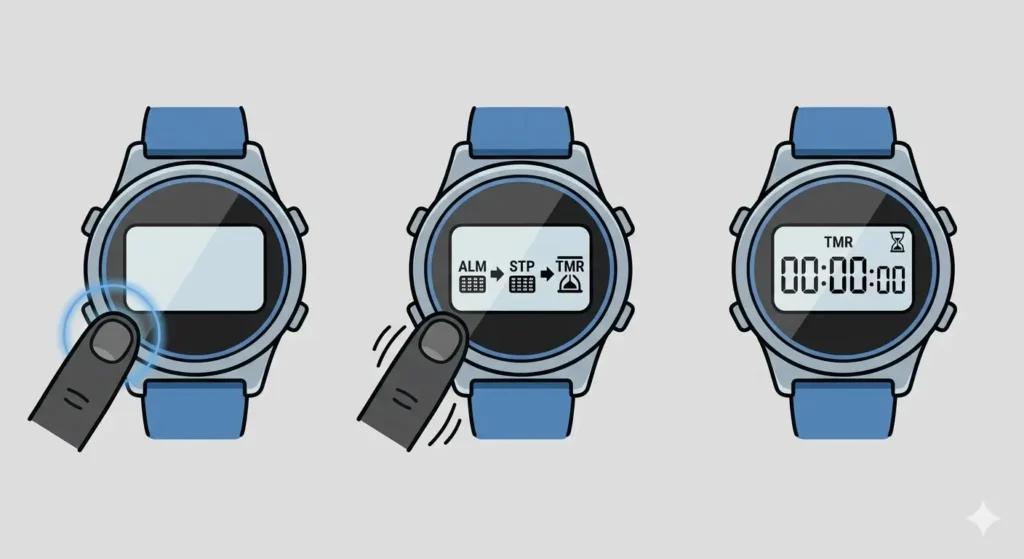
Digital watches cycle through different modes using dedicated buttons, typically labeled ‘Mode’ or ‘Select’. The countdown timer is usually positioned between the stopwatch and alarm functions in the mode sequence.
- Step 1: Locate the Mode button on the watch, usually positioned on the bottom-left or bottom-right side
- Step 2: Press the Mode button repeatedly until ‘TMR’, ‘TIMER’, or a countdown icon appears on the display
- Step 3: Confirm timer mode by checking for a time display that shows hours, minutes, and seconds (commonly formatted as 00:00:00 or 0:00:00)
Most digital watches require 2-4 Mode button presses to reach the timer function. Some models display a small indicator icon or text abbreviation when the countdown mode is active.
Setting the Countdown Duration
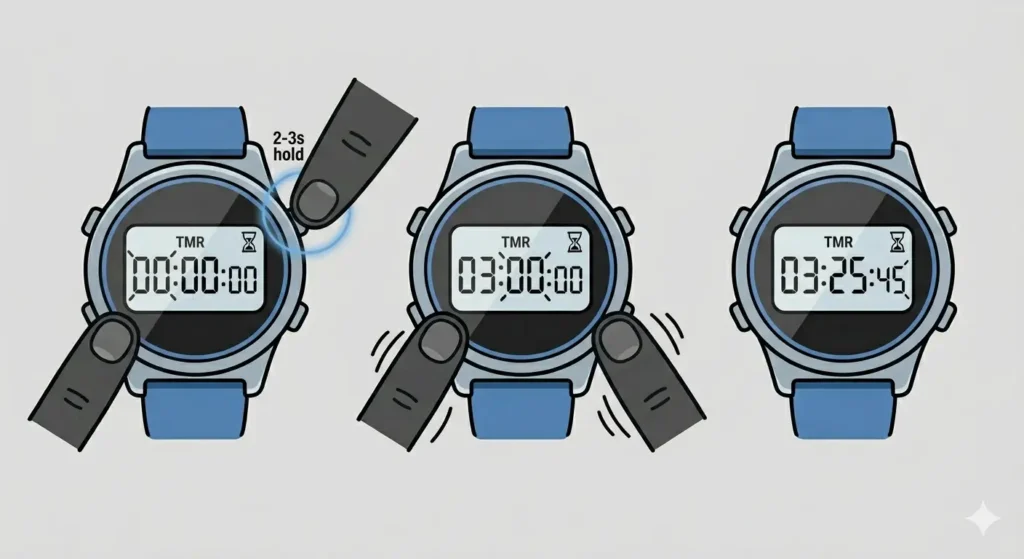
Once in timer mode, the next step involves programming the desired countdown length. Digital watches use adjustment buttons to increase or decrease time values.
- Step 1: Press and hold the Adjust, Set, or Start button for 2-3 seconds until the hours digit begins flashing
- Step 2: Use the Start/Stop button or up/down buttons to increase the hour value (if the countdown requires hours)
- Step 3: Press the Mode or Adjust button once to move to the minutes digit, which will start flashing
- Step 4: Adjust the minutes using the same buttons, then move to seconds if the watch allows second-level precision
- Step 5: Press the Mode or Set button to confirm and exit the setting mode
The flashing digit indicates which time unit is currently being adjusted. Some watches automatically advance to the next time unit after a few seconds of inactivity.
Pro-Tip: Many digital watches allow rapid value changes by holding down the adjustment button instead of pressing repeatedly. This saves significant time when setting longer countdowns like 30 or 60 minutes.
Starting the Countdown Timer
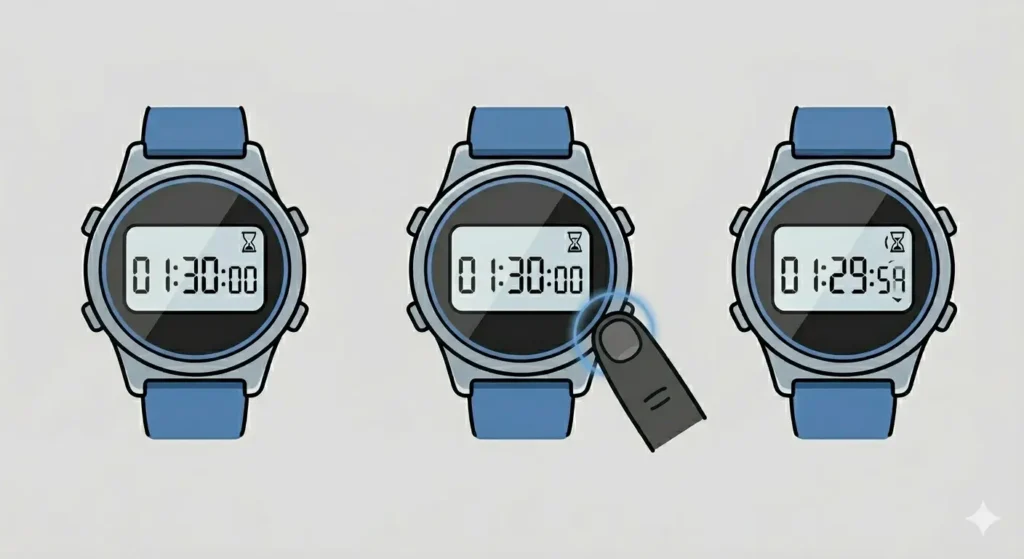
After programming the desired time, activating the countdown is straightforward and uses the Start/Stop button present on all digital watches.
- Step 1: Verify the countdown time is correctly displayed on the screen
- Step 2: Press the Start/Stop button once to begin the countdown
- Step 3: Watch for the seconds to begin decreasing, confirming the timer is active
The display will count down in real-time, showing the remaining hours, minutes, and seconds. Most watches emit a beep or vibration pattern when the countdown reaches zero, though this varies by model.
Pausing and Resuming the Timer
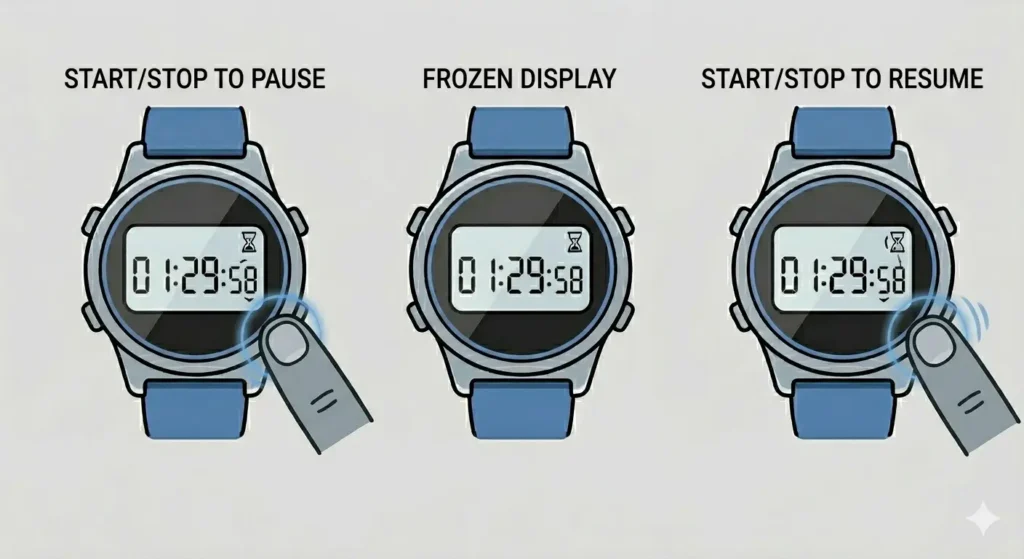
Digital watches provide control over active countdowns through pause and resume functions, useful when interruptions occur during timed activities.
- Step 1: Press the Start/Stop button once while the countdown is running to pause it
- Step 2: The display will freeze at the current remaining time
- Step 3: Press Start/Stop again to resume counting down from where it stopped
The pause function maintains the exact remaining time, allowing activities to be resumed without losing track. This works well for interval training or when cooking requires stepping away briefly.
Resetting the Countdown Timer
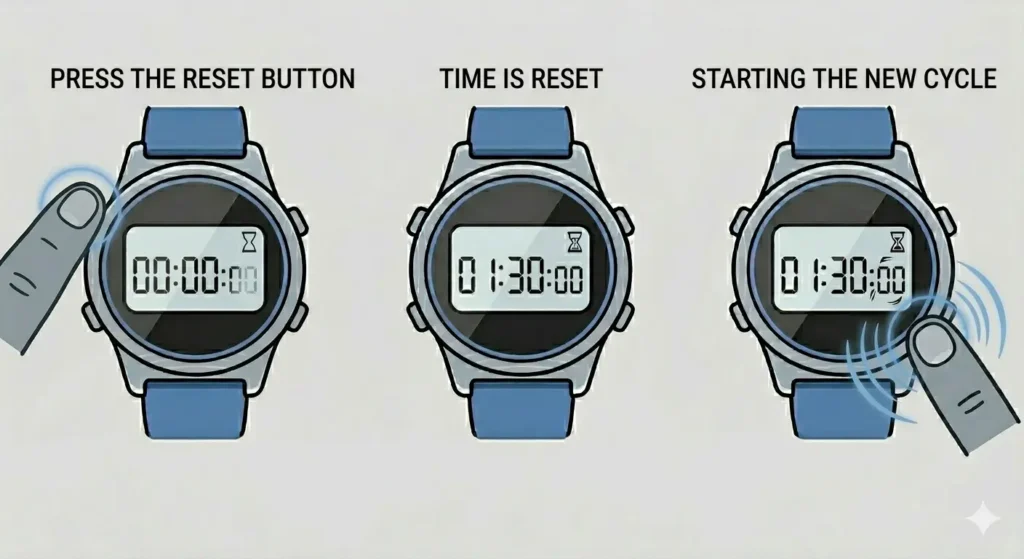
After a countdown completes or when starting over is needed, the reset function restores the timer to its programmed starting value.
- Step 1: While the timer is paused or after it reaches zero, press the Reset button (often labeled ‘Reset’ or shared with the Adjust button)
- Step 2: The display will return to the originally set countdown time
- Step 3: Press Start/Stop to begin a new countdown cycle with the same duration
Some watches automatically reset after the countdown alarm sounds, while others require manual reset. This behavior depends on the specific watch model and manufacturer settings.
Using Repeat/Auto-Repeat Functions
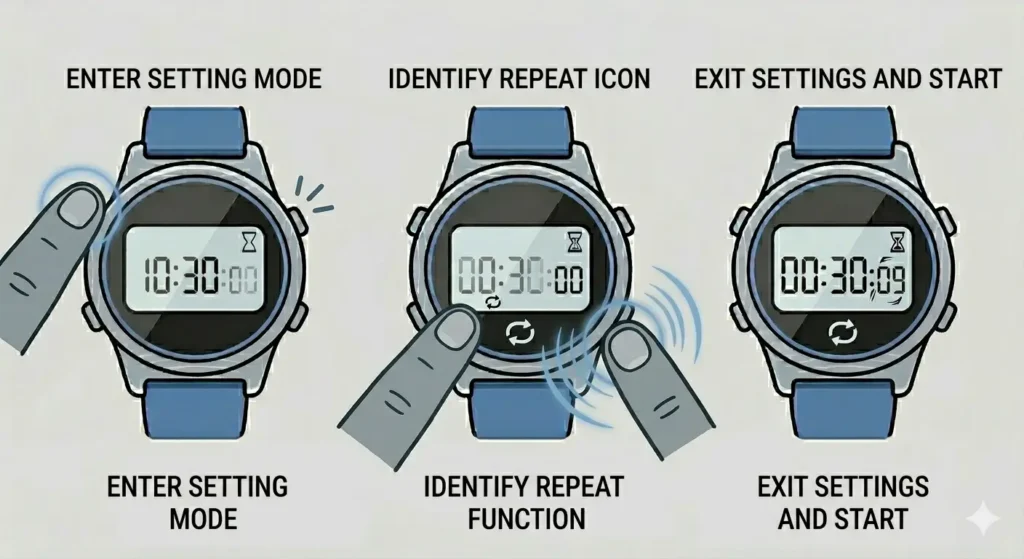
Advanced digital watches include repeat countdown features that automatically restart the timer after it reaches zero, ideal for interval training or repeated task timing.
- Step 1: Enter timer setting mode by holding the Adjust button
- Step 2: Look for a repeat icon, ‘RPT’, or cycle option on the display
- Step 3: Toggle the repeat function on using the Start or Mode button
- Step 4: Exit settings and start the countdown normally
When repeat mode is active, the timer will sound an alarm at zero, then automatically restart the countdown from the beginning. This continues until manually stopped, making it perfect for circuits or cooking multiple batches.
Pro-Tip: Repeat countdown timers are extremely useful for HIIT workouts, Pomodoro study sessions, or any activity requiring consistent time intervals. Setting a 25-minute repeat timer creates automatic work/break cycles without constant manual resets.
Tips for Effective Countdown Timer Use
Maximizing the countdown timer’s utility involves understanding watch capabilities and applying them to real-world scenarios.
- Set common countdown durations as presets if the watch allows multiple timer storage
- Use the online stopwatch as a backup timing tool when the watch battery runs low
- Check the alarm volume settings to ensure the countdown alert is audible in noisy environments
- Combine countdown timers with the clock tab for tracking multiple time-sensitive tasks simultaneously
- Practice setting and starting timers quickly to build muscle memory for the button sequence
- Keep the watch face clean and visible to monitor countdown progress without straining
- Test the timer function regularly to ensure battery strength supports reliable operation
Digital watches with backlight features allow countdown monitoring in low-light conditions, useful for early morning workouts or evening cooking.
Common Problems and Solutions
Method 1: Timer Not Starting After Setting
When the countdown refuses to start despite correct time programming, the issue often relates to incomplete setting confirmation or being in the wrong mode.
- Verify the watch display shows timer mode indicators (TMR, countdown icon)
- Ensure the setting mode was properly exited by pressing Set or Mode until digits stop flashing
- Check if the Start/Stop button is functioning by testing it in stopwatch mode
- Restart the setting process from the beginning if the timer remains unresponsive
Method 2: Countdown Alarm Not Sounding
Silent countdown alerts typically stem from muted alarm settings or disabled sound functions that affect all watch notifications.
- Enter the alarm mode and check if hourly chime or key tone settings are turned off
- Look for a bell icon with a slash through it, indicating muted alarms
- Toggle sound settings on by holding specific button combinations (often Mode + Start)
- Test alarm functionality by setting a 1-minute countdown to verify sound output
Method 3: Unable to Set Specific Time Increments
Some digital watches limit countdown precision to specific intervals like 1-minute or 5-minute increments rather than allowing second-by-second adjustment.
- Check the watch manual or manufacturer specifications for timer resolution limits
- Use the closest available increment if exact timing is not supported
- Consider upgrading to a watch model with finer countdown control if precision is critical
- Supplement with smartphone timer apps for second-specific countdown needs
Method 4: Timer Resets When Changing Modes
Accidental mode switching during active countdowns can cause the timer to pause or reset, losing progress on the current timing session.
- Avoid pressing the Mode button while a countdown is running
- Some watches preserve timer state across mode changes – test this by switching modes briefly
- Lock the watch buttons if the model supports a hold function to prevent accidental presses
- Position the watch to minimize contact with the Mode button during activities
Frequently Asked Questions
Can countdown timers run while using other watch functions?
Yes, most digital watches allow the countdown timer to run in the background while viewing other modes like time display or stopwatch. The timer continues counting down and will still sound the alarm when it reaches zero, even if the display shows a different function. Some watches show a small timer icon on all screens when a countdown is active.
How long can a countdown timer be set for on a typical digital watch?
Standard digital watches support countdown timers ranging from 1 second up to 24 hours, with most models offering a maximum of 23 hours, 59 minutes, and 59 seconds. Entry-level watches may limit countdowns to 60 or 99 minutes, while advanced sports models often allow multi-hour timers for endurance training or long-duration activities.
Does using the countdown timer drain the watch battery faster?
Countdown timers consume minimal additional battery power during operation, as the display and processor are already active for standard timekeeping. The alarm beep or vibration at zero uses slightly more power, but overall battery impact is negligible. Regular countdown use will not noticeably reduce battery life compared to normal watch operation.
What happens if the timer reaches zero while in a different mode?
The watch will sound the countdown alarm regardless of which mode is displayed when the timer reaches zero. The screen will typically flash or show a timer indicator, and pressing any button usually silences the alarm and returns to the timer display showing 00:00:00. The alarm continues until manually stopped, though most watches limit alarm duration to 10-20 seconds.
Can multiple countdown timers run simultaneously on one watch?
Most standard digital watches support only one active countdown timer at a time. However, premium sports watches and smart watches often include multiple timer functions that can run concurrently. For managing several timed activities simultaneously, pairing a digital watch with tools like the world time comparison tool provides additional timing capacity.
How do interval timers differ from regular countdown timers?
Interval timers automatically alternate between two preset durations, such as 40 seconds of work and 20 seconds of rest, while regular countdown timers run once from the set time to zero. Interval timers repeat the cycle continuously until stopped, making them ideal for structured workouts. Regular countdown timers require manual reset and restart for each timing session.
Why does the countdown timer sometimes skip seconds or appear irregular?
Display refresh rates cause some digital watches to update the countdown every 2-3 seconds rather than showing every single second change. This is normal behavior for battery conservation and does not affect timing accuracy – the watch tracks time precisely internally even if the display updates appear irregular. The actual countdown reaches zero at the correct moment regardless of display update frequency.
Can countdown timers be used as reminders throughout the day?
Yes, countdown timers serve as effective single-use reminders for time-sensitive tasks like medication schedules, parking meter expiration, or meeting preparation. Unlike alarms set for specific clock times, countdown timers start immediately and track elapsed time from the current moment, making them flexible for variable daily schedules. For recurring reminders, standard alarm functions work better than repeatedly setting countdowns.
Do countdown timers continue running if the watch battery is very low?
Digital watches prioritize core timekeeping over additional functions when battery power drops below critical levels. Countdown timers may stop functioning or reset when battery voltage becomes insufficient, though basic time display typically continues. Replacing the battery before complete depletion ensures countdown reliability and prevents losing programmed timer settings on models without memory backup.
How accurate are digital watch countdown timers compared to phone timers?
Digital watch countdown timers maintain accuracy within 1-2 seconds per day, comparable to smartphone timer apps. Both use quartz crystal oscillators for time measurement, providing reliable countdown precision for everyday activities. Atomic-synced smart watches offer even higher accuracy, though the difference is negligible for typical countdown applications like cooking or exercise timing.