
The Skylight Calendar has emerged as one of the most popular smart family organizers on the market, transforming how families coordinate their busy schedules. This comprehensive guide explores everything you need to know about the Skylight Calendar, from its key features to practical setup tips that help families stay synchronized in 2025.
Whether you’re juggling work meetings, school activities, sports practices, or family events, the Skylight Calendar offers a centralized solution that keeps everyone on the same page. Let’s dive into what makes this digital calendar system stand out and whether it’s the right choice for your household.
What Is the Skylight Calendar?
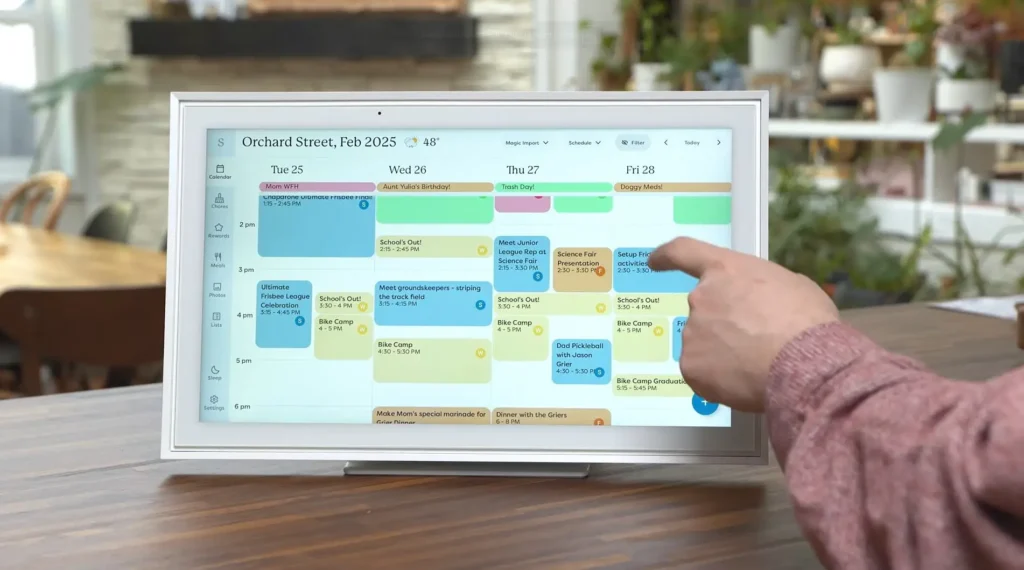
The Skylight Calendar is a touchscreen digital display designed specifically for family organization. Unlike traditional wall calendars or smartphone apps that family members check individually, this device serves as a central hub mounted in a common area of your home, typically the kitchen or family room.
The system features a high-resolution display that shows color-coded events, to-do lists, and important reminders at a glance. Each family member gets their own color, making it easy to see who needs to be where and when. The calendar syncs wirelessly with popular calendar services including Google Calendar, Apple Calendar, Outlook, and Cozi, ensuring all your existing schedules integrate seamlessly.
Key Features That Set Skylight Calendar Apart
Touchscreen Interface and Display
The Skylight Calendar comes with either a 15-inch or 27-inch touchscreen display, providing crisp visibility from across the room. The interface is intuitive enough for children to use independently, allowing them to check their own schedules and add events with parental permission settings.
The display automatically adjusts brightness based on ambient lighting and can switch to a photo frame mode during off-hours, showcasing family photos when not actively displaying calendar information.
Multi-Calendar Synchronization
One of the most powerful features is the ability to sync multiple calendar sources simultaneously. Parents can connect their work calendars, while children’s school calendars and extracurricular schedules all appear in one unified view. This eliminates the common problem of double-booking or forgetting important commitments because they were stored in different apps.
The system updates in real-time, so changes made on your phone immediately appear on the Skylight display, and vice versa. This two-way synchronization ensures everyone always sees the most current information.
Shared To-Do Lists and Chore Management
Beyond calendar events, the Skylight Calendar includes robust task management features. Families can create shared to-do lists, assign chores to specific members, and track completion. Kids can check off their responsibilities directly on the screen, fostering independence and accountability.
The system sends optional reminders for upcoming tasks, helping ensure nothing falls through the cracks during hectic weeks.
Meal Planning Integration
Many families use the meal planning feature to organize weekly dinners and grocery shopping. You can add meal plans directly to specific dates, attach recipes, and even generate shopping lists based on planned menus. This integration helps streamline one of the most time-consuming aspects of family management.
Setting Up Your Skylight Calendar
Getting started with the Skylight Calendar is straightforward. After unboxing, you’ll mount the device on your wall using the included hardware or place it on a countertop with the optional stand. The setup wizard walks you through connecting to your Wi-Fi network and linking your existing calendar accounts.
The initial configuration takes approximately 15-20 minutes. You’ll create family member profiles, assign colors to each person, and customize notification preferences. The mobile app (available for iOS and Android) provides additional control and allows you to manage the calendar when away from home.
For families serious about time management, tools like the Timer Tools on CheckDateTime.com complement the Skylight Calendar perfectly for tracking specific activities or study sessions.
Pricing and Model Options
Skylight offers two main calendar sizes to fit different needs and spaces:
| Model | Screen Size | Price Range | Best For |
|---|---|---|---|
| Skylight Calendar 15″ | 15-inch | $299-$329 | Smaller families or limited wall space |
| Skylight Calendar 27″ | 27-inch | $499-$649 | Larger families or high-traffic areas |
Both models require a subscription for full functionality, priced at $39 annually or $5 monthly. The subscription includes unlimited calendar syncing, chore management, meal planning, and regular software updates with new features.
Which Skylight Calendar Size Should You Choose?
Selecting between the 15-inch and 27-inch models depends on your viewing distance and household size. Both models offer identical features and functionality—the choice comes down to space, viewing distance, and how many family members will be using it regularly. Consider measuring your intended wall space and viewing distance before purchasing to ensure you select the size that fits your home best.
Skylight Calendar Max: 27-Inch Smart Digital Calendar & Chore Chart, Family Organizer with Interactive Touchscreen Display
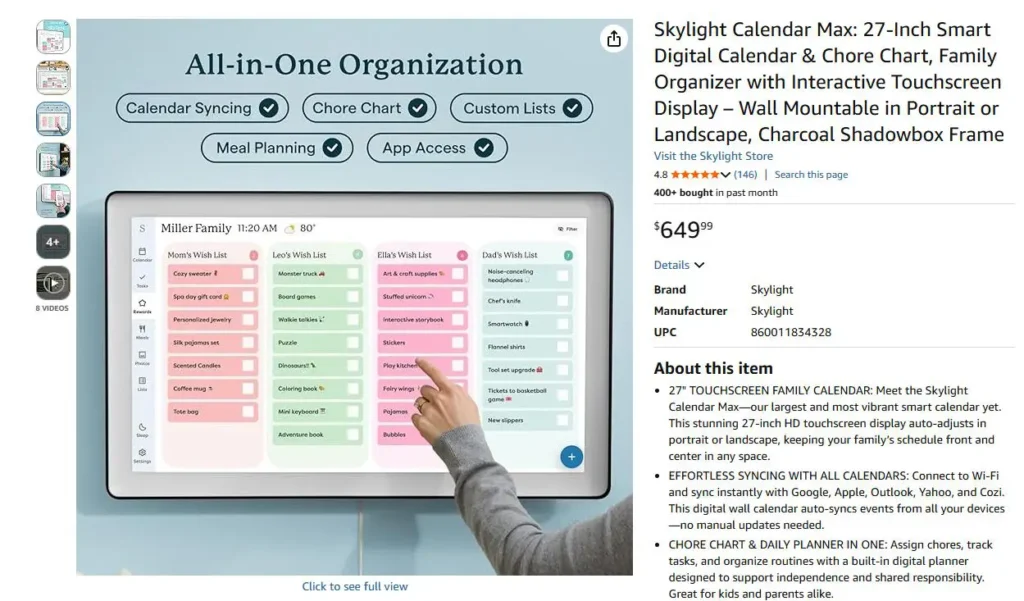
The 27-inch Skylight Calendar Max is ideal for larger families with 5+ members or open-concept spaces where the calendar needs to be visible from across the room. The bigger display makes it easier for everyone to see details without crowding around the screen, and the extra real estate accommodates more events and activities without scrolling. Families with particularly busy schedules find the larger screen reduces visual clutter and makes weekly planning sessions more effective. This model works perfectly in high-traffic areas like kitchen islands or main hallway walls where multiple family members pass throughout the day.
Skylight Calendar – 15″ Digital Calendar – White
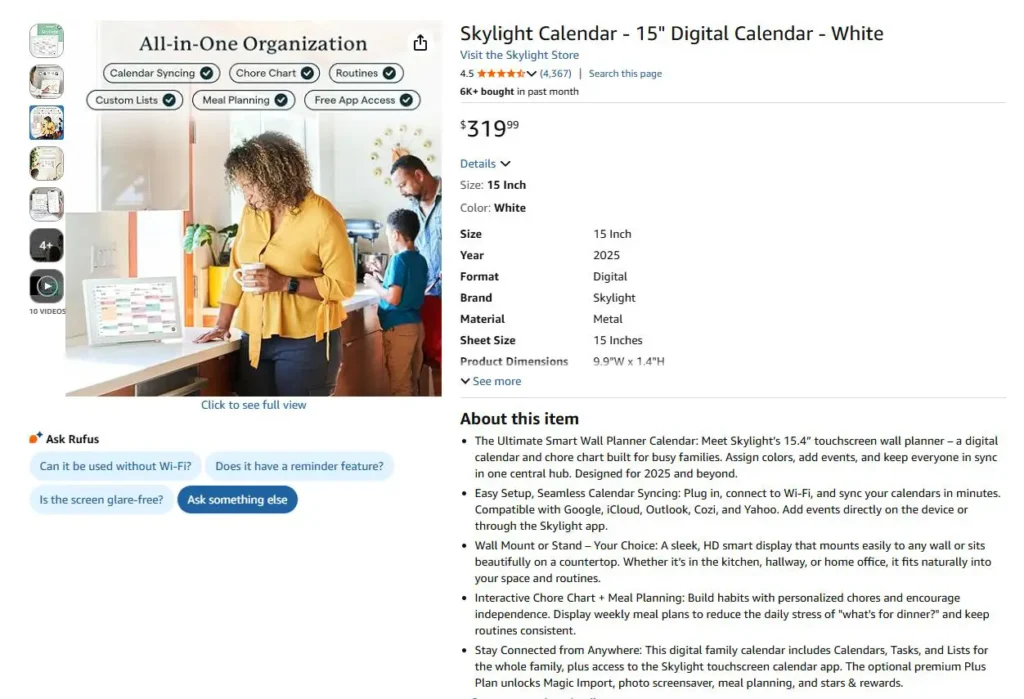
The 15-inch Skylight Calendar works well for smaller kitchens or families with 2-4 members, offering clear visibility from 6-8 feet away. It’s the more budget-friendly option for families testing the digital calendar concept or those with limited wall space. Despite its compact size, the display remains crisp and readable, making it suitable for apartments, breakfast nooks, or dedicated command centers. This model provides all the core functionality of the larger version while taking up less visual space and costing significantly less upfront.
Real-World Benefits for Busy Families
Families using the Skylight Calendar report significant improvements in household coordination. Parents appreciate having a single source of truth for all family activities, reducing the “Did you know about…?” conversations that often lead to last-minute scrambling.
Children benefit from visual clarity about their schedules, which reduces anxiety about upcoming events and helps them develop time management skills. The ability to see the entire week or month at a glance makes it easier for everyone to plan ahead and prepare for busy periods.
The system has proven particularly valuable for families with multiple children involved in various activities. Color-coding makes it immediately clear which child has practice, lessons, or appointments on any given day.
Comparing Skylight Calendar to Alternatives
While the Skylight Calendar leads the smart family organizer category, alternatives include traditional paper calendars, shared smartphone apps like Cozi or FamCal, and other digital displays such as Amazon Echo Show or Google Nest Hub used as calendar displays.
The Skylight’s dedicated design gives it advantages over repurposed smart displays, with a larger screen optimized specifically for calendar viewing and purpose-built family organization features. However, the annual subscription cost makes it a more significant investment than free smartphone apps.
For families who value centralized, visible organization and can accommodate the upfront cost, the Skylight Calendar delivers tangible benefits that justify the investment.
Tips for Maximizing Your Skylight Calendar
To get the most value from your Skylight Calendar, establish family routines around it. Many successful users hold a weekly planning session where everyone gathers around the calendar to review the upcoming week together. This creates a shared understanding of busy days and helps identify potential scheduling conflicts early.
Use color-coding consistently and take advantage of the recurring event feature for regular activities like sports practices, music lessons, and work meetings. This saves time compared to manually entering repeated events.
Integrate the meal planning feature fully by planning a week of dinners each Sunday. This reduces daily decision fatigue and makes grocery shopping more efficient.
For families tracking international events or coordinating with relatives in different time zones, checking Current Local Times Around the World helps avoid scheduling mistakes across time zones.
Privacy and Security Considerations
Skylight takes data security seriously, using encrypted connections for all synced calendar data. The company does not sell user information to third parties, and you maintain full control over which calendars sync to the display.
For families with privacy concerns, you can choose which calendar events appear on the shared display versus remaining private on individual devices. Work calendars can show “busy” blocks without revealing sensitive meeting details, and personal appointments can be kept private while still blocking out time on the family calendar.
The device requires a secure Wi-Fi connection and regular software updates to maintain security. Skylight automatically installs these updates to protect against vulnerabilities.
Common Questions and Troubleshooting
Most users find the Skylight Calendar reliable after initial setup, but occasional issues may arise. If calendar events aren’t syncing, verify your internet connection and check that the source calendar (Google, Apple, etc.) is still authorized in the Skylight app.
Display brightness can be adjusted manually or set to automatic mode. If the screen appears too dim or bright, adjust these settings through the touchscreen menu or mobile app.
For families wanting to explore broader time management strategies, the Guide section at CheckDateTime.com offers valuable insights into scheduling optimization and time tracking techniques.
Is the Skylight Calendar Worth It in 2025?
The Skylight Calendar represents a worthwhile investment for families struggling with coordination and organization. The upfront cost and annual subscription mean it’s not the right choice for everyone, but families who commit to using it consistently find it pays dividends in reduced stress, fewer missed appointments, and smoother household operations.
The device works best for families with children old enough to read and interact with the calendar independently, typically ages five and up. Households with multiple busy schedules see the greatest benefit, while single individuals or couples might find a shared smartphone app sufficient for their needs.
As smart home technology continues evolving, the Skylight Calendar has positioned itself as the category leader in family organization. Regular software updates add new features, ensuring the device remains relevant and useful for years to come.
For families ready to embrace centralized digital organization, the Skylight Calendar delivers on its promise of simplified coordination and improved family communication through thoughtful design and practical features that address real household challenges.
Frequently Asked Questions About Skylight Calendar
What is the Skylight Calendar?
The Skylight Calendar is a touchscreen digital display designed for family organization. It serves as a central hub that syncs with popular calendar services including Google Calendar, Apple Calendar, and Outlook, displaying color-coded events, to-do lists, and reminders for all family members in one place.
How much does the Skylight Calendar cost?
The Skylight Calendar comes in two sizes: the 15-inch model costs $299-$329, and the 27-inch model costs $499-$649. Both models require an annual subscription of $39 per year or $5 per month for full functionality including unlimited calendar syncing, chore management, and meal planning features.
Can multiple family members use the Skylight Calendar?
Yes, the Skylight Calendar is designed for multiple family members. Each person gets their own color-coded profile, and the system can sync calendars from different sources simultaneously. Family members can add events, check schedules, complete tasks, and view shared to-do lists and meal plans.
What calendar services work with Skylight Calendar?
The Skylight Calendar syncs with Google Calendar, Apple Calendar, Outlook, and Cozi. The system supports multi-calendar synchronization, allowing families to combine work calendars, school schedules, and personal appointments in one unified display with real-time two-way syncing.
Is the Skylight Calendar easy to set up?
Yes, the Skylight Calendar setup is straightforward and takes approximately 15-20 minutes. After mounting the device or placing it on a stand, the setup wizard guides you through Wi-Fi connection, linking calendar accounts, creating family member profiles, and customizing notification preferences. A mobile app provides additional control and management options.